
Uvod
This manual provides essential information for the safe and efficient use of your ONN 42-Inch Full HD LED Smart TV, Model 100018254. Please read these instructions thoroughly before operating your television and retain them for future reference.
Kaj je v škatli
Preden nadaljujete z namestitvijo, preverite, ali so vse komponente prisotne.
- ONN 42-Inch Full HD LED Smart TV
- Daljinski upravljalnik
- TV stojalo (2 kosa)
- Vijaki za TV stojalo
- Napajalni kabel
- Kratki vodnik (ni vključen v ta priročnik)

Slika: spredaj view of the ONN 42-inch Smart TV displaying the Roku TV home screen with various streaming app icons like Netflix, Disney+, Apple TV, Hulu, Peacock, and Roku Channel. The TV is black with slim bezels and two stand feet.
Nastavitev
1. Pritrditev stojala za televizor
- Televizor previdno položite z zaslonom navzdol na mehko, čisto površino, da preprečite poškodbe.
- Vsak kos stojala poravnajte z ustreznimi luknjami za vijake na spodnji strani televizorja.
- Vsak kos stojala pritrdite s priloženimi vijaki. Prepričajte se, da so trdno priviti.

Image: A diagram illustrating the dimensions of the ONN 42-inch TV, showing its width as 43 inches and height as 37 inches when placed on its stand.
2. Stenska montaža (neobvezno)
This TV is compatible with VESA standard wall mounts. Refer to your wall mount's instructions for proper installation. Ensure the wall mount can support the weight of the television.

Slika: Zadaj view of the ONN 42-inch TV, highlighting the VESA mounting screw holes in a square pattern and various input ports on the side and bottom right.
3. Povezovanje naprav
Connect your external devices such as cable boxes, gaming consoles, or Blu-ray players to the TV's input ports.
- HDMI: For high-definition audio and video. Use an HDMI cable to connect devices like set-top boxes, game consoles, or streaming sticks.
- USB: Za priključitev USB-naprav za predvajanje medijev files.
- Wi-Fi: For internet connectivity to access smart TV features and streaming services.
4. Čarovnik za začetni vklop in nastavitev
- Napajalni kabel priključite na televizor in nato v stensko vtičnico.
- Pritisnite gumb za vklop na daljinskem upravljalniku ali na samem televizorju.
- Follow the on-screen instructions to complete the initial setup, including language selection, network connection (Wi-Fi), channel scanning, and linking to your Roku account (if applicable).
Upravljanje televizorja
1. Daljinski upravljalnikview
Daljinski upravljalnik omogoča navigacijo po vmesniku televizorja in upravljanje različnih funkcij.
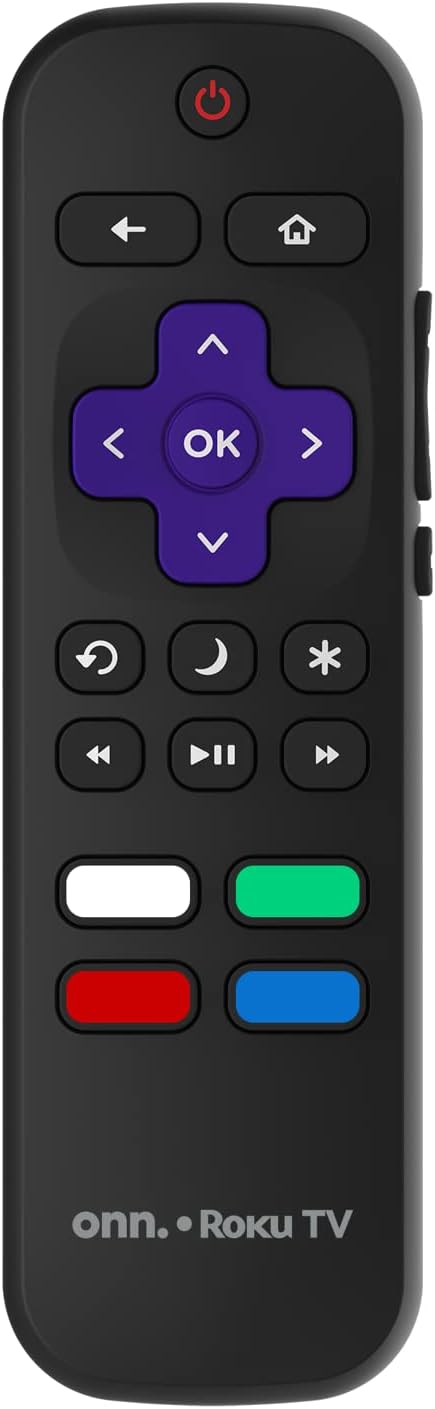
Image: The ONN Roku TV remote control, featuring a power button, directional pad, OK button, home button, back button, volume controls, and dedicated buttons for popular streaming services.
- Gumb za vklop: Vklopi ali izklopi TV.
- Directional Pad (D-Pad) & OK: Navigacija po menijih in potrditev izbir.
- Domov gumb: Vrne se na začetni zaslon televizorja Roku.
- Gumb za nazaj: Vrne se na prejšnji zaslon ali meni.
- Povečanje/zmanjšanje glasnosti: Prilagodi glasnost zvoka.
- Gumb za izklop zvoka: Izklopi ali vklopi zvok.
- Kanal gor/dol: Spremeni kanale (za antenske/kabelske vhode).
- Namenski gumbi za aplikacije: Quick access to popular streaming services like Netflix, Hulu, etc.
2. Funkcije pametnega televizorja
Your ONN Smart TV provides access to a wide range of streaming content and smart functionalities.
- Storitve pretakanja: Access pre-installed apps like Netflix, YouTube, and many more through the Roku Channel Store.
- Glasovni nadzor: Compatible with Alexa and Google Assistant for hands-free control (requires a separate compatible voice assistant device).
- Samodejne posodobitve programske opreme: The TV will automatically update its software when connected to the internet, ensuring you have the latest features and security.
3. Izbira vhoda
To switch between connected devices (e.g., cable box, game console), use the Vnos button on your remote or select the desired input from the Roku TV home screen.
4. Nastavitve slike in zvoka
Access the TV's settings menu to customize picture and sound preferences. Navigate to Nastavitve > Nastavitve slike televizorja or Nastavitve> Zvok to adjust options like brightness, contrast, color, sound mode, and equalizer settings.
Vzdrževanje
1. Čiščenje zaslona
- Always turn off the TV and unplug it before cleaning.
- Uporabite mehko krpo, ki ne pušča vlaken, rahloampz vodo ali specializiranim čistilom za zaslone.
- Čistila ne pršite neposredno na zaslon. Najprej ga nanesite na krpo.
- Izogibajte se uporabi abrazivnih čistil, alkohola, benzena ali razredčil, saj lahko poškodujejo zaslon.
2. Posodobitve programske opreme
Ensure your TV is connected to the internet to receive automatic software updates. These updates improve performance, add features, and enhance security. You can manually check for updates in the Nastavitve > Sistem > Posodobitev sistema meni.
Odpravljanje težav
Če imate težave s televizorjem, si oglejte naslednje pogoste rešitve:
Brez moči
- Preverite, ali je napajalni kabel varno priključen tako v televizor kot v stensko vtičnico.
- Preverite delovanje stenske vtičnice tako, da vanjo priključite drugo napravo.
- Poskusi pritisniti gumb za vklop na samem televizorju, ne samo na daljinskem upravljalniku.
Ni slike / Popačena slika
- Prepričajte se, da je izbran pravilen vhodni vir (npr. HDMI 1, HDMI 2).
- Preverite vse kabelske povezave med televizorjem in zunanjimi napravami.
- Če je mogoče, poskusite z drugim kablom HDMI.
- Adjust picture settings (brightness, contrast) in the TV menu.
Ni zvoka / Nizek zvok
- Check if the TV is muted or if the volume is turned down.
- Ensure external audio devices (soundbars, receivers) are properly connected and powered on.
- Preverite nastavitve zvoka v meniju televizorja.
Težave z omrežno povezavo
- Preverite, ali je vaš usmerjevalnik Wi-Fi vklopljen in deluje.
- Znova zaženite usmerjevalnik in modem.
- Pojdi na Nastavitve > Omrežje > Preveri povezavo na televizorju, da diagnosticirate težavo.
- Prepričajte se, da vnašate pravilno geslo za Wi-Fi.
Specifikacije
| Funkcija | Podrobnost |
|---|---|
| Številka modela | 100018254 |
| Velikost zaslona | 42 palcev |
| Tehnologija zaslona | LED |
| Resolucija | 1080p (polna visoka ločljivost) |
| Hitrost osveževanja | 60 Hz |
| Povezljivost | USB, Wi-Fi |
| Podprte internetne storitve | Netflix, YouTube (and others via Roku platform) |
| Nadzorna metoda | Voice (via Alexa & Google Assistant compatible devices), Remote Control |
| Vrsta namestitve | Stenski nosilec (združljiv z VESA) |
| barva | Črna |
| UPC | 671227025567 |

Image: Energy Guide label for Television Model 100018254, indicating an estimated yearly energy cost of $11 based on 12 cents per kWh and 5 hours use per day.
Garancija in podpora
For warranty information and technical support, please refer to the documentation included with your purchase or visit the official ONN support webmesto. Shranite račun za garancijske zahtevke.