
1. Uvod
This manual provides detailed instructions for the installation, operation, and maintenance of your INQMEGA Solar Security Camera. Please read this manual thoroughly before using the product to ensure proper function and safety. Keep this manual for future reference.
2. Izdelek je končanview
2.1 Vsebina paketa
Preverite, ali so v paketu prisotne vse komponente:
- 1 x Solar Tuya Camera
- 1 x Solarni panel
- 1 x nosilec
- 1 x uporabniški priročnik
- 1 x 5M long cable
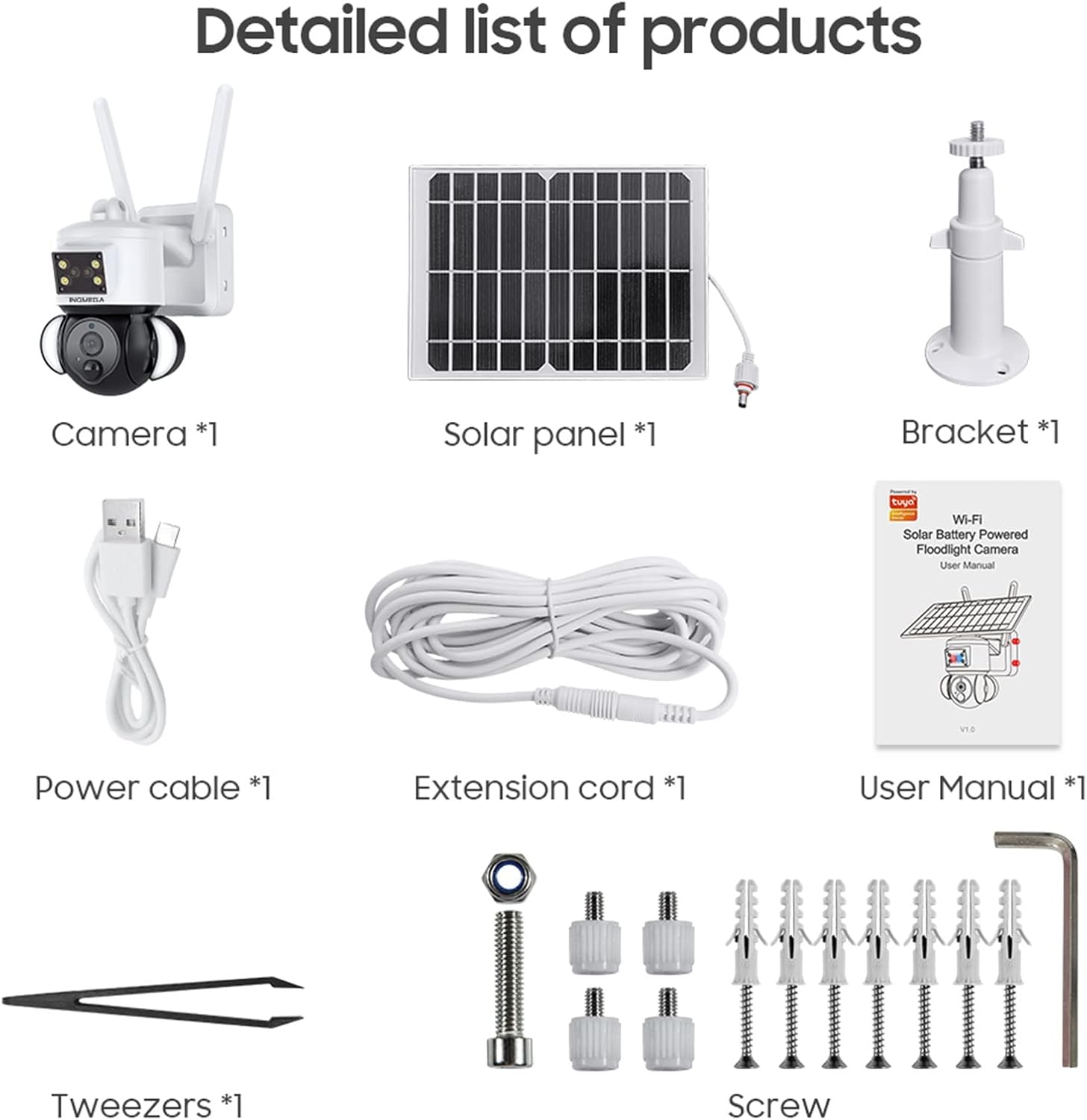
Figure 1: Package Contents. This image displays all items included in the INQMEGA Solar Security Camera package, such as the camera unit, solar panel, mounting bracket, power cable, extension cord, user manual, and installation hardware.
2.2 Ključne lastnosti
- Ločljivost 3MP FHD: Zajame jasen in podroben video footage.
- Na sončno energijo: Equipped with a 15000mAh rechargeable battery and a solar panel for continuous operation with 2-3 hours of daily sunlight.
- 360° View (Panoramsko in nagibno premikanje): Offers 355° horizontal pan and 120° vertical tilt for comprehensive area coverage, controllable via the TUYA SMART LIFE app.
- PIR zaznavanje gibanja: Built-in radar PIR motion sensor provides high sensitivity detection, sending instant alerts to your app.
- Floodlight with Siren: Features 10 LEDs for color night vision up to 90ft, with the floodlight activating upon motion detection. Includes a siren for deterrence.
- Dvosmerni zvok: Omogoča komunikacijo v realnem času prek kamere prek aplikacije.
- 2.4 GHz brezžična povezljivost: Ensures stable network reception with 5dBi dual antennas. (Note: Does not support 5G WiFi).
- Možnosti shranjevanja: Supports 8-128GB SD card (not included) and cloud storage.
- Združljivost Alexa: Can be paired with Alexa-enabled smart speakers for voice control.
- Odporen na vremenske vplive: IP66 International Protection Rating for outdoor use in various weather conditions.

Figure 2: PIR Human Detection. This image illustrates the camera's ability to detect human motion, activate a smart floodlight, and send phone alarms.

Figure 3: 3MP HD Image Quality and PTZ Control. This image demonstrates the camera's high-definition video capture and the pan-tilt-zoom functionality controlled through a mobile application.
3. Navodila za nastavitev
3.1 Začetni vklop
- Unpack all components and ensure they are intact.
- Priključite kabel sončne celice na napajalni vhod kamere.
- Locate the power button/switch on the camera and turn it on.
- Observe the LED indicator. It should blink RED initially, then turn to blink BLUE, indicating it is ready for connection.
3.2 Namestitev in povezava aplikacije
- Download the "TUYA SMART LIFE" app from your smartphone's app store (iOS or Android).
- Registrirajte se ali se prijavite v svoj račun.
- In the app, select "Add Device" or the "+" icon to add a new camera.
- Follow the on-screen prompts to select your device type (e.g., "Security Camera").
- Confirm that the camera's LED is blinking blue.
- Enter your 2.4GHz Wi-Fi network name and password. (Note: 5GHz Wi-Fi is not supported).
- The app will generate a QR code. Aim your phone screen, displaying the QR code, in front of the camera lens at a distance of approximately 4-8 inches.
- The camera will emit a confirmation sound once the QR code is successfully scanned and connected.
- Ko je povezava vzpostavljena, lahko kamero poimenujete in začnete v živo viewing.
Video 1: INQMEGA 528 Solar Security Cameras Packing list. This video demonstrates the unboxing and initial setup process for the INQMEGA solar security camera, including powering on and connecting to the mobile application.
3.3 Namestitev fotoaparata
- Izberite primerno zunanjo lokacijo s ample sunlight for the solar panel and a clear view za kamero.
- Use the provided bracket and screws to securely mount the camera to a wall or other stable surface.
- Poskrbite, da bo sončna celica nameščena tako, da bo čez dan deležna največ neposredne sončne svetlobe.
- Adjust the camera's angle for optimal surveillance coverage.

Figure 4: Outdoor Mounting and Solar Power. This image shows the camera and solar panel installed outdoors, emphasizing the solar charging capability and the use of a 16ft extension cord for flexible positioning of the solar panel.
4. Navodila za uporabo
4.1 V živo View in Predvajanje
- Open the TUYA SMART LIFE app and select your camera to view krma v živo.
- Uporabite funkcijo predvajanja za ponovnoview posnet footagshranjene na kartici SD ali v oblaku.
4.2 Nadzor panoramskega in nagibnega vrtenja
- V živo view interface, use the directional controls to remotely adjust the camera's horizontal (355°) and vertical (120°) angles.

Figure 5: PTZ App Control. This image illustrates how to control the camera's pan (355°) and tilt (90°) movements using the mobile application.
4.3 Dvosmerni zvok
- V aplikaciji tapnite ikono mikrofona, da govorite prek zvočnika kamere.
- Dotaknite se ikone zvočnika, da poslušate zvok z lokacije kamere.

Figure 6: Two-Way Audio Communication. This image shows the camera's two-way audio function, allowing users to speak and listen through the device via their smartphone.
4.4 Night Vision and Floodlight
- Kamera se v slabih svetlobnih pogojih samodejno preklopi v nočni način.
- Color night vision is enabled by the built-in floodlight, which activates upon motion detection.
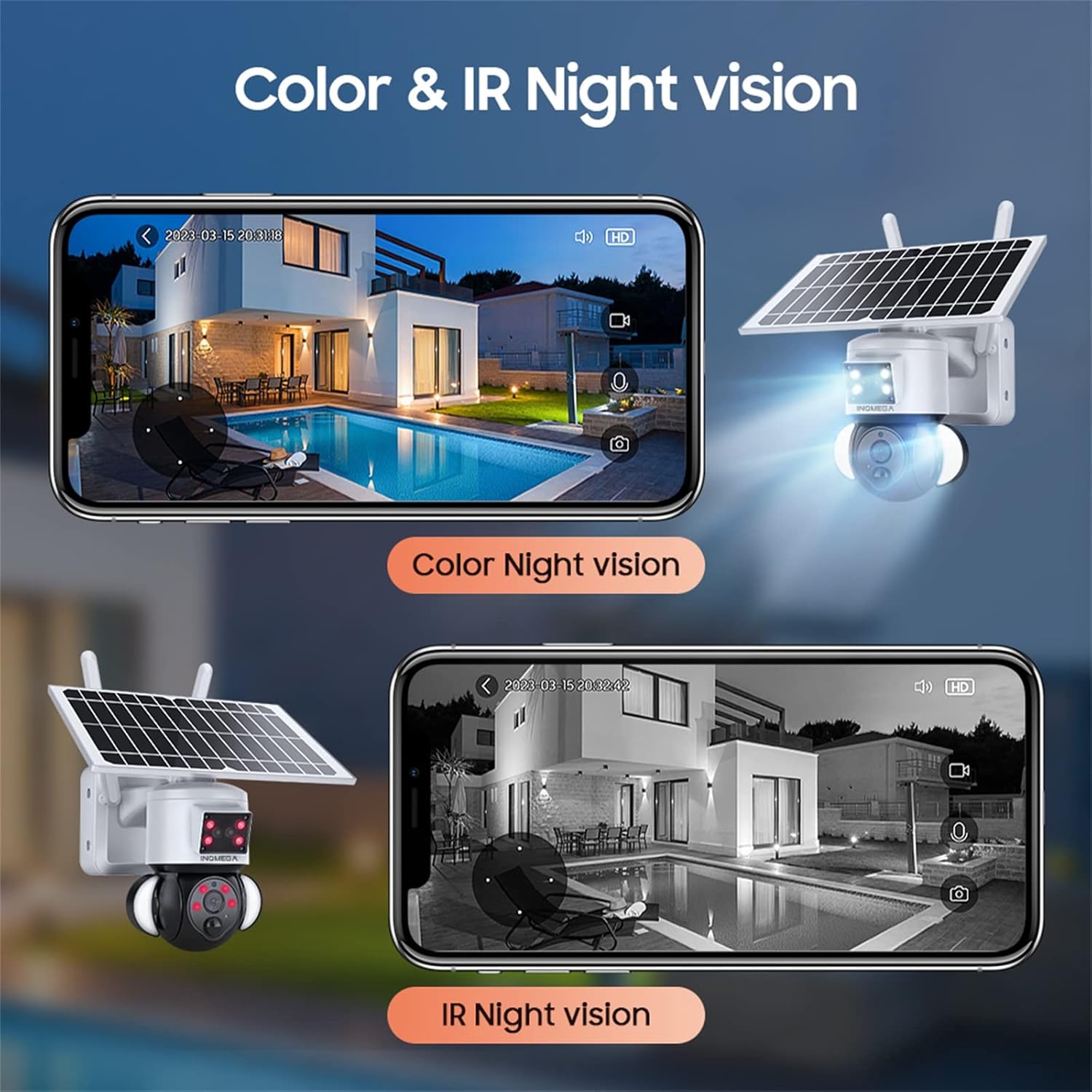
Figure 7: Color and IR Night Vision. This image compares the camera's color night vision, enabled by its floodlight, with traditional infrared (IR) night vision, both displayed on a smartphone.
4.5 Zaznavanje gibanja in opozorila
- The PIR motion sensor detects movement and triggers recording.
- Receive instant alerts on your TUYA SMART LIFE app when motion is detected.
- Adjust sensitivity settings within the app to minimize false alarms.
5. Vzdrževanje
- Čiščenje sončne plošče: Sončno celico redno obrišite z mehko krpoamp cloth to remove dust, dirt, and debris. A clean panel ensures optimal charging efficiency.
- Čiščenje objektiva fotoaparata: Za ohranjanje jasne kakovosti slike nežno očistite objektiv kamere s krpo iz mikrovlaken. Izogibajte se abrazivnim materialom.
- Posodobitve vdelane programske opreme: Check the TUYA SMART LIFE app periodically for available firmware updates to ensure your camera has the latest features and security enhancements.
- Zdravje baterije: While solar-powered, ensure the camera receives adequate sunlight. If the camera is in a shaded area for extended periods, consider temporarily relocating it or manually charging the battery if possible (refer to product specifications for charging options).
- Varstvo okolja: Although the camera is IP66 rated, avoid direct high-pressure water jets or prolonged submersion.
6. Odpravljanje težav
- Kamera se ne povezuje z Wi-Fi:
- Prepričajte se, da je vaše omrežje Wi-Fi 2.4 GHz. Kamera ne podpira omrežja Wi-Fi 5 GHz.
- Preverite, ali je geslo za Wi-Fi pravilno vneseno v aplikaciji.
- Preverite, ali je kamera v dosegu vašega usmerjevalnika Wi-Fi.
- Restart the camera and your router, then attempt the connection process again.
- Ensure the camera's LED is blinking blue before scanning the QR code.
- Slaba kakovost slike:
- Očistite lečo fotoaparata.
- Prepričajte se, da v vidnem polju kamere ni ovir view.
- Preverite moč signala Wi-Fi; šibek signal lahko vpliva na kakovost pretakanja.
- Baterija se ne polni:
- Prepričajte se, da je sončna celica čista in brez ovir.
- Verify the solar panel is receiving direct sunlight for at least 2-3 hours daily.
- Preverite povezavo med sončno celico in kamero.
- Motion Detection Not Working or Too Sensitive:
- Adjust the PIR motion detection sensitivity settings in the TUYA SMART LIFE app.
- Prepričajte se, da je kamera view ni oviran.
- No Audio or Poor Two-Way Audio:
- Preverite nastavitve glasnosti na pametnem telefonu in v aplikaciji.
- Ensure there is no interference near the camera's microphone or speaker.
7. Specifikacije
| Funkcija | Specifikacija |
|---|---|
| Ime modela | ST-S528M-3M-TY |
| Znamka | INQMEGA |
| Notranja/zunanja uporaba | Na prostem |
| Vir napajanja | Na sončno energijo |
| Protokol povezljivosti | Wi-Fi (samo 2.4 GHz) |
| Ločljivost zajema videa | 3 MP |
| Vrsta namestitve | Stenski nosilec |
| Območje nočnega vida | Do 90 metrov (barvni nočni vid) |
| Material | Plastika |
| Mere predmeta (D x Š x V) | 6 x 8.5 x 6 palcev |
| Teža predmeta | 3.74 funtov (1.7 kilograma) |
| Baterije | 3 Lithium Polymer batteries required (15000mAh capacity) |
| Ocena mednarodne zaščite | IP66 |
| Nadzorna metoda | App (TUYA SMART LIFE) |
| Posebne lastnosti | Motion Sensor, Night Vision, Floodlight, Two-Way Audio |
8. Garancija in podpora
For warranty information, please refer to the documentation included with your product packaging or contact INQMEGA customer support directly. INQMEGA is committed to providing reliable brand reputation and professional technical services. If you encounter any product problems, please contact support in a timely manner.
For further assistance, please visit the official INQMEGA website or refer to the TUYA SMART LIFE app's help section.