
1. Izdelek je končanview
The Kamon K1 wired earbuds are designed for audio playback and communication across various devices. They feature an in-ear design for sound isolation and include an in-line remote with an integrated microphone for convenient control.

Image 1.1: A user wearing Kamon K1 earbuds, demonstrating the product in use for audio listening.
Ključne značilnosti:
- Vgrajen mikrofon: Omogoča prostoročno klicanje.
- Multi-functional In-line Remote: Controls calls and music playback.
- Ergonomska zasnova v ušesu: Zagotavlja varno prileganje in zvočno izolacijo.
- High Fidelity Sound: Delivers clear audio with defined bass, mid-range, and treble.
- Široka združljivost: Connects to devices with a standard 3.5mm headphone jack.
- Kabel brez zapletanja: Designed to resist tangling for ease of use and storage.
2. Nastavitev in povezava
The Kamon K1 earbuds utilize a standard 3.5mm audio jack for connection. No additional software or drivers are required for basic functionality.
Priključitev slušalk:
- Locate the 3.5mm audio port on your device (e.g., smartphone, tablet, laptop, MP3 player).
- Insert the 3.5mm jack of the Kamon K1 earbuds firmly into the device's audio port.
- Ensure the connection is secure. If experiencing sound issues, gently rotate the plug within the port to establish full contact.
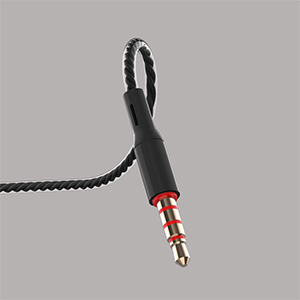
Image 2.1: A close-up of the 3.5mm audio jack, illustrating the connection interface.

Image 2.2: The 3.5mm audio jack of the Kamon K1 earbuds, shown with icons of compatible devices including PCs, Macbooks, iPads, iPhones, Android smartphones, and iPods.
3. Navodila za uporabo
The in-line remote control allows for easy management of calls and music playback without needing to access your connected device directly.
In-line Remote Control Functions:
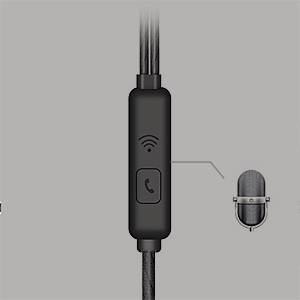
Image 3.1: A detailed image of the in-line remote control for Kamon K1 earbuds, featuring the multi-function button and microphone.
- Sprejmi/končaj klic: Enkrat pritisnite gumb.
- Zavrni klic: Pritisnite in držite gumb.
- Predvajaj/zaustavi glasbo: Enkrat pritisnite gumb.
- Next Music Track: Dvakrat pritisnite gumb.
- Previous Music Track: Trikrat pritisnite gumb.
- Aktivirajte glasovnega pomočnika (npr. Siri): Press and hold the button (functionality may vary by device).
Video 3.1: Official product video demonstrating the features and usage of Kamon K1 wired earbuds, including design, sound quality, and in-line control functions.
4. Vzdrževanje in nega
Proper care helps extend the lifespan and maintain the performance of your Kamon K1 earbuds.
- Handling the Cord: Avoid pulling the earbud cord directly. Always hold the earphone plug part and the earbud housing when disconnecting from devices or removing from ears.
- Čiščenje: Regularly clean the ear tips and earbud housing with a soft, dry cloth. Ensure no moisture enters the speaker components.
- Shranjevanje: Store earbuds in a clean, dry place. The tangle-free cable design assists in neat storage.
- Zaščita: The outer layer of the cable is designed for protection against external shocks. However, avoid excessive force or sharp objects.
5. Odpravljanje težav
If you encounter issues with your Kamon K1 earbuds, refer to the following common solutions:
- No Sound or Sound from One Side:
- Prepričajte se, da je 3.5 mm vtičnica popolnoma vstavljena v avdio vrata naprave.
- Gently rotate the plug within the port to ensure proper contact.
- Slušalke preizkusite z drugo napravo, da izključite težavo, specifično za napravo.
- Preverite nastavitve glasnosti v napravi.
- Mikrofon ne deluje:
- Ensure the earbuds are fully plugged in.
- Verify that your device's microphone input is set to the connected earbuds.
- Preizkusite mikrofon z drugo aplikacijo ali napravo.
- Daljinski upravljalnik se ne odziva:
- Confirm the earbuds are securely connected.
- Some older devices or specific operating systems may have limited compatibility with remote functions.
- Slaba kakovost zvoka (statika, popačenje):
- Check the audio source for quality.
- Prepričajte se, da je 3.5 mm vtičnica čista in brez umazanije.
- Test with another device to isolate the problem.
6. Specifikacije
Detailed technical specifications for the Kamon K1 wired earbuds.
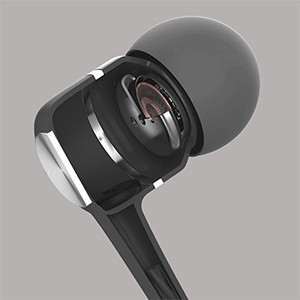
Image 6.1: A cutaway diagram of a Kamon K1 earbud, revealing its internal acoustic components for high-fidelity sound.
| Funkcija | Specifikacija |
|---|---|
| Ime modela | KE |
| Tehnologija povezljivosti | Žično |
| Priključek za slušalke | 3.5 mm Jack |
| Nadzor hrupa | Zvočna izolacija |
| Vrsta nadzora | Remote (Button) |
| Mikrofon | Integrirano |
| Funkcija kabla | Brez zapletov |
| Impedanca | 32 Ohm ±15 % pri 1 KHz |
| Nazivna moč | 3mW |
| Največja vhodna moč | 5mW |
| Izkrivljanje | 3 % največ (1 kHz/1 mW) |
| Frekvenčni odziv | 20~20,000Hz |
| Dolžina kabla | 120 cm |
| Teža predmeta | 0.07 kilograma (približno 2.39 unče) |
| Material | Plastic, Rubber, Silicone, Thermoplastic Elastomer (TPE) |
| Združljive naprave | iPhone devices, Android smartphones, iPod, iPad, MP3 players, music speakers |
7. Garancija in podpora
For warranty information or technical support regarding your Kamon K1 earbuds, please refer to the product packaging or contact Kamon customer service directly. Details for contacting support are typically provided with your purchase or on the official Kamon webmesto.