
1. Uvod
Thank you for choosing the Goshyda Portable Multimedia 1080P Projector. This compact and versatile device is designed to provide a personal cinema experience, supporting various multimedia inputs for entertainment, presentations, and more. Please read this manual carefully before using the projector to ensure proper operation and to maximize its lifespan.

Image 1.1: The Goshyda YG300 Mini Portable Projector in a home entertainment setting.
2. Varnostne informacije
- Napajanje: Use only the specified 5V 2A power adapter or a compatible power bank. Incorrect voltage lahko poškoduje napravo.
- Prezračevanje: Ne blokirajte prezračevalnih odprtin. Zagotovite zadosten pretok zraka okoli projektorja, da preprečite pregrevanje.
- Okolje: Avoid exposing the projector to water, moisture, dust, or extreme temperatures. Operate in a clean, dry environment.
- Čiščenje: Pred čiščenjem izklopite napajanje. Uporabite mehko, suho krpo. Ne uporabljajte tekočih ali aerosolnih čistil.
- Demontaža: Projektorja ne poskušajte razstavljati ali popravljati sami. Vsa servisna dela prepustite usposobljenemu osebju.
- Zaščita oči: Ne glejte neposredno v lečo projektorja, ko jeamp je vklopljen.
3. Vsebina paketa
Po razpakiranju preverite vsebino paketa. Če kateri koli predmet manjka ali je poškodovan, se obrnite na prodajalca.
- Goshyda Portable Projector
- Daljinski upravljalnik
- AV Cable
- Napajalni adapter
- Uporabniški priročnik (ta dokument)

Image 3.1: Included accessories with the Goshyda Portable Projector.
4. Izdelek je končanview
4.1. Značilnosti projektorja
- 1080P Resolution Support: Zagotavlja jasne in podrobne slike.
- Kompakten in prenosen dizajn: Weighing approximately 290g, it is easy to carry.
- Multi-Port Connectivity: Includes USB, HDMI, AV, memory card slot, and audio output.
- Vgrajeni zvočniki: Za udobje zagotavlja integriran zvok.
- Prilagodljiva moč: Can be powered by a 5V 2A wall charger or power bank.

Image 4.1: Visual representation of the projector's main features.
4.2. Projector Ports and Controls
Familiarize yourself with the various ports and controls on your projector.
- Objektiv: Front-facing projection lens.
- Fokusni obroč: Prilagodi jasnost slike.
- Vhodna moč (DC IN): Connects to the 5V 2A power adapter.
- Vrata HDMI: Za povezovanje naprav prek kabla HDMI.
- Vrata USB: Za priklop USB-naprav za shranjevanje podatkov.
- AV vrata: For connecting devices via AV cable.
- Reža za kartico MicroSD: Za vstavljanje pomnilniške kartice.
- Avdio izhod: Za priklop zunanjih zvočnikov ali slušalk.
- Gumbi za upravljanje: On the top panel for basic navigation and selection.

Slika 4.2: Stran view of the projector highlighting its connectivity ports.

Image 4.3: Close-up of the projector lens.
5. Nastavitev
5.1. Napajalni priključek
- Priloženi napajalnik priključite na vrata DC IN na projektorju.
- Priključite napajalnik v standardno električno vtičnico.
- Alternatively, for portable use, connect a 5V 2A power bank to the DC IN port.

Image 5.1: Powering the projector via wall adapter or power bank.
5.2. Postavitev in projekcija
Place the projector on a stable, flat surface. The optimal projection distance is between 1 to 2.5 meters, allowing for a screen size of up to 60 inches.
- For a 24-inch screen, place the projector approximately 0.8 meters away.
- For a 47-inch screen, place the projector approximately 1.2 meters away.
- For a 60-inch screen, place the projector approximately 1.6 meters away.
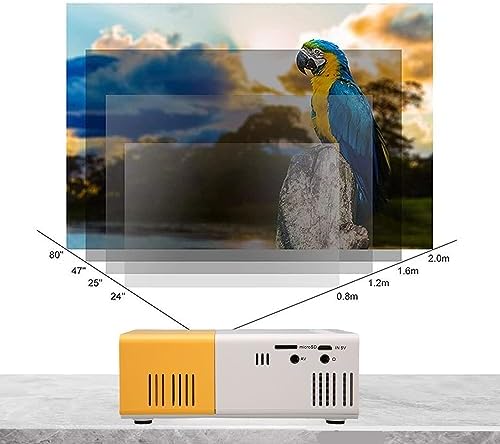
Image 5.2: Projection distance guidelines for various screen sizes. Note: Maximum recommended projection size is 60 inches.
5.3. Prilagoditev fokusa
After placing the projector and powering it on, rotate the focus ring located around the lens until the projected image appears clear and sharp.
6. Navodila za uporabo
6.1. Vklop/izklop
- Vklop: Pritisnite gumb za vklop na projektorju ali daljinskem upravljalniku.
- Ugasniti: Ponovno pritisnite gumb za vklop. Projektor se bo izklopil.
6.2. Izbira vhodnega vira
Use the 'Source' button on the remote control or the projector's control panel to cycle through available input sources (HDMI, USB, AV, MicroSD).
6.3. Navigacija po meniju
Use the arrow buttons on the remote control or projector to navigate through menus. Press 'OK' or 'Enter' to confirm selections. Use the 'Return' or 'Back' button to go back to the previous menu.
7. Povezljivost
The projector offers multiple connectivity options for various devices.

Image 7.1: Connectivity options for the Goshyda projector.
7.1. Povezava HDMI
Connect devices such as laptops, TV Sticks, game consoles (e.g., for Xbox One), or Blu-ray players using an HDMI cable. Select 'HDMI' as the input source.
7.2. USB povezava
Za predvajanje medijev vstavite USB-ključek v vrata USB files directly. Select 'USB' as the input source and navigate through your files.
7.3. AV Connection
Use the provided AV cable to connect older devices like DVD players. Select 'AV' as the input source.
7.4. Smartphone/Tablet Connection
To connect directly to your smartphone or tablet, you will need an appropriate adapter (e.g., Micro USB to HDMI, Type-C to HDMI, or a dedicated HD multimedia interface device), depending on your device's operating system (OS X or Android) and available ports. These adapters are sold separately.
7.5. Zvočni izhod
Connect external speakers or headphones to the audio output port for enhanced sound.
8. Vzdrževanje
- Čiščenje leč: Use a soft, lint-free cloth specifically designed for optical lenses to gently wipe the projector lens. Do not use abrasive materials or harsh chemicals.
- Čiščenje zunanjosti: Zunanjost projektorja obrišite z mehko, suho krpo.
- Shranjevanje: When not in use for extended periods, store the projector in a cool, dry place, away from direct sunlight and dust.
9. Odpravljanje težav
| Težava | Možen vzrok | rešitev |
|---|---|---|
| Brez moči | Power adapter not connected or faulty; insufficient power supply. | Ensure the 5V 2A power adapter is securely connected and plugged into a working outlet. Try a different power source or power bank. |
| Brez slike | Incorrect input source selected; cable not connected properly; device not outputting signal. | Select the correct input source (HDMI, USB, AV). Check all cable connections. Ensure the connected device is powered on and outputting a signal. |
| Slika je zamegljena | Fokus ni nastavljen; projektor je preblizu/predaleč od platna. | Rotate the focus ring to sharpen the image. Adjust the projection distance within the recommended range (1-2.5m). |
| Brez zvoka | Volume too low or muted; external speakers not connected; audio format not supported. | Increase the volume on the projector and the source device. Check if external speakers are properly connected. Ensure the audio format is supported. |
10. Specifikacije
| Funkcija | Podrobnost |
|---|---|
| Znamka | Gošida |
| Številka modela | Goshyda89pkbg17g0 |
| Ločljivost zaslona | 1920 x 1080 (1080P Support) |
| Svetlost | 200 lumnov |
| Razmerje stranic | 4:3 |
| Projekcijska razdalja | 1 - 2.5 metrov |
| Velikost projekcije | Do 60 palcev |
| Tehnologija povezljivosti | HDMI, USB, AV, MicroSD, Audio Out |
| Vhodna moč | 5V 2A |
| Vrsta zaslona | LCD |
| Dimenzije izdelka | 12L x 8.5W x 4.6H cm (Approx. 4.7 x 3.3 x 1.8 inches) |
| Faktor oblike | Prenosni |
| Vrsta namestitve | Namizni nosilec |
11. Garancija in podpora
For warranty information and customer support, please refer to the documentation provided with your purchase or contact your retailer directly. Keep your proof of purchase for warranty claims.