
1. Uvod
Hvala za nakupasing the Roadstar IR-540D+BT Micro Hi-Fi System. This system offers a wide range of audio options including Internet Radio, DAB+/FM digital radio, CD-MP3 playback, Bluetooth connectivity, and USB media support. This manual provides essential information for safe operation, setup, and troubleshooting to ensure optimal performance of your device.
2. Varnostne informacije
- Pred uporabo natančno preberite vsa navodila.
- Ta priročnik shranite za poznejšo uporabo.
- Naprave ne izpostavljajte dežju ali vlagi, da preprečite požar ali električni udar.
- Zagotovite ustrezno prezračevanje; ne blokirajte prezračevalnih odprtin.
- Uporabljajte samo priključke/dodatke, ki jih je določil proizvajalec.
- Izključite enoto med nevihtami ali ko je ne uporabljate dlje časa.
- Za vse servise se obrnite na usposobljeno servisno osebje.
3. Vsebina paketa
Prosimo, preverite, ali so vsi elementi prisotni:
- Roadstar IR-540D+BT Micro Hi-Fi System
- Daljinski upravljalnik
- Napajalni adapter
- Uporabniški priročnik (ta dokument)
4. Izdelek je končanview
Familiarize yourself with the main components and controls of your Hi-Fi system.
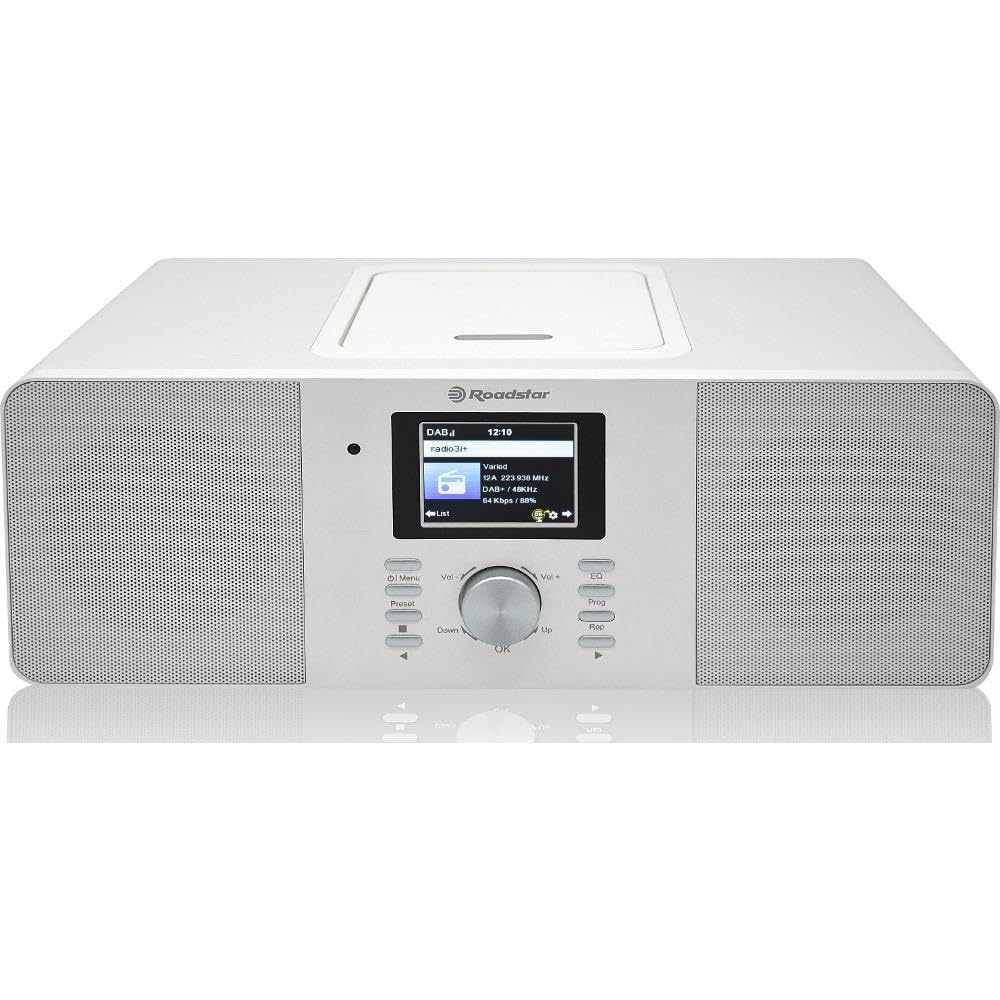
Slika 4.1: Spredaj view of the Roadstar IR-540D+BT Micro Hi-Fi System.

Figure 4.2: Close-up of the LCD display and main control buttons/knobs.
Nadzor sprednje plošče:
- LCD zaslon: Prikazuje trenutni način, informacije o skladbi, radijsko postajo, čas itd.
- Gumb za vklop: Vklopi/izklopi enoto.
- Gumb za način: Switches between CD, Internet Radio, DAB+, FM, Bluetooth, AUX, USB.
- Gumb za glasnost: Prilagodi izhodni nivo zvoka.
- Navigacijski gumbi (gor/dol/levo/desno/V redu): Za navigacijo in izbiro po menijih.
- Gumb za predvajanje/pavzo: Controls playback for CD/USB/Bluetooth.
- Gumbi za preskok/iskanje: Skips tracks or searches radio stations.
- Vrata USB: For USB media playback and fast charging.
- Priključek za slušalke: Za zasebno poslušanje.
Priključki na zadnji plošči:
- AUX IN: 3.5 mm priključek za priključitev zunanjih avdio naprav.
- Vhod za anteno FM/DAB: For connecting the included antenna.
- DC IN: Priključek napajalnika.

Figure 4.3: The Roadstar IR-540D+BT system shown with its multi-function remote control.
Funkcije daljinskega upravljalnika:
- All basic functions (Power, Volume, Mode, Playback controls).
- Direct access buttons for different modes (e.g., CD, BT, Internet Radio).
- Numeric keypad for direct track/station entry.
- Alarm setting and sleep timer functions.
5. Nastavitev
5.1 Napajalni priključek
- Priključite napajalnik v vtičnico DC IN na zadnji strani enote.
- Priključite napajalnik v standardno zidno vtičnico.
5.2 Antenska povezava
For optimal DAB+ and FM radio reception, connect the supplied antenna to the FM/DAB Antenna Input on the rear panel. Extend the antenna fully and adjust its position for the best signal.
5.3 Initial Wi-Fi Setup (for Internet Radio)
Upon first power-on or when selecting Internet Radio mode, the system will prompt you to configure network settings.
- Use the navigation buttons to select 'Network Setup' or 'Wi-Fi Setup'.
- The system will scan for available Wi-Fi networks. Select your network from the list.
- Enter your Wi-Fi password using the navigation buttons and 'OK' to confirm each character.
- Once connected, the system will confirm the connection. You can now access Internet Radio stations.
6. Navodila za uporabo
6.1 Splošno delovanje
- Vklop/izklop: Pritisnite gumb za vklop na enoti ali daljinskem upravljalniku.
- Izberite način: Press the 'Mode' button repeatedly to cycle through available sources (CD, Internet Radio, DAB+, FM, Bluetooth, AUX, USB).
- Prilagodi glasnost: Rotate the Volume knob or use the VOL +/- buttons on the remote.
6.2 CD/MP3 Playback
- Odprite pokrov predala za CD-je.
- Place a CD or MP3 CD with the label side facing up.
- Close the CD compartment cover. The system will automatically switch to CD mode and begin playback.
- Use the Play/Pause, Skip, and Search buttons for control.
6.3 Radijsko delovanje
6.3.1 Internetni radio
- Select 'Internet Radio' mode.
- Use the navigation buttons to browse stations by genre, location, or search.
- Press 'OK' to select a station.
6.3.2 DAB+/FM radio
- Select 'DAB+' or 'FM' mode.
- For DAB+, the system will perform an auto-scan for available stations. For FM, use the search buttons to find stations.
- To save a preset, press and hold the 'Preset' button, then select a preset number and press 'OK'.
6.4 Povezljivost Bluetooth
- Select 'Bluetooth' mode. The display will show 'Pairing' or 'Waiting for connection'.
- Na mobilni napravi (pametnem telefonu, tabličnem računalniku) omogočite Bluetooth in poiščite razpoložljive naprave.
- Select 'IR-540D+BT' from the list.
- Once paired, you can play audio from your device through the Hi-Fi system.
6.5 Predvajanje in polnjenje prek USB-ja
- Insert a USB flash drive into the USB port. The system will automatically switch to USB mode and begin playing compatible audio file(npr. MP3).
- The USB port also supports fast charging for compatible devices.
6.6 Priključek AUX IN
Connect an external audio device (e.g., MP3 player, smartphone) to the AUX IN jack on the rear panel using a 3.5mm audio cable. Select 'AUX' mode to listen to audio from the connected device.
6.7 Funkcija alarma

Figure 6.1: The display showing alarm clock settings.
The system features a dual alarm function.
- Press the 'Alarm' button on the remote or navigate through the menu to 'Alarm Settings'.
- Izberite Alarm 1 ali Alarm 2.
- Set the desired alarm time, source (Buzzer, FM, DAB+, Internet Radio), and volume.
- Omogoči alarm.
7. Vzdrževanje
- Čiščenje: Za čiščenje enote uporabite mehko, suho krpo. Ne uporabljajte abrazivnih čistil ali topil.
- Skrb za CD: CD-je prijemajte za robove. Čistite jih z mehko krpo, ki ne pušča vlaken, in jih brišite od sredine navzven.
- Prezračevanje: Prepričajte se, da prezračevalne odprtine niso blokirane, da preprečite pregrevanje.
8. Odpravljanje težav
| Težava | Možen vzrok | rešitev |
|---|---|---|
| Brez moči | Napajalni kabel ni priključen; vtičnica je okvarjena. | Preverite priklop napajalnega kabla; poskusite z drugo vtičnico. |
| Brez zvoka | Glasnost je prenizka; Izbran je napačen način; Priključene so slušalke. | Increase volume; Select correct source mode; Disconnect headphones. |
| Slab radijski sprejem | Antena ni pravilno iztegnjena/nameščena; Slab signal. | Extend and reposition the antenna; Try auto-tuning again. |
| Bluetooth povezovanje ni uspelo | Device not in pairing mode; Distance too far; Interference. | Ensure unit is in Bluetooth mode; Keep devices close; Restart both devices. |
| Internetni radio se ne povezuje | Napačno geslo za Wi-Fi; Težave z usmerjevalnikom; Šibek signal Wi-Fi. | Re-enter Wi-Fi password; Restart router; Move unit closer to router. |
9. Specifikacije
| Funkcija | Specifikacija |
|---|---|
| Znamka | Roadstar |
| Številka modela | IR-540D+BT |
| Tehnologija povezljivosti | Auxiliary, USB, Bluetooth, Wi-Fi |
| Podprti standardi | CD, CD-R, CD-RW, MP3, WAV, AAC, WMA |
| Vrsta zvočnika | Stereo |
| izhodna moč (RMS) | 2 x 10 W (Total 20W RMS) |
| Vir napajanja | Električni na kabel |
| Združljive naprave | MP3 predvajalnik, pametni telefon, tablični računalnik |
| Radijski sprejemnik | Internetni radio, DAB+, FM |
| Vrata USB | Playback and Fast Charging |
| Zaslon | Digitalni LCD |
| Posebne lastnosti | Dual Alarm, Equalizer Presets |
10. Garancija in podpora
For warranty information and technical support, please refer to the warranty card included with your product or visit the official Roadstar webspletnega mesta. Shranite dokazilo o nakupu za morebitne garancijske zahtevke.