
Uvod
Thank you for choosing the HTC Wireless Over-Ear Bluetooth Headphones, model BDT01. This manual provides essential information for setting up, operating, maintaining, and troubleshooting your new headphones. Please read it carefully to ensure optimal performance and longevity of your device.
Kaj je v škatli
Po razpakiranju preverite, ali so priloženi vsi naslednji elementi:
- 1 x HTC Wireless Over-Ear Bluetooth Headphones
- 1 x polnilni kabel USB-C
- 1 x 3.5 mm avdio kabel
- 1 x Kratki vodnik (ni vključen v ta digitalni priročnik)
- 1 x Warranty Card (details provided in the Warranty section)

Image: All items included in the product packaging.
Nastavitev
1. Polnjenje slušalk
Before first use, fully charge your headphones. Connect the provided USB-C charging cable to the charging port on the headphones and the other end to a USB power source (e.g., computer, wall adapter). A full charge provides up to 40-50 hours of playtime. For quick use, a 10-minute charge can provide approximately 10 hours of listening time.
2. Vklop/izklop
To power on the headphones, press and hold the Power button (usually indicated by a universal power symbol or a multi-function button) for a few seconds until an indicator light illuminates or an audio prompt is heard. To power off, repeat the process until the indicator light turns off or an audio prompt confirms shutdown.
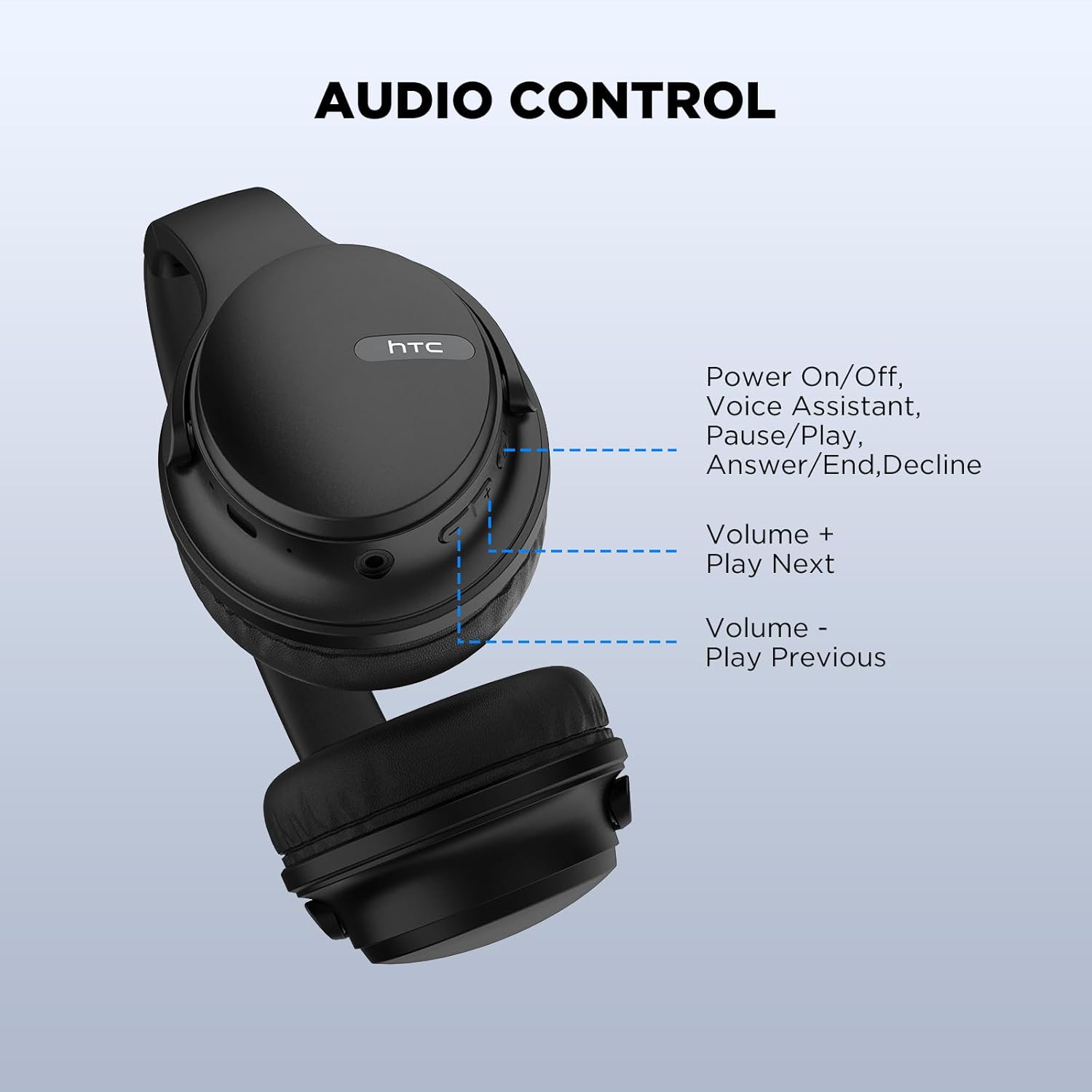
Image: Location of the Power button and other controls.
3. Bluetooth seznanjanje
- Prepričajte se, da so slušalke izklopljene.
- Pritisnite in držite gumb za vklop približno 5–7 sekund, dokler indikatorska lučka ne začne hitro utripati, kar označuje način seznanjanja.
- V napravi (pametnem telefonu, tablici, prenosniku) omogočite Bluetooth in poiščite razpoložljive naprave.
- Select "HTC BDT01" (or similar name) from the list of found devices.
- Once connected, the indicator light will typically stop flashing and remain solid, or an audio prompt will confirm the connection.
The headphones utilize Bluetooth 5.3 technology for a stable and fast connection. After the initial pairing, the headphones will automatically connect to the last paired device when powered on and within range.

Image: Bluetooth 5.3 compatibility with various devices.

Image: Wireless and wired connection options.
Navodila za uporabo
Kontrole slušalk
The headphones feature intuitive controls located on the earcup for easy management of audio and calls.
- Power On/Off / Multi-function Button: Press and hold to power on/off. Short press to Play/Pause music, Answer/End calls, or Decline calls. Double-press to activate Voice Assistant.
- Glasnost + / naslednja skladba: Kratek pritisk za povečanje glasnosti. Dolg pritisk za preskok na naslednjo skladbo.
- Glasnost - / Prejšnja skladba: Kratek pritisk za zmanjšanje glasnosti. Dolg pritisk za premik na prejšnjo skladbo.
Slika: Podrobna view upravljanje slušalk.
Wired Connection (Aux-in Mode)
You can use the headphones in wired mode when the battery is low or when connecting to devices without Bluetooth. Simply plug the provided 3.5mm audio cable into the aux-in port on the headphones and the other end into your audio source. The headphones will automatically switch to wired mode.
Odpravljanje hrupa pri klicu (ENC)
The integrated Environmental Noise Cancellation (ENC) technology enhances call clarity by reducing ambient noise, allowing for clear conversations even in noisy environments.
Vzdrževanje
Čiščenje
Za vzdrževanje dobrega stanja slušalk:
- Ušesne školjke in naglavni trak obrišite z mehko, suho krpo, ki ne pušča vlaken.
- Ne uporabljajte močnih kemikalij, čistilnih topil ali močnih detergentov.
- Izogibajte se vdoru vlage v morebitne odprtine.
Shranjevanje
The headphones feature a foldable design for convenient storage and portability. Fold them carefully to save space when not in use. Store them in a cool, dry place away from extreme temperatures and direct sunlight.

Image: Foldable design for compact storage.
Vodoodpornost
The headphones are designed with IPX5 sweatproof rating, making them suitable for daily life and light exercise. They are resistant to splashes of water and sweat but are not waterproof. Do not submerge them in water or expose them to heavy rain.
Odpravljanje težav
| Težava | Možen vzrok | rešitev |
|---|---|---|
| Slušalke se ne vklopijo. | Nizka baterija. | Polnite slušalke s priloženim kablom USB-C. |
| Seznanitev z napravo ni mogoča. | Slušalke niso v načinu seznanjanja; Bluetooth na napravi izklopljen; naprava je predaleč. | Ensure headphones are in pairing mode (flashing indicator). Turn on Bluetooth on your device. Move device closer to headphones (within 10 meters). |
| Ni zvoka ali slaba kakovost zvoka. | Volume too low; incorrect audio source; loose wired connection; interference. | Increase volume on headphones and device. Check if the correct audio output is selected on your device. Ensure 3.5mm cable is fully inserted if in wired mode. Move away from sources of interference. |
| Mikrofon ne deluje med klici. | Incorrect microphone selected on device; microphone muted. | Check your device's audio settings to ensure the headphone microphone is selected. Ensure the microphone is not muted on your device or application. |
Specifikacije
| Ime modela | BDT01 |
| Tehnologija povezljivosti | Bluetooth |
| Brezžična komunikacijska tehnologija | Bluetooth 5.3 |
| Oblika slušalke | Nad ušesi |
| Vrsta zvočnega gonilnika | Dinamični gonilnik (40 mm) |
| Življenjska doba baterije | Do 40-50 ure |
| Čas polnjenja | Approx. 10 minutes for 10 hours playtime (fast charge) |
| Material | Usnje, plastika |
| Posebna funkcija | Foldable, ENC Call Noise Cancellation, IPX5 Sweatproof |
| Dimenzije izdelka | 6.69 x 2.36 x 7.48 palcev |
| Teža predmeta | 10.6 unč |
| Združljive naprave | Smartphones, Laptops, Tablets, iPod, and other Bluetooth-enabled devices |
Garancija in podpora
Your HTC Wireless Over-Ear Bluetooth Headphones come with a 360-day warranty extension. This warranty covers manufacturing defects and ensures your satisfaction with the product.
If you encounter any issues, have questions, or require support, please do not hesitate to contact HTC customer service. Refer to the warranty card included in your packaging for specific contact details or visit the official HTC support webmesto.
Note: Please retain your proof of purchase for warranty claims.
Varnostne informacije
- Slušalk ne izpostavljajte ekstremnim temperaturam ali vlagi.
- Pazite, da vam slušalke ne padejo ali da jih ne izpostavljate močnim udarcem.
- Slušalk ne razstavljajte ali poskušajte sami popraviti. S tem boste razveljavili garancijo.
- Poslušajte pri zmerni glasnosti, da preprečite poškodbe sluha.
- Hraniti izven dosega otrok.