
1. Uvod
This manual provides instructions for the installation, operation, and maintenance of your NETGEAR GS305P 5-Port PoE Gigabit Ethernet Unmanaged Switch. This device is designed to expand your network connectivity with both standard Gigabit Ethernet and Power over Ethernet (PoE+) capabilities, ideal for small office or home network environments.
2. Vsebina paketa
Preverite, ali vaš paket vsebuje naslednje elemente:
- NETGEAR GS305P 5-Port PoE Gigabit Ethernet Unmanaged Switch (GS305Pv3)
- Napajalnik
- Komplet za pritrditev na steno
- Navodila za hitro namestitev

Image: The NETGEAR GS305P switch, power adapter, and power cord as typically found in the package.
3. Izdelek je končanview
The NETGEAR GS305P is an unmanaged switch featuring 5 Gigabit Ethernet ports, with 4 of these ports supporting PoE+ (Power over Ethernet Plus). It provides a total power budget of 63W for connected PoE devices. The switch is designed for plug-and-play operation, requiring no software installation or configuration.
Video: Prekoračitevview of the NETGEAR 5-Port PoE Switch, demonstrating its features and ease of use.
Sprednja plošča

Image: Front panel of the GS305P switch, highlighting the 5 Gigabit Ethernet ports and LED indicators for power, PoE Max, link/activity, and PoE fault.
- LED za napajanje: Označuje stanje napajanja.
- PoE Max LED: Illuminates when PoE power consumption is near maximum capacity.
- Link/Activity LEDs (Ports 1-5): Green for 1000Mbps link, Yellow for 10/100Mbps link. Blinks to indicate activity.
- PoE Status LEDs (Ports 1-4): Green for PoE powered, Yellow for PoE fault.
- Ethernet vrata (1-5): RJ-45 ports for network connections. Ports 1-4 support PoE+.
4. Nastavitev in namestitev
The NETGEAR GS305P switch is designed for simple plug-and-play installation. No software configuration is required.
4.1 Priključitev stikala
- Connect the power adapter to the switch's power input and then plug the power adapter into an electrical outlet. The Power LED on the switch will illuminate.
- Connect your router or modem to any of the 5 Gigabit Ethernet ports on the switch using an Ethernet cable.
- Connect your network devices (computers, printers, network storage) to the remaining Gigabit Ethernet ports. For PoE-powered devices (e.g., IP cameras, wireless access points), connect them to ports 1-4.

Image: A diagram illustrating the plug-and-play nature of the unmanaged switch, connecting various devices like WiFi Access Points, IP Cameras, Computers, and NAS.
4.2 Možnosti namestitve
The GS305P switch can be placed on a desktop or mounted on a wall. A wallmount kit is included for secure installation.
- Postavitev na namizje: Ensure the switch is placed on a flat, stable surface with adequate ventilation.
- Stenski nosilec: Use the provided wallmount kit to secure the switch to a wall. Refer to the quick installation guide for detailed steps on wall mounting.
5. Upravljanje stikala
Once connected, the switch operates automatically. The LEDs provide visual feedback on the network status.
- Vklop: The Power LED will be green when the switch is receiving power.
- Network Activity: The Link/Activity LEDs will light up when a device is connected and blink to indicate data transmission.
- Napajanje PoE: For PoE-powered devices, the PoE Status LED will be green when power is being supplied. If a PoE fault occurs, the LED will turn yellow.
- Tiho delovanje: The fanless design ensures quiet operation, making it suitable for noise-sensitive environments.
6. Vzdrževanje
Za zagotovitev optimalne zmogljivosti in dolge življenjske dobe stikala upoštevajte naslednja navodila za vzdrževanje:
- Čiščenje: Za čiščenje zunanjosti stikala uporabite mehko, suho krpo. Ne uporabljajte tekočih ali aerosolnih čistil.
- Prezračevanje: Prepričajte se, da prezračevalne odprtine niso blokirane, da preprečite pregrevanje.
- Okolje: Operate the switch within its specified temperature and humidity ranges. Avoid direct sunlight or extreme temperatures.
- Upravljanje kablov: Omrežne kable imejte urejene, da preprečite obremenitev vrat in izboljšate pretok zraka.
7. Odpravljanje težav
If you encounter issues with your NETGEAR GS305P switch, refer to the following common troubleshooting steps:
- Brez napajanja: Ensure the power adapter is securely connected to the switch and a working electrical outlet. Check the Power LED.
- Brez povezave/dejavnosti: Verify that Ethernet cables are properly connected to both the switch and the connected device. Try a different cable or port. Check the Link/Activity LED.
- Naprava PoE se ne vklopi: Ensure the device is PoE-compatible and connected to one of the PoE+ ports (1-4). Check the PoE Status LED for the port; a yellow light indicates a fault. Verify the total power budget (63W) is not exceeded by all connected PoE devices.
- Počasna hitrost omrežja: Ensure all connected devices and cables support Gigabit Ethernet for optimal performance. Check for excessive network traffic.
8. Specifikacije
Key technical specifications for the NETGEAR GS305P switch:
| Funkcija | Opis |
|---|---|
| Model | GS305P (GS305Pv3) |
| Število vrat | 5 gigabitnih ethernetnih vrat |
| Vrata PoE+ | 4 (Ports 1-4) |
| Skupni proračun za napajanje PoE | 63 W |
| Hitrost prenosa podatkov | 1000 Mbps (gigabit) |
| Tip stikala | Neupravljano |
| Material ohišja | Kovina |
| Dimenzije (D x Š x V) | 9.5" x 6.7" x 3.4" (approximate, from product data) |
| voltage | 240 Volts (Power adapter input) |
| Delovno okolje | Designed for indoor use in U.S. & CA. |
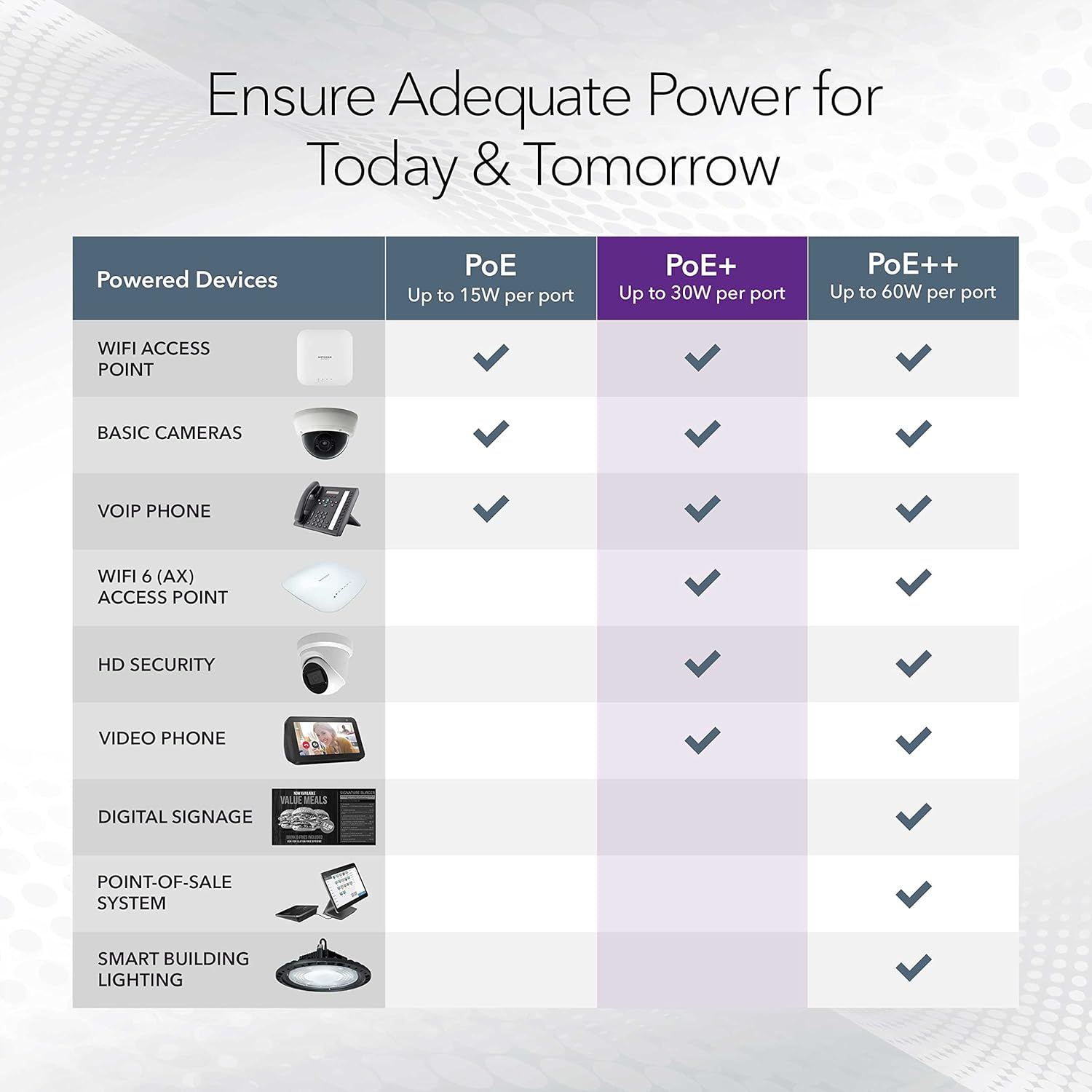
Image: A table illustrating the power capabilities of PoE, PoE+, and PoE++ for different powered devices.
9. Garancija in podpora
9.1 Informacije o garanciji
The NETGEAR GS305P switch comes with an industry-leading 3-letna omejena garancija za strojno opremo. Please retain your proof of purchase for warranty claims. For full warranty terms and conditions, refer to the official NETGEAR webspletnem mestu ali v dokumentaciji, ki je priložena vašemu izdelku.
9.2 Tehnična podpora
For technical assistance, product registration, or to access additional resources, visit the official NETGEAR support website. You can find FAQs, firmware updates, and community forums there.
Podpora za NETGEAR Webspletno mesto: www.netgear.com/support