
1. Uvod
This manual provides detailed instructions for the amazon basics Wired Gaming Mouse, Model ABIM03. This mouse is designed to enhance your gaming and computing experience with its adjustable DPI, customizable RGB lighting, and programmable buttons. Please read this manual thoroughly before use to ensure proper operation and longevity of your device.
2. Značilnosti izdelka
- Nastavljiv DPI: Up to 6400 DPI for precise cursor control and quick movements.
- Prilagodljiva RGB osvetlitev: Personalize your mouse with various RGB lighting modes and driver customization options for PC.
- Programabilni gumbi: Equipped with multiple programmable buttons for assigning custom functions or macros.
- Gaming-Grade Sensor: Ensures accurate tracking and rapid response for gaming.
- Trajna zasnova: Features extra durable switches and enhanced build quality for extended use.
- Honeycomb Grip: Ergonomic honeycomb design provides a comfortable and secure grip.

Image: The amazon basics Wired Gaming Mouse highlighting its adjustable DPI settings, ranging from 1200 to 7200 (though product states up to 6400).
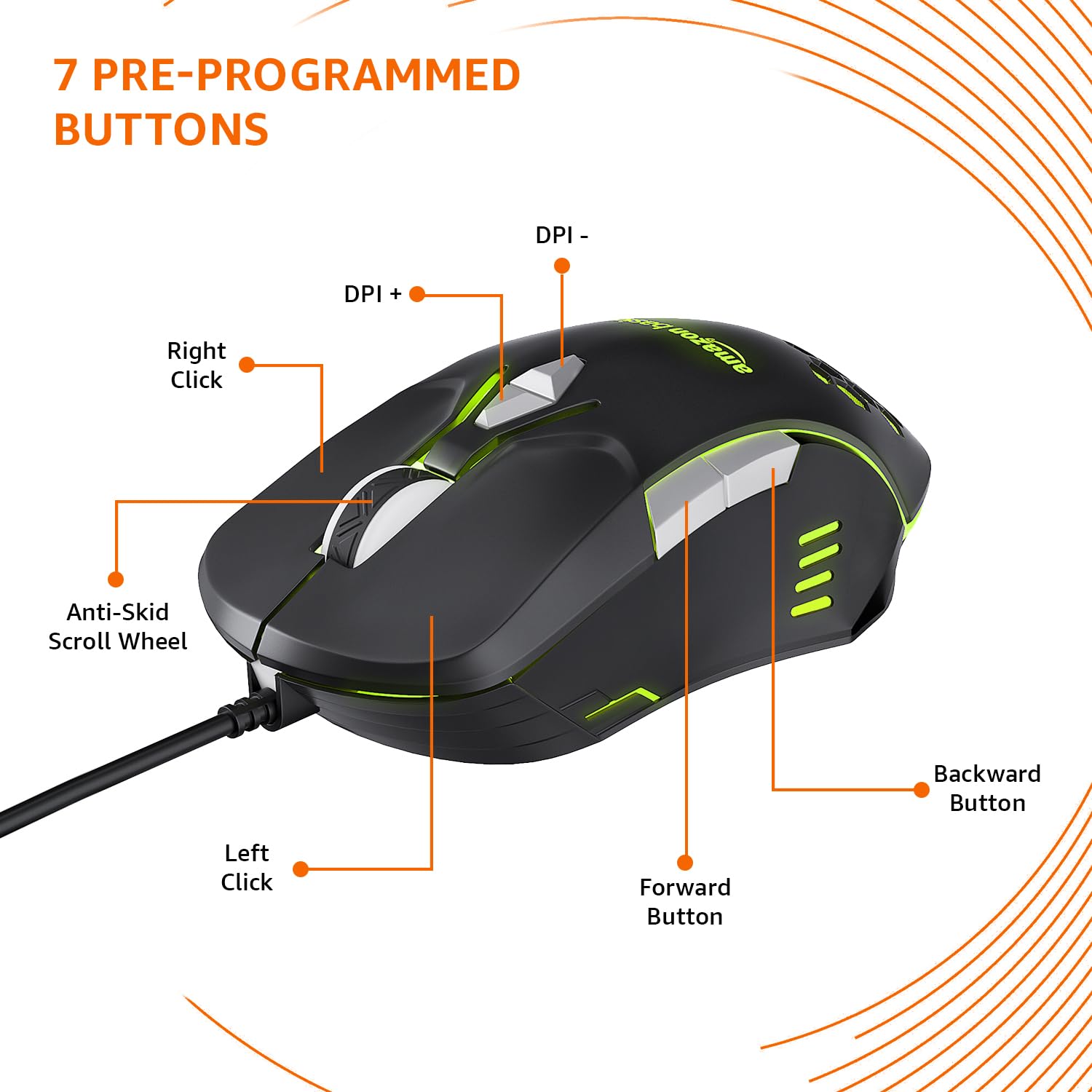
Image: The amazon basics Wired Gaming Mouse showing its 7 pre-programmed buttons, including Left Click, Right Click, Anti-Skid Scroll Wheel, DPI+, DPI-, Forward Button, and Backward Button.

Slika: Pogled od zgoraj navzdol view of the amazon basics Wired Gaming Mouse, emphasizing its honeycomb-designed surface for improved grip and airflow.

Image: The amazon basics Wired Gaming Mouse illuminated with red RGB lighting, showcasing its light and comfortable design.
3. Navodila za nastavitev
- Razpakirajte miško: Carefully remove the gaming mouse from its packaging.
- Povežite se z računalnikom: Priključite USB priključek miške v prosta vrata USB na vašem računalniku.
- Namestitev gonilnika: Your operating system (Windows, Linux) should automatically detect and install the necessary drivers. If prompted, follow the on-screen instructions. For advanced customization of RGB and programmable keys, refer to the manufacturer's website for specific driver software.
- Umestitev: Place the mouse on a flat, clean surface or a mouse pad for optimal performance.
4. Navodila za uporabo
4.1 Osnovna funkcionalnost
- Levi klik: Primarno dejanje, izbira.
- Desni klik: Secondary action, context menus.
- Kolesce za pomikanje: Scroll up/down pages. Pressing the scroll wheel often acts as a middle click.
- Gumbi naprej/nazaj: Običajno se uporablja za navigacijo v web brskalniki oz file raziskovalci.
4.2 Prilagajanje DPI (pik na palec)
The mouse features dedicated DPI adjustment buttons (DPI+ and DPI-) to change cursor sensitivity on the fly. Press these buttons to cycle through different DPI levels up to 6400. A higher DPI setting results in faster cursor movement across the screen with less physical mouse movement.
4.3 Customizing RGB Lighting
The mouse includes customizable RGB lighting. Specific lighting modes can often be cycled through using a dedicated button (if present) or through the optional driver software. Refer to the driver software for advanced customization options, including color selection, effects, and brightness.
4.4 Programming Buttons
The mouse is equipped with programmable buttons. To assign custom functions, macros, or key combinations to these buttons, you will need to install and use the specific driver software provided by the manufacturer. This software typically allows you to create profileza različne aplikacije ali igre.
Video: A short product highlight video demonstrating the key features of the amazon basics Wired Gaming Mouse, including adjustable DPI, RGB lighting, programmable buttons, and durable design.
5. Vzdrževanje
- Čiščenje: Za čiščenje zunanjosti miške uporabite mehko, suho krpo. Za trdovratno umazanijo rahlo obrišiteamp Uporabite lahko krpo, pri čemer pazite, da v miško ne pride tekočina.
- Čiščenje senzorja: Občasno z vatirano palčko rahlo pobrišiteampened with isopropyl alcohol to gently clean the optical sensor on the underside of the mouse. Ensure the mouse is disconnected before cleaning.
- Izogibajte se tekočinam: Do not immerse the mouse in water or any cleaning solutions.
- Shranjevanje: Miško shranjujte na hladnem in suhem mestu, stran od neposredne sončne svetlobe in ekstremnih temperatur.
6. Odpravljanje težav
| Težava | rešitev |
|---|---|
| Miška se ne odziva. |
|
| Premikanje kurzorja je neenakomerno ali poskakujoče. |
|
| Programmable buttons are not working. |
|
| RGB lighting is not working or stuck. |
|
7. Specifikacije
| Funkcija | Podrobnost |
|---|---|
| Znamka | osnove Amazona |
| Številka modela | ABIM03 |
| Tehnologija povezljivosti | Žično (USB) |
| Tehnologija zaznavanja gibanja | Optični |
| Razpon DPI | Do 6400 DPI |
| Programabilne tipke | 4 (in addition to standard left/right click and scroll) |
| Razsvetljava | RGB |
| barva | Črna |
| Teža predmeta | 145 g |
| Dimenzije izdelka (DxŠxV) | 15.8 x 10.4 x 5.4 cm |
| Platforma strojne opreme | PC |
| Združljivost operacijskega sistema | Linux, Windows 7 and above |
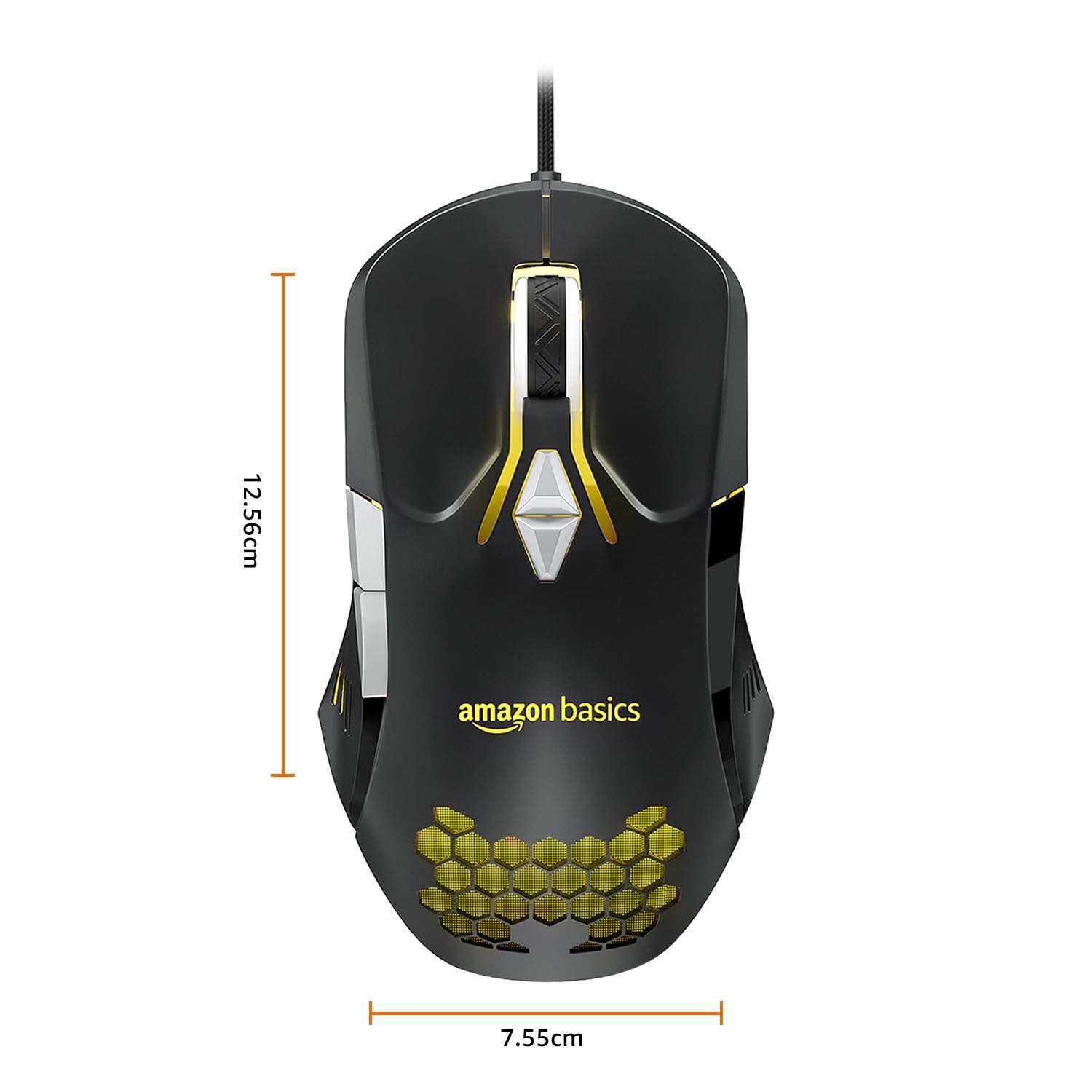
Image: The amazon basics Wired Gaming Mouse with its length (12.56cm) and width (7.55cm) dimensions indicated.
8. Informacije o garanciji
This amazon basics Wired Gaming Mouse comes with a 1 leta garancije from the date of purchase. This warranty covers manufacturing defects and issues arising from normal use. It does not cover damage caused by misuse, accidents, unauthorized modifications, or normal wear and tear. Please retain your proof of purchase for warranty claims.
9. Podpora
For further assistance, technical support, or warranty claims, please visit the official amazon basics support page or contact customer service through your purchase platform. Ensure you have your product model number (ABIM03) and proof of purchase ready when contacting support.
Spletni viri:
- Stran izdelka: amazon.in/dp/B0BTD2YN6Y
- amazon basics Store: amazon basics Store