
1. Uvod
Welcome to the instruction manual for your Zenwire USB-C Hub Adapter EB7. This guide provides essential information for setting up, operating, and maintaining your device to ensure optimal performance.
The Zenwire EB7 is a versatile 8-in-1 USB-C hub designed to expand the connectivity of your USB-C enabled devices. It offers a comprehensive range of ports for display output, high-speed data transfer, stable wired networking, and efficient power delivery.

Slika 1: The Zenwire USB-C Hub Adapter EB7, shown alongside its packaging, highlighting its compact design and multiple connectivity options.
2. Značilnosti izdelka
The Zenwire EB7 USB-C Hub Adapter offers a robust set of features to enhance your device's connectivity:
- Advanced Display Output: Supports Display Port resolutions up to 8K at 60Hz, 4K at 144Hz, 2K WQHD at 144Hz, and Full HD at 240Hz.
- Hitri Ethernet: Zagotavlja stabilno žično omrežno povezavo.
- Power Delivery 3.0: Supports up to 100W for efficient charging of your host device.
- Več vrat USB: Includes 2x USB 3.0 and 1x USB 2.0 ports for various peripherals.
- Vgrajen čitalnik kartic: Features dedicated slots for SD and Micro SD memory cards.
- Kompakten in prenosen: Lightweight design (approximately 61 grams) for easy transport.
- Vzdržljiva konstrukcija: Housed in a robust aluminum casing.
- Široka združljivost: Works with Windows, macOS (including Macbook M1/M2), Linux, iOS, and Android devices.

Slika 2: Bližnji posnetek view of the Zenwire USB-C Hub Adapter EB7, demonstrating its various ports in use with connected USB drives and an HDMI adapter, along with SD and Micro SD cards.
3. Vsebina paketa
Prosimo, preverite, ali so v vašem paketu vsi predmeti:
- Zenwire USB-C Hub Adapter EB7
- Navodila za uporabo (ta dokument)
4. Naprava je končanaview in pristanišča
The Zenwire EB7 hub integrates the following ports:
- 1x Display Port: Supports high-resolution video output up to 8K@60Hz, 5K@120Hz, 4K@144Hz, 2K WQHD@144Hz, and Full HD@240Hz.
- 2x vrata USB 3.0: For connecting high-speed USB peripherals and data transfer.
- 1x vrata USB 2.0: Ideal for connecting standard USB devices such as keyboards, mice, or webkamere.
- 1x vrata USB-C za napajanje (PD): Allows charging of your host device with up to 100W power input.
- 1x reža za SD kartico: For standard Secure Digital memory cards.
- 1x Micro SD Card Slot: For smaller Micro Secure Digital memory cards.
- 1x Fast Ethernet (RJ45) Port: Provides a stable wired network connection at speeds up to 100 Mbps.

Slika 3: Zenwire USB-C Hub Adapter EB7 with all its ports clearly labeled for identification.
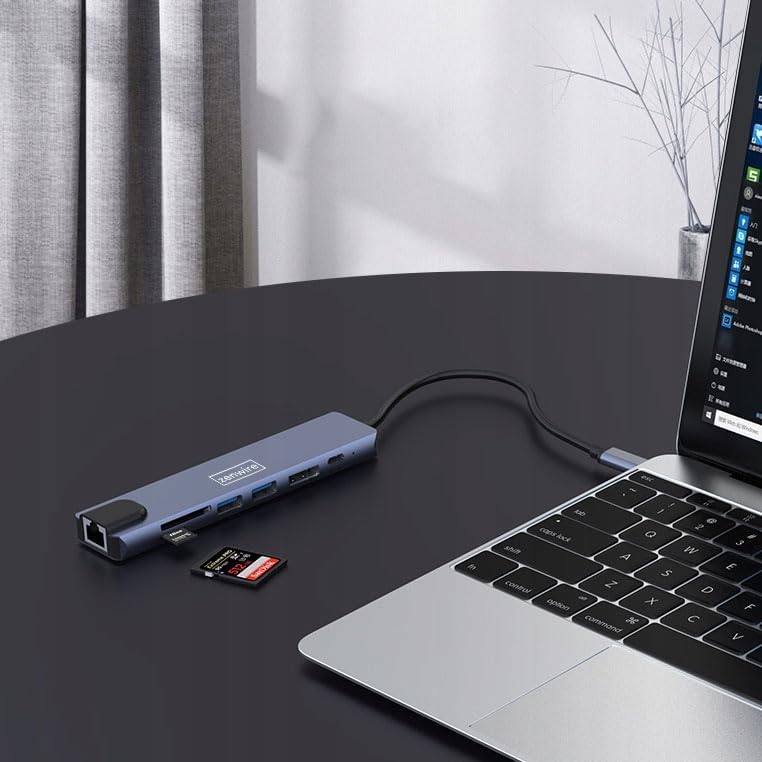
Slika 4: The Zenwire USB-C Hub Adapter EB7 connected to a laptop, with an SD card clearly inserted into its slot, demonstrating the card reader function.
5. Navodila za namestitev
Follow these steps to set up your Zenwire EB7 hub:
- Priključite Hub: Plug the USB-C connector of the Zenwire EB7 hub firmly into an available USB-C port on your laptop, tablet, or smartphone. Ensure the USB-C port on your host device supports DisplayPort Alternate Mode for video output.
- Povežite zunanje naprave:
- Zaslon: Connect a Display Port cable from the hub's Display Port to your external monitor or TV.
- Naprave USB: Plug your USB devices (e.g., mouse, keyboard, USB drive) into the USB 3.0 or USB 2.0 ports.
- Pomnilniške kartice: Insert your SD or Micro SD card into the corresponding slot.
- Omrežje: Connect an Ethernet cable to the RJ45 port for a stable wired internet connection.
- Dostava energije: If your host device requires charging, connect your USB-C power adapter to the hub's USB-C PD port. This allows your device to charge while using the hub.
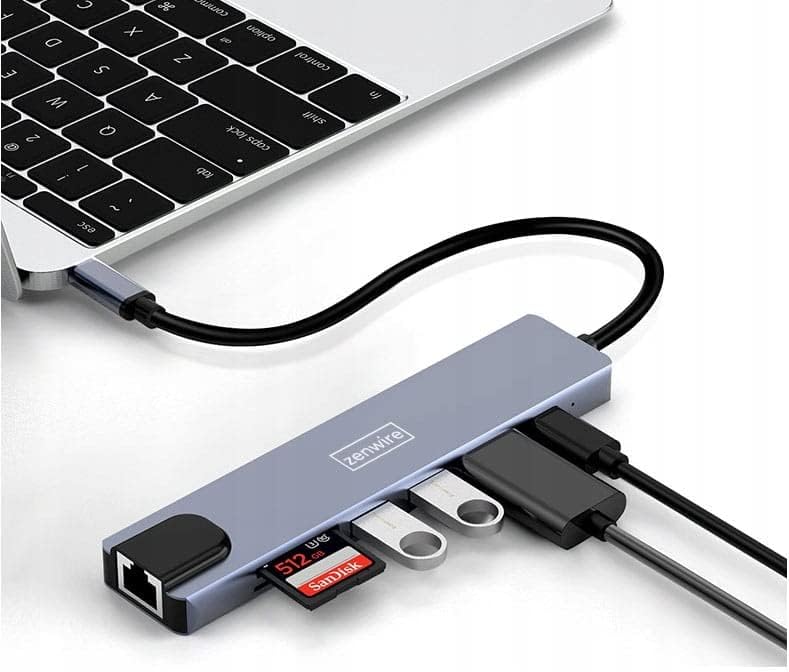
Slika 5: The Zenwire USB-C Hub Adapter EB7 connected to a laptop, showcasing its functionality with multiple USB flash drives and an SD card inserted into its respective slots.

Slika 6: The Zenwire USB-C Hub Adapter EB7 connected to a laptop, with a power adapter plugged into the hub's Power Delivery port and a power strip, illustrating its charging capability.
6. Navodila za uporabo
6.1 Izhod zaslona
The Display Port allows you to connect an external monitor or projector. The hub supports various resolutions and refresh rates. Ensure your display and Display Port cable support the desired resolution and refresh rate for optimal performance.
- zrcalni način: Duplicate your host device's screen onto the external display.
- Razširjeni način: Extend your desktop across multiple screens, allowing for more workspace.
To configure display settings (e.g., resolution, refresh rate, mirror/extend), refer to your operating system's display preferences (e.g., Windows Display Settings, macOS System Preferences).

Slika 7: A laptop connected to a large external monitor via the Zenwire USB-C Hub Adapter EB7, illustrating its display output capability for an extended or mirrored desktop.
6.2 Prenos podatkov
Utilize the USB 3.0 ports for high-speed data transfer with compatible devices such as external hard drives or high-speed flash drives. The USB 2.0 port is suitable for standard peripherals that do not require high bandwidth.
6.3 Card Reader Functionality
Insert your SD or Micro SD cards into their respective slots. The cards will appear as removable drives on your host device, allowing you to access, transfer, and manage files.
6.4 Omrežna povezava
The Fast Ethernet port provides a stable wired network connection. Once an Ethernet cable is connected, your host device should automatically detect the network and establish an internet connection.
6.5 Dovajanje energije
The USB-C PD port allows you to charge your host device while simultaneously using the hub's other functions. Connect your original USB-C power adapter to this port. The hub supports up to 100W power delivery, ensuring efficient charging for most compatible devices.
7. Združljivost
The Zenwire EB7 USB-C Hub Adapter is designed for broad compatibility with various devices and operating systems:
- Operacijski sistemi: Windows, macOS (including Macbook M1/M2), Linux, iOS (for compatible iPad models), Android (for compatible smartphones and tablets, including Samsung DEX).
- Naprave: Laptops, tablets, and smartphones equipped with a full-featured USB-C port that supports DisplayPort Alternate Mode and Power Delivery.

Slika 8: The Zenwire USB-C Hub Adapter EB7 connected to both a smartphone and a tablet, highlighting its compatibility with mobile devices for expanded connectivity.
8. Specifikacije
| Funkcija | Podrobnost |
|---|---|
| Display Port Resolution | 8K@60Hz, 5K@120Hz, 4K@144Hz, 2K WQHD@144Hz, Full HD@240Hz |
| Vrata USB | 2x USB 3.0, 1x USB 2.0 |
| Čitalec kartic | SD Card Slot, Micro SD Card Slot |
| Ethernet | Fast Ethernet (100 Mbps) |
| Dostava moči | USB-C PD 3.0, up to 100W |
| Dimenzije (D x Š x V) | Pribl. 142 mm x 32.4 mm x 11 mm |
| Dolžina kabla | Pribl. 150 mm |
| Teža | Pribl. 61 gramov |
| Material | Aluminij |
| barva | Vesoljsko siva |
| Podprti operacijski sistemi | Windows, macOS, Linux, iOS, Android |

Slika 9: A technical diagram illustrating the precise dimensions of the Zenwire USB-C Hub Adapter EB7, including its length, width, height, and cable length.
9. Vzdrževanje
To ensure the longevity and optimal performance of your Zenwire EB7 hub, please follow these maintenance guidelines:
- Čiščenje: Keep the hub clean and free from dust. Use a soft, dry, lint-free cloth for cleaning. Avoid using liquid cleaners or abrasive materials.
- Okoljski pogoji: Naprave ne izpostavljajte ekstremnim temperaturam, visoki vlažnosti ali neposredni sončni svetlobi.
- Ravnanje: Handle the hub with care. Do not drop it or subject it to strong impacts.
- Demontaža: Do not attempt to disassemble or repair the hub yourself. This may void your warranty and could cause damage.
- Shranjevanje: Disconnect the hub from your devices and store it in a cool, dry place when not in use for extended periods.
10. Odpravljanje težav
If you encounter issues with your Zenwire EB7 hub, please refer to the following troubleshooting tips:
10.1 Ni izhoda za prikaz
- Preverjanje povezave: Ensure the USB-C connection to your host device is secure and fully inserted.
- Preverjanje kabla: Verify that the Display Port cable is correctly connected to both the hub and the external monitor. Try a different cable if available.
- Host Device Support: Confirm that your host device's USB-C port supports video output (DisplayPort Alternate Mode). Not all USB-C ports have this capability.
- Vhod monitorja: Ensure your monitor is set to the correct input source (e.g., Display Port).
- Posodobitev gonilnika: Update your graphics drivers on your host device to the latest version.
10.2 Naprave USB niso prepoznane
- Pravilno vstavljanje: Ensure the USB devices are properly inserted into the hub's ports.
- Direct Connection Test: Try connecting the USB device directly to your host device to confirm its functionality.
- Zahteve glede napajanja: Some high-power USB devices may require external power. Ensure the hub's Power Delivery port is connected to a power source if needed.
10.3 Počasna hitrost omrežja
- Omejitev hitrosti: The Fast Ethernet port supports speeds up to 100 Mbps. If you require Gigabit Ethernet speeds, this hub may not meet that requirement.
- Kabel in povezava: Check your Ethernet cable for damage and ensure a secure connection to both the hub and your router/modem.
- Posodobitev gonilnika: Prepričajte se, da so omrežni gonilniki na vaši gostiteljski napravi posodobljeni.
10.4 Host Device Not Charging
- Povezava napajalnika: Prepričajte se, da je vaš napajalnik USB-C priključen na vrata USB-C PD na vozlišču.
- Power Adapter Functionality: Verify that your power adapter is functional and provides sufficient wattage (up to 100W supported by the hub).
- Host Device Support: Check if your host device supports charging via its USB-C port.
11. Garancija in podpora
For detailed warranty information and technical support, please refer to the official Zenwire website or contact your retailer. It is recommended to retain your proof of purchase for any warranty claims.