
Edifier CX7
Uporabniški priročnik za domači kino Edifier CX7 Active 2.1
Model: CX7
Uvod
The Edifier CX7 is an active 2.1 home entertainment system designed to deliver high-quality audio for various devices, including televisions, personal computers, and notebooks. This system features Bluetooth V5.0 connectivity, an 8-inch subwoofer, and an infrared remote control for convenient operation. This manual provides essential information for setting up, operating, and maintaining your CX7 system.
Vsebina paketa
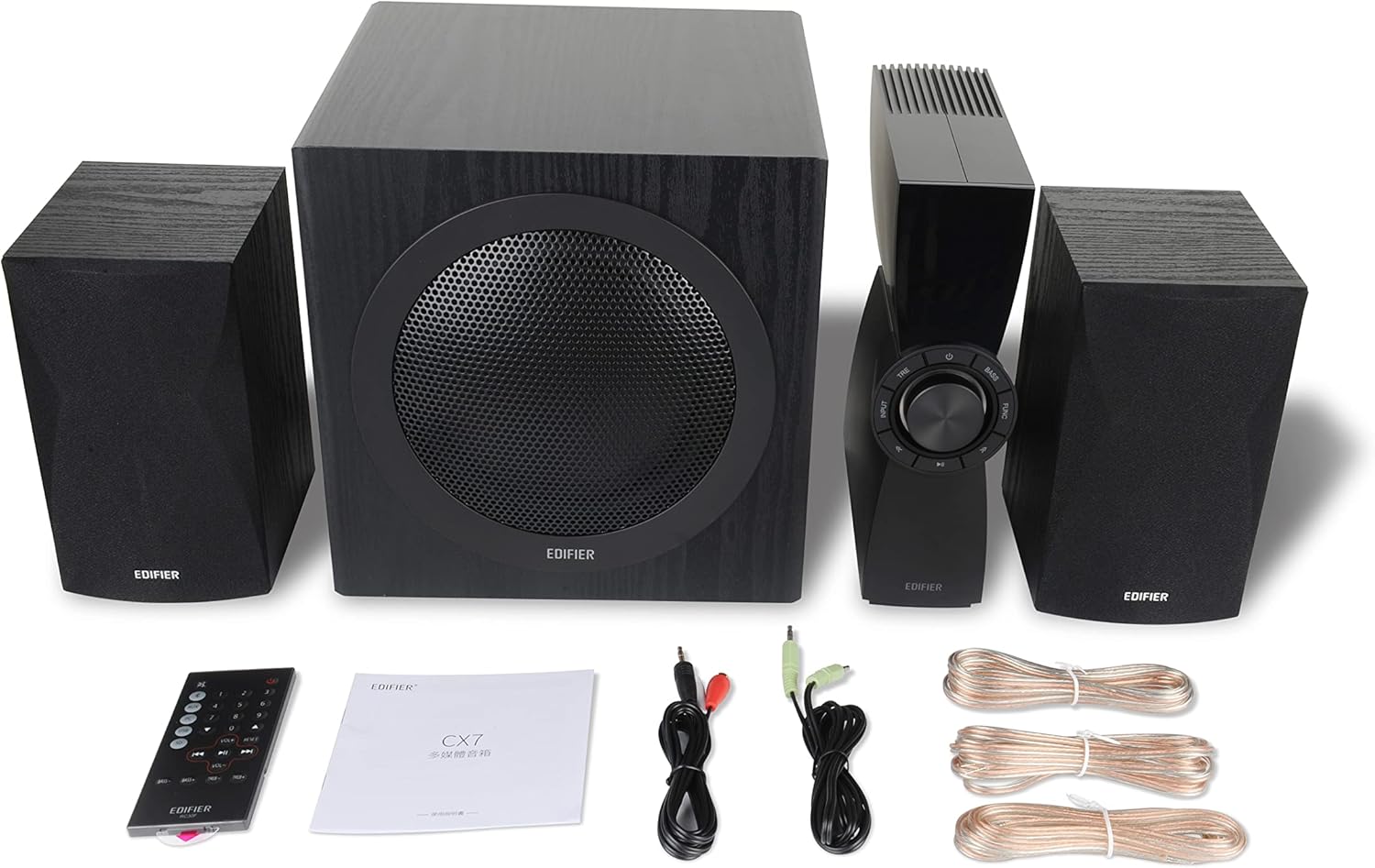
Figure 1: Edifier CX7 System Components
Prosimo, preverite, ali so v vašem paketu priloženi vsi spodaj navedeni artikli:
- Nizkotonec (1)
- Satellite Speakers (2)
- Control Unit (1)
- Infrared Remote Control (1)
- 3.5mm to RCA Audio Cable (1)
- RCA to RCA Audio Cable (1)
- Speaker Connection Cables (2)
- Uporabniški priročnik (1)
Vodnik za namestitev
1. Umestitev
Position the subwoofer on the floor, preferably in a corner or near a wall for optimal bass response. Place the satellite speakers on either side of your listening area, equidistant from the listener, and at ear level if possible. Ensure the control unit is easily accessible.

Figure 2: Recommended System Placement
2. Priključitev zvočnikov
Connect the satellite speakers to the speaker output terminals on the rear of the control unit using the provided speaker cables. Ensure correct polarity (red to red, black to black) for each speaker.
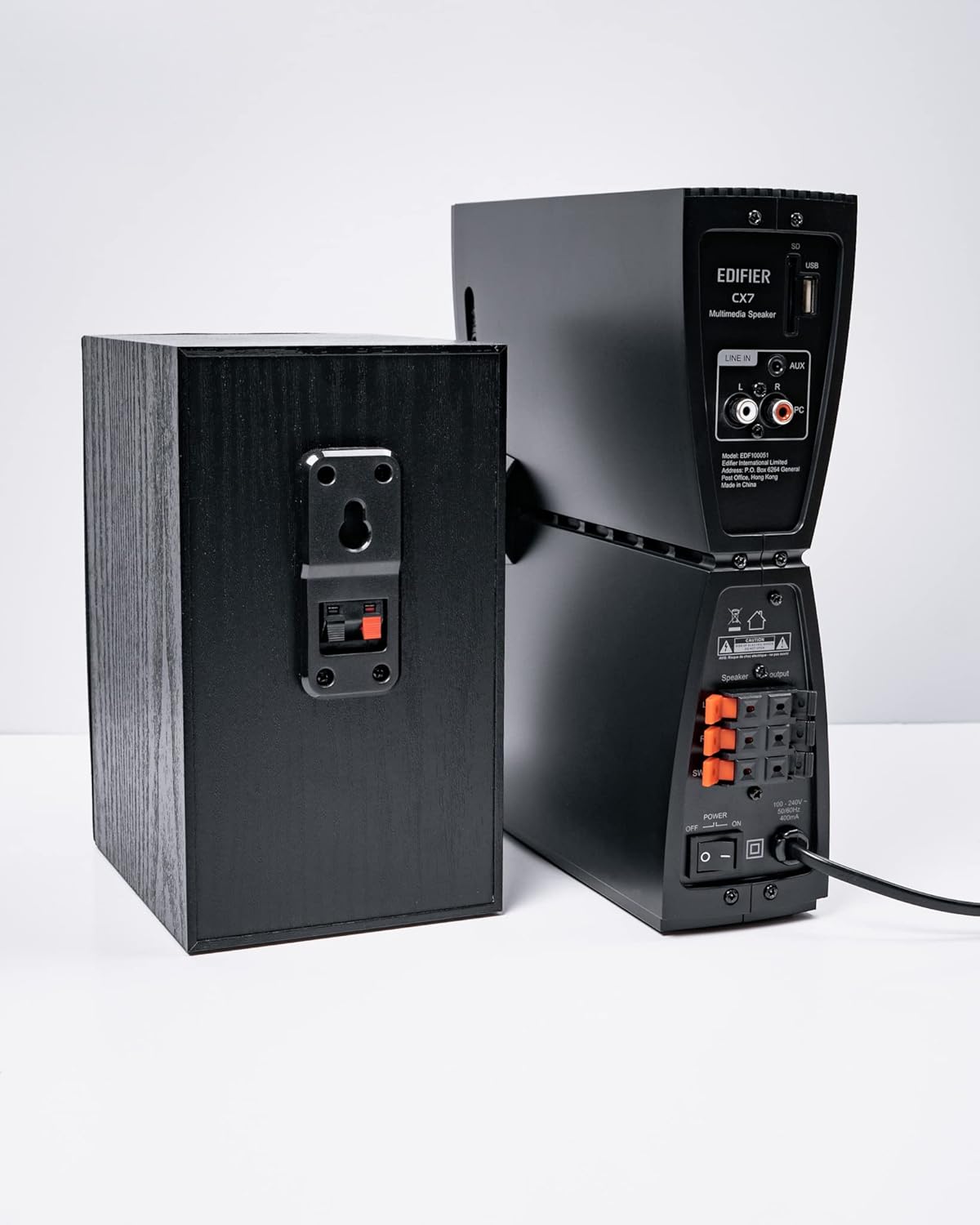
Slika 3: Priključki zvočnikov
3. Priključitev avdio virov
The CX7 system supports multiple audio input options:
- AUX vhod: Use the 3.5mm to RCA audio cable to connect devices like smartphones, tablets, or computers to the AUX input on the control unit.
- PC vhod: Use the RCA to RCA audio cable to connect your PC's audio output to the PC input on the control unit.
- Bluetooth: Za brezžično povezavo glejte razdelek »Seznanjanje prek Bluetootha« v navodilih za uporabo.
4. Napajalni priključek
Connect the power cable to the control unit and then plug it into a standard wall outlet. Turn on the power switch located on the rear of the control unit.
Navodila za uporabo
1. Vklop/izklop
After connecting the power, press the power button on the control unit or the remote control to turn the system on or off. The display on the control unit will illuminate when powered on.

Figure 4: Control Unit Display
2. Izbira vhoda
Press the "INPUT" button on the control unit or the remote control to cycle through available audio sources: AUX, PC, and Bluetooth. The selected input will be displayed on the control unit's screen.

Figure 5: Control Knob and Input Buttons
3. Nadzor glasnosti
Rotate the large knob on the control unit clockwise to increase volume and counter-clockwise to decrease it. Alternatively, use the "VOL+" and "VOL-" buttons on the remote control.
4. Prilagoditev nizkih in visokih tonov
Press the "BASS" or "TRE" (Treble) buttons on the control unit or remote control, then rotate the main knob to adjust the respective levels. The display will show the current bass/treble setting.
5. Bluetooth seznanjanje
- Select the Bluetooth input on the CX7 system. The display will show "BT" and flash, indicating it's in pairing mode.
- V napravi (pametnem telefonu, tabličnem računalniku itd.) omogočite Bluetooth in poiščite razpoložljive naprave.
- Select "EDIFIER CX7" from the list of found devices.
- Once paired, the "BT" indicator on the CX7 display will stop flashing and remain solid.
To disconnect a Bluetooth device, press and hold the "FUNC" button on the control unit or the Bluetooth button on the remote control for a few seconds.
6. Funkcije daljinskega upravljalnika

Figure 6: Infrared Remote Control
The remote control provides convenient access to all major functions:
- moč: Vklopi/izklopi sistem.
- Izbira vnosa: Cycles through AUX, PC, Bluetooth.
- obseg: Prilagodi glavno glasnost.
- Nizki/Visoki toni: Prilagodi raven nizkih in visokih tonov.
- Mute: Izklopi/vklopi zvok.
- Nadzor predvajanja: Play/Pause, Previous/Next track (for Bluetooth mode).
Vzdrževanje
- Čiščenje: Use a soft, dry cloth to clean the surfaces of the speakers and control unit. Do not use liquid cleaners or abrasive materials.
- Prezračevanje: Ensure adequate ventilation around the control unit and subwoofer to prevent overheating. Do not block ventilation openings.
- Okolje: Sistema ne izpostavljajte ekstremnim temperaturam, vlagi, prahu ali neposredni sončni svetlobi.
- Ugasniti: If the system will not be used for an extended period, disconnect it from the power outlet.
Odpravljanje težav
| Težava | Možen vzrok | rešitev |
|---|---|---|
| Brez zvoka |
|
|
| Bluetooth povezava ne uspe |
|
|
| Popačen zvok |
|
|
Specifikacije
| Funkcija | Podrobnost |
|---|---|
| Ime modela | CX7 |
| Vrsta zvočnika | 2.1 sistem zvočnikov |
| Tehnologija povezljivosti | Bluetooth |
| Brezžična komunikacijska tehnologija | Bluetooth V5.0 |
| Bluetooth obseg | 10 metrov |
| Način avdio izhoda | Surround |
| Največja izhodna moč zvočnika | 69 vatov |
| Tehnologija povezljivosti globokotonca | Brezžično |
| Premer nizkotonca | 8 palcev |
| Material | polipropilen |
| barva | Črna |
| Dimenzije izdelka | 16.93"D x 17.72"Š x 13.39"V |
| Teža predmeta | 29 funtov (13.2 kilograma) |
| Vir napajanja | Električni na kabel |
| Vrsta krmilnika | Daljinski upravljalnik |
| Priporočene uporabe | Za televizorje, za računalnike, za pametne telefone ali tablice |
Garancija in podpora
For warranty information and technical support, please refer to the warranty card included with your product or visit the official Edifier webspletnega mesta. Račun shranite kot dokazilo o nakupu za uveljavljanje garancije.
Uradni Edifier Webspletno mesto: www.edifier.com
Ask a question about this manual
Ask about setup, troubleshooting, compatibility, parts, safety, or missing instructions. Manuals+ will review the question and use this page’s manual context to help answer it.