
Uvod
This manual provides essential instructions for the safe and efficient use of your Olympia 2298 foldable 4G mobile phone. Please read it thoroughly before operating the device and keep it for future reference.
1. Nastavitev
1.1 Vsebina paketa
- Olympia 2298 Mobile Phone
- Baterija (litij-ionska)
- Polnilni kabel USB-C
- Charging Cradle (if included)
- Uporabniški priročnik
1.2 Inserting the Battery and SIM Card
- Open the phone: Gently open the phone to access the battery compartment.
- Odstranite zadnji pokrov: Previdno odstranite zadnji pokrov telefona.
- Vstavite kartico SIM: Locate the SIM card slot(s). Insert your 4G compatible SIM card(s) into the designated slot(s) with the gold contacts facing down, ensuring it clicks into place.
- Vstavite baterijo: Place the Lithium-ion battery into the battery compartment, aligning the contacts.
- Zamenjajte zadnji pokrov: Zadnji pokrov trdno namestite, dokler ne klikne.
 Slika: spredaj view of the Olympia 2298 foldable phone, showing the main display with time and date.
1.3 Polnjenje baterije
Pred prvo uporabo popolnoma napolnite baterijo telefona.
- Connect charger: Plug the USB-C cable into the phone's USB-C port or place the phone in the charging cradle. Connect the other end of the cable to a suitable power adapter.
- Indikator polnjenja: The phone will display a charging indicator on the screen.
- Polno polnjenje: Allow the phone to charge until the battery indicator shows a full charge. This may take several hours for the initial charge.
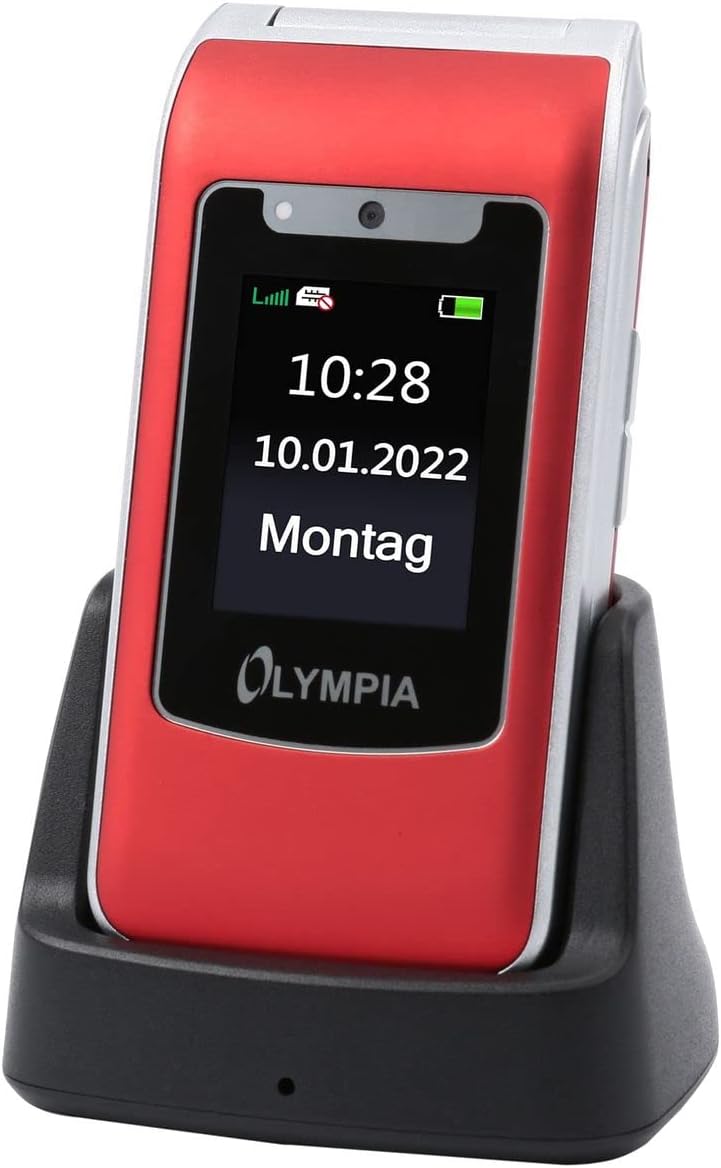 Image: The Olympia 2298 phone placed in its charging cradle, indicating ease of charging.
1.4 Vklop/izklop
- Za vklop: Pritisnite in držite gumb za vklop/končanje klica, dokler se zaslon ne prižge.
- Za izklop: Pritisnite in držite gumb za vklop/končanje klica, nato pa med možnostmi na zaslonu izberite »Izklop«.
2. Navodila za uporabo
2.1 Osnovne funkcije klica
- Klicanje: Z uporabo tipkovnice pokličite številko in pritisnite zeleni gumb za klic.
- Sprejem klica: Ko telefon zazvoni, pritisnite zeleni gumb za klic.
- Končanje klica: Pritisnite rdeč gumb za končanje klica.
- Prilagoditev glasnosti: Use the volume buttons on the side of the phone during a call.
2.2 Emergency Call Button (SOS)
The Olympia 2298 features a dedicated SOS button for emergencies.
 Slika: Zadaj view of the Olympia 2298 phone, highlighting the prominent SOS emergency call button.
- Setup Emergency Contacts: Before using, configure up to 5 emergency contacts in the phone's settings. Refer to the "Settings" section in the menu for details.
- Aktiviranje SOS-a: In an emergency, press and hold the SOS button on the back of the phone for several seconds.
- Automatic Dialing: The phone will automatically dial the pre-set emergency contacts one by one until a connection is made. It will also send an emergency SMS message to these contacts.
Pomembno: Ensure emergency contacts are regularly updated and aware they are listed as such.
2.3 Navigacija po meniju
Use the navigation keys (up, down, left, right) and the central "OK" button to browse the phone's menu. The "Back" button typically returns to the previous screen.
- Kontakti: Store and manage phone numbers.
- Sporočila: Pošiljanje in prejemanje SMS sporočil.
- Seznam klicev: View missed, dialed, and received calls.
- nastavitve: Customize phone preferences, including sound, display, and emergency contacts.
- Kamera: Access the integrated camera.
- Orodja: Includes features like alarm, calendar, and calculator.
2.4 Pošiljanje in prejemanje sporočil
- To Send: Go to "Messages" -> "Write Message". Enter the recipient's number or select from contacts, type your message, and send.
- Za prejem: New messages will appear as a notification. Go to "Messages" -> "Inbox" to read them.
3. Vzdrževanje
3.1 Čiščenje
- Za čiščenje zunanjosti telefona uporabite mehko, suho krpo.
- Avoid using liquid cleaners, aerosols, or harsh chemicals.
- Keep the USB-C port free from dust and debris.
3.2 Skrb za baterije
- Baterije ne izpostavljajte ekstremnim temperaturam.
- Izogibajte se pogostemu popolnemu praznjenju baterije, da podaljšate njeno življenjsko dobo.
- Če telefona ne boste uporabljali dlje časa, ga pred shranjevanjem napolnite na približno 50 %.
4. Odpravljanje težav
| Težava | Možen vzrok | rešitev |
|---|---|---|
| Telefon se ne vklopi. | Baterija je prazna ali ni pravilno vstavljena. | Napolnite baterijo. Prepričajte se, da je baterija pravilno vstavljena. |
| Ne morem klicati ali sprejemati klicev. | Ni omrežnega signala, kartica SIM ni vstavljena ali pa je težava s kartico SIM. | Preverite moč omrežnega signala. Ponovno vstavite kartico SIM. Obrnite se na svojega ponudnika storitev. |
| Gumb SOS ne deluje. | Stiki za nujne primere niso nastavljeni ali so napačni. | Verify and update emergency contacts in settings. |
| Slaba kakovost klicev. | Šibek omrežni signal ali motnje. | Premaknite se na območje z boljšim signalom. Izogibajte se oviram. |
5. Specifikacije
- Številka modela: 2298
- Znamka: OLIMPIJA
- Velikost zaslona: 2.4 palcev
- Celična tehnologija: 4G (LTE)
- Tehnologija povezljivosti: USB (USB Type C)
- Brezžični operater: Vsi prevozniki
- Baterija: 1 litij-ionska (priložena)
- Teža artikla: 105 gramov
- Čas pogovora: 6 ur
- Dimenzije: 5.3 x 2.1 x 10.5 centimetrov
6. Garancija in podpora
For warranty information and technical support, please refer to the documentation provided with your purchase or visit the official OLYMPIA webspletnega mesta. Shranite dokazilo o nakupu za uveljavljanje garancije.
Opomba: Spare parts availability and software update guarantees are not specified in the product information provided.


