
1. Uvod
The Wallbox Pulsar Max 7.4kW is an advanced electric vehicle (EV) charger designed for efficient and convenient home charging. This manual provides essential information for safe installation, operation, and maintenance of your charger. It is compatible with all electric and plug-in hybrid vehicles equipped with a Type 2 connector.
The Pulsar Max offers fast charging capabilities, up to 8 times faster than a standard outlet, and includes smart features like scheduled charging to optimize energy costs and usage.
2. Varnostne informacije
Before installing or using the Wallbox Pulsar Max, please read and understand all safety instructions. Failure to follow these instructions may result in electric shock, fire, or serious injury.
- Installation must be performed by a qualified electrician in accordance with local regulations and standards.
- Polnilnika ne poskušajte odpreti, razstaviti ali spremeniti.
- Pred vsako uporabo se prepričajte, da polnilni kabel ni poškodovan. Ne uporabljajte, če je kabel ali priključek obrabljen, zlomljen ali izpostavljen.
- Med delovanjem naj otroci in hišni ljubljenčki ne bodo v bližini območja polnjenja.
- Avoid exposing the charger to extreme temperatures or direct water spray beyond its IP55 rating.
3. Vsebina paketa
Preverite, ali so v škatli vsi elementi:
- Wallbox Pulsar Max Charger Unit
- Socket Holder
- Charging Cable (5 meters, Type 2)
- Opening Card (for activation/access)
- Pritrdilni material (vijaki, stenski vložki)
- Navodila za namestitev

Image: Contents of the Wallbox Pulsar Max package.
4. Izdelek je končanview in funkcije
4.1 Ključne lastnosti
- Fast and Powerful Charging: Up to 7.4kW (32A) for quick charging of EVs and PHEVs.
- Pametno upravljanje z energijo: Schedule charging sessions via the myWallbox app to utilize off-peak electricity rates and integrate with solar power.
- Enostavna namestitev: Simple wall-mount design with integrated PEN fault protection, eliminating the need for an additional earthing rod.
- Trajna zasnova: Weather and dust resistant (IP55 and IK10 rated) for indoor or outdoor installation, featuring a scratch-resistant matte finish.
- Povezljivost: Built-in WiFi and Bluetooth for seamless app control and updates.
4.2 Mere
The Wallbox Pulsar Max has compact dimensions suitable for various installation locations.

Image: Wallbox Pulsar Max dimensions (198mm W x 201mm H x 99mm D) and 5m cable length.
4.3 Stanja LED indikatorjev
The LED indicator on the charger provides visual feedback on its operational status.
| LED barva | Stanje |
|---|---|
| zelena | Pripravljen za polnjenje |
| Modra | Povezan z vozilom |
| Svetlo modra | Polnjenje v teku |
| Rumena | Locked (charger or cable) |
| Rdeča | Napaka |
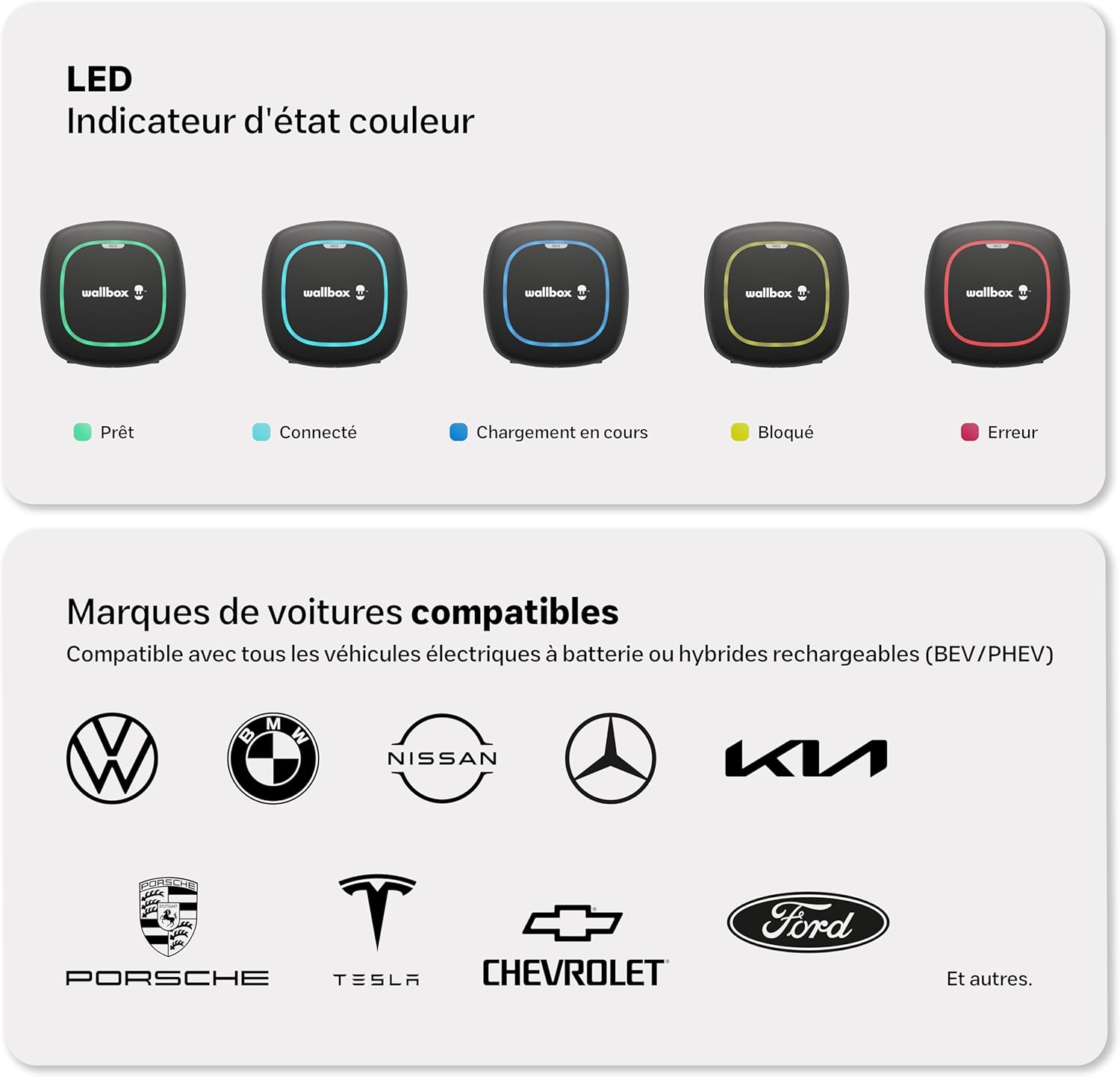
Image: Visual representation of LED indicator states and compatible vehicle brands.
5. Nastavitev in namestitev
The Wallbox Pulsar Max is designed for straightforward installation. It features a simple wall-mounting process and integrated PEN fault protection, which simplifies electrical requirements by eliminating the need for a separate earthing rod.
Pomembno: Installation must be carried out by a certified electrician to ensure compliance with all local electrical codes and safety standards. Refer to the detailed Navodila za namestitev included in your package for step-by-step instructions.

Image: A technician performing the installation of the Wallbox Pulsar Max.
6. Navodila za uporabo
Once installed and configured, operating your Wallbox Pulsar Max is simple:
- Ensure your vehicle is parked within reach of the 5-meter charging cable.
- Take the Type 2 connector from the socket holder.
- Plug the Type 2 connector into your vehicle's charging port. The charger's LED will change to blue, indicating a successful connection.
- Charging will begin automatically if no schedule is set, or according to your programmed schedule. The LED will turn light blue during active charging.
- To stop charging, unlock your vehicle (if necessary) and disconnect the cable from the car, then from the charger. Return the connector to its holder.

Image: Wallbox Pulsar Max in operation, charging an electric vehicle.
7. Wallbox App Integration
The myWallbox app allows you to fully control and monitor your charging experience. Connect your charger via WiFi or Bluetooth to access a range of smart features:
- Informacije v realnem času: View live charging status and energy consumption.
- Daljinski upravljalnik: Start, pause, or stop charging sessions from anywhere.
- Session Management: Nastavite urnike polnjenja, da izkoristite prednostitage cen električne energije izven konic.
- Charging Statistics: Track your charging history and energy usage.
- Financial and Energy Savings: Optimize charging times to reduce costs.
- Prilagoditev intenzivnosti: Control the charging current to manage power consumption.

Image: The myWallbox application interface on a smartphone.
8. Vzdrževanje
Regular maintenance ensures the longevity and optimal performance of your Wallbox Pulsar Max charger.
- Čiščenje: Periodically wipe the charger's exterior with a soft, damp krpo. Ne uporabljajte abrazivnih čistil ali topil.
- Pregled kabla: Regularly inspect the charging cable and connector for any signs of wear, damage, or corrosion. If any damage is found, discontinue use and contact support.
- Posodobitve vdelane programske opreme: Ensure your charger's firmware is up to date via the myWallbox app to benefit from the latest features and improvements.
9. Odpravljanje težav
If you encounter issues with your Wallbox Pulsar Max, refer to the LED indicator states (Section 4.3) for initial diagnosis. Here are some common troubleshooting steps:
- Charger Not Responding (No LED): Check the circuit breaker for the charger. Ensure power is supplied to the unit.
- Red LED (Error): This indicates a fault. Try disconnecting and reconnecting the charger from the power supply. If the error persists, consult the myWallbox app for specific error codes or contact Wallbox support.
- Yellow LED (Locked): The charger or cable might be locked. Ensure the charging session is not paused or scheduled for a later time in the app.
- Polnjenje se ne začne: Verify the cable is securely connected to both the charger and the vehicle. Check the myWallbox app for any active schedules or paused sessions. Ensure your vehicle is ready to accept a charge.
- Težave s povezljivostjo aplikacije: Ensure your charger is within WiFi or Bluetooth range. Restart the app and try reconnecting.
10. Specifikacije
| Specifikacija | Vrednost |
|---|---|
| Znamka | Wallbox |
| Številka modela | PLP2-0-2-2-9-002 |
| barva | Črna |
| Izhodna voltage | 230 volta |
| Vhodna voltage | 230 volta |
| Trenutna ocena | 32 A |
| Vrsta priključka | Vrsta 2 |
| Dolžina kabla | 5 metrov |
| Združljive naprave | All electric and hybrid vehicles with Type 2 connector |
| Število vrat | 1 |
| Ocena zaščite | IP55, IK10 |
| Delovna temperatura | -25 do 50 °C |
| Povezljivost | WiFi, Bluetooth |

Image: Wallbox Pulsar Max highlighting its durability and warranty.
11. Garancija in podpora
The Wallbox Pulsar Max charger comes with a 3-letna garancija, covering manufacturing defects and malfunctions under normal use. Please retain your proof of purchase for warranty claims.
For technical support, warranty claims, or further assistance, please contact Wallbox customer service through their official website or the contact information provided in your product documentation. Ensure you have your model number (PLP2-0-2-2-9-002) and purchase details ready.
You can also find additional resources, FAQs, and community support on the official Wallbox webspletno mesto: wallbox.com