
1. Uvod
Thank you for choosing the DELTACO Gaming PM80 Wireless Optical Gaming Mouse. This manual provides essential information for setting up, operating, and maintaining your new gaming mouse. Please read these instructions carefully before use to ensure optimal performance and longevity of your device.
2. Vsebina paketa
- DELTACO Gaming PM80 Wireless Optical Gaming Mouse
- USB brezžični sprejemnik
- USB polnilni kabel
- Uporabniški priročnik
3. Izdelek je končanview
The DELTACO Gaming PM80 is a high-performance wireless optical gaming mouse designed for precision and comfort. It features 7 programmable buttons, adjustable DPI up to 4800, and customizable illumination. The mouse is rechargeable, ensuring uninterrupted gaming sessions.
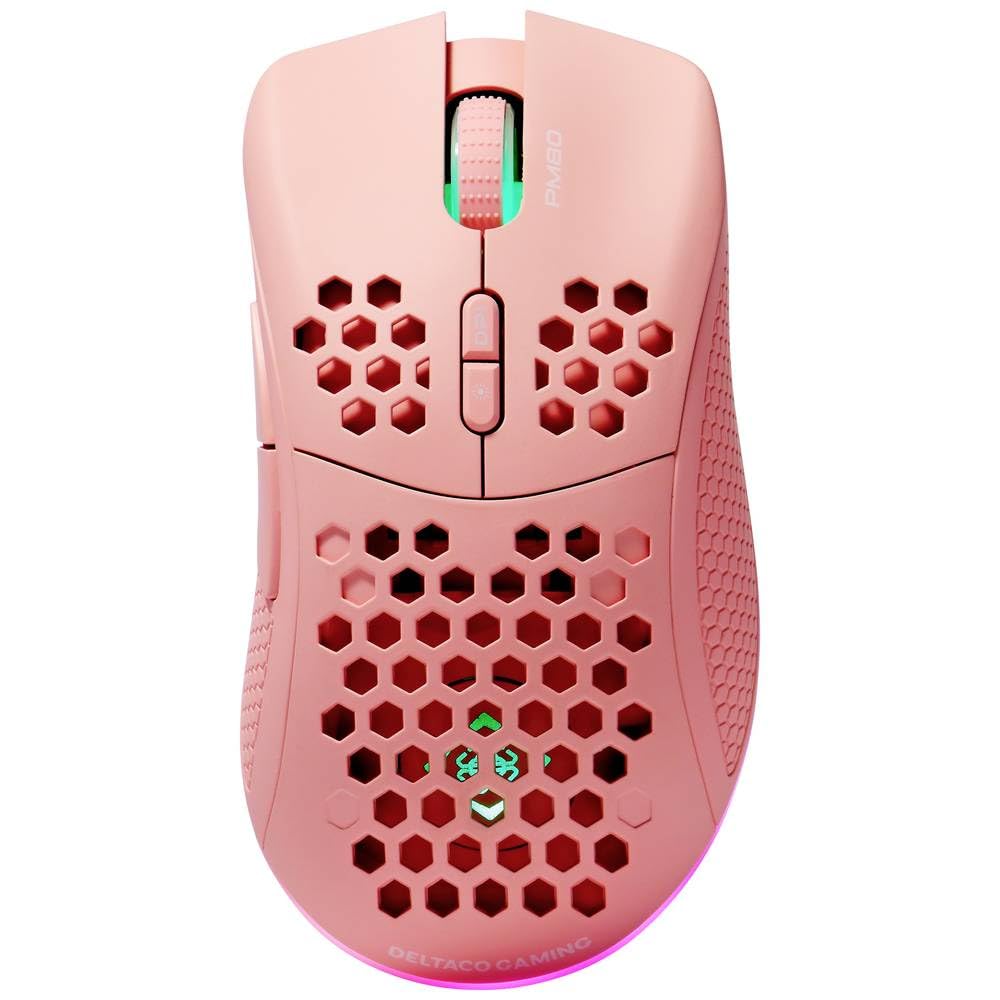
Image: DELTACO Gaming PM80 Wireless Optical Gaming Mouse. This image displays the mouse from a top-down perspective, highlighting its ergonomic design, the central scroll wheel, and the arrangement of its seven buttons.
Funkcije gumbov:
- Levi klik na gumb: Standardna funkcija primarnega klika.
- Desni klik na gumb: Standardna funkcija sekundarnega klika.
- Kolesce za pomikanje: Pomika se gor/dol in deluje kot srednji klik.
- Gumb za preklop DPI: Changes the mouse's sensitivity (DPI).
- Gumb za naprej: Navigacija naprej v web brskalniki oz file raziskovalci.
- Gumb za nazaj: Navigacija nazaj v web brskalniki oz file raziskovalci.
- Illumination Mode Button: Cycles through different lighting effects or turns illumination on/off.
4. Nastavitev
4.1. Polnjenje miške
- Connect the small end of the USB charging cable to the charging port on the front of the mouse.
- Connect the larger end of the USB charging cable to an available USB port on your computer or a USB wall adapter.
- The mouse's illumination will indicate charging status (e.g., breathing effect, specific color). A full charge typically takes 2-3 hours.
- Once fully charged, the illumination may change or turn off. Disconnect the charging cable.
4.2. Priključitev brezžičnega USB-sprejemnika
- Locate the USB wireless receiver, usually stored in a compartment on the underside of the mouse.
- Odstranite sprejemnik iz njegove reže za shranjevanje.
- Brezžični sprejemnik USB priključite v prosta vrata USB na računalniku.
- Vaš računalnik bi moral samodejno zaznati in namestiti potrebne gonilnike. To lahko traja nekaj trenutkov.
4.3. Vklop/izklop
- Poiščite stikalo za vklop na spodnji strani miške.
- Slide the switch to the 'ON' position to power on the mouse. The illumination will light up.
- To conserve battery life, slide the switch to the 'OFF' position when the mouse is not in use for extended periods.
5. Navodila za uporabo
5.1. Osnovna uporaba
Once connected and powered on, the mouse is ready for use. Move the mouse on a flat surface to control the cursor on your screen. Use the left and right click buttons for primary and secondary actions, and the scroll wheel for navigation.
5.2. Prilagoditev DPI
The DPI (Dots Per Inch) setting determines the sensitivity of your mouse. The DELTACO Gaming PM80 offers multiple DPI levels up to 4800 DPI. To adjust the DPI:
- Pritisnite Gumb za cikel DPI (typically located behind the scroll wheel).
- Each press will cycle through the available DPI settings. The mouse's illumination may change color or flash to indicate the current DPI level.
- Select the DPI setting that best suits your preference for gaming or general use.
5.3. Illumination Control
The DELTACO Gaming PM80 features customizable illumination. To change the lighting effects:
- Pritisnite Illumination Mode Button (refer to Product Overview za lokacijo).
- Each press will cycle through different lighting modes, such as static colors, breathing effects, or off.
6. Vzdrževanje
6.1. Čiščenje
- Ensure the mouse is powered off before cleaning.
- Za brisanje površine miške uporabite mehko, suho krpo, ki ne pušča vlaken.
- Za trdovratno umazanijo rahlo dampKrpo sperite z vodo ali blagim, neabrazivnim čistilom. Izogibajte se prekomerni vlagi.
- Do not use harsh chemicals, solvents, or abrasive materials, as these can damage the mouse's finish.
- Use a cotton swab or compressed air to clean around the scroll wheel and button crevices.
6.2. Shranjevanje
When not in use for extended periods, store the mouse in a cool, dry place away from direct sunlight and extreme temperatures. Ensure the power switch is in the 'OFF' position to preserve battery life.
7. Odpravljanje težav
- Miška se ne odziva:
- Prepričajte se, da je miška vklopljena.
- Preverite, ali je brezžični sprejemnik USB varno priključen v delujoča vrata USB.
- Verify the mouse battery is charged. Connect the charging cable and try again.
- Poskusite priklopiti sprejemnik v drug USB vhod.
- Znova zaženite računalnik.
- Zakasnitev ali občasna povezava:
- Ensure the mouse is within close proximity to the USB receiver (ideally within 10 meters).
- Avoid placing the receiver near other wireless devices or sources of interference (e.g., Wi-Fi routers, cordless phones).
- Prepričajte se, da je miška popolnoma napolnjena.
- Premikanje kurzorja je neenakomerno ali nenatančno:
- Optični senzor na spodnji strani miške očistite z mehko, suho krpo.
- Miško uporabljajte na primerni površini (npr. podlogi za miško). Izogibajte se močno odsevnim ali prozornim površinam.
- Adjust the DPI setting to a lower sensitivity if the cursor is too fast.
- Illumination not working:
- Prepričajte se, da je miška vklopljena.
- Press the Illumination Mode Button to cycle through modes, ensuring it's not set to 'off'.
- Check battery level; low battery might disable illumination.
8. Specifikacije
| Funkcija | Podrobnost |
|---|---|
| Znamka | DELTACO GAMING |
| Številka modela | GAM-120-P |
| Povezljivost | Brezžično (USB sprejemnik) |
| Vrsta senzorja | Optični |
| DPI | Do 4800 DPI (nastavljivo) |
| Število gumbov | 7 |
| Ročna orientacija | prav |
| Osvetlitev | ja |
| Polnilna | ja |
| Potrebne baterije | No (Internal Rechargeable) |
9. Garancija in podpora
For warranty information and technical support, please refer to the warranty card included with your product or visit the official DELTACO Gaming webspletnega mesta. Shranite dokazilo o nakupu za morebitne garancijske zahtevke.