
Uvod
This manual provides detailed instructions for the safe and proper installation and operation of your USX STAR Fixed TV Wall Mount. Please read all instructions carefully before installation to ensure correct setup and to prevent damage or injury.
The USX STAR Fixed TV Wall Mount is designed for most 26-60 inch televisions, supporting a maximum weight of 99 lbs. It features a low-profile design and a quick-release lock mechanism for convenience and safety.
Video: Prekoračitevview of the USX STAR Fixed TV Wall Mount, showcasinnjegove lastnosti in obliko.
Pomembne varnostne informacije
- Zmogljivost teže: Ne prekoračite največje dovoljene nosilnosti 45 kg. Presežek te omejitve lahko povzroči resne poškodbe ali materialno škodo.
- Velikost televizorja: Ta nosilec je zasnovan za televizorje z diagonalo med 26 in 60 palci. Prepričajte se, da je vaš televizor znotraj tega razpona.
- Vrsta stene: This mount is suitable for wood stud walls (up to 16-inch spacing), solid concrete walls, and brick walls. DO NOT MOUNT ON DRYWALL ALONE.
- Profesionalna namestitev: Če niste prepričani o postopku namestitve ali primernosti vaše stene, se posvetujte s usposobljenim strokovnjakom.
- Strojna oprema: Use only the provided mounting hardware. If concrete anchors are needed, please contact customer service.

Image: A visual guide demonstrating how to check your wall type, including concrete, wood stud (8-16 inch spacing), and brick walls, with a critical warning not to mount on drywall alone.
Vsebina paketa
Verify that all components are present and undamaged before beginning installation. Refer to the included detailed instruction manual for a complete list of parts.
Nastavitev in namestitev
Follow these steps for a secure and successful installation. It is recommended to have two people for certain steps, especially when handling the TV.
1. Check TV Compatibility (VESA Pattern & Size)
- Ensure your TV screen size is between 26 and 60 inches.
- Verify your TV's VESA mounting hole pattern. This mount supports VESA patterns from 75x75 mm up to 400x400 mm.

Image: A diagram illustrating various VESA mounting patterns (e.g., 100x100mm, 200x200mm, 400x400mm) compatible with the TV mount, suitable for 26-60 inch TVs.
2. Prepare the Wall
- Use a stud finder to locate wood studs. This mount is compatible with wood stud spacing up to 16 inches.
- For concrete or brick walls, appropriate anchors (not always included, contact customer service if needed) must be used.
3. Pritrdite nosilce za televizor na televizor
Secure the vertical TV brackets to the back of your television using the appropriate screws and spacers from the provided hardware kit. Ensure they are firmly attached.
4. Namestite stensko ploščo
Mount the wall plate to your chosen wall location, ensuring it is level and securely fastened to the studs or using appropriate anchors for concrete/brick. The wall plate features a 1.5x taller plate for enhanced support.

Slika: Podrobna view of the wall mount's stronger support features, highlighting the 1.5x taller plate, enhanced hooks for drop-free use, and a secure anti-drop buckle, capable of holding up to 99 lbs.
5. Obesite televizor
Carefully lift your TV and hook the attached brackets onto the wall plate. The quick-release pull straps will help secure the TV in place. Ensure the TV is properly seated and locked.

Image: A three-step visual guide for easy installation: 1) Mount TV Brackets, 2) Install Wall Plate, 3) Hang Your TV.
Navodila za uporabo
Ključavnica za hitro sprostitev
The quick disconnect pull straps allow for easy removal of the TV from the mount when needed. Simply pull the straps to release the locking mechanism.
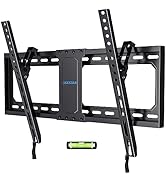
Image: A close-up of the quick release lock mechanism, demonstrating how to pull down the cord to release the TV from the mount.
Centering Your TV
After installation, you can center your TV by sliding the bracket along the wall plate for optimal viewing.

Image: An illustration demonstrating how to center the TV after installation by sliding the bracket along the wall plate to achieve the perfect view.
Vzdrževanje
- Občasno preverite vse vijake in povezave, da se prepričate, da so trdno priviti in varno pritrjeni.
- Nosilec očistite z mehko, suho krpo. Izogibajte se abrazivnim čistilom ali topilom.
Odpravljanje težav
Televizor po namestitvi ni poravnan:
Ensure the wall plate was installed level. Some mounts allow for minor post-installation leveling adjustments. Refer to the detailed manual for specific adjustment options.
Difficulty attaching TV to wall plate:
Ensure the TV brackets are correctly aligned with the wall plate hooks. Verify that no cables are obstructing the connection. The quick-release straps should be in the open position during attachment.
Specifikacije
| Funkcija | Podrobnost |
|---|---|
| Znamka | ZVEZDA USX |
| Model | B0BQ7DN3XG |
| Združljivost velikosti televizorja | 26-60 palcev |
| Največji vzorec VESA | 400x400 mm |
| Min VESA Pattern | 75x75 mm |
| Zmogljivost teže | 99 lbs (45 kg) |
| Vrsta namestitve | Fiksni stenski nosilec |
| Razdalja od stene (nizka profesionalnafile) | 1.3 palcev |
| Wood Stud Spacing | Do 16 palcev |
| Material | Kovina |
| barva | Črna |
| Dimenzije izdelka | 16 x 8.5 x 1.3 palcev |
| Teža predmeta | 2.03 funtov |
Garancija in podpora
USX STAR provides ten-years after-sales service for this product. For any questions regarding compatibility, installation, or other support needs, please contact USX STAR customer service.
If you are unsure if the bracket will work with your TV, please provide the complete TV model number to customer service for assistance.
This product is sold by XStar-US and fulfilled by Amazon.