
WulaWindy black
WulaWindy RGB Digital Clock User Manual
Model: RGB-Black (Model Number: black)
Brand: WulaWindy
Konec izdelkaview
The WulaWindy RGB Digital Clock is a versatile LED alarm clock featuring a large mirror surface display and dual USB charging ports. It offers multiple color display modes and adjustable brightness, making it suitable for various home and office environments.

Slika: spredaj view of the WulaWindy RGB Digital Clock displaying time with a vibrant RGB color scheme, highlighting its mirror surface.
Ključne značilnosti
- RGB Colorful Display: Features 11 color display modes, including 4 dynamic and 7 fixed modes, for enhanced visual experience.
- 6-stopenjska nastavitev svetlosti: Equipped with a light sensor for automatic brightness adjustment or manual control (0% to 100% brightness).
- Velika zrcalna površina: A 6.5-inch HD display with a mirror surface, functional for time viewing and as a personal mirror.
- Dvojna vrata USB: Omogoča hkratno polnjenje dveh naprav.
- Big Snooze Button: Provides an easy-to-access snooze function with adjustable duration (5 to 60 minutes).
Vsebina paketa
- 1 x WulaWindy RGB Digital Alarm Clock
- 1 x USB polnilni kabel
- 1 x Priročnik za izdelek (ta dokument)
Nastavitev
- Razpakiranje: Previdno odstranite vse komponente iz embalaže.
- Odstranite zaščitne folije: Before first use, gently peel off the protective film from the mirror surface of the clock.

Image: Illustration showing the removal of the protective film from the clock's display and the plastic insulator tab from the battery compartment.
- Insert Battery (for memory backup): The clock uses a button cell battery (CR2016) for memory backup during power outages. Ensure the plastic insulator tab is removed from the battery compartment.
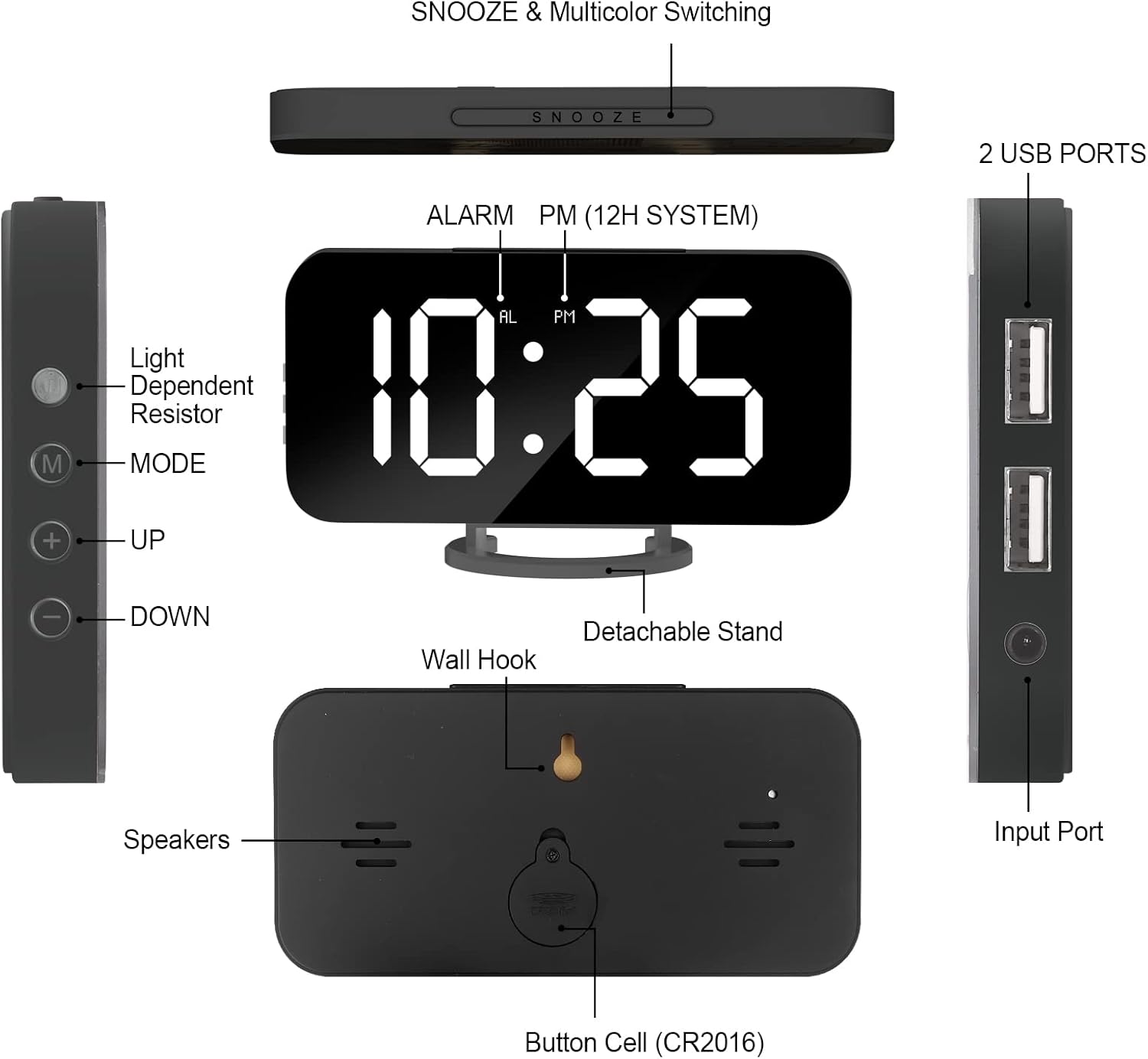
Image: Detailed diagram of the clock's back, indicating the button cell (CR2016) battery compartment and wall hook.
- Napajalni priključek: Connect the provided USB charging cable to the clock's input port and plug the other end into a compatible USB power adapter (not included) or a powered USB port.
- Umestitev: Place the clock on a flat surface using its detachable stand or mount it on a wall using the integrated wall hook.
Navodila za uporabo
Nastavitev časa in alarma
Refer to the side panel for control buttons: 'M' (Mode), '+' (Up), '-' (Down).
Slika: Stran view of the clock showing the 'M' (Mode), '+' (Up), and '-' (Down) buttons for settings.
- Nastavitev časa: Press the 'M' button once to enter time setting mode. Use '+' and '-' buttons to adjust hours and minutes. Press 'M' again to confirm.
- 12/24-urni format: While in time setting mode, press the 'M' button repeatedly to cycle between 12-hour and 24-hour formats. The 'PM' indicator will light up for PM hours in 12-hour format.
- Nastavitev alarma: Press the 'M' button twice to enter alarm setting mode. Use '+' and '-' buttons to set the desired alarm time. Press 'M' again to confirm.
- Aktivacija/deaktivacija alarma: Press the 'AL' button (usually located on the side or back, refer to diagram) to toggle the alarm on or off. An alarm icon will appear on the display when active.
Nastavitev svetlosti
The clock features 6 levels of brightness. You can adjust it manually or enable automatic adjustment.

Image: Visual representation of the clock's 6-level brightness adjustment, from dimmest to brightest, and automatic darkening feature.
- Ročna nastavitev: Press the 'Light Dependent Resistor' button (refer to diagram on side) or the '+' button when not in setting mode to cycle through the 6 brightness levels.
- Samodejna prilagoditev: The clock can automatically dim its brightness based on ambient light conditions. This feature is typically enabled by default or can be toggled via a specific button (refer to product manual for exact button, often the light sensor button).
RGB Color Display Modes
The clock offers 11 distinct color display modes, including static colors and dynamic RGB effects.

Image: A grid showing 11 different display modes, including various solid colors (White, Red, Yellow, Green, Light Blue, Blue, Purple) and dynamic RGB effects (RGB Changing, Random Color, RGB Left to Right Flowing, RGB Top Downward Flowing).
- Spreminjanje načinov: Press the large 'SNOOZE' button on the top of the clock to cycle through the 11 available color display modes.
Funkcija dremeža
When the alarm sounds, press the large 'SNOOZE' button on top to temporarily silence the alarm and activate the snooze function.

Image: Close-up of the clock's top, emphasizing the large snooze button for easy access.
- Trajanje dremeža: The snooze duration can be set from 5 to 60 minutes. Refer to the full product manual for specific steps to adjust snooze time.
Vrata za polnjenje USB
The clock is equipped with two USB ports on its side for charging external devices.
Image: The side of the clock with two USB charging ports, demonstrating their use for charging mobile devices.
- Istočasno polnjenje: You can charge up to two devices concurrently using these ports.
Vzdrževanje
- Čiščenje: Use a soft, dry cloth to clean the clock's surface. Avoid abrasive cleaners or solvents that may damage the mirror finish or electronic components.
- Odklop napajanja: Disconnect the power cable before cleaning or if the clock will not be used for an extended period.
- Zamenjava baterije: Če se nastavitve časa in alarma izgubijo po izpadu električne energijetage, the internal CR2016 button cell battery may need replacement. Open the battery compartment on the back of the clock to replace it.
Odpravljanje težav
| Težava | Možen vzrok | rešitev |
|---|---|---|
| Prikaz ure je izklopljen ali zatemnjen. | No power, low brightness setting, or automatic dimming active. | Ensure USB cable is securely connected to a power source. Adjust brightness manually using the '+' button or check automatic brightness settings. |
| Alarm se ne oglasi. | Alarm ni aktiviran ali pa je glasnost prenizka. | Verify the alarm icon is displayed. Check alarm volume settings (if applicable, refer to full manual). |
| Time/settings reset after power disconnection. | Backup battery (CR2016) is dead or missing. | Replace the CR2016 button cell battery. |
| Vrata za polnjenje USB ne delujejo. | Clock not powered, or device cable is faulty. | Ensure the clock is powered on. Try a different USB cable or device to confirm functionality. |
Specifikacije
- Znamka: WulaWindy
- Model: RGB-Black (Model Number: black)
- Vrsta zaslona: Digitalna LED
- barva: RGB-Black
- Material: Akrilonitril butadien stiren (ABS plastika)
- Dimenzije izdelka: 6.7"W x 6.7"H (approximate, based on product info)
- Teža artikla: 6.4 unč (0.18 kilograma)
- vir energije: Corded Electric (with Battery Powered backup for memory)
- Posebne lastnosti: Adjustable Brightness, Silent Clock, Mirror Surface, Dual USB Charging Ports
- Vrsta pritrditve: Desk Clock, Wall Mount
Garancija in podpora
WulaWindy offers a 1-letna garancija za ta izdelek. Poleg tega ste upravičeni do 30 Days Unconditional Money Back/Exchange policy from the date of purchase.
For any inquiries, issues, or support needs, please contact WulaWindy customer service via email. We aim to provide a solution within 24 hours.
Proizvajalec: WulaWindy
For more information or to explore other products, visit the official WulaWindy store.
Note: This manual provides general instructions. For detailed information or specific troubleshooting, please refer to the complete PDF user manual available online or contact customer support.
Ask a question about this manual
Ask about setup, troubleshooting, compatibility, parts, safety, or missing instructions. Manuals+ will review the question and use this page’s manual context to help answer it.