
Uvod
Hvala za nakupasing the Andoer D2 Handheld RGB LED Video Light Wand. This manual provides detailed instructions for the safe and effective use of your new light wand. Please read this manual thoroughly before operation and retain it for future reference.
Varnostne informacije
- Naprave ne izpostavljajte vodi ali visoki vlažnosti.
- Izogibajte se neposredni izpostavljenosti oči viru svetlobe.
- Do not disassemble or modify the device. Repairs should only be performed by authorized personnel.
- Hraniti izven dosega otrok.
- Uporabljajte samo priloženi ali certificirani polnilni kabel.
- Ne uporabljajte v okoljih z vnetljivimi plini ali tekočinami.
Vsebina paketa
Po odprtju preverite vsebino paketa. Če kateri koli predmet manjka ali je poškodovan, se obrnite na prodajalca.
- Andoer D2 Handheld RGB LED Video Light Wand
- USB polnilni kabel tipa C
- Uporabniški priročnik (ta dokument)
Konec izdelkaview
Familiarize yourself with the components and controls of the Andoer D2 light wand.
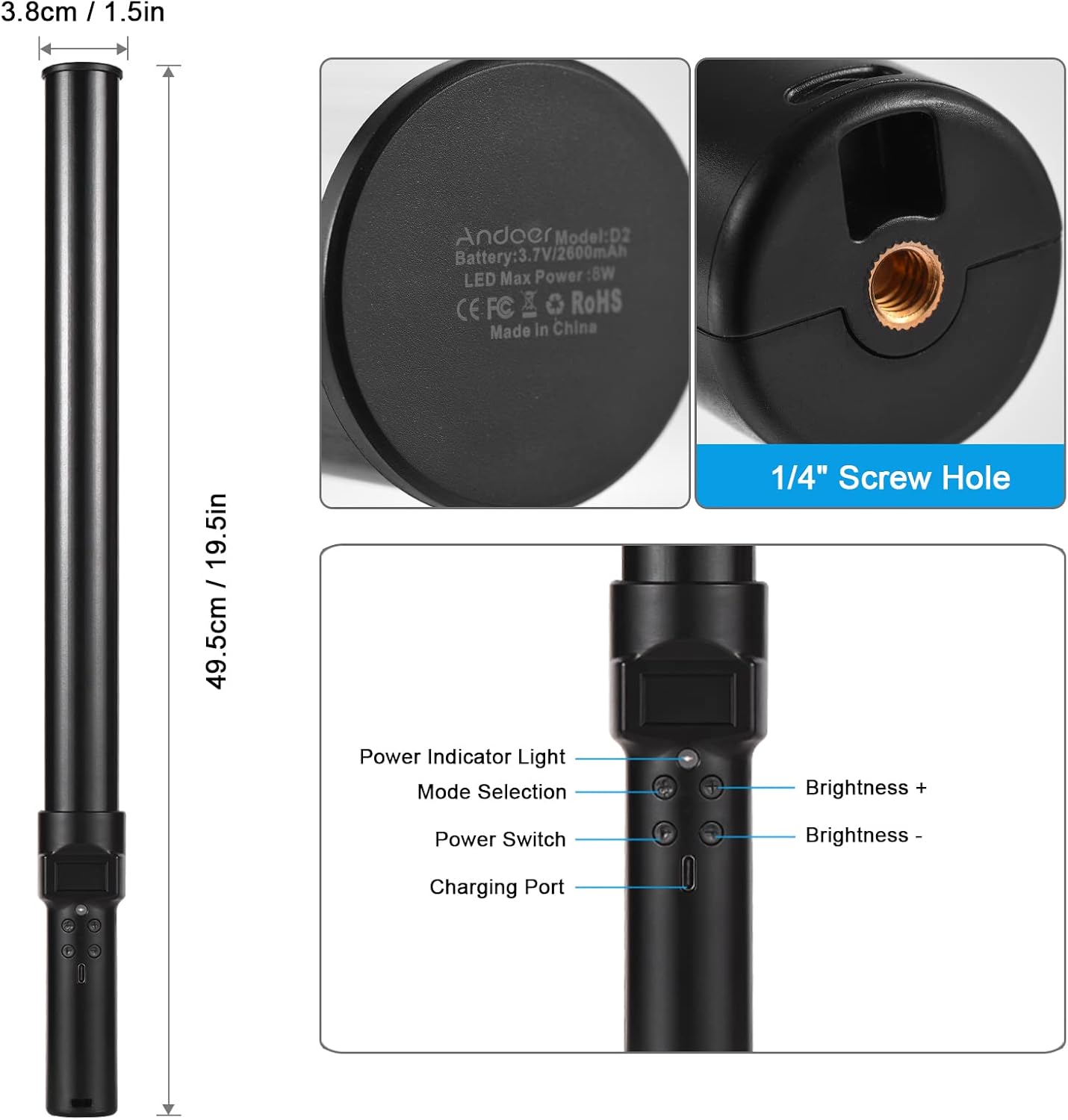
Slika: konecview of the Andoer D2 light wand, showing its dimensions (approximately 49.5cm / 19.5in long and 3.8cm / 1.5in diameter) and control panel. The control panel includes a Power Indicator Light, Mode Selection button, Power Switch, Brightness + button, Brightness - button, and a Charging Port.
Funkcije nadzorne plošče:
- Stikalo za vklop: Turns the light wand on or off.
- Izbira načina: Cycles through different lighting modes (e.g., CCT mode, RGB color effects).
- Svetlost +: Increases the light brightness.
- Svetlost -: Decreases the light brightness.
- Indikator napajanja: Shows the power status and charging status.
- Polnilna vrata (tip C): Uporablja se za polnjenje notranje baterije.
Nastavitev
Začetni strošek:
Before first use, fully charge the light wand. Connect the provided USB Type-C cable to the charging port on the device and the other end to a USB power adapter (not included) or a computer USB port. The power indicator light will show charging status.

Slika: Bližnji posnetek view of the Type-C charging port, indicating where to connect the charging cable.

Slika: The Andoer D2 light wand shown alongside its USB Type-C charging cable, illustrating the charging setup.
Možnosti namestitve:
The Andoer D2 light wand can be used handheld for flexible lighting or mounted for stable positioning. It features a standard 1/4-inch screw hole at the bottom.

Slika: Podrobno view of the 1/4-inch screw hole located at the base of the light wand, demonstrating how it can be attached to a light stand or tripod for stable use. Note that the light stand/tripod is sold separately.
- Ročna uporaba: Simply hold the light wand to direct light as needed.
- Tripod/Light Stand Mounting: Screw the 1/4-inch thread at the bottom of the light wand onto a compatible tripod or light stand. Ensure it is securely fastened before use.
Navodila za uporabo
Vklop/izklop:
Pritisnite in držite Stikalo za napajanje gumb za vklop ali izklop svetlobne palice.
Prilagoditev svetlosti:
The light wand offers 12 levels of adjustable brightness. Use the Svetlost + gumb za povečanje svetlosti in Brightness - gumb za zmanjšanje.

Slika: Illustration of the 12 levels of adjustable brightness, demonstrating the range from dim to bright light output.
Prilagajanje barvne temperature (način CCT):
In CCT mode, you can adjust the color temperature between 2500K (warm light), 5500K (neutral/daylight), and 8500K (cold light). Press the Izbira načina button to cycle to CCT mode, then use the Svetlost + in Brightness - buttons to adjust the color temperature.

Slika: Visual representation of the adjustable color temperatures, ranging from warm (2500K) to neutral (5500K) to cool (8500K) light.
Activating Colorful Light Effects (RGB Mode):
The light wand features 7 colorful light effects: red, green, blue, orange, purple, light blue, and red & blue flash. Press the Izbira načina button to cycle through these RGB effects. Brightness can still be adjusted in these modes using the Svetlost + in Brightness - gumbi.
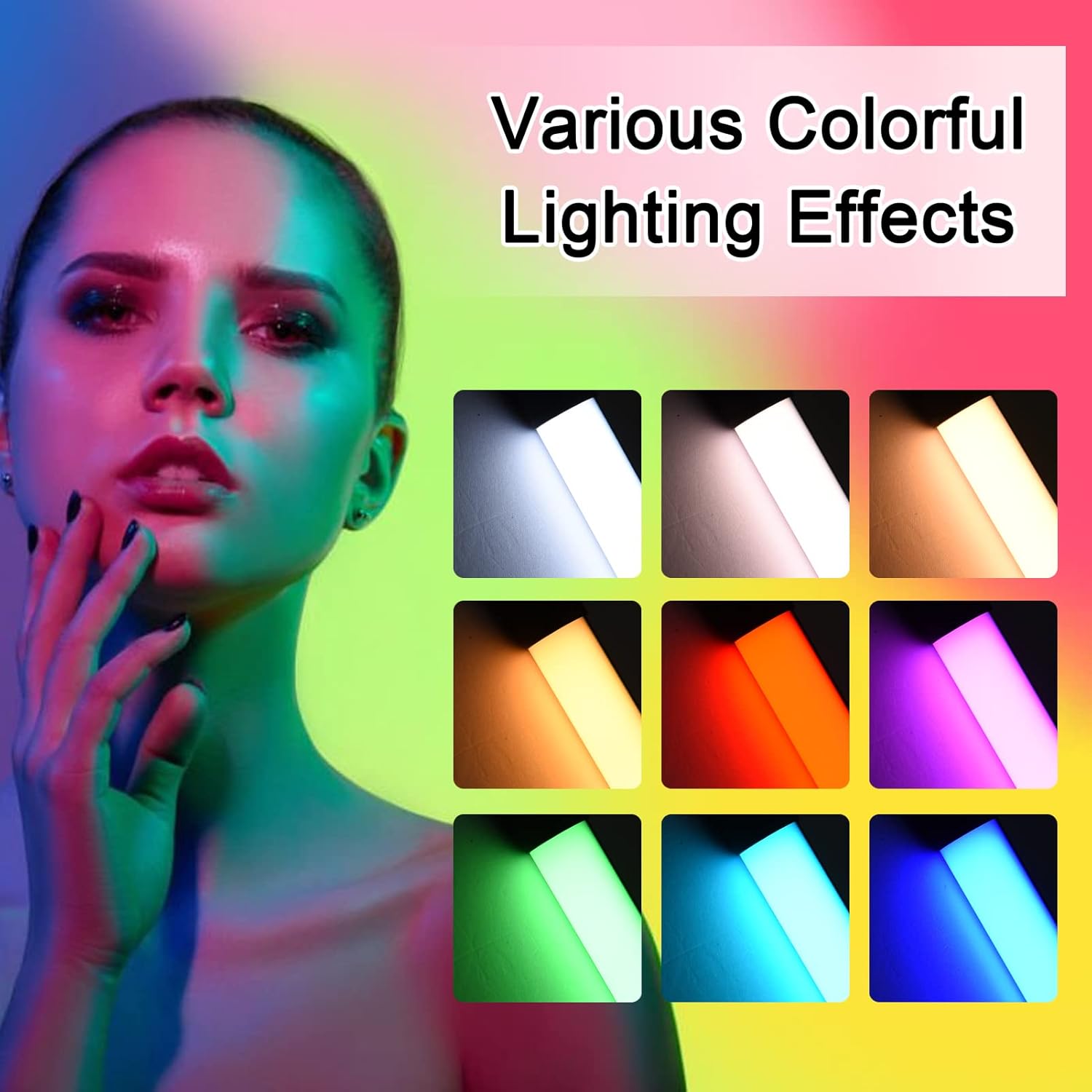
Slika: A visual guide to the 7 colorful light effects available, showcasing the vibrant range of colors the light wand can produce.
Polnjenje
The Andoer D2 light wand has a built-in 2600mAh rechargeable lithium battery. When the battery is low, the power indicator light will signal. To charge:
- Connect the small end of the USB Type-C charging cable to the charging port on the light wand.
- Connect the standard USB end of the cable to a USB power source (e.g., wall adapter, power bank, computer USB port).
- The power indicator light will illuminate or change color to indicate charging. It will change again or turn off when fully charged.
A full charge provides approximately 2.5 hours of continuous use at maximum brightness.
Vzdrževanje
- Clean the light wand with a soft, dry cloth. Do not use abrasive cleaners or solvents.
- Napravo shranjujte na hladnem in suhem mestu, stran od neposredne sončne svetlobe in ekstremnih temperatur.
- If not used for extended periods, charge the battery every 3 months to maintain battery health.
Odpravljanje težav
| Težava | Možen vzrok | rešitev |
|---|---|---|
| Luč se ne vklopi. | Baterija je prazna. | Charge the light wand using the provided USB Type-C cable. |
| Svetloba je šibka ali utripa. | Nizka baterija. | Ponovno napolnite napravo. |
| Cannot change color or mode. | Napačen pritisk gumba ali začasna programska napaka. | Ensure you are pressing the Mode Selection button. Try turning the device off and on again. |
| Naprava se ne polni. | Faulty cable, power adapter, or charging port. | Try a different USB Type-C cable or power adapter. Ensure the cable is fully inserted. |
Specifikacije
| Funkcija | Podrobnost |
|---|---|
| Model | D2 (SJI3033515989406YA) |
| Znamka | Andoer |
| Barvna temperatura | 2500K / 5500K / 8500K (nastavljivo) |
| Stopnje svetlosti | 12 ravni |
| Barvni svetlobni učinki | 7 effects (Red, Green, Blue, Orange, Purple, Light Blue, Red & Blue Flash) |
| Kapaciteta baterije | 2600 mAh litijeva baterija |
| Vrata za polnjenje | USB Type-C |
| Življenjska doba baterije (največja svetlost) | Pribl. 2.5 ur |
| Montaža | 1/4-inch screw hole |
| Dimenzije | Approx. 49.5cm (19.5in) length, 3.8cm (1.5in) diameter |
Garancija in podpora
Andoer products are designed and manufactured to the highest quality standards. For warranty information or technical support, please refer to the warranty card included with your purchase or visit the official Andoer webspletnega mesta. Prosimo, shranite dokazilo o nakupu za uveljavljanje garancije.
Andoer Official Webspletno mesto: Andoer Store on Amazon


