
1. Uvod
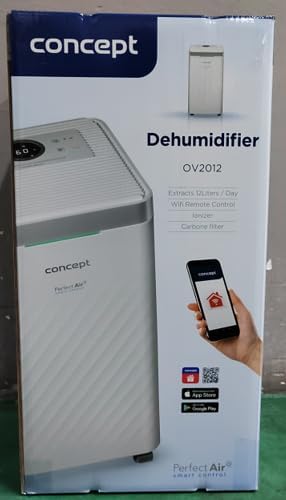
The Concept OV2012 is a versatile appliance designed to improve indoor air quality by combining dehumidification with air purification. This device effectively reduces excess humidity, which can contribute to mold growth and discomfort, while simultaneously filtering airborne pollutants. It features a triple filtration system, intuitive touch controls, and smart app connectivity for convenient operation.

Slika 1: Spredaj view of the Concept OV2012 Dehumidifier.
2. Varnostne informacije
Pred uporabo naprave natančno preberite vsa varnostna navodila. Neupoštevanje teh navodil lahko povzroči električni udar, požar ali resne poškodbe.
- Prepričajte se, da je napajalnik voltage se ujema z nalepko z nazivnimi vrednostmi na napravi.
- Ne uporabljajte enote s poškodovanim napajalnim kablom ali vtičem.
- Naprave hranite stran od vode in drugih tekočin. Ne potapljajte je.
- Ne blokirajte dovodnih ali odvodnih odprtin za zrak. Zagotovite dovolj prostora okoli enote za pravilen pretok zraka.
- Pred čiščenjem, vzdrževanjem ali če naprave dalj časa ne uporabljate, jo izključite iz električnega omrežja.
- Ta naprava ni namenjena uporabi s strani oseb (vključno z otroki) z zmanjšanimi telesnimi, senzoričnimi ali duševnimi sposobnostmi ali brez izkušenj in znanja, razen če so pod nadzorom ali so jim dane navodila.
- Naprave ne uporabljajte v prostorih, kjer so prisotni vnetljivi plini ali hlapi.
3. Sestavni deli izdelka
Familiarize yourself with the main parts of your Concept OV2012 dehumidifier.
- Nadzorna plošča: Touch-sensitive interface for setting modes and functions.
- Izhod zraka: Where processed air is released.
- Pokrov dovoda zraka/filtra: Located at the rear, provides access to the air filters.
- Rezervoar za vodo: Zbira kondenzirano vodo.
- Izpust za neprekinjeno drenažo: Port for attaching a hose for continuous water drainage.
- 360° Rolling Wheels: Za enostavno premikanje enote.

Slika 2: Zadaj view of the dehumidifier, showing air intake and water tank.
4. Nadzorna plošča in zaslon
The OV2012 features an intuitive touch control panel with a digital display and LED indicators.
Slika 3: Podrobno view nadzorne plošče na dotik.
- Gumb za vklop: Vklopi ali izklopi enoto.
- Izbira načina: Cycles through operating modes (Automatic, Continuous, Laundry Drying, Fan).
- Humidity Slider/Buttons: Prilagodi želeno raven vlažnosti.
- Gumb časovnika: Sets the delayed on/off time (up to 24 hours).
- Hitrost ventilatorja: Adjusts fan speed (usually two levels).
- Gumb za ionizator: Activates or deactivates the ionizer function.
- LED indikator vlažnosti: Changes color based on current room humidity:
- Rdeča: High humidity (RH > 70%)
- zelena: Satisfactory humidity (70% ≥ RH ≥ 50%)
- Modra: Low humidity (RH < 50%)
5. Začetna nastavitev
- Razpakiranje: Razvlažilnik zraka previdno vzemite iz embalaže. Embalažo shranite za kasnejše shranjevanje ali transport.
- Umestitev: Place the unit on a firm, level surface. Ensure there is at least 20 cm of clear space around all sides for optimal airflow. The 360° rolling wheels allow for easy positioning.
- Napajalni priključek: Priključite napajalni kabel v ozemljeno električno vtičnico.
- Rezervoar za vodo: Prepričajte se, da je rezervoar za vodo pravilno vstavljen v enoto.
6. Načini delovanja
The OV2012 offers four distinct operating modes to suit various needs:
- Samodejni način: The dehumidifier automatically maintains the humidity level you select. The unit will cycle on and off to achieve and sustain the target humidity.
- Neprekinjeno delovanje: Ideal for long-term drying of very wet areas. In this mode, the unit runs continuously regardless of the ambient humidity. It is recommended to use the continuous drainage hose in this mode.
- Način sušenja perila: Accelerates the drying of laundry and helps prevent moisture buildup in the room, reducing the risk of mold.
- Fan Mode (Air Purification without Dehumidification): In this mode, the compressor is off, and only the fan and filtration system operate to purify the air without removing moisture.
Using the Concept Home Mobile Application
The OV2012 can be controlled remotely via the Concept Home mobile application, available for iOS and Android devices. This app allows you to:
- Vklopite ali izklopite enoto.
- Select desired operating modes.
- Check the current air status in the room.
- Create a precise operating schedule for the dehumidifier.

Figure 4: The Concept Home mobile application for remote control.
7. Odvajanje vode
Drenaža rezervoarja za vodo
When the 2.2-liter water tank is full, the unit will automatically shut off, and an indicator light will illuminate. Carefully remove the water tank, empty it, and reinsert it securely to resume operation.
Kontinuirana drenaža
For continuous operation without needing to empty the water tank, attach the included hose to the continuous drainage outlet. Direct the hose to a suitable drain, ensuring it is sloped downwards for proper water flow. This allows the unit to operate uninterrupted.
8. Vzdrževanje in čiščenje
Redno vzdrževanje zagotavlja optimalno delovanje in dolgo življenjsko dobo vašega razvlažilnika zraka.
Sistem filtrov
The OV2012 features a triple filter system:
- Filter za prah: Captures coarse impurities like dust particles, hair, fur, and pollen. This filter should be cleaned regularly.
- Filter z aktivnim ogljem: Absorbs toxic, suffocating, and foul-smelling gases and vapors, such as formaldehyde, benzene, and cigarette smoke. This filter requires periodic replacement (Optional accessory: Carbon filter - 42394390).
- ionizator: Refreshes and purifies the air by increasing negatively charged ions, neutralizing odors and absorbing positively charged particles, viruses, and bacteria.
To clean the dust filter, remove the rear filter cover, gently remove the filter, and clean it with a vacuum cleaner or rinse it with water. Ensure it is completely dry before reinserting. Replace the activated carbon filter as recommended by the manufacturer or when you notice a decrease in odor removal effectiveness.

Figure 5: Illustration of the triple filtration system.
Čiščenje rezervoarja za vodo
Periodically clean the water tank with mild detergent and warm water to prevent mold and bacterial growth. Rinse thoroughly and dry before reinserting.
Čiščenje zunanjosti
Obrišite zunanjost enote z mehko damp krpo. Ne uporabljajte abrazivnih čistil ali topil.
9. Vodnik za odpravljanje težav
Če imate težave z razvlažilnikom zraka, si oglejte naslednje pogoste težave in rešitve:
| Težava | Možen vzrok | rešitev |
|---|---|---|
| Enota se ne vklopi | Ni napajanja; Rezervoar za vodo je poln ali nepravilno vstavljen. | Check power cord connection; Empty and reinsert water tank correctly. |
| Brez razvlaževanja | Room temperature too low; Air filters clogged; Humidity setting too high. | Ensure room temperature is above 5°C; Clean or replace filters; Lower the desired humidity setting. |
| Enota je hrupna | Enota ni na ravni površini; Zračni filter je zamašen. | Place unit on a flat, stable surface; Clean or replace air filters. |
| Water tank full indicator remains on after emptying | Water tank not fully inserted; Sensor malfunction. | Push the water tank firmly into place; If problem persists, contact customer support. |
Če težava po poskusu teh rešitev še vedno obstaja, se obrnite na podporo strankam.
10. Tehnične specifikacije
| Funkcija | Specifikacija |
|---|---|
| Številka modela | OV2012 |
| Dehumidification Performance (max) | 12 litrov/dan (pri 30 °C, 80 % relativne vlažnosti) |
| Prostornina rezervoarja za vodo | 2.2 litra |
| Poraba energije | 210 W (Note: Product description also mentions 245W, refer to product label for exact value) |
| Nivo hrupa | ≤ 45 dB |
| Dimenzije (Š x G x V) | 250 x 250 x 460 mm (25 x 25 x 46 cm) |
| Teža predmeta | 10.82 kg |
| Dolžina kabla | 1.8 m |
| Načini delovanja | 4 (Automatic, Continuous, Laundry Drying, Fan) |
| Sistem filtrov | Dust filter, Activated Carbon filter, Ionizer |
| Nadzor | Touch control, Mobile App (Concept Home) |
| Posebne lastnosti | Automatic Shut-off, Timer, 360° wheels, LED Humidity Indicator |

Slika 6: Dimenzije izdelka.
11. Garancija in podpora strankam
For warranty information, please refer to the warranty card included with your product or contact your local Concept distributor. For technical support, spare parts, or service inquiries, please contact Concept customer service. Contact details may be found on the product packaging or the official Concept webmesto.
Example contact information from product packaging (may vary by region):
- CZ: Zavolejte nám +420 465 471 400, www.my-concept.cz
- SK: Zavolajte nám +421 326 583 465, www.my-concept.sk
- PL: Zadzwoń do nas +48 71 339 04 44, www.my-concept.pl