
Sharp RP-TT70
Sharp RP-TT70 Vinyl Record Player Turntable User Manual
Model: RP-TT70
1. Izdelek je končanview
The Sharp RP-TT70 is a 12-inch vinyl record player turntable designed to deliver a rich audio experience with modern convenience. It features a classic wooden cabinet and comes with stereo bookshelf speakers. This belt-drive turntable supports multiple playback speeds and offers versatile connectivity options, including dual Bluetooth functionality.

Figure 1.1: Sharp RP-TT70 Turntable and Speakers. The turntable features a stylish wooden finish and a clear dust cover, flanked by two matching stereo bookshelf speakers.
2. Kaj je vključeno
Prosimo, preverite vsebino paketa in se prepričajte, da so prisotni vsi elementi:
- Sharp RP-TT70 Turntable Unit
- Stereo Bookshelf Speakers (2 units)
- Pokrov proti prahu
- Napajalni adapter
- Uporabniški priročnik (ta dokument)
3. Navodila za nastavitev
Follow these steps to set up your Sharp RP-TT70 turntable:
- Umestitev: Place the turntable on a stable, level surface away from direct sunlight, heat sources, and excessive dust. Ensure adequate ventilation around the unit.
- Povezava zvočnikov: Connect the included stereo bookshelf speakers to the "SPEAKER OUT" terminals on the rear of the turntable. Ensure correct polarity (positive to positive, negative to negative).
- Napajalni priključek: Connect the power adapter to the "POWER IN DC 12V" port on the rear of the turntable, then plug the adapter into a wall outlet.
- Pokrov proti prahu: Carefully attach the dust cover to the hinges on the back of the turntable.

Figure 3.1: Rear Panel Connections. This image highlights the AUX-IN Jack, RCL (R&L) Speaker Out, Pitch (+)(-) Speed Calibration, and Power In DC 12V ports, crucial for proper setup.
4. Navodila za uporabo
4.1 Predvajanje vinilne plošče
- Vklop: Turn the power knob to activate the turntable.
- Izberite hitrost: Adjust the speed selector to match the record's RPM (33 1/3, 45, or 78 RPM). For 45 RPM records, place the included 45 RPM adapter on the spindle.
- Krajevni zapis: Vinilno ploščo previdno položite na gramofonski krožnik.
- Dviganje ročice tona: Nežno dvignite ročico tona z ročico za nastavitev tona.
- Position Stylus: Premaknite ročico gramofona čez želeni začetni utor plošče.
- Spodnja ročica: Počasi spustite ročico za nastavitev tona. Igla se bo dotaknila plošče in predvajanje se bo začelo.
- Prilagoditev glasnosti: Glasnost prilagodite z gumbom za glasnost na gramofonu.
- Funkcija samodejne ustavitve: The turntable features an auto-stop function that will automatically stop the platter rotation when the record reaches its end.
4.2 Povezljivost Bluetooth
The Sharp RP-TT70 supports dual Bluetooth connectivity, allowing you to stream music in two ways:
- Streaming Vinyl to External Bluetooth Device:
- Prepričajte se, da je gramofon vklopljen.
- Activate Bluetooth pairing mode on your external Bluetooth speaker or headphones.
- The turntable will automatically search for and connect to nearby Bluetooth devices. The Bluetooth indicator light will illuminate when connected.
- Once connected, audio from your vinyl record will play through the external Bluetooth device.
- Streaming Music from Your Phone to Turntable Speakers:
- Prepričajte se, da je gramofon vklopljen.
- On your smartphone or other Bluetooth-enabled device, search for "Sharp RP-TT70" in the Bluetooth settings.
- Select the turntable to pair. The Bluetooth indicator light will illuminate when connected.
- Once connected, audio from your phone will play through the turntable's included stereo speakers.
4.3 Auxiliary Input (AUX-IN)
Connect external audio devices such as smartphones, tablets, or MP3 players using a 3.5mm audio cable (not included) to the AUX-IN jack on the rear of the turntable. Switch the input mode to AUX to play audio through the turntable's speakers.
4.4 Priključek za slušalke
For private listening, connect headphones to the headphone jack located on the front panel of the turntable.
5. Vzdrževanje
Proper maintenance ensures the longevity and optimal performance of your turntable:
- Pokrov proti prahu: Always keep the dust cover closed when the turntable is not in use to prevent dust accumulation on the platter and stylus.
- Čiščenje pisala: Gently clean the stylus regularly using a soft brush designed for turntable styli. Brush from back to front.
- Čiščenje gramofona: Gramofon in zvočnike obrišite z mehko, suho krpo. Ne uporabljajte abrazivnih čistil ali topil.
- Cartridge and Stylus Replacement: The RP-TT70 uses a changeable ceramic cartridge and stylus. If sound quality degrades or the stylus is damaged, replace it with a compatible Sharp replacement part.
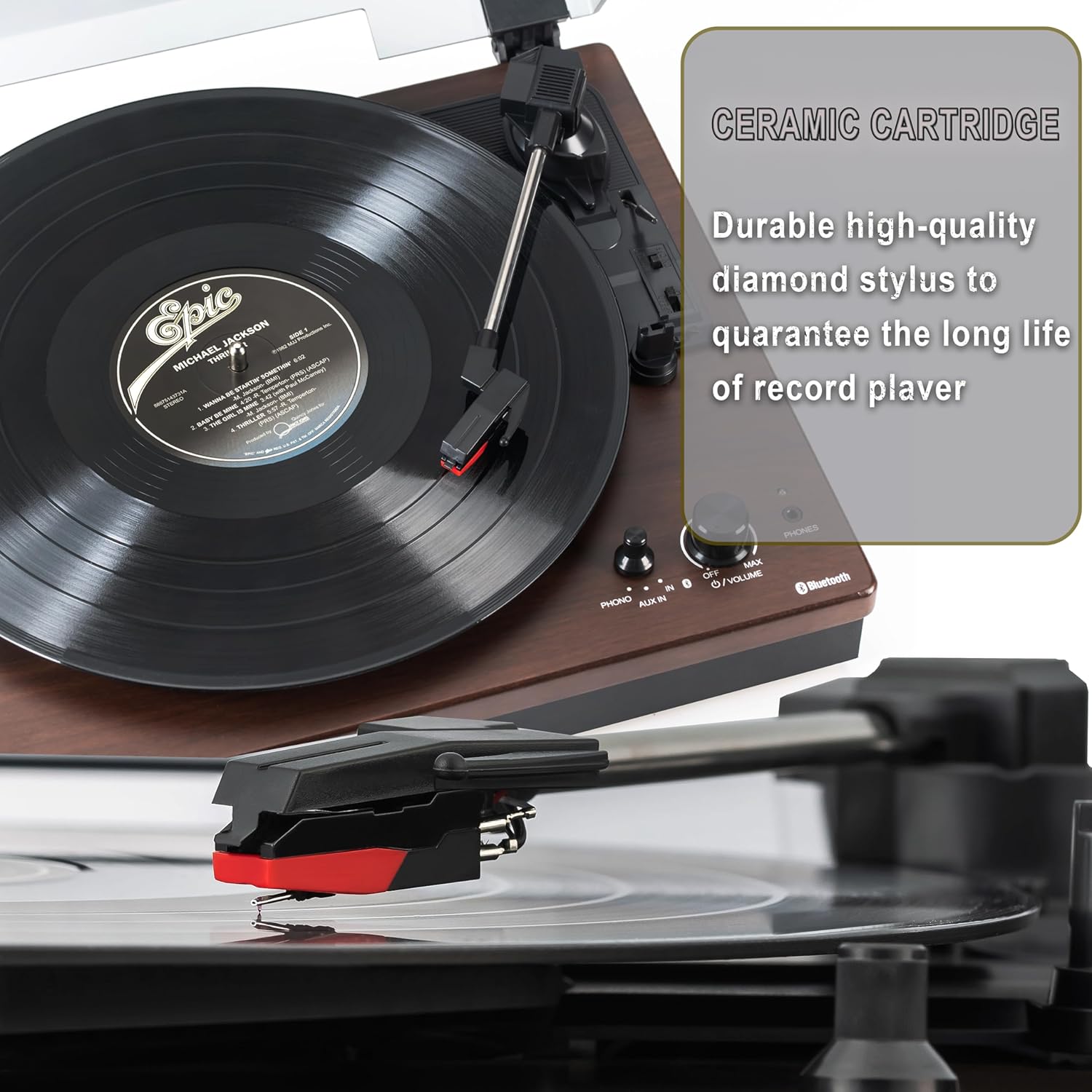
Figure 5.1: Ceramic Cartridge. The turntable is equipped with a durable high-quality diamond stylus designed for extended record playback life.
6. Odpravljanje težav
If you encounter issues with your Sharp RP-TT70, refer to the following common problems and solutions:
| Težava | Možen vzrok | rešitev |
|---|---|---|
| Brez moči | Napajalnik ni priključen ali vtičnica ni aktivna. | Ensure power adapter is securely plugged into the turntable and a working wall outlet. |
| Ni zvoka iz zvočnikov | Speakers not connected correctly; Volume too low; Incorrect input mode. | Check speaker cable connections and polarity. Increase volume. Ensure turntable is in PHONO or AUX mode as appropriate. |
| Poor Sound Quality / Skipping | Dirty or worn stylus; Dirty record; Turntable not level. | Clean the stylus and record. Ensure the turntable is on a stable, level surface. Consider replacing the stylus if worn. |
| Težave s povezovanjem Bluetooth | Device too far; Bluetooth not enabled on external device; Interference. | Ensure devices are within range (approx. 30 ft). Confirm Bluetooth is enabled on the external device. Try restarting both devices. |
| Platter Not Spinning | Belt dislodged; Auto-stop engaged prematurely. | Check if the drive belt is properly seated around the platter and motor pulley. If auto-stop is causing issues, ensure the record is placed correctly. |
7. Specifikacije
| Funkcija | Podrobnost |
|---|---|
| Številka modela | RP-TT70 |
| Znamka | Ostra |
| Dimenzije izdelka | 16.8 x 13.5 x 2.8 palcev |
| Teža predmeta | 18.6 funtov |
| Tehnologija povezljivosti | Bluetooth (Bi-directional) |
| Podprte hitrosti | 33 1/3, 45, 78 RPM |
| Vključene komponente | Turntable, Stereo Bookshelf Speakers |
| Material | Plastika, Les |
| barva | Black (with wooden finish) |
| Vrsta kartuše | Changeable Ceramic Cartridge and Stylus |
| Lastnosti | Belt-drive, Auto-return, Pitch control, Dust cover |
8. Garancija in podpora
Za informacije o garanciji in tehnično podporo se obrnite na uradnega Sharpovega webspletno mesto ali se obrnite neposredno na njihovo službo za stranke. Račun shranite kot dokazilo o nakupu za uveljavljanje garancije.
Ask a question about this manual
Ask about setup, troubleshooting, compatibility, parts, safety, or missing instructions. Manuals+ will review the question and use this page’s manual context to help answer it.