

Uvod
This manual provides comprehensive instructions for the Xtrfy M8 Wireless Gaming Mouse. Designed for professional gamers, the M8 offers an ultra-lightweight design, symmetrical shape, and lag-free 2.4 GHz wireless connectivity.
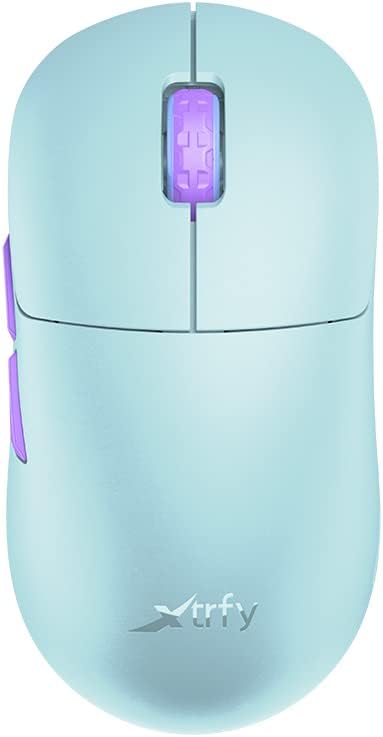
Image: The Xtrfy M8 Wireless Gaming Mouse in Frosty Mint, showcasing njegovo ergonomsko zasnovo.
A key design feature is its ultra-low front, measuring just 4mm, which allows for a unique grip style.

Slika: Bližnji posnetek view of the Xtrfy M8 mouse's front, highlighting its low profile 4mm.
Vsebina paketa
Preverite, ali so v paketu vsi elementi:
- Xtrfy M8 Wireless Gaming Mouse
- Polnilni kabel USB-C
- Brezžični USB sprejemnik (dongle)
- USB-A to USB-C Adapter (for receiver extension)
- Navodila za uporabo (ta dokument)

Image: The USB-C charging cable and the USB wireless receiver (dongle) for the Xtrfy M8 mouse.
Nastavitev
- Napolnite miško: Before first use, connect the USB-C charging cable to the mouse and a powered USB port. The mouse has an internal Lithium Ion battery.
- Connect the USB Wireless Receiver:
- Insert the USB wireless receiver directly into an available USB-A port on your computer.
- For optimal signal strength or if your computer's USB port is not easily accessible, use the provided USB-A to USB-C adapter with the charging cable to extend the receiver closer to the mouse.
- Vklop miške: Locate the power switch on the underside of the mouse. Slide the switch to the "ON" position.
- Samodejna povezava: The mouse should automatically connect to the receiver. No additional pairing software is typically required for 2.4 GHz wireless operation.

Image: The underside of the Xtrfy M8 mouse, displaying the power switch, optical sensor, and hardware adjustment buttons.
Navodila za uporabo
The Xtrfy M8 mouse features standard left and right click buttons, a scroll wheel, and two side buttons. All functions are plug-and-play compatible with most operating systems.
Hardware Adjustments
The Xtrfy M8 allows for on-the-fly adjustment of key performance settings directly from the mouse hardware, without the need for software. These settings are typically located on the underside of the mouse.
- DPI/CPI (Dots Per Inch / Counts Per Inch): Adjusts mouse sensitivity. Use the dedicated button on the mouse bottom to cycle through preset DPI levels. An indicator light may change color to show the current setting.
- Polling Rate (PR): Determines how often the mouse reports its position to the computer. Higher polling rates (e.g., 1000 Hz) provide smoother tracking but consume more battery.
- Vzletna razdalja (LOD): Controls how high the mouse can be lifted before tracking stops. A lower LOD prevents unwanted cursor movement when repositioning the mouse.
Refer to the markings near the buttons on the mouse's underside for specific adjustment procedures.

Slika: Stran view of the Xtrfy M8 mouse, highlighting the main click buttons, scroll wheel, and two programmable side buttons.
Polnjenje in baterija
The Xtrfy M8 Wireless Gaming Mouse is equipped with a rechargeable Lithium Ion battery. To charge the mouse, connect the supplied USB-C cable to the front port of the mouse and the other end to a powered USB port on your computer or a USB wall adapter.
- A small LED indicator on the mouse will typically show charging status (e.g., solid light for charging, off or different color for fully charged).
- The mouse can be used while charging, though the cable connection point may feel unusual during active use.
- Battery life varies based on usage and polling rate settings.
Vzdrževanje
Proper maintenance ensures the longevity and performance of your Xtrfy M8 mouse.
- Čiščenje: Za brisanje površine miške uporabite mehko, suho krpo. Za trdovratno umazanijo rahlo obrišiteampkrpo z vodo. Izogibajte se agresivnim kemikalijam ali abrazivnim materialom.
- Senzor: Optični senzor na spodnji strani miške naj bo čist in brez prahu ali umazanije. Po potrebi uporabite vatirano palčko ali stisnjen zrak.
- Shranjevanje: Ko miške dlje časa ne uporabljate, jo shranite na suhem in hladnem mestu.
- Skrb za kabel: Avoid sharp bends or excessive pulling on the USB-C charging cable to prevent damage.
Odpravljanje težav
If you encounter issues with your Xtrfy M8 mouse, refer to the following common solutions:
- Miška se ne odziva:
- Prepričajte se, da je miška vklopljena.
- Preverite, ali je brezžični sprejemnik USB varno priključen v delujoča vrata USB.
- Verify the mouse battery is charged. Connect the charging cable and observe the indicator light.
- Poskusite priklopiti sprejemnik v drug USB vhod.
- Zamik ali prekinitve povezave:
- Ensure the receiver is close to the mouse and not obstructed by metal objects.
- Avoid placing the receiver near other wireless devices that may cause interference (e.g., Wi-Fi routers, other wireless peripherals).
- Lower the polling rate setting on the mouse if experiencing frequent disconnections in a crowded wireless environment.
- Netočno sledenje:
- Očistite optični senzor na spodnji strani miške.
- Prepričajte se, da miško uporabljate na ustrezni površini (priporočljiva je podloga za miško).
- Adjust the DPI/CPI settings to a comfortable level.
- Scroll Wheel Issues (e.g., jumping):
- Ensure the mouse firmware is up to date (check the Xtrfy official website for any available updates).
- If the issue persists, contact Xtrfy customer support.
Specifikacije
| Številka modela | M8 |
| Znamka | Xtrfy |
| Tehnologija povezljivosti | Radio Frequency (2.4 GHz), USB (for charging/wired mode) |
| Tehnologija zaznavanja gibanja | Optični |
| Posebne lastnosti | Lahka, brezžična |
| Teža predmeta | 1.94 unč (približno 55 gramov) |
| Baterije | 1 litij-ionska baterija (priložena) |
| Dimenzije paketa | 7.32 x 4.06 x 2.44 palcev |
| ASIN | B0BMLF5FMT |
| Prvič na voljo | 16. november 2022 |
Garancija in podpora
The Xtrfy M8 Wireless Gaming Mouse typically comes with a 1-year manufacturer's warranty. For specific warranty details, claims, or technical support, please contact Xtrfy directly through their official webmesto.
Xtrfy Official Webspletno mesto: www.xtrfy.com
Always refer to the manufacturer's official resources for the most current support information and firmware updates.


