
1. Uvod
This manual provides essential instructions for the setup, operation, maintenance, and troubleshooting of your Shuttle XPC Slim DH610 Barebone PC. The DH610 is a compact and versatile barebone system designed to support Intel 12th and 13th Generation LGA1700 processors, offering robust performance for various applications including office, digital signage, and kiosks.
2. Varnostne informacije
Prosimo, preberite in upoštevajte ta varnostna navodila, da preprečite poškodbe naprave ali telesne poškodbe:
- Always disconnect the power cord before performing any installation or maintenance.
- Ensure the system is placed on a stable, flat surface with adequate ventilation.
- Naprave ne izpostavljajte vlagi, ekstremnim temperaturam ali neposredni sončni svetlobi.
- Only use the power adapter provided or an approved equivalent.
- Refer to qualified service personnel for any repairs not covered in this manual.
3. Vsebina paketa
Preverite, ali so v paketu vsi elementi:
- Shuttle XPC Slim DH610 Barebone PC Unit
- Komplet za pritrditev VESA
- Napajalni adapter in kabel
- Accessory Pack (screws, cables, etc.)
- Vodnik za hitri začetek (če je priložen)
4. Nastavitev in namestitev
The Shuttle DH610 is a barebone system, requiring the installation of a CPU, RAM, and storage devices before operation.
4.1. Opening the Chassis
Carefully remove the chassis cover to access the internal components. Typically, this involves unscrewing a few screws on the rear or sides of the unit and sliding the cover off.

Image: The Shuttle XPC Slim DH610 with its top cover removed, showing the internal layout including cooling fans and the motherboard.
4.2. Namestitev procesorja
The DH610 supports Intel 12th/13th Generation Alder Lake-S LGA1700 processors with a maximum TDP of 65W. Ensure your chosen CPU has integrated graphics, as the system does not support F-series processors without integrated graphics or K-series processors.
- Odprite ročico podnožja procesorja in odstranite zaščitni pokrov.
- Carefully align the CPU with the socket, matching the triangular markers.
- Procesor previdno namestite v podnožje, ne da bi ga silili.
- Zaprite ročico vtičnice, da pritrdite procesor.
- Namestite hladilnik procesorja v skladu z navodili proizvajalca.
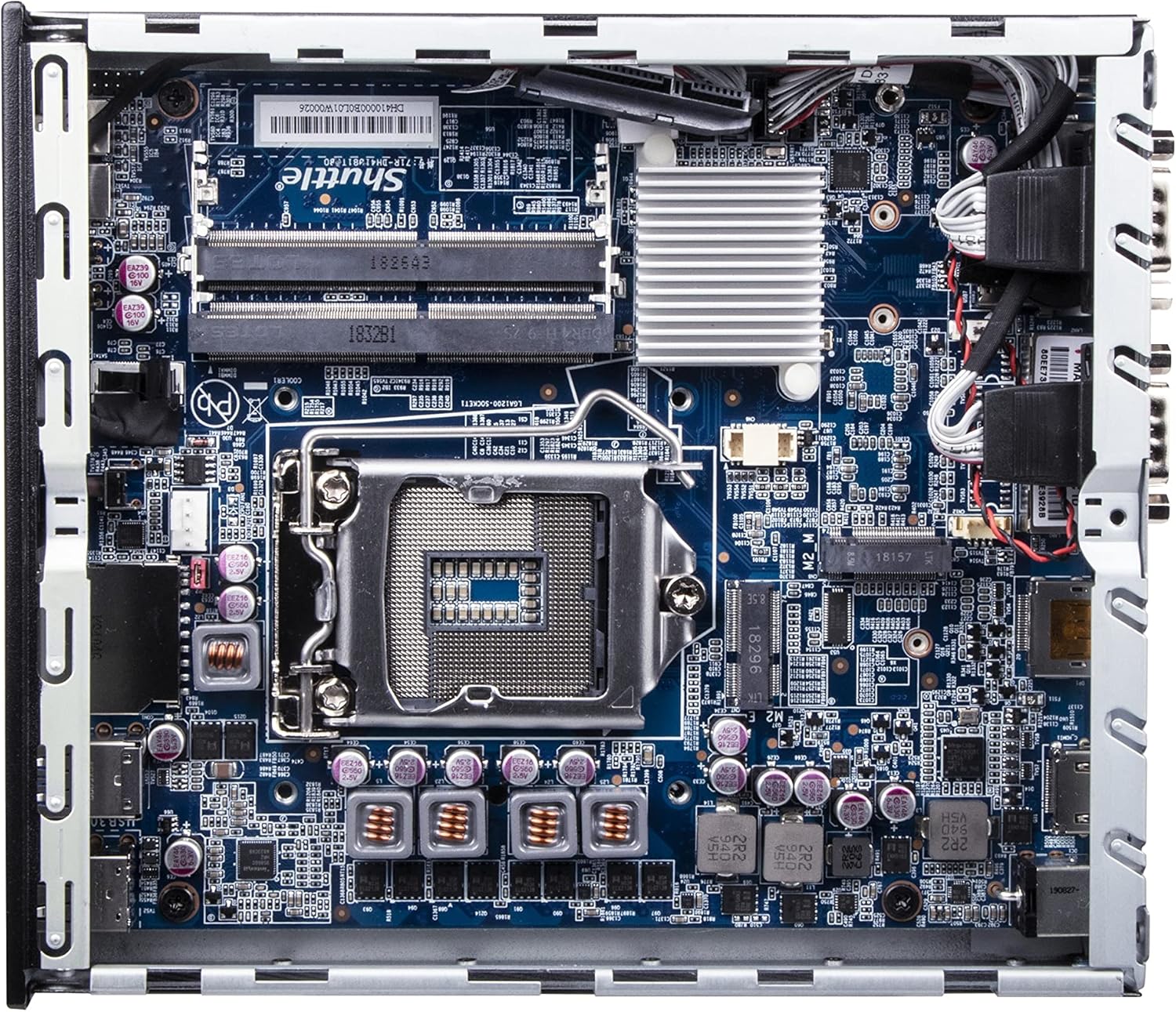
Slika: Podrobna view of the Shuttle DH610 motherboard, highlighting the LGA1700 CPU socket, RAM slots, and other integrated circuits.
Note: For 13th Gen Intel Processors, BIOS Version DH610000.202 or newer is required. Update BIOS if necessary after initial setup with a 12th Gen CPU or via a compatible method.
4.3. Namestitev RAM-a
The system features two 260-pin dual-channel DDR4 SODIMM slots, supporting up to 64GB (2x 32GB) at 3200MHz. Dual-channel memory is recommended for optimal performance.
- Locate the SODIMM slots on the motherboard.
- Poravnajte zarezo na modulu RAM s ključem v reži.
- Insert the module at a 45-degree angle and push down until the clips on both sides snap into place.
4.4. Namestitev shrambe
The DH610 supports one 2.5-inch HDD/SSD and one M.2 2280 SSD.
- 2.5" Drive: Mount the 2.5" HDD/SSD into the designated bay using the provided screws and connect the SATA data and power cables.
- M.2 SSD: Insert the M.2 2280 SSD into its slot, securing it with the provided screw.
4.5. Povezovanje zunanjih naprav
After installing internal components, reattach the chassis cover. Connect your peripherals to the available ports:
- Zaslon: Connect your monitor(s) to the HDMI 2.0b port or one of the two DisplayPort outputs. The system supports up to three 4K UHD displays.
- Naprave USB: Use the four USB 3.2 Gen1 ports (including one Type-C) and four USB 2.0 ports for keyboard, mouse, and other USB devices.
- Omrežje: Connect to your network using either of the two Gigabit Ethernet LAN ports (Intel 2.5GbE + Intel 1GbE).
- Serijske naprave: Utilize the two RS232 COM ports for compatible devices.
- Avdio: Connect headphones or a microphone to the front audio jacks.

Image: The front panel of the Shuttle DH610, featuring the power button, USB 3.2 Gen1 ports (one Type-C), and audio input/output jacks.

Image: The rear panel of the Shuttle DH610, displaying the DC-IN power input, HDMI, two DisplayPort outputs, two LAN ports, USB ports, and two COM ports.
4.6. Napajalni priključek
Connect the power adapter to the DC-IN port on the rear of the unit, then plug the power cord into an electrical outlet.
5. Navodila za uporabo
5.1. Vklop/izklop
- Vklop: Pritisnite gumb za vklop na sprednji plošči.
- Ugasniti: Perform a graceful shutdown through your operating system. Alternatively, press and hold the power button for 4-5 seconds for a forced shutdown (use only when necessary).
5.2. Namestitev operacijskega sistema
The DH610 is compatible with Windows 11/10 (64-bit) and Linux (64-bit) operating systems. Follow the standard installation procedures for your chosen OS. Ensure all necessary drivers are installed for optimal performance, which can typically be found on the Shuttle support webmesto.
5.3 Dostop do BIOS-a/UEFI-ja
Za dostop do orodja za nastavitev BIOS/UEFI pritisnite Izbriši or F2 key repeatedly during system startup. This allows configuration of boot options, system settings, and hardware parameters.
6. Vzdrževanje
6.1. Čiščenje
Regularly clean the exterior of the unit with a soft, dry cloth. Use compressed air to clear dust from ventilation openings to ensure proper airflow and prevent overheating. Do not use liquid cleaners directly on the device.
6.2. Posodobitve BIOS-a
Periodically check the Shuttle website for BIOS updates. BIOS updates can improve system stability, add support for new hardware (like 13th Gen Intel CPUs), and fix bugs. Follow the instructions provided with the BIOS update package carefully.
7. Odpravljanje težav
If you encounter issues with your DH610, refer to the following common problems and solutions:
- Brez izhoda za prikaz:
- Ensure the monitor is powered on and correctly connected to the HDMI or DisplayPort.
- Verify that the CPU has integrated graphics and that the display cable is connected to the motherboard's video output, not a discrete graphics card (if applicable).
- Poskusite z drugim kablom za prikaz ali monitorjem.
- Sistem se ne vklopi:
- Check that the power adapter is securely connected to both the unit and the electrical outlet.
- Ensure the CPU and RAM are correctly installed and seated.
- Preverite vtičnico z drugo napravo.
- 13th Gen CPU Not Recognized:
- The system requires BIOS Version DH610000.202 or newer for 13th Gen Intel processors. If you have an older BIOS, you may need to install a 12th Gen CPU first to update the BIOS.
- Pregrevanje sistema:
- Ensure the chassis ventilation holes are not obstructed.
- Clean any dust accumulation from the internal fans and heatsinks.
- Verify the CPU cooler is properly installed and making good contact with the CPU.
8. Specifikacije
| Funkcija | Specifikacija |
|---|---|
| Znamka | Shuttle |
| Ime modela | DH610 |
| CPU vtičnica | LGA 1700 |
| Podprti procesorji | Intel 12th/13th Gen Alder Lake-S (65W max, with integrated graphics) |
| Čipset | Intel H610 |
| Vrsta RAM-a | DDR4 SODIMM (2x slots) |
| Največja kapaciteta RAM-a | 64 GB (2x 32GB) |
| Hitrost pomnilnika | Do 3200 MHz |
| Grafika | Integrated Intel UHD Graphics (CPU dependent) |
| Video izhod | 1x HDMI 2.0b, 2x DisplayPort (Supports triple 4K UHD displays) |
| Shranjevanje | 1x 2.5" HDD/SSD bay, 1x M.2 2280 slot |
| Vrata USB | 4x USB 3.2 Gen1 (1x Type-C), 4x USB 2.0 (Total 8) |
| LAN | 1x Intel 2.5GbE, 1x Intel 1GbE |
| Serijska vrata | 2x RS232 (COM) |
| Združljivost operacijskega sistema | Windows 11/10 (64-bit), Linux (64-bit) |
| Poraba energije | 65 Watts (CPU) |
| Vključene komponente | VESA nosilec |
9. Garancija in podpora
9.1. Garancija proizvajalca
The Shuttle XPC Slim DH610 Barebone PC comes with a 3-Year Manufacturer's Warranty. This warranty covers defects in materials and workmanship under normal use. Please retain your proof of purchase for warranty claims.
9.2. Tehnična podpora
For technical assistance, driver downloads, BIOS updates, or further troubleshooting not covered in this manual, please visit the official Shuttle website or contact Shuttle customer support. Free lifetime technical support is typically provided by the manufacturer.
Za več informacij obiščite: www.shuttle.com