
1. Uvod
Hvala za nakupasing the Innocn 39G1R 39-inch 2K WQHD 165Hz Curved Gaming HDR Monitor. This manual provides essential information for setting up, operating, maintaining, and troubleshooting your new monitor. Please read this manual thoroughly before use and keep it for future reference.
2. Varnostne informacije
Upoštevajte naslednje varnostne ukrepe, da preprečite poškodbe monitorja ali telesne poškodbe.
- Monitorja ne izpostavljajte dežju, vlagi ali ekstremnim temperaturam.
- Zagotovite ustrezno prezračevanje okoli monitorja. Ne blokirajte prezračevalnih odprtin.
- Uporabljajte samo napajalnik, ki je priložen monitorju.
- Izogibajte se postavljanju težkih predmetov na napajalni kabel.
- Če monitorja dalj časa ne boste uporabljali, izključite napajalni kabel iz vtičnice.
- Monitorja ne poskušajte razstavljati ali popravljati sami. Vsa servisna dela prepustite usposobljenemu osebju.
3. Vsebina paketa
Prosimo, preverite, ali so v vašem paketu vsi artikli:
- Innocn 39G1R Monitor
- Stojalo za monitor (podstavek in vrat)
- Napajalnik in kabel
- Kabel DisplayPort
- HDMI kabel
- Uporabniški priročnik
4. Izdelek je končanview
The Innocn 39G1R is a 39-inch curved gaming monitor designed for an immersive visual experience. It features a WQHD (2560x1440) resolution, a high 165Hz refresh rate, and HDR support. The VA panel offers a 3000:1 contrast ratio for deep blacks and vibrant colors. It also includes Adaptive-Sync/G-Sync compatibility and built-in speakers.


5. Nastavitev
5.1 Sestavljanje stojala
- Previdno vzemite komponente monitorja in stojala iz embalaže.
- Attach the stand neck to the monitor's rear mounting point. Ensure it clicks securely into place or is fastened with screws if provided.
- Pritrdite podstavek stojala na spodnji del vratu stojala. Privijte palčni vijak ali vijake, da pritrdite podstavek.
- Sestavljeni monitor postavite na stabilno, ravno površino.
5.2 Namestitev VESA
The monitor supports VESA 100x100mm mounting. To mount the monitor on a wall or an alternative stand:
- Remove the original stand if it is already attached.
- Attach your VESA-compatible mount to the 100x100mm screw holes on the back of the monitor using appropriate screws (not included).
- Ensure the mount is securely fastened before releasinmonitor.
5.3 Priključitev monitorja
Priključite potrebne kable v ustrezna vrata na zadnji strani monitorja in računalnika ali drugih naprav.
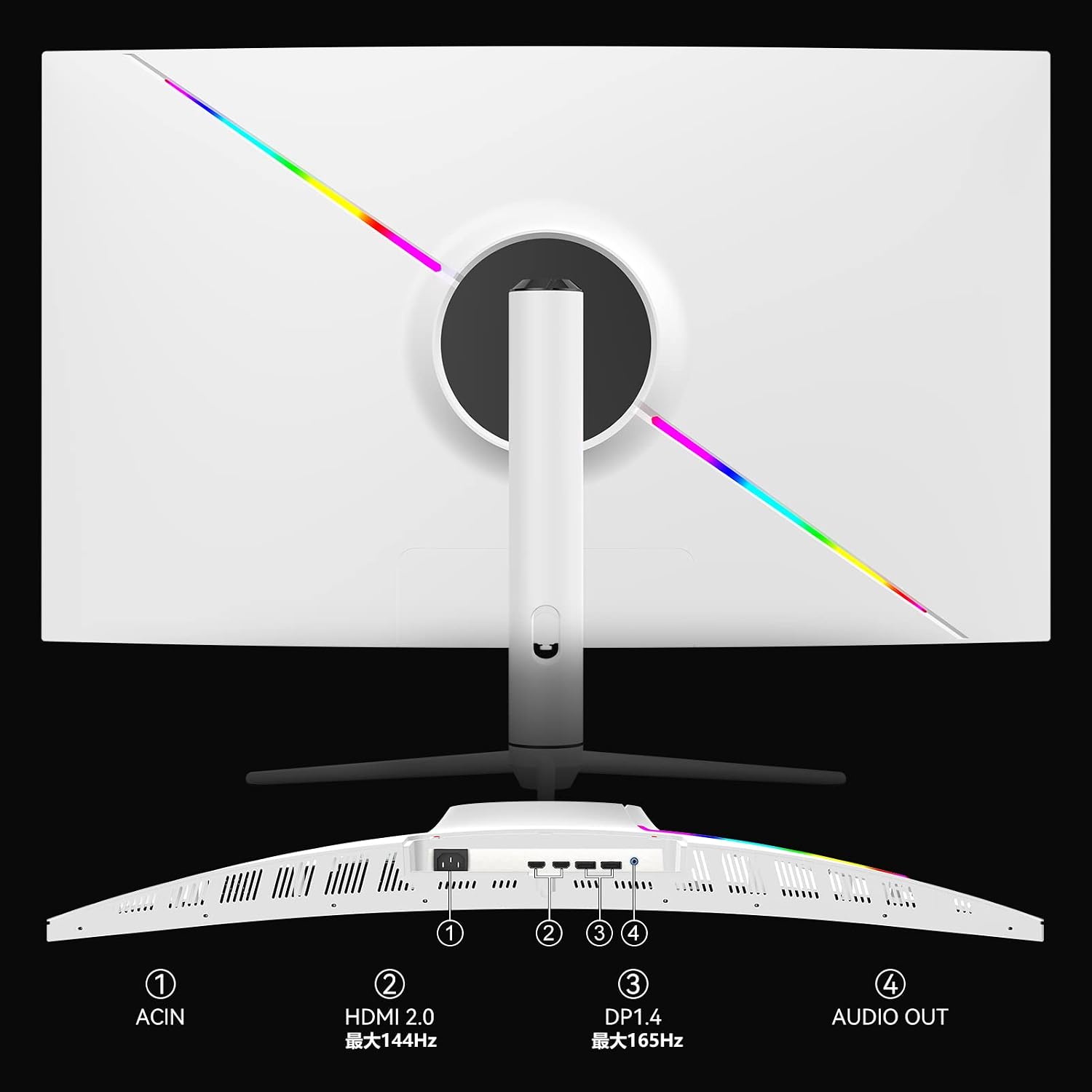
- Napajalni priključek: Priključite napajalnik na vhod za napajanje monitorja in ga nato priključite v električno vtičnico.
- DisplayPort (DP): For optimal performance and 165Hz refresh rate, connect a DisplayPort cable from your computer's graphics card to the monitor's DP 1.4 port.
- HDMI: Connect an HDMI cable from your computer or game console to one of the monitor's HDMI 2.0 ports. HDMI supports up to 144Hz refresh rate.
- Zvočni izhod: Connect external speakers or headphones to the Audio Out port if desired. The monitor has built-in speakers, but external audio devices can be used for enhanced sound.
6. Navodila za uporabo
6.1 Vklop/izklop
Press the power button, usually located on the back or bottom of the monitor, to turn the monitor on or off. The power indicator light will illuminate when the monitor is on.
6.2 Navigacija po zaslonskem meniju
The On-Screen Display (OSD) menu allows you to adjust various monitor settings. Navigate the OSD menu using the joystick or buttons typically found on the back or bottom of the monitor. Press the joystick/button to enter the menu, move it up/down/left/right to select options, and press again to confirm.
6.3 Prilagajanje nastavitev zaslona
- Resolucija: Ensure your device is set to the monitor's native resolution of 2560x1440 (WQHD) for the clearest image.
- Hitrost osveževanja: Adjust the refresh rate in your operating system's display settings. Use DisplayPort for 165Hz; HDMI supports up to 144Hz.
- HDR: Enable HDR in the OSD menu and your device's display settings for enhanced contrast and color. The monitor's brightness reaches 300-400 Nits with HDR On.
- Adaptive-Sync/G-Sync: Activate Adaptive-Sync in the OSD menu and enable G-Sync compatibility in your graphics card's control panel (if applicable) to eliminate screen tearing and stuttering during gaming.
- Zmanjšanje modre svetlobe: The monitor features TUV certified blue light reduction to minimize eye strain during prolonged use. This setting can be adjusted in the OSD menu.

7. Vzdrževanje
7.1 Čiščenje monitorja
- Pred čiščenjem monitor vedno odklopite.
- Uporabite mehko krpo, ki ne pušča vlaken, dampZaslon obrišite z vodo ali blagim, neabrazivnim čistilom za zaslone.
- Za casing, uporabite mehko, suho krpo. Izogibajte se uporabi agresivnih kemikalij ali abrazivnih materialov.
7.2 Shranjevanje
Če monitor shranjujete dalj časa, odklopite vse kable, ga po možnosti zapakirajte v originalno embalažo in shranite na hladnem in suhem mestu, stran od neposredne sončne svetlobe in ekstremnih temperatur.
8. Odpravljanje težav
Če imate težave z monitorjem, si oglejte naslednje pogoste težave in rešitve:
| Težava | Možna rešitev |
|---|---|
| Brez moči | Ensure the power cable is securely connected to the monitor and the power outlet. Check if the power outlet is functioning. |
| Ni signala | Verify that the video cable (DP or HDMI) is correctly connected to both the monitor and your device. Select the correct input source via the OSD menu. |
| Utripajoča ali popačena slika | Check the video cable for damage. Ensure your graphics card drivers are up to date. Adjust the refresh rate in your device's display settings. Enable Adaptive-Sync/G-Sync if applicable. |
| No Sound from Speakers/Headphones | Check the volume settings on the monitor and your connected device. Ensure external speakers/headphones are properly connected to the Audio Out port. |
| Gumbi se ne odzivajo | Unplug the monitor's power cable, wait for 30 seconds, then plug it back in to reset the monitor. |
9. Specifikacije
| Funkcija | Specifikacija |
|---|---|
| Znamka | NENOČNO |
| Model | 39G1R |
| Velikost zaslona | 39 palcev (38.5 palcev) viewsposoben) |
| Resolucija | 2560 x 1440 (WQHD) |
| Razmerje stranic | 16:9 |
| Vrsta plošče | VA |
| Hitrost osveževanja | 165 Hz (DisplayPort), 144 Hz (HDMI) |
| Odzivni čas | 6 ms |
| Podpora za HDR | Yes (300-400 Nits with HDR On) |
| Kontrastno razmerje | 3000:1 |
| Barvna lestvica | sRGB 99 % |
| Povezljivost | 1x DisplayPort 1.4, 2x HDMI 2.0, 1x avdio izhod |
| VESA nosilec | 100x100 mm |
| Vgrajeni zvočniki | ja |
| Mere (D x Š x V) | 28.7 cm x 87.9 cm x 51.4 cm |
10. Garancija in podpora
Innocn provides a 12-mesečno garancijsko obdobje for this product. If you encounter any issues or have questions regarding your Innocn 39G1R monitor, please contact our customer support team.
For support, please refer to the contact information provided with your purchase documentation or visit the official Innocn website. When contacting support, please have your model number (39G1R) and purchase details ready.