
1. Izdelek je končanview
The VANTRUE E2 Dual Dash Cam is designed to provide comprehensive front and rear vehicle recording with advanced features for enhanced safety and convenience. This manual provides instructions for proper installation, operation, and maintenance of your device.

Figure 1: VANTRUE E2 Dual Dash Cam Main Unit
2. Vsebina paketa
Preverite, ali so v paketu vsi spodaj navedeni predmeti. Če kateri koli predmet manjka ali je poškodovan, se obrnite na podporo strankam.

Slika 2: Vključene komponente
- VANTRUE E2 Main Dash Cam Unit
- Zadnja kamera
- Magnetic GPS Mount
- Brezžični daljinski upravljalnik
- Avto polnilec
- Rear Camera Cable (Standard 6m)
- Type-C USB Cable (1m)
- Orodje za namestitev
- 3M lepilni trak
- Elektrostatični film
- Vodnik za hiter začetek
3. Nastavitev in namestitev
Follow these steps to properly install your VANTRUE E2 Dual Dash Cam.
3.1 Namestitev armaturne kamere
The compact design and magnetic mount allow for flexible installation on the front windshield, dashboard, or rear window.

Figure 3: Mounting Options (Front Glass, Dashboard, Rear Window)

Slika 4: Diagram enostavne namestitve
- Clean the desired mounting area on your windshield or dashboard.
- Attach the electrostatic film to the windshield first, then attach the magnetic mount to the film.
- Secure the main dash cam unit to the magnetic mount.
- Zadnjo kamero priključite na glavno enoto s priloženim kablom za zadnjo kamero.
- Route the cables neatly using the installation tool to hide them along the vehicle's interior trim.
- Connect the car charger to your vehicle's cigarette lighter socket and the dash cam.
3.2 SD Card Insertion and Formatting
Insert a high-speed Micro SD card (Class 10 or higher, up to 1TB, sold separately) into the dash cam. It is crucial to format the SD card within the dash cam before its first use and periodically thereafter to ensure optimal performance and prevent recording errors.
4. Navodila za uporabo
The VANTRUE E2 offers various operating modes and control methods.
4.1 Vklop/izklop
Kamera na armaturni plošči se bo samodejno vklopila in začela snemati, ko boste vžgali vozilo. Samodejno se bo izklopila, ko boste izklopili vžig.
4.2 Načini snemanja
The E2 records simultaneously from both front and rear cameras at 1944P (2.7K) resolution, utilizing STARVIS IMX335 sensors for clear footage.

Figure 5: Front and Rear 2.7K Recording
4.3 Nočni vid in WDR
Equipped with STARVIS night vision and WDR technology, the E2 captures clear images in low-light conditions and balances exposure in high-contrast environments.
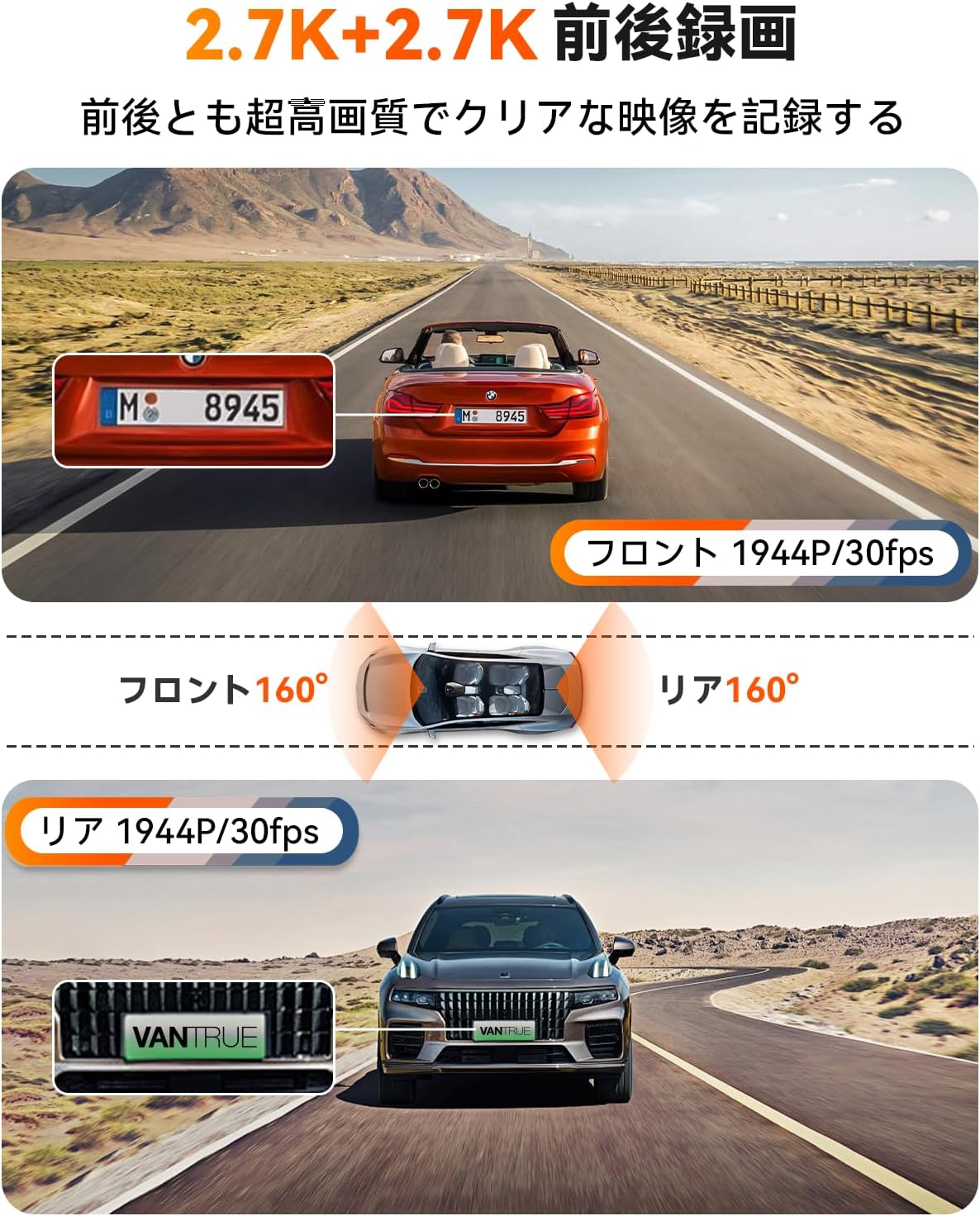
Figure 6: Enhanced Night Vision and WDR

Figure 7: WDR in Action
4.4 Funkcionalnost GPS-a
The built-in GPS module records your vehicle's speed, location (latitude and longitude), and driving route, embedding this data into the video files. This information can be viewed using the dedicated VANTRUE app or desktop viewer.
Slika 8: GPS sledenje
4.5 Glasovni nadzor
Control your dash cam hands-free using simple voice commands. This allows you to perform actions like taking photos, locking videos, or toggling audio recording without diverting your attention from the road.
Video 1: Demonstration of Voice Commands for VANTRUE E2.

Figure 9: Voice Control Features
4.6 Brezžični daljinski upravljalnik
The included wireless remote allows for quick actions such as capturing photos or locking important video segments with a single press.

Slika 10: Funkcije daljinskega upravljalnika
4.7 5.8GHz WiFi and App Control
Connect your smartphone to the dash cam via high-speed 5.8GHz WiFi using the VANTRUE app. This enables live streaming, video playback, downloading, editing, and sharing of recorded footage, as well as adjusting device settings.

Figure 11: WiFi App Control Interface
Video 2: Konecview of VANTRUE E2 features including wide-angle, resolution, night vision, GPS, G-sensor, remote, 5GHz WiFi, parking modes, and CPL filter.
4.8 Načini nadzora parkiranja
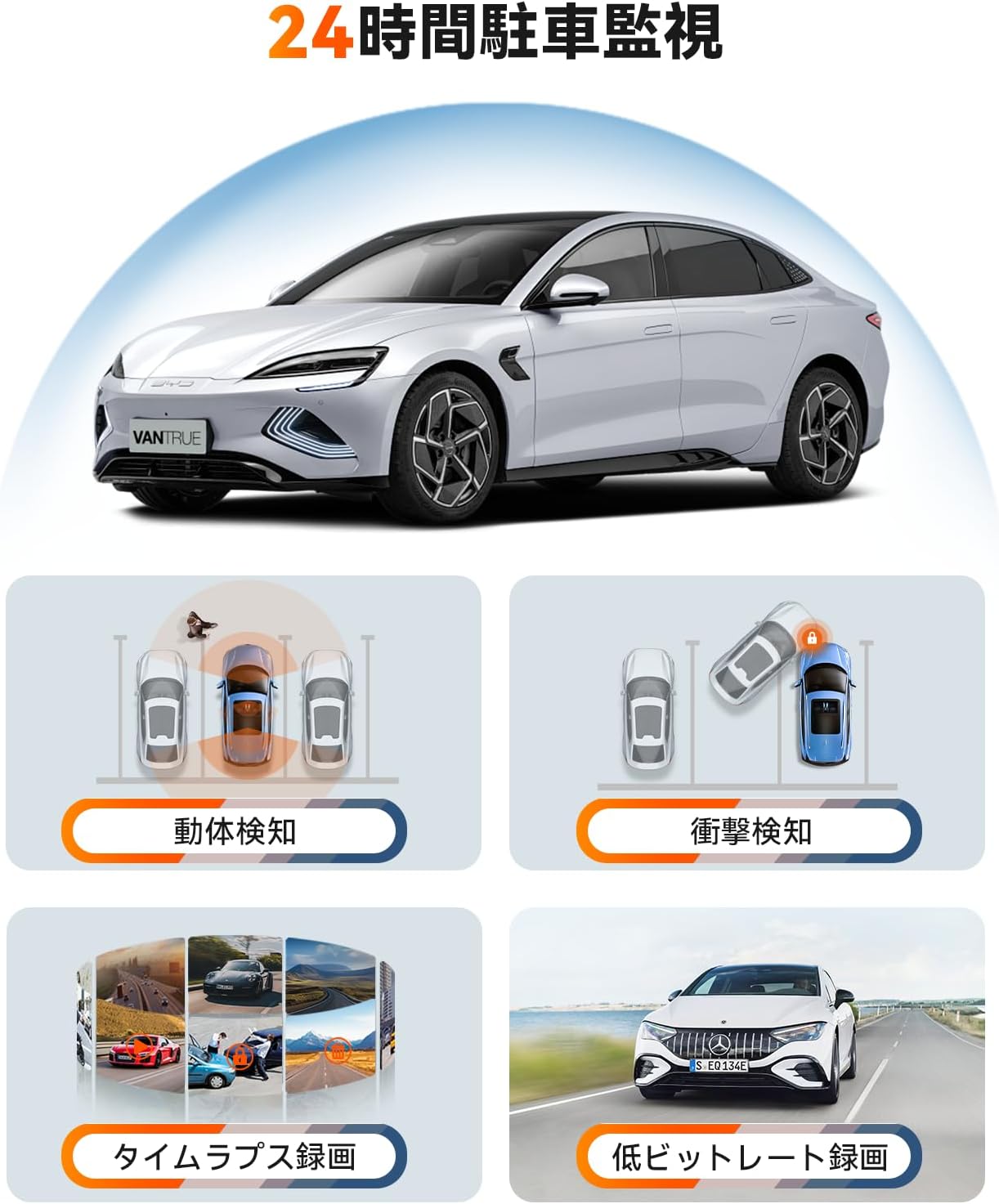
The E2 offers four distinct parking surveillance modes to protect your vehicle when parked. Note: A separately sold direct-wire power cable (ASIN: B094882TJC) is required to enable these functions.

Figure 12: 24-Hour Parking Surveillance
- Zaznavanje gibanja: Records 15 seconds before and 30 seconds after motion is detected, saving the footage to a normal folder.
- Impact Detection (Low Power Consumption): Automatically starts recording when an impact is detected while the vehicle is parked (power off).
- Low Bitrate Recording (Space Saving): Records at 1080P@15FPS or 720P@15FPS, optimizing storage space.
- Time-Lapse Recording (Space Saving): Captures images at a low frame rate and stitches them into a time-lapse video, condensing long periods into short, viewzmogljive sponke.
5. Vzdrževanje
Redno vzdrževanje zagotavlja dolgo življenjsko dobo in optimalno delovanje vaše kamere za armaturno ploščo.
5.1 Nega SD-kartice
To prevent data corruption and ensure continuous recording, format your Micro SD card within the dash cam at least once a month. Use a high-quality, reputable brand of Micro SD card (Class 10 or higher).
5.2 Čiščenje naprave
Use a soft, dry cloth to clean the dash cam's lens and screen. Avoid using abrasive cleaners or solvents that could damage the device.
6. Odpravljanje težav
If you encounter issues with your VANTRUE E2, refer to the following common solutions:
- Kamera na armaturni plošči se ne vklopi: Check the power connection to the car charger and ensure the vehicle's ignition is on. Verify the car charger is functioning correctly.
- Napake pri snemanju: Format the SD card within the dash cam. Ensure you are using a compatible high-speed SD card. Replace the SD card if errors persist.
- Slaba kakovost videa: Clean the camera lenses. Ensure the protective film has been removed from the lenses. Check that the resolution settings are appropriate.
- Težave z WiFi povezavo: Ensure the dash cam's WiFi is enabled. Restart both the dash cam and your smartphone. Reinstall the VANTRUE app if necessary.
- Način parkiranja ne deluje: Confirm that the optional direct-wire power cable (ASIN: B094882TJC) is correctly installed and connected.
For further assistance, please contact VANTRUE customer support.
7. Specifikacije
Detailed technical specifications for the VANTRUE E2 Dual Dash Cam.
| Funkcija | Specifikacija |
|---|---|
| Znamka | VREDNOST |
| Številka modela | Element 2 (E2) |
| Video ločljivost | Front: 1944P (2.7K), Rear: 1944P (2.7K) |
| Polje od View | 160 degrees (Front & Rear) |
| Zaslonka | F1.8 |
| Vrsta zaslona | LCD |
| Velikost zaslona | 2.45 palcev |
| Povezljivost | 5.8 GHz Wi-Fi |
| GPS | Vgrajen GPS modul |
| G-senzor | ja |
| Parking Modes | Motion Detection, Impact Detection, Low Bitrate, Time-Lapse |
| Nadzorne metode | App, Push Button, Voice, Wireless Remote |
| Shranjevanje | Micro SD card (up to 1TB, sold separately) |
| Mere (D x Š x V) | 2.9 x 7.4 x 4.4 cm |
| Teža | 0.88 kg |
| Država izvora | Kitajska |
8. Garancija in podpora
The VANTRUE E2 Dual Dash Cam comes with a standard 12-month warranty. You can extend this warranty to 18 months by registering your product on the official VANTRUE webspletno mesto v roku 6 mesecev od nakupa.
For any questions, concerns, or technical support, please contact VANTRUE customer service through Amazon or visit our official webmesto.