
1. Uvod in konecview
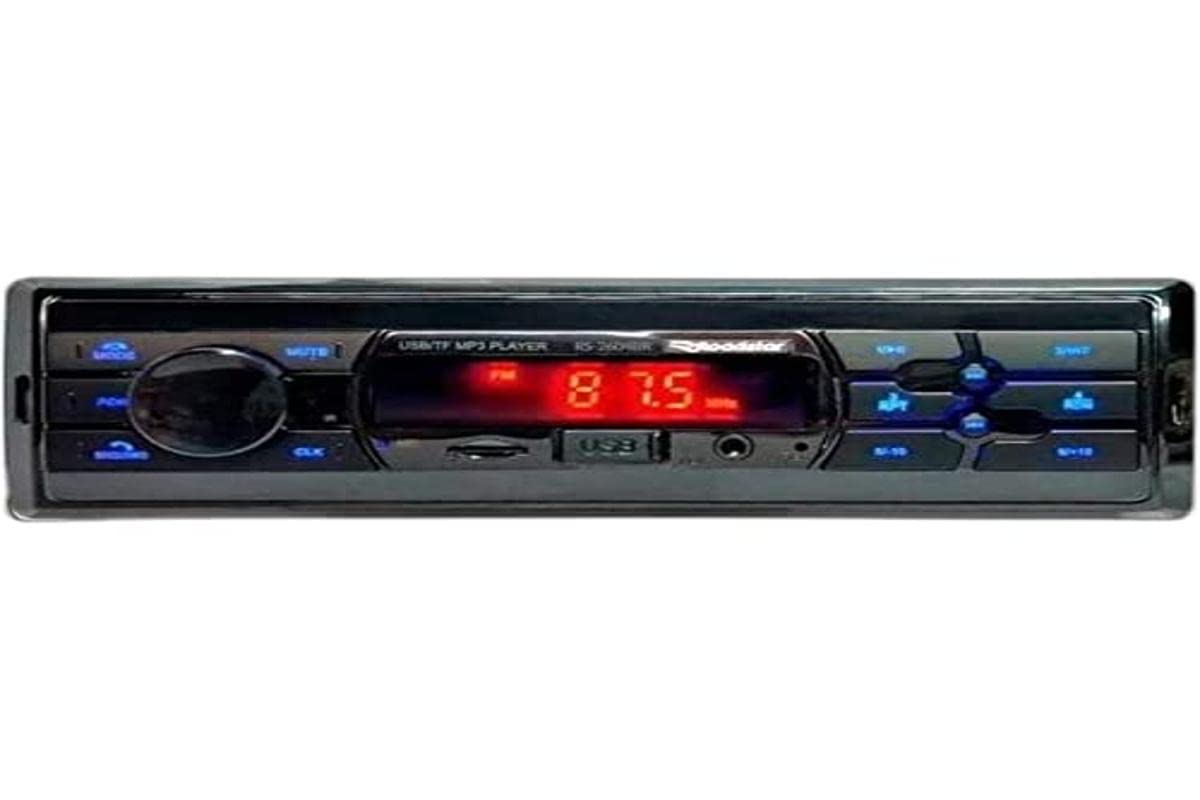
The Roadstar RS-2604BR USB/Bluetooth Car Radio is a versatile audio device designed to enhance your in-vehicle entertainment and communication. This unit features Bluetooth connectivity for wireless audio streaming and hands-free calling, a USB port for media playback, and an SD card slot. It also includes an auxiliary input for connecting other audio sources and an FM radio tuner. This manual provides essential information for the safe installation, operation, and maintenance of your new car radio.
2. Varnostne informacije
- Priporočena profesionalna namestitev: For optimal performance and safety, it is highly recommended that this product be installed by a qualified professional.
- vir energije: Napravo priključite samo na 12V enosmerno napajanje z negativno ozemljitvijo.
- Izogibajte se motnjam: Ne upravljajte enote oz view videos while driving, as this can lead to accidents.
- Ožičenje: Ensure all wiring is correctly connected according to the wiring diagram to prevent damage to the unit or vehicle. Incorrect wiring can cause fire or electric shock.
- Nadzor glasnosti: Glasnost naj bo nastavljena tako, da boste še vedno slišali zvoke prometa od zunaj.
- Vlaga: Do not expose the unit to moisture or water to prevent electric shock.
3. Vsebina paketa
Prosimo, preverite paket za naslednje artikle:
- Roadstar RS-2604BR Car Radio Unit
- Daljinski upravljalnik
- snopu
- Mounting Hardware (Screws, Brackets)
- Uporabniški priročnik (ta dokument)
4. Značilnosti izdelka
The Roadstar RS-2604BR offers a range of features for a comprehensive audio experience:
- Izhodna moč: 4 channels of 30 Watts RMS (Total 120W RMS).
- Zaslon: Clear Red LED display.
- Bluetooth povezljivost: Za brezžično pretakanje zvoka in prostoročno klicanje.
- Več vhodov: Micro SD card slot, Auxiliary input, and 1 USB port.
- Zvočni izhodi: 4 RCA outputs for external amposvežilci.
- ISO-priključek: Yes, for easy installation.
- Daljinski upravljalnik: Physical remote control included, with potential for app control.
- Nadzor zvoka: Adjustable Bass, Treble, and Channel Balance.
- Prednastavitve izenačevalnika: Predefined equalization settings for various music genres.
- Prilagodljiva osvetlitev: 7-color illumination options to match your vehicle's interior.
Slika izdelka
5. Vodič za namestitev
Proper installation is crucial for the performance and longevity of your car radio. If you are unsure about any steps, consult a professional installer.
Osnovni koraki namestitve:
- Odklopite baterijo: Pred zagonom odklopite negativni pol akumulatorja vozila, da preprečite kratke stike.
- Odstranite staro enoto: Previdno odstranite obstoječi avtoradio z armaturne plošče.
- Povežite ožičenje: Connect the wiring harness of the RS-2604BR to your vehicle's wiring. Ensure all connections (power, ground, speaker, antenna, accessory) are secure and correctly matched. The ISO connector simplifies this process.
- Montažna enota: Slide the RS-2604BR into the dashboard opening and secure it using the provided mounting hardware.
- Priključitev antene: Plug in your vehicle's radio antenna cable.
- Ponovno priključite baterijo: Ponovno priključite negativni pol akumulatorja vašega vozila.
- Testna funkcionalnost: Turn on the unit and test all functions (radio, USB, Bluetooth, sound controls) to ensure proper operation.
6. Navodila za uporabo
6.1 Osnovne kontrole
- Vklop/izklop: Pritisnite gumb za vklop (običajno gumb za glasnost), da vklopite ali izklopite napravo.
- Nadzor glasnosti: Za nastavitev glasnosti zavrtite gumb za glasnost.
- Izbira načina: Press the MODE button to cycle through available sources (FM, Bluetooth, USB, SD, AUX).
- Seek/Tune: Use the seek buttons (◀◀ / ▶▶) to change radio stations or skip tracks.
6.2 Delovanje radia (FM)
- Select FM mode using the MODE button.
- Press and hold the seek buttons (◀◀ / ▶▶) for automatic station scanning.
- Briefly press the seek buttons to manually tune to the next available station.
- To save a station, tune to the desired frequency, then press and hold one of the preset number buttons (1-6) until you hear a beep.
6.3 Bluetooth seznanjanje
- Ensure the car radio is in Bluetooth mode. The display will show "BT" or a Bluetooth icon.
- Na mobilnem telefonu omogočite Bluetooth in poiščite razpoložljive naprave.
- Select "ROADSTAR" or a similar name from the list of devices.
- If prompted, enter the pairing code (usually "0000").
- Once paired, the unit will confirm the connection, and you can stream audio or make calls.
6.4 Predvajanje z USB-ja/SD-kartice
- Vstavite USB-ključek v vrata USB ali SD-kartico v režo za SD-kartico.
- The unit will automatically switch to USB/SD mode and begin playing compatible audio files.
- Use the seek buttons (◀◀ / ▶▶) to skip tracks.
- Use the Play/Pause button to pause or resume playback.
6.5 Pomožni vhod
Connect an external audio device (e.g., MP3 player, smartphone) to the AUX input jack using a 3.5mm audio cable. Select AUX mode using the MODE button to play audio from the connected device.
6.6 Sound Settings and Illumination
- Izenačevalnik: Press the EQ button (or similar) to cycle through predefined equalizer settings (e.g., POP, ROCK, JAZZ, CLASSIC, USER).
- Bass/Treble/Balance: Press the AUDIO button repeatedly to access settings like BASS, TREBLE, FADER (front/rear balance), and BALANCE (left/right balance). Use the volume knob to adjust these values.
- Osvetlitev: The unit features 7-color illumination. Refer to the specific button on your unit (often labeled 'CLR' or similar) or the remote control to cycle through the available colors and select your preferred display color.
Video predstavitev izdelka
7. Odpravljanje težav
If you encounter issues with your Roadstar RS-2604BR, refer to the following common problems and solutions:
| Težava | Možen vzrok | rešitev |
|---|---|---|
| Brez moči | Blown fuse, incorrect wiring, loose power connection. | Check vehicle's fuse box and the unit's fuse. Verify all power and ground wires are securely connected. |
| Brez zvoka | Muted, incorrect source selected, loose speaker wires, damaged speakers. | Check if the unit is muted. Ensure the correct audio source is selected. Verify speaker wire connections. Test with different speakers if possible. |
| Bluetooth se ne povezuje | Unit not in pairing mode, phone's Bluetooth off, interference. | Ensure the unit is in Bluetooth mode. Turn your phone's Bluetooth off and on again. Delete previous pairings and try re-pairing. |
| USB/SD not reading | Nezdružljivo file format, corrupted media, incorrect insertion. | Zagotovite files are in a compatible format (e.g., MP3, WMA). Try a different USB drive or SD card. Ensure media is inserted correctly. |
| Daljinski upravljalnik ne deluje | Dead battery, obstruction, out of range. | Replace the remote control battery. Ensure no obstructions between the remote and the unit's IR sensor. |
8. Specifikacije
| Funkcija | Specifikacija |
|---|---|
| Znamka | Roadstar |
| Številka modela | RS-2604BR (78650) |
| Tehnologija povezljivosti | USB, Bluetooth |
| Združljive naprave | Pametni telefon, Zvočniki |
| Vrsta priključka | USB, Auxiliary, RCA |
| Način avdio izhoda | Stereo |
| Izhodna moč | 30 Watts per channel (RMS) |
| Število kanalov | 4 |
| Nadzorna metoda | Daljinsko |
| Brezžična komunikacijska tehnologija | Bluetooth |
| Teža predmeta | 300 gramov |
| Vključene komponente | Radio, Remote Control |
| barva | White (Note: Product image shows black/blue unit, color may vary by specific variant) |
9. Vzdrževanje
To ensure the longevity and optimal performance of your Roadstar RS-2604BR car radio, follow these maintenance guidelines:
- Čiščenje: Use a soft, dry cloth to clean the unit's exterior. Do not use abrasive cleaners, solvents, or chemical sprays, as they can damage the finish or internal components.
- Izogibajte se tekočinam: Keep the unit away from water and other liquids. If liquid enters the unit, immediately disconnect power and have it inspected by a qualified technician.
- Temperatura: Izogibajte se izpostavljanju enote ekstremnim temperaturam, neposredni sončni svetlobi dlje časa ali visoki vlažnosti.
- USB/SD Port Care: When inserting or removing USB drives or SD cards, do so gently to avoid damaging the ports.
10. Garancija in podpora
Informacije o garanciji
This Roadstar RS-2604BR car radio comes with a 12-mesečna garancija from the date of purchase. This warranty covers manufacturing defects under normal use. It does not cover damage caused by improper installation, misuse, accidents, unauthorized repairs, or normal wear and tear.
Podpora uporabnikom
For technical assistance, warranty claims, or further inquiries, please contact Roadstar customer support through their official website or the retailer where the product was purchased. Please have your proof of purchase and product model number ready when contacting support.