Hvala za nakupasing the OFANTOP 132cm Modern Ceiling Fan. This manual provides detailed instructions for safe installation, operation, and maintenance of your new ceiling fan. Please read this manual thoroughly before installation and keep it for future reference.
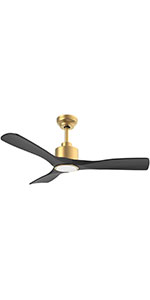
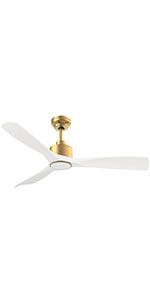
Image 1.1: The OFANTOP 132cm Modern Ceiling Fan, featuring a sleek black motor housing and three dark wood-grain blades, with an integrated LED light kit.
2. Varnostna navodila
Pri nameščanju in upravljanju električnih naprav vedno upoštevajte osnovne varnostne ukrepe, da zmanjšate tveganje požara, električnega udara in telesnih poškodb.
Pred začetkom namestitve preberite vsa navodila.
Pred namestitvijo ali servisiranjem se prepričajte, da je napajanje izklopljeno na odklopniku.
Vsa napeljava mora biti v skladu z nacionalnimi in lokalnimi električnimi predpisi. Če niste prepričani glede napeljave, se posvetujte z usposobljenim električarjem.
Montažna konstrukcija mora biti sposobna podpirati težo ventilatorja (približno 7.91 kg).
Ventilatorja ne uporabljajte s poškodovanimi lopaticami ali ohišjem.
Med delovanjem ventilatorja imejte roke, oblačila in druge predmete stran od lopatic ventilatorja.
This fan is suitable for both indoor and outdoor (patio/porch) use, with an IP44 rating for protection against splashing water.
3. Vsebina paketa
Pred začetkom namestitve preverite, ali so prisotne vse komponente:
Motor Housing Assembly (with integrated LED light)
Rezila ventilatorja (3)
Downrods (15cm and 25cm options)
Montažni nosilec
Daljinski upravljalnik s stenskim nosilcem
Paket strojne opreme (vijaki, podložke, matice)
Uporabniški priročnik
4. Nastavitev in namestitev
Follow these steps for proper installation of your ceiling fan.
4.1 Predhodna namestitev
Before installation, ensure the electrical box is securely mounted to the building structure and can support the fan's weight. Confirm that the power supply is turned off at the main circuit breaker.
4.2 Namestitev nosilca
Attach the mounting bracket to the ceiling electrical box using the provided screws. Ensure the bracket is firmly secured.
Image 4.1: Diagram illustrating flat ceiling mounting for the fan.
Image 4.2: Diagram illustrating sloped ceiling mounting, supporting angles up to 15 degrees.
4.3 Sestavljanje ventilatorja
Insert the chosen downrod (15cm or 25cm) into the motor housing.
Previdno dvignite sklop ventilatorja in ga obesite na nosilec.
Connect the electrical wires according to the wiring diagram (typically black to black, white to white, and green/bare copper to ground).
Pritrdite lopatice ventilatorja na ohišje motorja s priloženimi vijaki. Prepričajte se, da so vsi vijaki varno priviti.
Image 4.3: Detailed dimensions of the ceiling fan, showing its 132cm (52 inch) span and various height options with different downrods.
5. Navodila za uporabo
Your OFANTOP ceiling fan offers multiple control options for convenience.
5.1 Delovanje daljinskega upravljalnika
The included remote control allows full functionality of the fan and light. Install 2 AAA batteries (not included) into the remote.
Hitrost ventilatorja: Select from 6 wind speeds (1-6) to adjust airflow.
Nadzor svetlobe: Turn the LED light ON/OFF.
Zatemnitev: Prilagodite svetlost LED luči.
Barvna temperatura: Cycle through Cool White (6000K), Natural Light (4500K), and Warm Light (3000K).
Časovnik: Nastavite ventilator, da se samodejno izklopi po 1, 4 ali 8 urah.
Povratna funkcija: Toggle between summer (downward airflow) and winter (upward airflow) modes.
Image 5.1: The ceiling fan in a living room setting, highlighting the remote control and its key features: 6 wind speeds, reversible function, and timer settings.
Image 5.2: Illustration of the dimmable LED light feature, showing the fan's light output at Cool White (6000K), Natural Light (4500K), and Warm Light (3000K).
5.2 Pametno upravljanje (aplikacija in glas)
This smart ceiling fan can be controlled via a dedicated mobile application and voice commands through Amazon Alexa or Google Assistant. Ensure your fan is connected to a 2.4GHz Wi-Fi network for initial setup. After setup, it can operate on 5GHz.
Nadzor aplikacij: Download the OFANTOP smart home app (refer to the app store for specific app name). Follow in-app instructions to pair your fan.
Glasovni nadzor: Once paired with the app, enable the OFANTOP skill/action in your Alexa or Google Home app to control the fan with voice commands.
Image 5.3: Visual representation of the multiple control options available for the fan, including remote control, smart app, and voice control via Alexa and Google Assistant.
5.3 Reverse Function Explained
The reversible function allows you to optimize air circulation for different seasons.
Poletni način: Blades rotate counter-clockwise, pushing cool air downwards, creating a refreshing breeze.
Zimski način: Blades rotate clockwise, drawing cool air up towards the ceiling and circulating warm air downwards, helping to distribute heat more evenly.
Image 5.4: Diagram illustrating the fan's reversible function, showing downward airflow for summer cooling and upward airflow for winter heat circulation.
6. Vzdrževanje
Redno vzdrževanje zagotavlja optimalno delovanje in dolgo življenjsko dobo vašega stropnega ventilatorja.
Čiščenje: Da preprečite praskanje površine, ventilator očistite z mehko,amp krpo. Ne uporabljajte abrazivnih čistil ali topil.
Čiščenje rezila: Dust the blades regularly to prevent dust buildup, which can affect balance and performance.
Zatezni vijaki: Periodically check all screws on the fan and mounting hardware to ensure they are tight. Loose connections can cause noise or wobbling.
Vir svetlobe: The integrated LED light source is designed for long life. If replacement is ever needed, consult a qualified technician.
7. Odpravljanje težav
Če imate težave z ventilatorjem, si oglejte naslednje pogoste težave in rešitve:
Težava
Možen vzrok
rešitev
Ventilator se ne zažene
Ventilator ni napajan Zrahljane žične povezave Remote control battery low/dead
Preverite odklopnik in stensko stikalo. Preverite, ali so vse žične povezave varne (najprej se prepričajte, da je napajanje izklopljeno). Zamenjajte baterije daljinskega upravljalnika.
Privijte vse vijake rezila. Ensure blades are installed correctly and are not bent. Use a balancing kit if necessary. Privijte vijake nosilca.
Hrupno delovanje
Zrahljani vijaki Motor hum Blades hitting an obstruction
Preverite in privijte vse vijake. A slight hum from the DC motor is normal, especially at higher speeds. Ensure fan is securely mounted. Ensure nothing is obstructing the blades' path.
Svetloba ne deluje
Ohlapna žična povezava Izklop luči Težava z LED modulom
Check light wire connections. Ensure light is turned on via remote or app. Če težava vztraja, se obrnite na podporo strankam.
Daljinski upravljalnik ne deluje
Batteries dead/incorrectly inserted Daljinski upravljalnik ni seznanjen
Zamenjajte baterije in pazite na pravilno polarnost. Refer to pairing instructions in the full manual (if applicable).
8. Specifikacije
Funkcija
Specifikacija
Znamka
OFANTOP
Številka modela
7068
Dimenzije (D x Š x V)
132 x 132 x 29.5 cm (52 inch diameter)
Teža
7.91 kilogramov
Moč
35 vatov
voltage
230 voltov (DC)
Nivo hrupa
30 dB
Število rezil
3
Vrsta motorja
DC motor
Nastavitve hitrosti
6 hitrosti
Vrsta svetlobe
Zatemnljiva LED (3000K/4500K/6000K)
Nadzorne metode
Remote Control, Smart APP, Voice (Alexa, Google Assistant)
Funkcija časovnika
1H, 4H, 8H
Reverzibilna funkcija
Da (poletni/zimski način)
Ocena IP
IP44 (Suitable for outdoor patios/porches)
Pretok zraka (CFM)
Up to 6335 CFM (High Speed)
Ceiling Mount Type
Flat or Sloped (up to 15°)
9. Garancija in podpora
OFANTOP is committed to providing high-quality products. For any questions, technical assistance, or warranty claims, please contact OFANTOP customer support through the retailer's platform or the official brand webspletno mesto. Ko se obrnete na podporo, imejte pripravljeno številko modela (7068) in podatke o nakupu.
Ask a question about this manual
Ask about setup, troubleshooting, compatibility, parts, safety, or missing instructions. Manuals+ will review the question and use this page’s manual context to help answer it.