
1. Uvod
The XPG Levante X 360 is an All-in-One (AIO) ARGB CPU Liquid Cooler designed to provide efficient and reliable thermal management for high-performance CPUs. This cooler features a 360mm radiator equipped with three 120mm Fluid Dynamic Bearing (FDB) ARGB fans and an Asetek-powered pump, ensuring optimal heat dissipation and quiet operation. This manual provides essential information for the proper installation, operation, and maintenance of your XPG Levante X 360 liquid cooler.
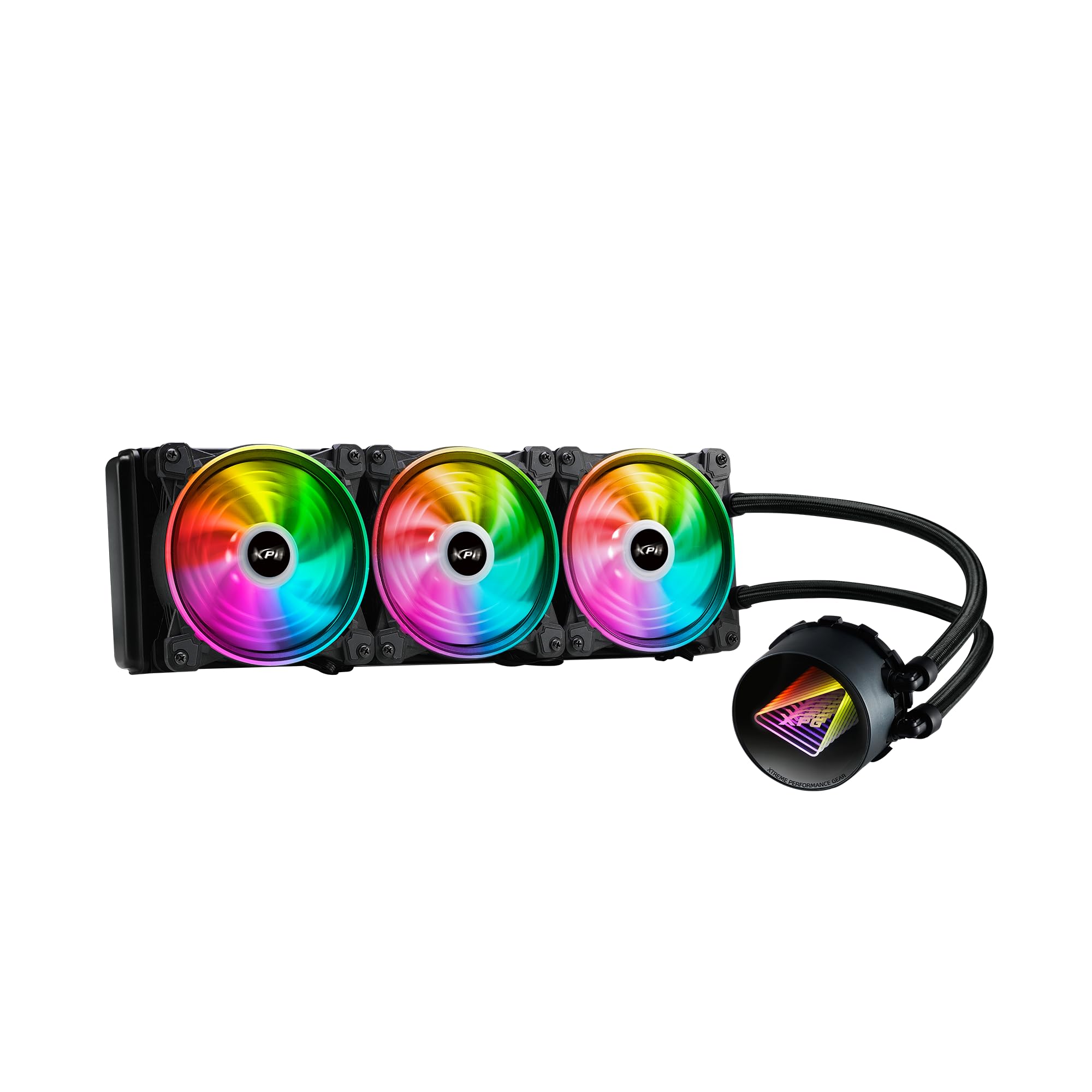
Image 1.1: XPG Levante X 360 All-in-One ARGB CPU Liquid Cooler. This image displays the complete liquid cooler unit, including the 360mm radiator, three 120mm ARGB fans, and the pump/cold plate assembly with braided tubing.
2. Vsebina paketa
Verify that all components are present and in good condition before proceeding with installation.
- XPG Levante X 360 CPU Liquid Cooler (Radiator, Pump, Tubing, 3x 120mm ARGB Fans)
- Mounting Bracket Kit for Intel (LGA 1700, 1200, 115X, 2066, 2011-3, 2011)
- Mounting Bracket Kit for AMD (AM5, AM4, TR4)
- Vijaki ventilatorja in vijaki radiatorja
- ARGB Controller/Cables
- Termalna pasta (vnaprej nanesena ali v tubi)
- Uporabniški priročnik (ta dokument)

Image 2.1: Package contents. This image shows the radiator with fans, pump, various mounting brackets, screws, and cables included in the box.
3. Varnostne informacije
Please read and understand the following safety precautions before installing or operating the XPG Levante X 360 liquid cooler.
- Odklop napajanja: Pred kakršno koli namestitvijo ali vzdrževanjem vedno izključite računalnik iz napajanja.
- Elektrostatična razelektritev (ESD): Take precautions against ESD by grounding yourself before handling components.
- Ravnanje s tekočino: While the cooler is a sealed unit, handle it with care to prevent damage to the tubing or radiator, which could lead to leaks.
- Ostri robovi: Be aware of sharp edges on computer cases and cooler components during installation.
- Prezračevanje: Ensure adequate airflow within your computer case for optimal cooling performance.
- Združljivost: Verify compatibility with your CPU socket and computer case before installation.
4. Nastavitev in namestitev
The XPG Levante X 360 is designed for hassle-free installation. Follow these steps carefully for proper setup.
4.1 Priprava sistema
- Izklopite računalnik in odklopite vse kable.
- Odprite ohišje računalnika, da dostopate do matične plošče in procesorja.
- Odstranite morebitni obstoječi hladilnik procesorja. Temeljito očistite površino procesorja, da odstranite staro termalno pasto.
4.2 Namestite pritrdilno opremo
Select the appropriate mounting bracket for your CPU socket (Intel or AMD). The cooler supports LGA 1700, 1200, 115X, 2066, 2011-3, 2011 for Intel, and AM5, AM4, TR4 for AMD.
- Attach the correct backplate to the rear of your motherboard (for Intel sockets). AMD AM4/AM5 typically uses the stock backplate.
- Distančnike pritrdite na matično ploščo skozi luknje za pritrditev hladilnika procesorja.
- Attach the chosen CPU bracket to the pump head.

Image 4.1: Key features highlighting support for LGA 1700 and AM5 sockets, along with low noise fan, aluminum radiator, high quality low noise pump, and hassle-free installation.
4.3 Mount the Radiator and Fans
Determine the optimal mounting location for the 360mm radiator within your case (e.g., front, top).
- If not pre-attached, mount the three 120mm ARGB fans to the radiator using the provided fan screws. Ensure correct airflow direction (intake or exhaust) based on your case's ventilation strategy.
- Secure the radiator assembly to your chosen mounting location in the PC case using the longer radiator screws.
4.4 Install the Pump Head
Carefully place the pump head onto the CPU, aligning the mounting holes with the standoffs.
- If thermal paste is not pre-applied, apply a small pea-sized amount to the center of the CPU's integrated heat spreader (IHS).
- Place the pump head onto the CPU, ensuring even contact.
- Tighten the thumbscrews or nuts in a diagonal pattern until snug. Do not overtighten.
4.5 Priključite kable
Connect the pump and fan cables to your motherboard or ARGB controller.
- Connect the pump's 3-pin or 4-pin power cable to the motherboard's CPU_FAN or AIO_PUMP header.
- Connect the 4-pin PWM fan cables from the three 120mm fans to available fan headers on your motherboard or to a fan hub/controller.
- Connect the ARGB cables from the fans and pump head to an ARGB header on your motherboard (5V 3-pin) or to the included ARGB controller.

Image 4.2: The XPG Levante X 360 cooler installed inside a computer case, showcasing the illuminated pump head and ARGB fans.
5. Navodila za uporabo
Once installed, the XPG Levante X 360 operates automatically to cool your CPU.
- Začetni vklop: After installation, power on your computer. The pump and fans should start operating. Check for any unusual noises or leaks.
- Krmiljenje ventilatorja in črpalke: The 4-pin PWM fans and pump allow for speed control via your motherboard's BIOS/UEFI settings or dedicated software. Adjust fan curves to balance cooling performance and noise levels.
- ARGB osvetlitev: The Addressable RGB (ARGB) lighting on the fans and pump head can be controlled via your motherboard's ARGB software (e.g., ASUS Aura Sync, MSI Mystic Light Sync, GIGABYTE RGB Fusion, ASRock Polychrome Sync) or through the included ARGB controller.

Slika 5.1: Bližnji posnetek view of the XPG Levante X 360's ARGB fans and pump, illustrating the vibrant lighting effects.
6. Vzdrževanje
Redno vzdrževanje pomaga zagotoviti optimalno delovanje in dolgo življenjsko dobo vašega hladilnika tekočin.
- Odstranjevanje prahu: Periodically clean dust from the radiator fins and fan blades using compressed air or a soft brush. Excessive dust can impede airflow and reduce cooling efficiency.
- Preglejte cevje: Occasionally check the tubing for any signs of kinks, cracks, or leaks.
- Delovanje ventilatorja: Ensure all fans are spinning freely and quietly. Replace any fans that become excessively noisy or stop functioning.
- Delovanje črpalke: Listen for any unusual noises from the pump. A properly functioning pump should operate quietly.
7. Odpravljanje težav
If you encounter issues with your XPG Levante X 360, refer to the following common problems and solutions.
| Težava | Možen vzrok | rešitev |
|---|---|---|
| Pregrevanje procesorja | Poor thermal paste application, pump not running, fans not spinning, insufficient mounting pressure. | Reapply thermal paste, check pump and fan connections, ensure pump head is securely mounted. Verify fan direction. |
| Ventilatorji se ne vrtijo | Loose fan cable connection, incorrect fan header, faulty fan. | Check fan cable connections to motherboard/controller. Ensure correct fan headers are used. Test fans individually if possible. |
| Črpalka ne deluje | Loose pump power cable, incorrect pump header, faulty pump. | Verify pump power cable is securely connected to the CPU_FAN or AIO_PUMP header. Check BIOS settings for pump control. |
| ARGB osvetlitev ne deluje | Loose ARGB cable connection, incorrect ARGB header (5V vs 12V), software issue. | Ensure ARGB cables are connected to a 5V 3-pin ARGB header. Check motherboard ARGB software. Verify connections to the ARGB controller. |
| Prekomerni hrup | Fan speed too high, pump noise, air bubbles in the loop. | Adjust fan curves in BIOS/software. Orient radiator to ensure pump is not the highest point to minimize air bubbles. |
8. Specifikacije
Detailed technical specifications for the XPG Levante X 360 All-in-One ARGB CPU Liquid Cooler.
- Model: LEVANTEX360-BKCWW
- Vrsta hladilnika: All-in-One Liquid CPU Cooler
- Velikost radiatorja: 360 mm
- Velikost ventilatorja: 120 mm (x3)
- Tip ventilatorja: ARGB Fluid Dynamic Bearing (FDB) Fans
- Priključek ventilatorja: 4-Pin PWM
- Največja vrtilna hitrost: 2000 RPM
- Zmogljivost pretoka zraka: 61.5 kubičnih čevljev na minuto (CFM)
- Raven hrupa: 18.17 decibelov (dBA)
- Tip črpalke: Asetek-powered High-Performance Pump
- Črpalka Voltage: 12 volta
- Metoda hlajenja: Tekočina
- Material: Aluminij (radiator), baker (hladna plošča)
- Compatible CPU Sockets:
- Intel: LGA 1700, 1200, 115X, 2066, 2011-3, 2011
- AMD: AM5, AM4, TR4
- Dimenzije izdelka (paket): 18.9 x 5.91 x 7.48 palcev
- Teža artikla: 4.71 funtov
- UPC: 842243029062
- Proizvajalec: Adata

Image 8.1: Graph illustrating the relationship between PWM duty cycle, fan speed (RPM), fan air flow (CFM), and fan noise (dBA) for the XPG Hurricane 120 ARGB PWM fans.
9. Garancija in podpora
XPG products are manufactured to the highest quality standards. For warranty information, technical support, or service inquiries, please refer to the official XPG webspletno mesto ali se obrnite na njihovo podporo strankam. Shranite dokazilo o nakupu za uveljavljanje garancije.
Official XPG Webspletno mesto: www.xpg.com