
1. Uvod
Thank you for choosing the Hoco GA08 Smart Sports Bracelet. This device is designed to help you monitor your fitness activities and health metrics, providing convenient notifications and smart features directly on your wrist. Please read this manual carefully before using the product to ensure proper operation and to maximize its potential.
2. Vsebina paketa
Označite polje za naslednje elemente:
- Hoco GA08 Smart Sports Bracelet (main unit and strap)
- USB polnilni kabel
- Uporabniški priročnik
3. Izdelek je končanview
Familiarize yourself with the components of your Hoco GA08 Smart Sports Bracelet.

Figure 3.1: Hoco GA08 Smart Sports Bracelet and its retail packaging.
3.1 Main Unit and Strap
The main unit houses the display, sensors, and internal electronics. It is designed to be detachable from the strap for charging and maintenance.
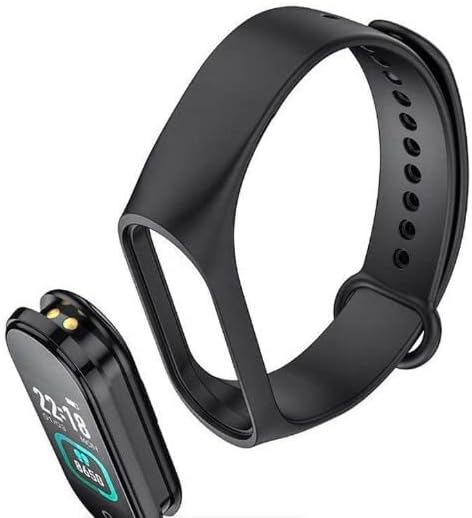
Figure 3.2: The main unit of the Hoco GA08 Smart Sports Bracelet detached from its silicone strap.
3.2 Senzorji in polnilni kontakti
On the underside of the main unit, you will find the optical sensors for heart rate and blood pressure monitoring, along with the charging contacts.

Slika 3.3: Zadaj view of the Hoco GA08 Smart Sports Bracelet, highlighting the health sensors and charging pins.
4. Nastavitev
4.1 Polnjenje naprave
- Gently detach the main unit from the strap.
- Connect the main unit to the USB charging cable, ensuring the charging contacts align correctly.
- Priključite USB konec kabla v standardni USB napajalnik (priporočeno 5 V/1 A) ali USB vrata računalnika.
- The bracelet display will show a charging indicator. A full charge typically takes 1-2 hours.
4.2 Prenos spremljevalne aplikacije
To unlock all features and synchronize data, download the dedicated companion app on your smartphone. Iskanje the app name (usually mentioned in the quick start guide or on the product packaging) in your device's app store (Google Play Store for Android or Apple App Store for iOS).
4.3 Seznanjanje s pametnim telefonom
- Prepričajte se, da je Bluetooth na vašem pametnem telefonu omogočen.
- Odprite spremljevalno aplikacijo na pametnem telefonu.
- Follow the in-app instructions to search for and connect to your Hoco GA08 bracelet. The bracelet's name will typically appear as 'GA08' or 'Hoco GA08'.
- Confirm the pairing request on both your smartphone and the bracelet if prompted.
5. Navodila za uporabo
The Hoco GA08 Smart Sports Bracelet features a touch-sensitive button or area for navigation. Tap to cycle through functions, or long-press to select/activate.
5.1 Osnovna navigacija
- Tapnite: Short press the touch area to switch between different display screens (time, steps, heart rate, etc.) or to navigate within a menu.
- Dolg pritisk: Press and hold the touch area for a few seconds to enter a function, confirm a selection, or start/stop an activity.
5.2 Spremljanje zdravja
- Spremljanje srčnega utripa: Navigate to the heart rate screen. The bracelet will automatically begin measuring your heart rate. Ensure the bracelet is snug on your wrist for accurate readings.
- Meritev krvnega tlaka: Navigate to the blood pressure screen. Remain still and relaxed during the measurement.
- Prikaz temperature: Navigate to the temperature screen to view your current body temperature.
5.3 športnih načinov
The bracelet supports 6 športnih načinov. Navigate to the sports mode section and long-press to select your desired activity. The bracelet will track relevant metrics such as duration, steps, and calories burned during your workout.
5.4 Pametne funkcije
- Clock, Stopwatch, Alarm, Timer, Calendar: Access these time-keeping functions directly from the bracelet. Alarms and timers can often be set via the companion app.
- Incoming Message and Call Notifications: Once paired with your smartphone, the bracelet will vibrate and display notifications for incoming calls and messages.
- Iskanje telefona: Use this feature to make your paired smartphone ring, helping you locate it.
- Funkcija opomnika: Set custom reminders through the app for hydration, movement, or other tasks.
- Prikaz vremena: View current weather conditions after synchronizing with the companion app and your phone's location services.
- Oddaljeno fotografiranje: Use the bracelet as a remote shutter button for your smartphone camera. Open the camera in the app, then shake the bracelet or tap its touch area to take a photo.
6. Vzdrževanje
- Čiščenje: Regularly clean the bracelet, especially the sensors and charging contacts, with a soft, dry cloth. If necessary, use a slightly damp krpo in blagim milom, nato temeljito posušite.
- Izogibajte se kemikalijam: Do not use harsh chemicals, cleaning solvents, or strong detergents, as these can damage the device.
- Vodoodpornost: The bracelet typically has a certain level of water resistance (e.g., IP67). Avoid prolonged submersion or use in hot water/steam. Refer to product specifications for exact water resistance ratings.
- Shranjevanje: Store the bracelet in a cool, dry place when not in use.
- Vzdrževanje baterije: Avoid completely draining the battery frequently. Charge the device regularly to maintain battery health.
7. Odpravljanje težav
If you encounter issues with your Hoco GA08 Smart Sports Bracelet, try the following solutions:
- Naprava se ne vklopi: Prepričajte se, da je naprava popolnoma napolnjena. Priključite jo na polnilnik za vsaj 30 minut.
- Seznanjanje s pametnim telefonom ni mogoče:
- Prepričajte se, da je Bluetooth omogočen v vašem telefonu.
- Make sure the bracelet is charged and within Bluetooth range of your phone.
- Restart both your phone and the bracelet.
- Poskusite prekiniti seznanitev in ponovno seznaniti napravo prek aplikacije.
- Netočne zdravstvene meritve:
- Ensure the bracelet is worn snugly on your wrist, about one finger's width above the wrist bone.
- Keep still during measurements.
- Clean the sensor area on the back of the bracelet.
- Obvestila se ne prikazujejo:
- Check app permissions on your smartphone to ensure the companion app has access to notifications.
- Verify that notification settings are enabled within the companion app.
- Ensure the bracelet is connected via Bluetooth.
8. Specifikacije
| Funkcija | Opis |
|---|---|
| Blagovna znamka | Hoco |
| Model | GA08 |
| Operating System (App Compatibility) | Android |
| Posebne lastnosti | Heart Rate Monitor, Blood Pressure Measurement, 6 Sports Modes, Notifications, Remote Camera Control, Weather Display, Temperature Display |
| Oblika predmeta | Ovalna |
| Slog | Primerno za vse letne čase |
| barva | Črna |
| Ciljna publika | Adults (Unisex) |
| Združljive naprave | Pametni telefon |
| Barva traku | Črna |
| Vrsta materiala ohišja | Smola |
9. Varnostne informacije
- This device is not a medical device and should not be used to diagnose or treat any medical condition. Consult a healthcare professional for medical advice.
- Napravo hranite stran od ekstremnih temperatur, neposredne sončne svetlobe in odprtega ognja.
- Naprave ne poskušajte razstavljati ali spreminjati. To bo razveljavilo garancijo in lahko povzroči škodo ali poškodbe.
- Hraniti izven dosega otrok.
- Če občutite draženje kože ali nelagodje, prenehajte z uporabo in se posvetujte z zdravnikom.
10. Garancija in podpora
For warranty information and customer support, please refer to the warranty card included in your product packaging or visit the official Hoco website. Typically, warranty covers manufacturing defects for a specified period from the date of purchase.
If you require technical assistance or have questions not covered in this manual, please contact Hoco customer service through their official channels.