
1. Uvod
Hvala za nakupasing the Lenco SCD-341 Portable CD-Radio. This device combines a CD player, DAB+ and FM radio, and Bluetooth connectivity in a compact design. This manual provides essential information for safe and efficient use of your new audio system. Please read it thoroughly before operation and retain it for future reference.
2. Varnostne informacije
- Naprave ne izpostavljajte dežju ali vlagi, da preprečite požar ali električni udar.
- Zagotovite ustrezno prezračevanje. Ne blokirajte prezračevalnih odprtin.
- Uporabljajte samo napajalnik, ki je priložen enoti.
- Ne odpirajte casing. Vsa servisna dela prepustite usposobljenemu osebju.
- Izogibajte se postavljanju enote v bližino virov toplote ali na neposredno sončno svetlobo.
- Enoto hranite stran od močnih magnetnih polj.
3. Vsebina paketa
Prosimo, preverite, ali so vsi predmeti prisotni in v dobrem stanju:
- Lenco SCD-341 Portable CD-Radio Unit
- Napajalni adapter
- Uporabniški priročnik (ta dokument)
- Vodnik za hiter začetek
4. Izdelek je končanview
The Lenco SCD-341 features a user-friendly interface with clearly labeled buttons and an LCD display.

Slika 1: Spredaj view of the Lenco SCD-341, showing the main controls, LCD display, and stereo speakers.

Figure 2: Lenco SCD-341 with its integrated handle and telescopic antenna extended for radio reception.
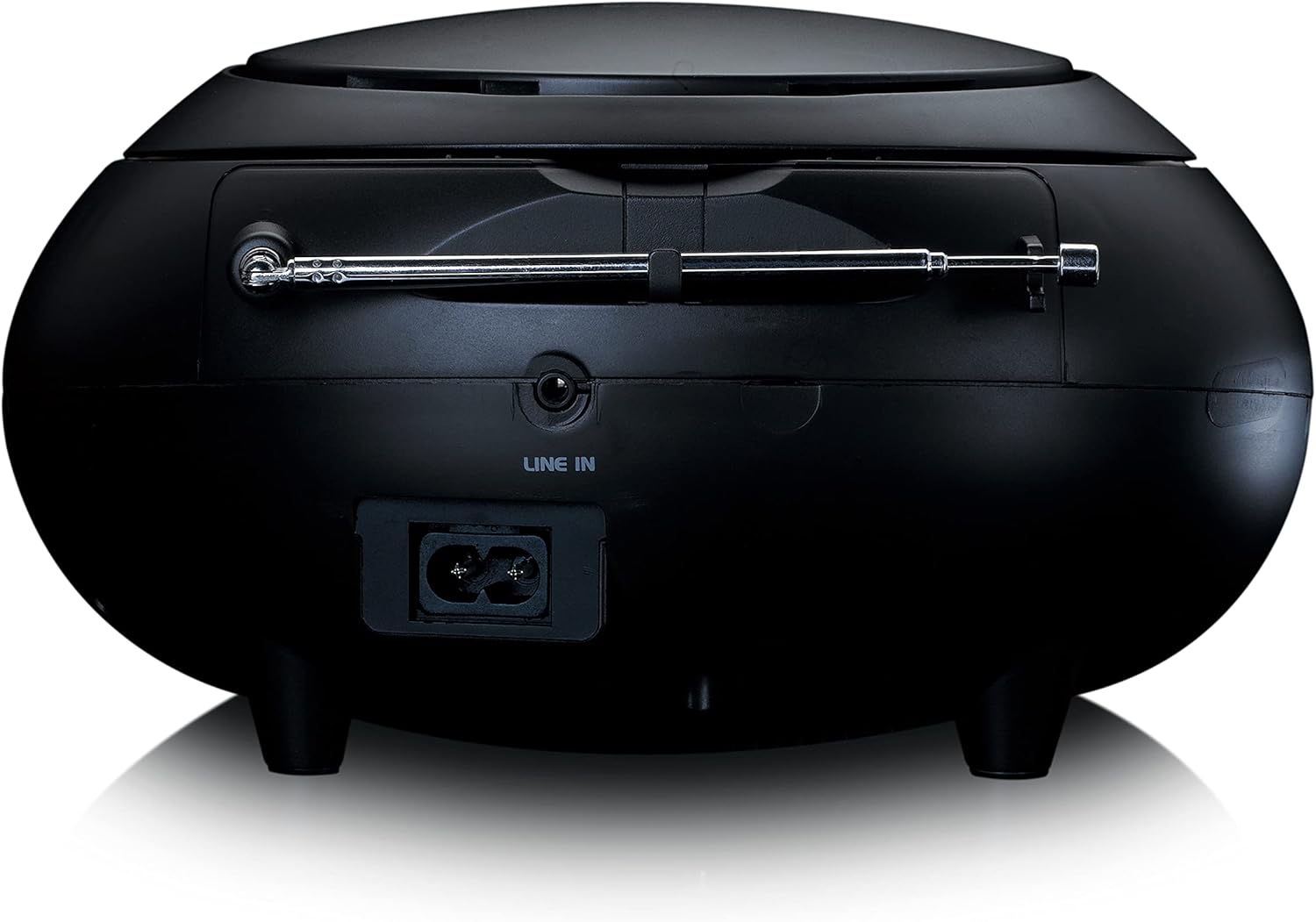
Slika 3: Zadaj view of the Lenco SCD-341, highlighting the power input and LINE IN audio port.
5. Nastavitev
5.1 Napajalni priključek
The Lenco SCD-341 can be powered by the included AC adapter or by batteries.
- AC napajanje: Connect the supplied power adapter to the AC IN socket on the rear of the unit (refer to Figure 3) and plug the other end into a standard wall outlet.
- Moč baterije: Open the battery compartment on the bottom of the unit. Insert the required number of C-type batteries (not included), ensuring correct polarity. Close the compartment securely.
5.2 Nastavitev antene
For optimal DAB+ and FM radio reception, fully extend the telescopic antenna located on the rear of the unit. Adjust its position for the best signal.
6. Navodila za uporabo
6.1 Vklop/izklop
Pritisnite MOČ gumb za vklop ali izklop enote.
6.2 Predvajanje CD-ja
- Pritisnite VIR button repeatedly until "CD" is displayed on the LCD screen.
- Pokrov predala za CD-je odprite tako, da ga nežno dvignete.
- CD postavite na vreteno z nalepko navzgor.
- Close the CD compartment lid. The unit will begin reading the CD.
- Uporabite PREDVAJAJ/PAVZA, STOP, PRESKUSITE NAPREJ, in PRESKOČI NAZAJ gumbi za nadzor predvajanja.

Slika 4: Zgornji del view of the Lenco SCD-341 with the CD compartment open, showing a CD being inserted.
6.3 Delovanje radia DAB+
- Pritisnite VIR button repeatedly until "DAB" is displayed.
- The unit will automatically scan for available DAB+ stations. This may take a few moments.
- Ko je skeniranje končano, uporabite TUNE +/- buttons to navigate through the available stations.
- Če želite postajo shraniti kot prednastavitev, pritisnite in držite PREDNASTAVITEV gumb, nato uporabite TUNE +/- to select a preset number and press PREDNASTAVITEV ponovno za potrditev.
6.4 Delovanje FM-radia
- Pritisnite VIR button repeatedly until "FM" is displayed.
- Pritisnite in držite TUNE +/- buttons to automatically scan for the next available station. Briefly press to manually tune.
- Če želite postajo shraniti kot prednastavitev, pritisnite in držite PREDNASTAVITEV gumb, nato uporabite TUNE +/- to select a preset number and press PREDNASTAVITEV ponovno za potrditev.
6.5 Bluetooth seznanjanje
- Pritisnite VIR button repeatedly until "Bluetooth" is displayed. The unit will enter pairing mode, indicated by a flashing Bluetooth icon on the display.
- On your external device (smartphone, tablet), enable Bluetooth and search for available devices.
- Select "Lenco SCD-341" from the list of found devices.
- Once paired, the Bluetooth icon on the unit's display will stop flashing and remain solid. You can now play audio from your device through the Lenco SCD-341.
6.6 Nadzor glasnosti
Uporabite GLASNOST +/- buttons to adjust the audio output level.
7. Vzdrževanje
- Čiščenje: Za čiščenje zunanjosti enote uporabite mehko, suho krpo. Ne uporabljajte abrazivnih čistil ali topil.
- Nega CD leč: Če pride do težav s predvajanjem CD-jev, uporabite komercialno dostopen čistilni disk za leče CD-jev.
- Shranjevanje: When not in use for extended periods, disconnect the power adapter and remove batteries. Store the unit in a cool, dry place.
8. Odpravljanje težav
| Težava | Možen vzrok | rešitev |
|---|---|---|
| Brez moči | Napajalnik ni priključen; baterije so prazne ali nepravilno vstavljene. | Check power adapter connection; replace batteries or ensure correct polarity. |
| Brez zvoka | Glasnost je prenizka; izbran napačen vir; priključene slušalke. | Increase volume; select correct source (CD, DAB, FM, Bluetooth); disconnect headphones. |
| CD se ne predvaja | CD je bil napačno vstavljen; CD je umazan ali opraskan; format CD-ja ni podprt. | Reinsert CD correctly; clean or replace CD; ensure CD is a standard audio CD. |
| Slab radijski sprejem | Antenna not extended or positioned poorly; strong interference. | Fully extend and adjust antenna; move unit away from other electronic devices. |
| Bluetooth povezovanje ni uspelo | Bluetooth not enabled on external device; device too far; unit not in pairing mode. | Ensure Bluetooth is on and discoverable; move device closer; select Bluetooth source on unit. |
9. Specifikacije
| Številka modela | SCD-341 |
| Znamka | Lenco |
| Dimenzije (D x Š x V) | 21.5 x 21 x 11.5 cm |
| Teža | 1.09 kg |
| Vir napajanja | AC (adapter included) / Battery-Powered |
| Tehnologija sprejemnika | DAB+, FM |
| Povezljivost | Bluetooth |
| Način avdio izhoda | Stereo |
| Vrsta zaslona | LCD |
| Izhodna moč | 3 vatov RMS |

Figure 5: Dimensions of the Lenco SCD-341 unit.
10. Garancija in podpora
For warranty information and technical support, please refer to the warranty card included in your package or visit the official Lenco webmesto.
Proizvajalec: Lenco GmbH
Država izvora: Hongkong
11. Uradni videoposnetki izdelkov
Watch this official video for a visual guide to the Lenco SCD-341.
Video 1: A 360-degree product view of the Lenco SCD-341, showcasinnjegovo zasnovo in značilnosti z vseh zornih kotov.