
Uvod
This manual provides comprehensive instructions for the installation, operation, maintenance, and troubleshooting of your Amazon Basics Keyless Entry Door Lock Deadbolt. Designed for convenience and security, this electronic keypad deadbolt offers keyless access with customizable security codes and an automatic locking feature. Please read this manual thoroughly before installation and use to ensure proper functionality and safety.
Vsebina paketa
Pred začetkom namestitve preverite, ali so prisotne vse komponente:
- Electronic Keypad Deadbolt Assembly (Exterior and Interior Units)
- Zaklepni mehanizem
- Udarna plošča
- Paket vijakov
- Keys (for traditional key option)
- Predloga za namestitev

The image above displays the complete set of parts you should find in your product package, including the electronic keypad unit, the interior deadbolt assembly, the latch, strike plate, screws, and traditional keys.
Nastavitev
Pred namestitvijo
- Ensure your door thickness is between 1-3/8 to 1-3/4 inches (35mm to 44mm).
- Verify the backset (distance from door edge to center of bore hole) is either 2-3/8 inches (60mm) or 2-3/4 inches (70mm).
- Prepare the necessary tools: Phillips head screwdriver, tape measure, pencil.
- The lock requires 4 AA batteries (not included). Install fresh batteries before final assembly.
Koraki namestitve
Follow these general steps for installation. For detailed, step-by-step instructions, refer to the included printed manual or the official Garancija (PDF) document which often contains installation guides.
- Pripravite vrata: Use the provided installation template to mark and drill holes if your door is not pre-drilled. Ensure the correct backset is selected.
- Namestite zapah: Insert the latch into the door edge, ensuring the correct orientation for your door swing. Secure it with screws.
- Namestitev zunanjega sklopa: Place the exterior keypad assembly onto the door, aligning the spindle through the latch.
- Namestite notranjo montažno ploščo: Secure the interior mounting plate to the exterior assembly using screws, ensuring it is flush against the door.
- Namestite notranji sklop: Connect the cable from the exterior assembly to the interior assembly. Attach the interior assembly to the mounting plate.
- Namestite baterije: Remove the battery cover on the interior assembly and insert 4 new AA batteries, observing polarity. Replace the cover.
- Izvedite postopek odpiranja vrat: This step calibrates the lock to your door's orientation. Follow the specific instructions in your printed manual for this crucial step.

The template provides clear markings for drilling holes, ensuring proper alignment for the deadbolt mechanism and keypad. It supports both 60mm and 70mm backsets.
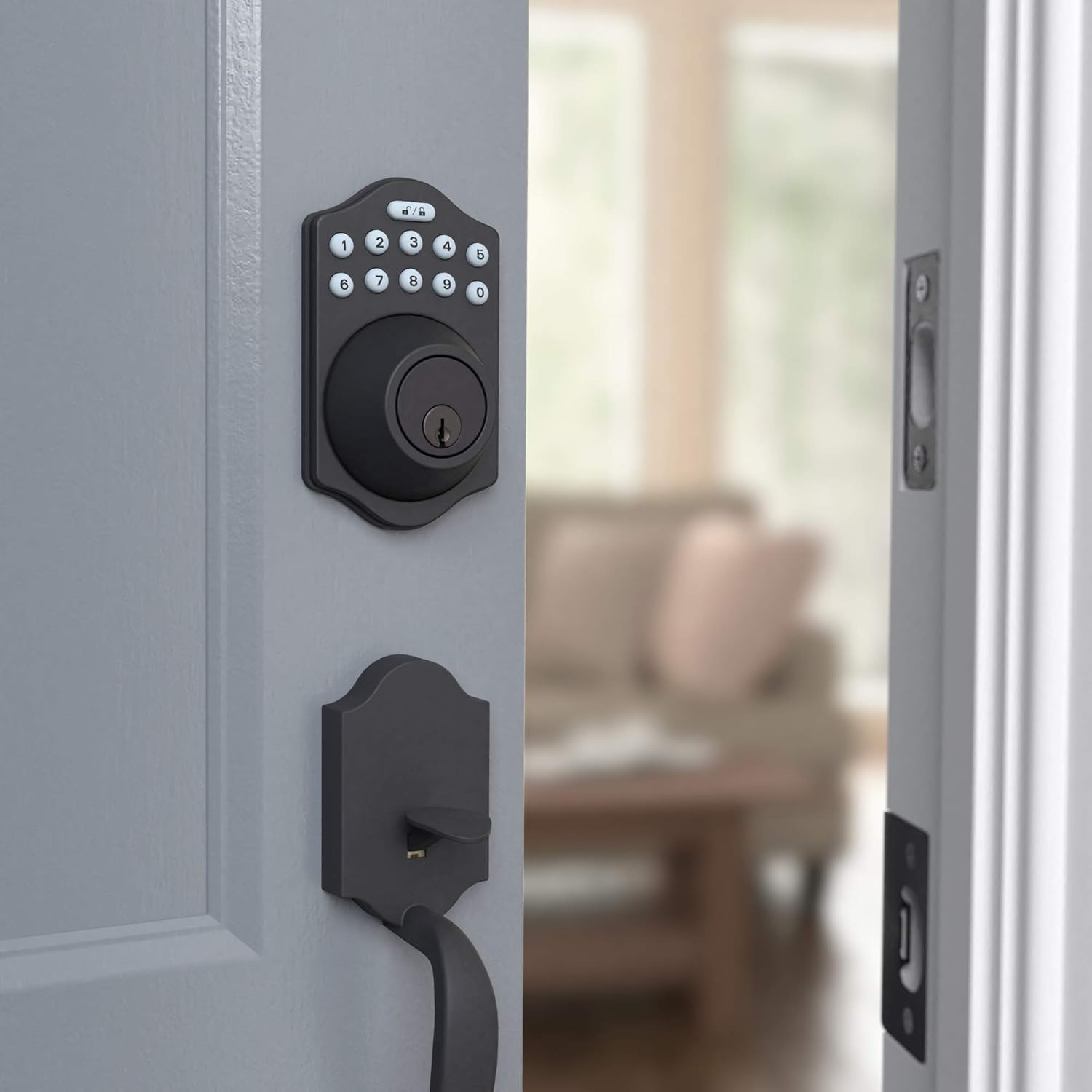
This image shows the electronic keypad deadbolt installed on the exterior side of a door, ready for operation. The matte black finish blends seamlessly with the door.

Stran view illustrates how the deadbolt integrates with the door frame, providing a secure locking mechanism. The internal components are neatly concealed.
Navodila za uporabo
Programiranje uporabniških kod
Your deadbolt comes with a default programming code. You will use this code to set up to 6 unique user codes for family members or temporary single-use codes for guests. Refer to your printed manual for the exact sequence of button presses to add, delete, or modify user codes.
Zaklepanje in odklepanje
The lock can be operated using the keypad or a traditional key.
- Zakleniti: Pritisnite Zaklepanje button (top right button with lock icon) on the keypad. The deadbolt will extend.
- Za odklepanje: Enter your valid user code, then press the Odkleni button (top left button with unlock icon). The deadbolt will retract.
- Samodejno zaklepanje: The deadbolt features an automatic locking function, which can be set to engage 10 to 99 seconds after entry. This provides added peace of mind, ensuring your door is always secured.
- Ročno delovanje: From the interior, the deadbolt can be manually locked or unlocked using the thumb turn. From the exterior, a traditional key can be used as a backup.

The keypad features illuminated numbers for easy visibility in low light conditions, along with dedicated lock and unlock buttons at the top. The traditional keyhole is located below the keypad.
Vzdrževanje
Zamenjava baterije
The electronic deadbolt is powered by 4 AA batteries. When the batteries are low, the lock may emit a warning sound or the keypad lights may flash. To replace the batteries:
- Remove the battery cover located on the interior side of the deadbolt assembly. This cover typically slides upwards or detaches with a gentle pull.
- Previdno odstranite stare baterije.
- Vstavite 4 nove baterije AA in pazite na pravilno polarnost (+/-).
- Replace the battery cover, making sure it clicks securely into place.
Regularly check battery levels to ensure uninterrupted operation. High usage may require more frequent battery changes.
Čiščenje
Tipkovnico in ohišje ključavnice očistite z mehko krpoamp krpo. Izogibajte se uporabi abrazivnih čistil ali topil, saj lahko poškodujejo površino in elektronske komponente.
Odpravljanje težav
If you encounter issues with your Amazon Basics Keyless Entry Door Lock Deadbolt, refer to the following common problems and solutions:
| Težava | Možen vzrok/rešitev |
|---|---|
| Lock does not respond to keypad input. |
|
| Zapah se ne izvleče ali uvleče v celoti. |
|
| Cannot program new user codes. |
|
| Automatic locking feature not working. |
|
If these solutions do not resolve the issue, please contact Amazon Basics customer support for further assistance.
Specifikacije
| Funkcija | Podrobnost |
|---|---|
| Znamka | Osnove Amazona |
| Ime modela | PL14910_6B |
| Številka dela | PL14910 |
| UPC | 840095890281 |
| Vrsta ključavnice | Key Lock, Keypad |
| Posebna funkcija | Brez ključa |
| barva | Mat črna |
| Slog | Traditional Electronic Keypad Deadbolt (Pack of 6) |
| Število kosov | 6 |
| Vrsta zaključka | Saten |
| Teža predmeta | 2.71 funta |
| Nadzorna metoda | Dotik |
| Priporočene uporabe | Residential door locking, commercial door locking |
| Združljivost debeline vrat | 1-3/8 do 1-3/4 palcev |
| Potrebne baterije | Da (4 baterije AA) |
| Država izvora | Tajvan |
Garancija in podpora
For warranty information regarding your Amazon Basics Keyless Entry Door Lock Deadbolt, please refer to the official warranty document provided with your product or available online:
For additional support, troubleshooting assistance, or to inquire about replacement parts, please visit the Osnovna trgovina Amazon or contact Amazon customer service directly.