
Lavaudio DS220
Uporabniški priročnik za Bluetooth sprejemnik Lavaudio DS220 HiFi
Model: DS220 | Brand: Lavaudio
1. Uvod
This manual provides detailed instructions for the setup, operation, and maintenance of your Lavaudio DS220 HiFi Bluetooth Receiver. Please read this manual thoroughly before using the device to ensure proper functionality and to maximize your audio experience. The DS220 is designed to seamlessly integrate high-resolution Bluetooth audio into your existing home stereo system.
2. Varnostne informacije
- Naprave ne izpostavljajte vodi ali prekomerni vlagi.
- Naprave ne postavljajte v bližino virov toplote ali na neposredno sončno svetlobo.
- Uporabljajte samo priloženi napajalnik in kable.
- Naprave ne poskušajte razstavljati ali popravljati sami. Vsa servisna dela prepustite usposobljenemu osebju.
- Med delovanjem zagotovite ustrezno prezračevanje okoli naprave.
3. Vsebina paketa
Preverite, ali so v vašem paketu priloženi vsi spodaj navedeni elementi:
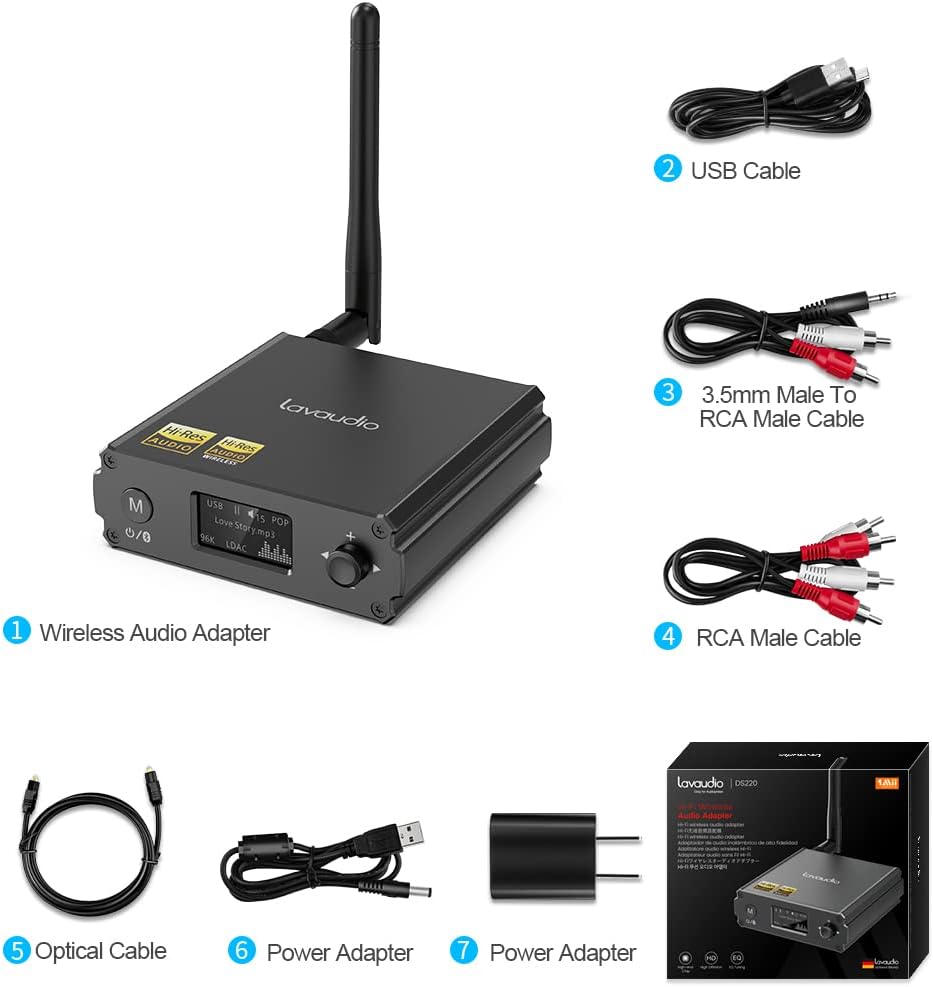
Image: Contents of the Lavaudio DS220 package, including the receiver, cables, and power adapter.
- Lavaudio DS220 HiFi Bluetooth Receiver x 1
- Polnilni kabel USB x 1
- 3.5mm Female to 2RCA Splitter Cable x 1
- 2RCA to 2RCA Stereo Audio Cable x 1
- Optični avdio kabel x 1
- Napajalnik x 1
- Uporabniški priročnik x 1
4. Izdelek je končanview
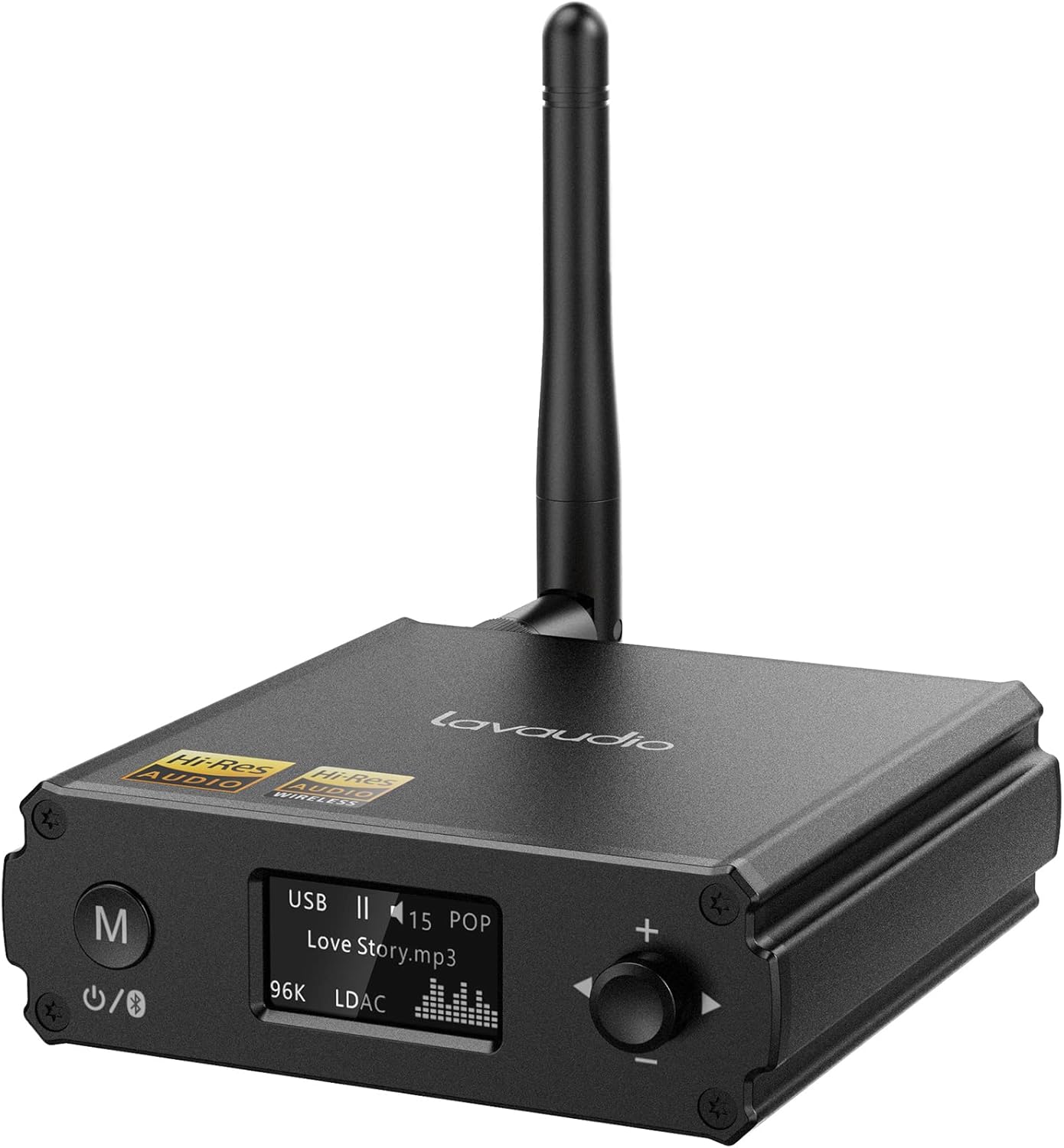
Slika: spredaj view of the Lavaudio DS220 HiFi Bluetooth Receiver with its antenna.
4.1 Kontrole in zaslon na sprednji plošči

Image: Close-up of the DS220's OLED display and control buttons.
- Gumb M: Press and hold for 2 seconds to enter pairing mode. Press and hold for 4 seconds to power off. Press and hold for 10 seconds to perform a factory reset.
- OLED zaslon: Shows current mode (USB, Bluetooth), track information, volume level, and EQ mode.
- Vrtljivi gumb (+/-): Adjusts volume. Press to cycle through EQ modes.
4.2 Priključki na zadnji plošči

Slika: Zadaj view of the DS220 showing its various output and input ports.
- DC 5 V: Vhod za napajanje.
- ODLOČITEV: Optical digital audio output.
- R-RCA OUT-L: Analog RCA stereo audio output.
- Vhod USB: USB Type-C input for connecting to a computer or other audio source.
5. Nastavitev
5.1 Začetni vklop
Connect the provided power adapter to the DC 5V port on the DS220 and plug it into a power outlet. The device will automatically power on and enter pairing mode for first-time use.
5.2 Priključitev na vaš avdio sistem
The DS220 offers flexible output options to connect to your ampzvočniki ali zvočniki z aktivnim napajanjem:
- Using RCA Cables: Connect the 2RCA to 2RCA stereo audio cable from the R-RCA OUT-L ports on the DS220 to the corresponding RCA input ports (e.g., AUX IN) on your amplifier ali močni zvočniki.
- Using Optical Cable: Connect the optical audio cable from the OPT OUT port on the DS220 to the optical input port on your amplifier ali DAC.
Zagotovite si amplifier or audio system is set to the correct input mode (e.g., AUX, Optical) corresponding to your connection.
6. Navodila za uporabo

Image: Step-by-step visual guide for connecting, pairing, playing, and adjusting EQ.
6.1 Bluetooth IN Mode

Image: Detailed guide for Bluetooth IN mode setup.
- Vklop: Ensure the DS220 is powered on. For first-time use, it will automatically enter pairing mode, indicated by a quickly flashing Bluetooth icon on the OLED display.
- Enter Pairing Mode (if not first-time use): If the device is already connected or in standby, press and hold the 'M' button for 2 seconds until the Bluetooth icon flashes rapidly.
- Seznanjanje: On your smartphone, tablet, or other Bluetooth audio source, enable Bluetooth and search for available devices. Select "DS220" from the list to connect.
- Predvajaj glasbo: Once connected, the Bluetooth icon will stop flashing and remain solid. You can now play audio from your connected device through the DS220.
6.2 USB IN Mode

Image: Diagram illustrating USB IN mode setup.
To use the DS220 as a USB DAC:
- Connect the provided USB cable from your computer/laptop or other audio source device to the USB IN port on the DS220.
- Connect the DS220's RCA or Optical output to your amplifier ali močni zvočniki.
- The DS220 will automatically switch to USB audio mode. You can now play audio from your computer through the DS220.
6.3 EQ Mode and Volume Control
- Način EQ: Press the rotary knob to cycle through various EQ modes such as Rock, Pop, Jazz, etc. The selected EQ mode will be displayed on the OLED screen. You can also adjust Bass and Treble settings within the EQ menu.
- Nadzor glasnosti: Za povečanje glasnosti zavrtite gumb v smeri urinega kazalca, za zmanjšanje pa v nasprotni smeri urinega kazalca.
7. Kakovost zvoka in kodeki
The Lavaudio DS220 supports various high-definition audio codecs to ensure optimal sound quality:

Image: Comparison of audio bitrates for various codecs supported by the DS220.
- LDAC: Supports up to 24bit/96 kHz sampling rate with a bitrate of 990 kbps, offering high-resolution wireless audio.
- aptX-HD: Supports up to 24bit/48 kHz sampling rate with a bitrate of 576 kbps, providing high-definition audio over Bluetooth.
- CCA: Supports up to 16bit/96 kHz sampling rate with a bitrate of 264 kbps.
- SBC: Supports up to 16bit/48 kHz sampling rate with a bitrate of 328 kbps, a standard Bluetooth audio codec.

Image: The DS220 integrated into a home stereo setup for high-definition audio.
The DS220 features a Qualcomm 5125 Bluetooth chip and an ESS ES9018K2M DAC chip for superior audio processing.
8. Odpravljanje težav
Glejte naslednje pogoste težave in rešitve:
- Q1: How to enter pairing mode?
- A: For first-time use, the Lavaudio DS220 automatically enters pairing mode after power-on. To manually enter pairing mode, press and hold the 'M' button for 2 seconds until the Bluetooth icon on the display flashes rapidly.
- Q2: What does it mean when the Bluetooth icon slowly flashes?
- A: A slowly flashing Bluetooth icon indicates that the DS220 is in standby mode.
- Q3: Why do I have a sound problem when connecting DS220 by optical output?
- A: If your device does not support a 96K sample rate, try switching LDAC off. This often resolves sound issues. To do this, find DS220 in your phone's Bluetooth list, click to open the drop-down list, and switch LDAC to off. Ensure you use a power adapter for power supply to eliminate ground loop noise.
9. Specifikacije
| Znamka | Lavaudio |
| Številka modela | DS220 |
| Tehnologija povezljivosti | Bluetooth |
| Vrsta krmilnika | Nadzor gumbov |
| Združljive naprave | Osebni računalnik, pametni telefon |
| Način avdio izhoda | Stereo |
| Konfiguracija kanala za prostorski zvok | 2.0 |
| Izhodna moč | 5 vatov |
| Število kanalov | 2 |
| Teža predmeta | 12.6 unč |
| Dimenzije paketa | 5.63 x 4.92 x 2.4 palcev |
10. Vzdrževanje
To ensure the longevity and optimal performance of your Lavaudio DS220, follow these maintenance guidelines:
- Čiščenje: Za čiščenje zunanjosti naprave uporabite mehko, suho krpo. Ne uporabljajte tekočih čistil ali aerosolov.
- Shranjevanje: Ko naprave dalj časa ne uporabljate, jo shranite na hladnem in suhem mestu, stran od neposredne sončne svetlobe in ekstremnih temperatur.
- Ravnanje: Z napravo ravnajte previdno. Pazite, da vam ne pade ali da je ne izpostavljate močnim udarcem.
11. Garancija in podpora
For warranty information and technical support, please refer to the official Lavaudio webspletno mesto ali se obrnite na njihovo službo za stranke. Račun shranite kot dokazilo o nakupu za morebitne garancijske zahtevke.
Opomba: Na podlagi posredovanih podatkov ni bilo na voljo nobenih uradnih videoposnetkov izdelkov za vdelavo.
Ask a question about this manual
Ask about setup, troubleshooting, compatibility, parts, safety, or missing instructions. Manuals+ will review the question and use this page’s manual context to help answer it.