
Konec izdelkaview
This document provides instructions for the ZdalaMit 0212-62622-00R replacement remote control. This remote is designed to function with various Polaroid TV/DVD Combo models, offering a direct replacement without requiring complex programming. Simply install batteries, and the remote is ready for use.

Spredaj view of the ZdalaMit 0212-62622-00R replacement remote control, showing all buttons and layout.
Nastavitev
1. Namestitev baterij
The remote control requires two (2) 1.5V AAA Alkaline batteries (not included). Ensure correct polarity when inserting the batteries.
- Poiščite predal za baterije na zadnji strani daljinskega upravljalnika.
- Pokrov predalčka za baterije potisnite navzdol ali v smeri, ki jo kaže puščica, da ga odprete.
- Insert two AAA batteries, matching the positive (+) and negative (-) terminals as shown inside the compartment.
- Namestite pokrov predalčka za baterije in se prepričajte, da se varno zaskoči.
Opomba: No programming is required for this replacement remote. Once batteries are installed, it is ready for use with compatible Polaroid TV/DVD Combo models.
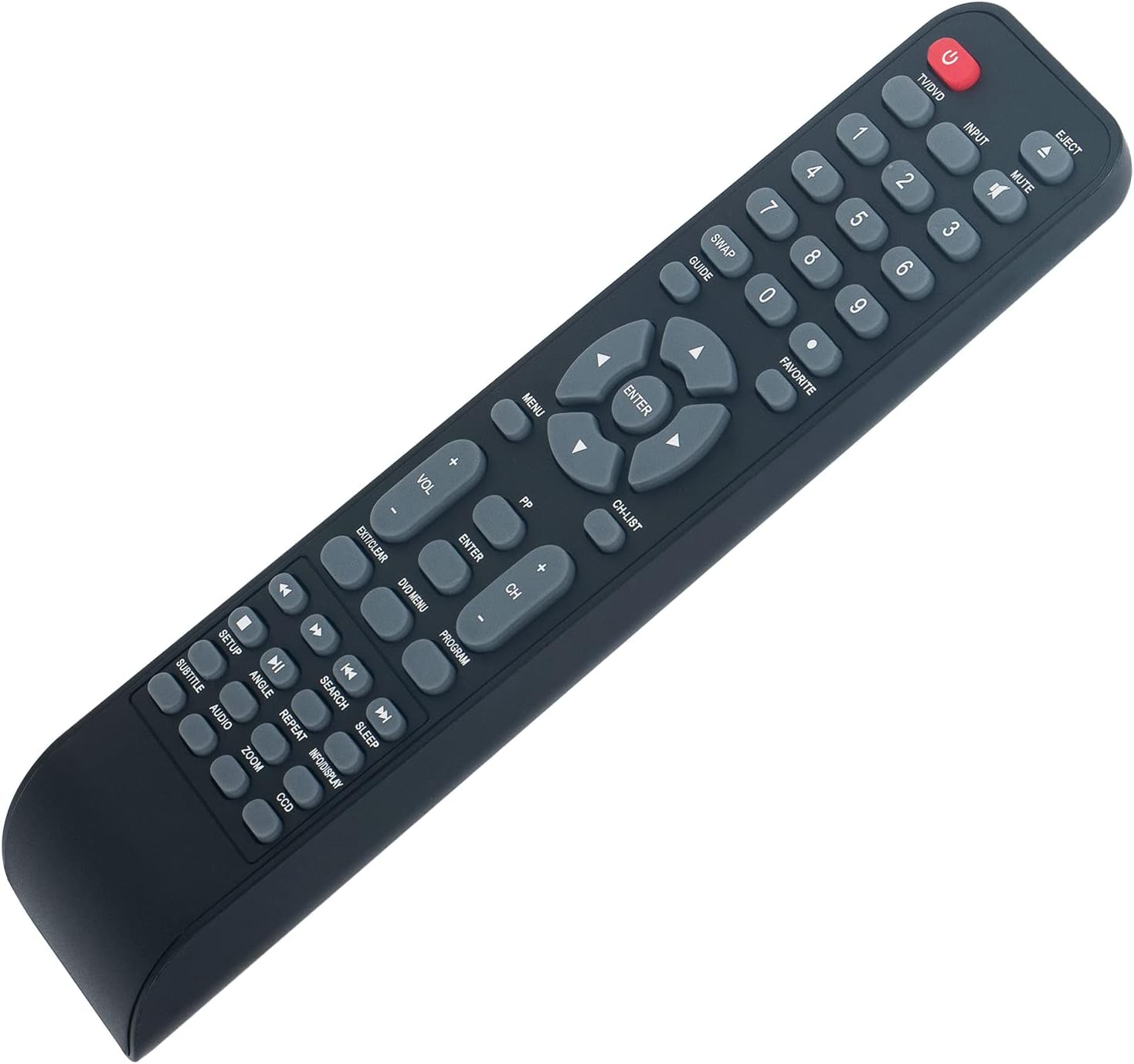
Pod kotom view of the remote control, illustrating its ergonomic design and button layout for easy handling during battery installation.
Navodila za uporabo
Point the remote control directly at the infrared sensor on your Polaroid TV/DVD Combo unit for optimal performance. Ensure there are no obstructions between the remote and the unit.
Osnovne funkcije
- TV/DVD (Power): Press to turn the TV/DVD Combo unit on or off.
- VHOD: Selects the input source (e.g., TV, DVD, HDMI if applicable).
- MUTE: Izklopi ali vklopi zvok.
- Številski gumbi (0-9): Used for direct channel selection or entering numerical values.
- GLASNOST +/-: Prilagodi raven glasnosti.
- CH +/-: Spremeni televizijski kanal navzgor ali navzdol.
- MENI: Accesses the main menu of the TV or DVD player.
- Puščične tipke (gor, dol, levo, desno): Navigacija po možnostih menija.
- VNESI: Potrdi izbiro v meniju.
- EXIT/CLEAR: Exits a menu or clears an entry.
DVD/Media Playback Functions
- IZBRIS: Ejects the DVD from the player.
- DVD MENI: Accesses the DVD disc menu.
- PREDVAJANJE/PAVZA (►/❚❚): Zažene ali zaustavi predvajanje.
- STOP (■): Ustavi predvajanje.
- REWIND (◀◀): Previje predvajanje nazaj.
- FAST FORWARD (►►): Hitro predvajanje naprej.
- PREVIOUS (◀❚): Skips to the beginning of the current track/chapter or the previous one.
- NEXT (❚►): Preskoči na naslednjo skladbo/poglavje.
- PONOVI: Repeats a track, chapter, or entire disc.
- ISKANJE: Initiates a search function within media.
- PODNASLOV: Vklopi/izklopi prikaz podnapisov.
- AVDIO: Changes audio tracks or languages.
- KOT: Spremeni kot kamere na združljivih DVD-jih.
- POVEČAVA: Zooms in or out on the picture.
- INFO/DISPLAY: Prikaže informacije o trenutnem programu ali mediju.
Vzdrževanje
- Čiščenje: To clean the remote control, wipe it with a soft, dry cloth. Do not use liquid cleaners or abrasive materials, as these can damage the surface or internal components.
- Zamenjava baterije: Replace batteries when the remote's response becomes sluggish or stops working. Always replace both batteries at the same time with new AAA Alkaline batteries. Do not mix old and new batteries, or different types of batteries.
- Shranjevanje: If the remote control will not be used for an extended period, remove the batteries to prevent leakage, which can cause damage to the remote. Store the remote in a cool, dry place away from direct sunlight and extreme temperatures.
Odpravljanje težav
| Težava | Možen vzrok | rešitev |
|---|---|---|
| Daljinski upravljalnik se ne odziva | Dead or incorrectly installed batteries. Obstruction between remote and TV/DVD Combo. Remote is too far from the unit. | Replace batteries with new AAA Alkaline batteries, ensuring correct polarity. Remove any objects blocking the line of sight to the TV/DVD Combo's IR sensor. Move closer to the unit (within 33 feet). |
| Nekatere funkcije ne delujejo | The specific function may not be supported by your particular Polaroid TV/DVD Combo model. | This remote is a replacement designed for a range of Polaroid TV/DVD Combo models. While it offers broad compatibility, some advanced or model-specific functions may not be fully supported on all units. Refer to your original TV/DVD Combo manual for specific feature compatibility. |
| Gumbi so lepljivi ali se ne odzivajo | Umazanija ali ostanki pod gumbi. | Gently clean the remote control surface with a soft, dry cloth. Avoid pressing buttons excessively hard. |
Specifikacije
- Model: 0212-62622-00R
- Znamka: ZdalaMit
- Združljivost: Polaroid TV/DVD Combo models (TDAC-01933, TDAC-02212, TLAC-03212, 4641-TLXB, TDAC-03212B, TDAC-03212W, TLAC-02255, TDAC01933, TDAC02212, TLAC02255, TDAC03212B, TDAC03212W, TLAC03212, 4641TLXB)
- Napajanje: 2 x 1.5 V AAA alkalne baterije (niso priložene)
- Tehnologija povezljivosti: Infrardeči (IR)
- Največji obseg: Približno 33 čevljev (10 metrov)
- Količina gumbov: 18
- barva: Črna
- Dimenzije (D x Š x V): 8.34" x 1.99" x 0.55" (21.18 cm x 5.05 cm x 1.4 cm)
- Teža artikla: 40 gramov (brez baterij)
Garancija in podpora
This ZdalaMit remote control comes with a 1-letna garancija od datuma nakupa. Ta garancija krije proizvodne napake pri normalni uporabi. Ne krije škode, ki jo povzroči nepravilna uporaba, nesreče, nepooblaščene spremembe ali puščanje baterije.
For technical support, warranty claims, or any questions regarding your remote control, please contact the seller directly through the platform where the purchase was made. Please have your order number ready when contacting support.