
1. Uvod
Thank you for choosing the Rollei DF-S 1600 SE Film and Slide Scanner. This device is designed to digitize your precious film negatives and slides with high resolution, preserving your memories for years to come. This manual provides detailed instructions for the proper setup, operation, and maintenance of your scanner. Please read this manual thoroughly before using the device to ensure optimal performance and safety.
2. Varnostna navodila
- Always use the provided power adapter. Using an incorrect adapter may damage the device and void the warranty.
- Optičnega bralnika ne izpostavljajte vodi ali prekomerni vlagi.
- Skenerja ne postavljajte na neposredno sončno svetlobo ali v bližino virov toplote.
- Skener hranite stran od močnih magnetnih polj.
- Ne poskušajte sami razstavljati ali popravljati optičnega bralnika. Obrnite se na usposobljeno servisno osebje.
- Clean the scanner with a soft, dry cloth. Do not use liquid cleaners or solvents.
- Med delovanjem zagotovite ustrezno prezračevanje okoli naprave.
3. Vsebina paketa
Please check the contents of your package upon unpacking. If any items are missing or damaged, contact your retailer.
- Rollei DF-S 1600 SE Film and Slide Scanner
- Napajalni adapter
- USB kabel
- Film Holder for 135/126/110 mm Negatives
- Slide Holder for 135/126/110/8 mm Slides
- Krtača za čiščenje
- Uporabniški priročnik (ta dokument)

Image: Included film and slide holders for different media types.
4. Izdelek je končanview
Familiarize yourself with the main components of your Rollei DF-S 1600 SE scanner.

Slika: Pod kotom view of the Rollei DF-S 1600 SE scanner, highlighting the display and film input.

Slika: spredaj view of the scanner, showing the power button and film output slot.
- LCD zaslon: 3.5-inch TFT LCD color screen for previewing images and navigating menus.
- Gumbi za upravljanje: Buttons for navigation, capture, and menu access.
- Film/Slide Input Slot: Where film holders are inserted.
- Gumb za vklop: Za vklop/izklop naprave.
- Reža za kartico SD: For inserting an SD/SDHC/MMC memory card to save scanned images.
- Vrata USB: For connecting to a computer or power adapter.
- HDMI/TV Out Port: Za priklop na zunanji zaslon ali televizor.
5. Nastavitev
Follow these steps to set up your scanner for first use.
- Priključite napajanje: Connect the provided power adapter to the scanner's USB port and then to a power outlet. The scanner can also be powered via a computer's USB port.
- Vstavite pomnilniško kartico: Insert an SD/SDHC/MMC memory card (not included) into the designated slot on the scanner. Ensure it is inserted correctly until it clicks into place.
- Vklop: Press and hold the Power button until the LCD display turns on.
- Izberi jezik: If prompted, use the navigation buttons to select your preferred language and confirm.
- Prepare Film/Slide: Choose the appropriate film or slide holder for your media type. Carefully insert your negatives or slides into the holder. Ensure they are clean and free of dust.

Image: Preparing a film strip for insertion into the scanner using a film holder.
6. Navodila za uporabo
6.1 Scanning Negatives (135, 126, 110 mm)
- Insert the negative film strip into the appropriate negative film holder. Ensure the film is flat and correctly aligned.
- Insert the loaded film holder into the scanner's film input slot. Push it gently until it locks into position.
- On the scanner's LCD, select "Negative Film" as the media type.
- Use the navigation buttons to preview the image. Adjust exposure and color settings if necessary (refer to Section 6.3).
- Press the "Capture" button to scan the image. The scanned image will be saved to the memory card.
- Remove the film holder and advance the film to the next frame, or replace with a new film strip.
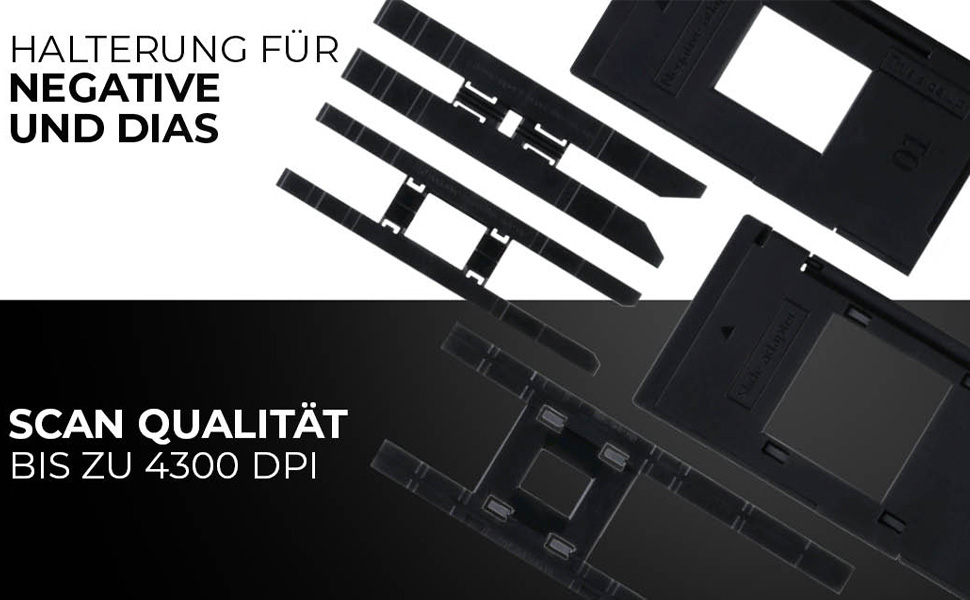
Image: Scanning a negative film strip with the Rollei DF-S 1600 SE.
6.2 Scanning Slides (135, 126, 110, 8 mm)
- Place your mounted slide into the appropriate slide holder. Ensure the slide is clean and correctly oriented.
- Insert the loaded slide holder into the scanner's film input slot.
- On the scanner's LCD, select "Slide" as the media type.
- Prejview the image on the display. Adjust settings as needed (refer to Section 6.3).
- Press the "Capture" button to scan the image. The scanned image will be saved to the memory card.
- Remove the slide holder and replace with the next slide.

Image: Scanning a mounted slide with the Rollei DF-S 1600 SE.
6.3 Prilagajanje nastavitev
The Rollei DF-S 1600 SE offers 7 manual adjustment levels for optimal image results. Access the menu to adjust settings such as:
- Izpostavljenost: Nastavitev svetlosti.
- Barvno ravnovesje: Adjust red, green, and blue channels.
- Resolucija: Select scanning resolution (up to 16 MP interpolated, 4300 DPI optical).
- Vrsta filma: Ensure the correct film type (color negative, black & white negative, slide) is selected for accurate color reproduction.
6.4 Connecting to PC/TV
- USB Connection (PC): Connect the scanner to your computer using the USB cable. The scanner will appear as a mass storage device, allowing you to transfer scanned images.
- HDMI/TV Connection: Use an HDMI cable (not included) to connect the scanner to a TV or external monitor. This allows for a larger view of your images during scanning or playback.
7. Vzdrževanje
Regular maintenance ensures the longevity and performance of your scanner.
- Čiščenje optičnega bralnika: Use the provided cleaning brush to gently remove dust from the film input slot and the internal light source. Do not use compressed air, as it may push dust further inside.
- Cleaning Film/Slide Holders: Wipe the holders with a soft, dry, lint-free cloth. Ensure they are free of dust and debris before inserting film or slides.
- Shranjevanje: When not in use, store the scanner in a cool, dry place, away from direct sunlight and dust.
8. Odpravljanje težav
Če naletite na težave, si oglejte spodnjo tabelo za pogoste težave in rešitve.
| Težava | Možna rešitev |
|---|---|
| Skener se ne vklopi. | Ensure the power adapter is securely connected to both the scanner and a working power outlet. Try a different USB port or power outlet. |
| Images appear blurry or dusty. | Clean the film/slides and the scanner's internal light source using the provided brush. Ensure film/slides are inserted correctly and flat. |
| Barve so nepravilne. | Verify that the correct film type (negative, slide) is selected in the scanner's menu. Adjust color balance settings manually. |
| Memory card error / Cannot save images. | Ensure the memory card is inserted correctly and is not full. Try formatting the card (this will erase all data) or use a different card. Check if the card is locked (write-protected). |
| Scanner freezes or is unresponsive. | Turn off the scanner, disconnect the power, wait a few seconds, then reconnect and power on again. |
9. Specifikacije
| Funkcija | Vrednost |
|---|---|
| Znamka | Rollei |
| Ime modela | Rollei DF-S 1600 SE |
| Številka modela artikla | 20699 |
| Vrsta optičnega bralnika | Filmski optični bralnik |
| Resolucija | 4300 DPI (optično) |
| Tehnologija povezljivosti | HDMI, USB |
| Teža predmeta | 513 gramov |
| Barvna globina | 2.8 megabita |
| Tehnologija optičnega senzorja | CCD, CMOS |
| Minimalne sistemske zahteve | Windows, macOS |
| Vrsta medija | Negative, Slide, 110 mm Film, 8 mm/Super8 Film |
| Vrsta svetlobnega vira | LED |
| Mednarodna koda artikla | 04048805206995 |
10. Garancija in podpora
Rollei is committed to providing high-quality products and customer satisfaction.
- Exchange Guarantee: Your Rollei DF-S 1600 SE scanner comes with an exchange guarantee for a full 24 months from the date of purchase.
- Free Return Shipping: Enjoy free return shipping within 14 days of purchase.
- Pomoč in podpora: Our expert team is available to assist you with any questions or issues.
- Kontaktni podatki: You can reach us Monday-Friday from 10:00 AM to 4:00 PM at +49 40 270 750 277.