
1. Končanoview
The Hoco ES61 Manner Sports Wireless Bluetooth Headset is designed for active lifestyles, offering a blend of comfort, long battery life, and versatile connectivity. This manual provides detailed instructions to help you get the most out of your headset.
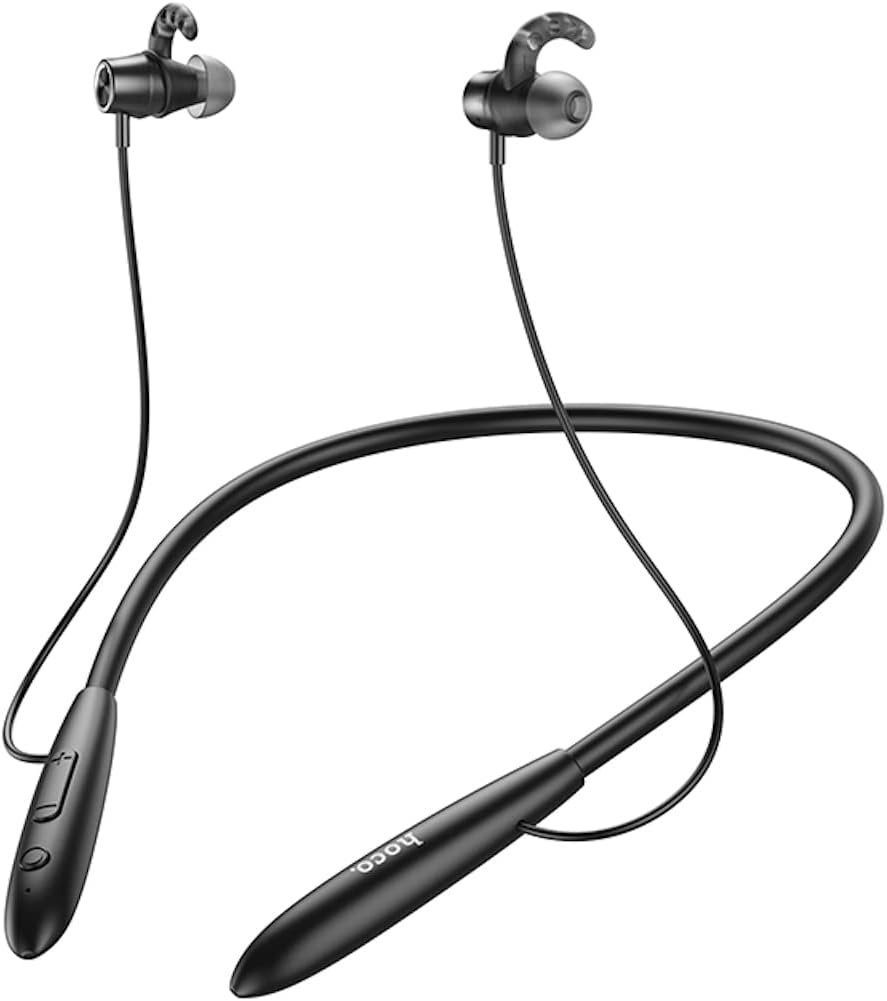
Slika: spredaj view of the Hoco ES61 headset, showcasing its neckband design and in-ear earbuds.
2. Značilnosti izdelka
- Povezljivost Bluetooth 5.1: Equipped with JL AC7006 chip for stable and efficient wireless connection.
- Podaljšana življenjska doba baterije: Features a 200mAh battery, providing up to 20 hours of music/talk time and an impressive 330 hours of standby time.
- Hitro polnjenje: Popolnoma se napolni v približno 2 urah.
- Lahek in udoben dizajn: The earphone cord measures 85cm in length, and the headset weighs only 22g, ensuring comfort during extended wear.
- Vsestranske možnosti predvajanja: Supports Bluetooth audio streaming and TF card playback (up to 32GB) for direct music listening.
- Multi-language Voice Prompts: Offers voice prompts in both Chinese and English for user convenience.
- Široka združljivost: Compatible with a broad range of devices including iPhone, Samsung, OnePlus, Huawei, Xiaomi, and Oppo smartphones.

Slika: Bližnji posnetek view of the Hoco ES61 headset, highlighting the integrated TF card slot for direct music playback.
Video: Uradna video predstavitev izdelkaasing the Hoco ES61 Bluetooth Headset's features, including its 20-hour battery life, voice prompts, and compatibility with iOS and Android devices.
3. Navodila za namestitev
3.1 Polnjenje slušalk
Before first use, fully charge the headset. Use a standard USB charger (not included) to connect the charging port on the headset to a power source.
- The LED indicator will typically show a red light during charging.
- Once fully charged (approximately 2 hours), the LED indicator will turn blue or off.
3.2 Bluetooth seznanjanje
To connect your Hoco ES61 headset to a Bluetooth-enabled device:
- Prepričajte se, da so slušalke izklopljene.
- Press and hold the multi-function button (usually the power button) for approximately 3-5 seconds until the LED indicator flashes red and blue alternately. This indicates pairing mode.
- V napravi (pametnem telefonu, tabličnem računalniku itd.) omogočite Bluetooth in poiščite razpoložljive naprave.
- Select "Hoco ES61" from the list of found devices.
- Once connected, the LED indicator on the headset will typically flash blue slowly or turn off, and you will hear a voice prompt confirming the connection.
3.3 Predvajanje s kartice TF
The Hoco ES61 supports direct music playback from a TF (MicroSD) card.
- Carefully insert a TF card (up to 32GB) with your music files into the designated TF card slot on the headset.
- The headset will automatically switch to TF card playback mode if a card is detected and contains playable audio files.
- Use the headset controls to manage playback (play, pause, skip tracks).
4. Navodila za uporabo
4.1 Osnovne kontrole
| Gumb/dejanje | funkcija |
|---|---|
| Večfunkcijski gumb (MFB) | Vklop/izklop, predvajanje/premor, sprejem/končanje klica |
| Povečanje glasnosti (+) | Povečanje glasnosti, naslednja skladba (dolg pritisk) |
| Znižaj glasnost (-) | Zmanjšanje glasnosti, prejšnja skladba (dolg pritisk) |
4.2 Predvajanje glasbe
- Predvajanje/pavza: Kratek pritisk na MFB.
- Naslednja skladba: Dolgo pritisnite gumb za povečanje glasnosti (+).
- Prejšnja skladba: Dolgo pritisnite gumb za zmanjšanje glasnosti (-).
- Prilagoditev glasnosti: Short press Volume Up (+) or Volume Down (-) buttons.
4.3 Upravljanje klicev
- Sprejmi/končaj klic: Short press the MFB during an incoming call.
- Zavrni klic: Long press the MFB during an incoming call.
- Ponovno klicanje zadnje številke: Double-click the MFB when not on a call.

Image: The Hoco ES61 headset resting on a smartphone, illustrating its use with mobile devices for music and calls.
5. Vzdrževanje in nega
- Keep the headset dry. Do not expose it to extreme temperatures or humidity.
- Clean the earbuds and charging port regularly with a soft, dry cloth to prevent dust and debris buildup.
- Izogibajte se uporabi močnih kemikalij ali abrazivnih čistil.
- Ko slušalk ne uporabljate, jih shranjujte na hladnem in suhem mestu.
- Slušalke ne poskušajte razstavljati ali spreminjati, saj boste s tem razveljavili garancijo in jo lahko poškodovali.

Image: The Hoco ES61 headset shown with different sizes of silicone ear tips, emphasizing the importance of proper fit for comfort and sound quality.
6. Odpravljanje težav
6.1 Headset Not Turning On
- Ensure the headset is fully charged. Connect it to a charger and check the LED indicator.
- Press and hold the multi-function button for a few seconds to power on.
6.2 Seznanjanje z napravo ni mogoče
- Make sure the headset is in pairing mode (LED flashing red and blue alternately).
- Prepričajte se, da je Bluetooth v vaši napravi omogočen in da je v dosegu (običajno 10 metrov).
- Forget/delete "Hoco ES61" from your device's Bluetooth list and try pairing again.
- Znova zaženite slušalke in napravo.
6.3 Ni zvoka ali nizka glasnost
- Povečajte glasnost tako na slušalkah kot na povezani napravi.
- Prepričajte se, da so slušalke pravilno povezane z vašo napravo.
- If using TF card, ensure the card is inserted correctly and contains playable audio files.
- Check for any obstructions in the earbud nozzles and clean if necessary.
6.4 Kratka življenjska doba baterije
- Pred uporabo se prepričajte, da so slušalke povsem napolnjene.
- Življenjska doba baterije se lahko razlikuje glede na glasnost in vzorce uporabe.
- Izogibajte se izpostavljanju baterije ekstremnim temperaturam.
7. Specifikacije
| Funkcija | Podrobnost |
|---|---|
| Različica Bluetooth | 5.1 |
| Bluetooth čip | JL AC7006 |
| Kapaciteta baterije | 200 mAh |
| Čas polnjenja | Pribl. 2 ur |
| Glasba / čas pogovora | Do 20 ur |
| Čas pripravljenosti | Do 330 ur |
| Earphone Cord Length | 85 cm |
| Teža | 22 g |
| Podpora za kartico TF | Da, do 32 GB |
| Glasovni pozivi | kitajščina in angleščina |
| Združljivost | iPhone, Samsung, OnePlus, Huawei, Xiaomi, Oppo |
8. Garancija in podpora
For warranty information and customer support, please refer to the product packaging or contact your retailer. Keep your purchase receipt as proof of purchase for any warranty claims.