
Clear Power DCOT-0004-DC
Clear Power Outdoor Digital Programmable Timer
Model: DCOT-0004-DC
Brand: Clear Power
Uvod
Thank you for choosing the Clear Power Outdoor Digital Programmable Timer. This manual provides detailed instructions for the safe and efficient operation of your new timer. Designed for outdoor use, this digital timer offers convenient control over your outdoor lighting and electrical devices, featuring two grounded outlets and a user-friendly interface.
Pomembne varnostne informacije
OPOZORILO: Da bi zmanjšali tveganje električnega udara, požara ali poškodb, pri uporabi električnih izdelkov vedno upoštevajte osnovne varnostne ukrepe.
- Samo za zunanjo uporabo.
- Ne potapljajte v vodo.
- Always ensure the timer is securely mounted vertically and not laid on the ground.
- Works with Incandescent, Compact Fluorescent, and LED light sources.
- Ensure the connected devices do not exceed the timer's maximum electrical rating.
- Otroke hranite stran od časovnika in priključenih naprav.
For more detailed safety guidelines, please refer to the official Varnostne informacije v PDF-ju.
Ključne značilnosti
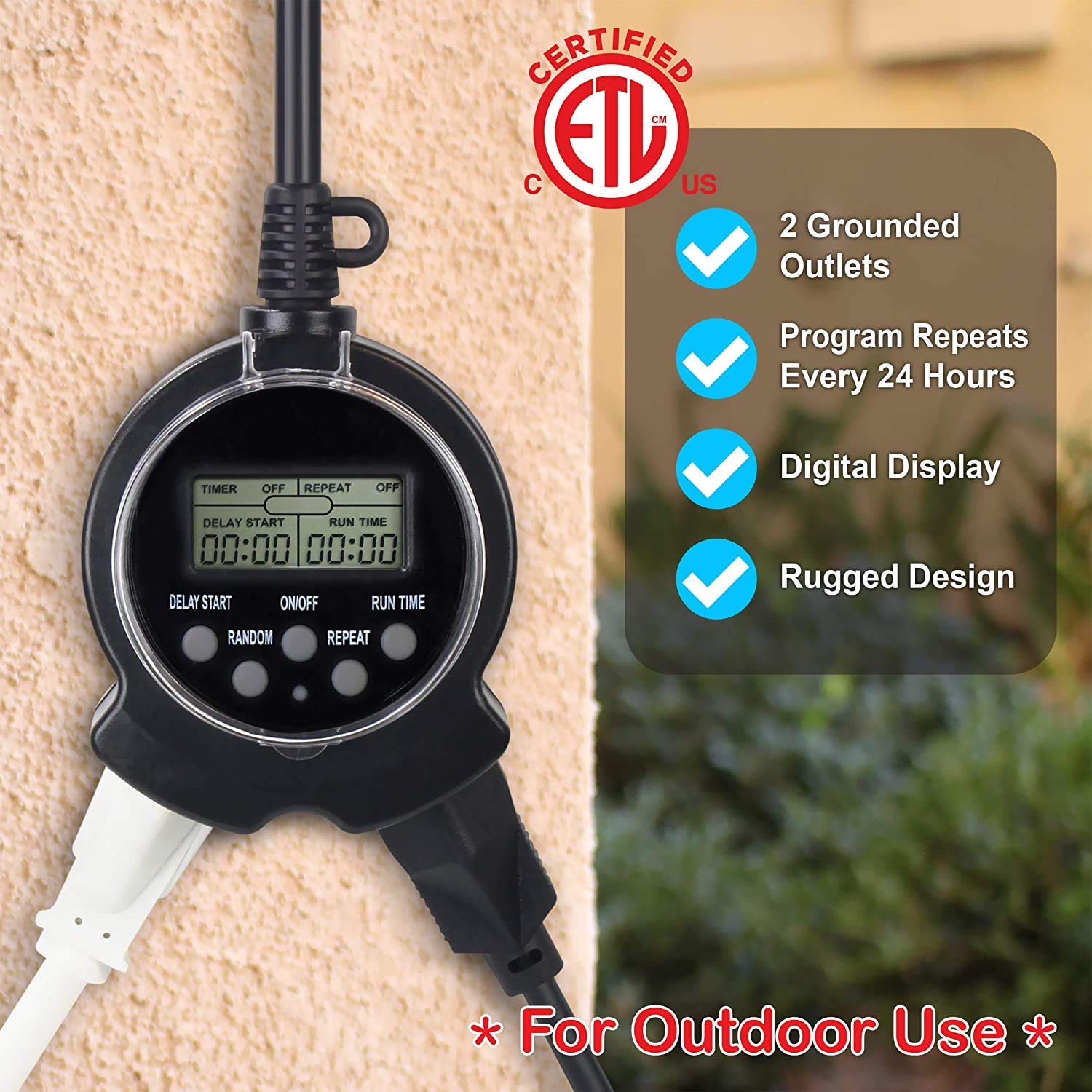
- 2 ozemljenih vtičnic: Allows control of two devices simultaneously.
- 24-Hour Repeating Cycle: Programs turn on/off at the same time daily.
- Simple Digital Programming: Easy to set with only three buttons.
- Random Vacation Mode: Turns devices on/off +/- 30 minutes from programmed times for a "lived-in" appearance.
- Ročno preglasitveno stikalo: Enables bypassing the timer to manually control connected items.
- Na vremenske vplive odporen dizajn: Safe for year-round outdoor use in various weather conditions.
- Flat Grounded Plug: Patented reversed ground pin enables use with right angle & lo-profile čepi.
Vsebina paketa
- 1 x Clear Power Outdoor Digital Programmable Timer (Model: DCOT-0004-DC)
- 1 x Navodila za uporabo (ta dokument)
Navodila za namestitev
- Začetni strošek: To fully charge the internal battery and ensure proper operation, plug the timer into a standard 120V AC outlet for at least 30 minutes before first use or after prolonged storage.
- Ponastavitev časovnika: Before programming, it is recommended to reset the timer. Use a small pointed object (like a pen tip) to press the recessed "RESET" button located on the timer's face. The display will clear.
- Montaža: Install the timer vertically close to an outdoor-rated grounded receptacle. Use the integrated eye-hole on the cord to secure the timer to a wall or suitable surface with a screw. Do not lay the timer on the ground.


Navodila za uporabo
Programming the Timer (Easy 3-Step Process)
The Clear Power Digital Timer is designed for simple programming with only three main buttons: DELAY START, ON/OFF, and RUN TIME.
- Step 1: Turn Timer ON. Pritisnite VKLOP/IZKLOP button to activate the timer. The display will show "TIMER ON".
- Step 2: Set Delay Start Time. Pritisnite in držite ZAKASNITEV ZAČETKA button to quickly advance the time in hours. Lightly touch and release the button to move the time in 1-minute intervals. This sets how many hours and minutes from the current moment the timer will turn ON. For example, if the current time is 1:00 PM and you want the timer to turn ON at 6:00 PM, set DELAY START for 5:00 (5 hours).
- Step 3: Set Run Time. Pritisnite in držite ČAS TEKANJA button to quickly advance the time in hours. Lightly touch and release the button to move the time in 1-minute intervals. This sets how long the timer will remain ON after it activates. For example, if the timer turns ON at 6:00 PM and you want it to turn OFF at 10:30 PM, set RUN TIME for 4:30 (4 hours and 30 minutes).

Ponovi funkcijo
To have the timer turn ON/OFF at the same programmed times every day, press the PONOVI button. The display will show "REPEAT ON". This is ideal for daily routines like garden lights or holiday decorations.
Random Mode (Vacation Mode)
For a more "lived-in" appearance when you are away, use the NAKLJUČNO način. Pritisnite NAKLJUČNO button. The display will show "RANDOM ON". In this mode, the timer will randomly turn ON/OFF up to +/- 30 minutes from your programmed DELAY START and RUN TIME settings. For example, if DELAY START is 6:00 PM, it might turn on as early as 5:30 PM or as late as 6:30 PM. Similarly, the RUN TIME will randomly vary by up to 30 minutes.
Ročna preglasitev
To bypass the timer's program and manually control the attached device, press the VKLOP/IZKLOP button again. The timer will hold its program until you change it. To return control of the device to the timer, press the VKLOP/IZKLOP gumb še enkrat.
Video Guide: Programming and Features
Vzdrževanje
- Čiščenje: Pred čiščenjem izključite časovnik iz električne vtičnice. Zunanjost obrišite z mehko, suho krpo.amp krpo. Ne uporabljajte močnih kemikalij ali abrazivnih čistil.
- Shranjevanje: Ko časovnika dalj časa ne uporabljate, ga shranite na hladnem in suhem mestu, stran od neposredne sončne svetlobe in ekstremnih temperatur.
- Pregled: Periodically inspect the timer and its cord for any signs of damage, such as cuts, fraying, or exposed wires. If damage is found, discontinue use immediately and replace the unit.
Odpravljanje težav
| Težava | Možen vzrok | rešitev |
|---|---|---|
| Zaslon časovnika je prazen ali temen. | Notranja baterija je skoraj prazna ali izpraznjena. | Časovnik priključite v vtičnico pod napetostjo za vsaj 30 minut, da napolnite baterijo. |
| Časovnik se ne vklopi/izklopi ob programiranih časih. | Incorrect programming; Timer is in manual override mode; Power outage. | Review programming steps carefully. Ensure the timer is not in manual override (press ON/OFF button). If there was a power outage, the internal battery should maintain the program, but verify settings. |
| Priključena naprava se ne vklopi. | Device is not properly plugged in; Device is faulty; Timer is not receiving power. | Ensure the device is securely plugged into the timer. Test the device in another outlet. Check the power outlet the timer is plugged into. |
| Random mode not working as expected. | Misunderstanding of random mode function. | Random mode varies ON/OFF times by +/- 30 minutes from programmed settings, it does not completely randomize. This is normal operation. |
Specifikacije
- Model: DCOT-0004-DC
- Znamka: Clear Power
- Dimenzije izdelka: 1"D x 2"Š x 3"V
- Število vtičnic: 2 Prizemljeno
- Velikost zaslona: 6 Inches (display area)
- barva: Črna
- Proizvajalec: Clear Power
- Prvi na voljo: 17. junij 2020
Garancija in podpora
Clear Power products are designed for reliability and performance. For specific warranty information and customer support, please refer to the documentation included with your purchase or visit the official Clear Power website. You can also contact the seller, DATACONCT SOLUTIONS INC, for assistance.
For additional resources, you may find the Uporabniški priročnik (PDF) koristno.
Ask a question about this manual
Ask about setup, troubleshooting, compatibility, parts, safety, or missing instructions. Manuals+ will review the question and use this page’s manual context to help answer it.