
1. Uvod
This manual provides essential information for the safe and efficient operation of your TechniSat DIGITRADIO 370 IR. Please read these instructions carefully before using the device and retain them for future reference.
2. Varnostna navodila
- Naprave ne izpostavljajte dežju ali vlagi, da preprečite požar ali električni udar.
- Ne blokirajte prezračevalnih odprtin. Zagotovite dovolj prostora okoli naprave za pravilen pretok zraka.
- Uporabljajte samo napajalnik, ki je priložen napravi.
- Naprave ne postavljajte v bližino virov toplote, kot so radiatorji, grelniki, štedilniki ali druge naprave (vključno z amplifiers), ki proizvajajo toploto.
- Zaščitite napajalni kabel, da se po njem ne pohodi ali stisne, zlasti pri vtičih, vtičnicah in na mestu, kjer izstopa iz naprave.
- Izklopite napravo med nevihtami ali ko je dlje časa ne uporabljate.
- Za vse servise se obrnite na usposobljeno servisno osebje. Servis je potreben, če je bil aparat kakor koli poškodovan, na primer poškodovan je napajalni kabel ali vtič, je bila polita tekočina ali so v aparat padli predmeti, je bil aparat izpostavljen dežju ali vlagi, ne deluje normalno , ali je bil opuščen.
3. Vsebina paketa
Preverite, ali so v paketu prisotni vsi elementi:
- TechniSat DIGITRADIO 370 IR (Black)
- Daljinski upravljalnik
- Napajalni adapter
- Uporabniški priročnik (ta dokument)
4. Nadzor in povezave

Slika 4.1: Sprednja plošča zgorajview
The image above displays the front panel of the DIGITRADIO 370 IR, featuring the central display, volume and tuning/OK rotary knobs, and various control buttons such as Power, Mode, Preset, Scan, and Back.
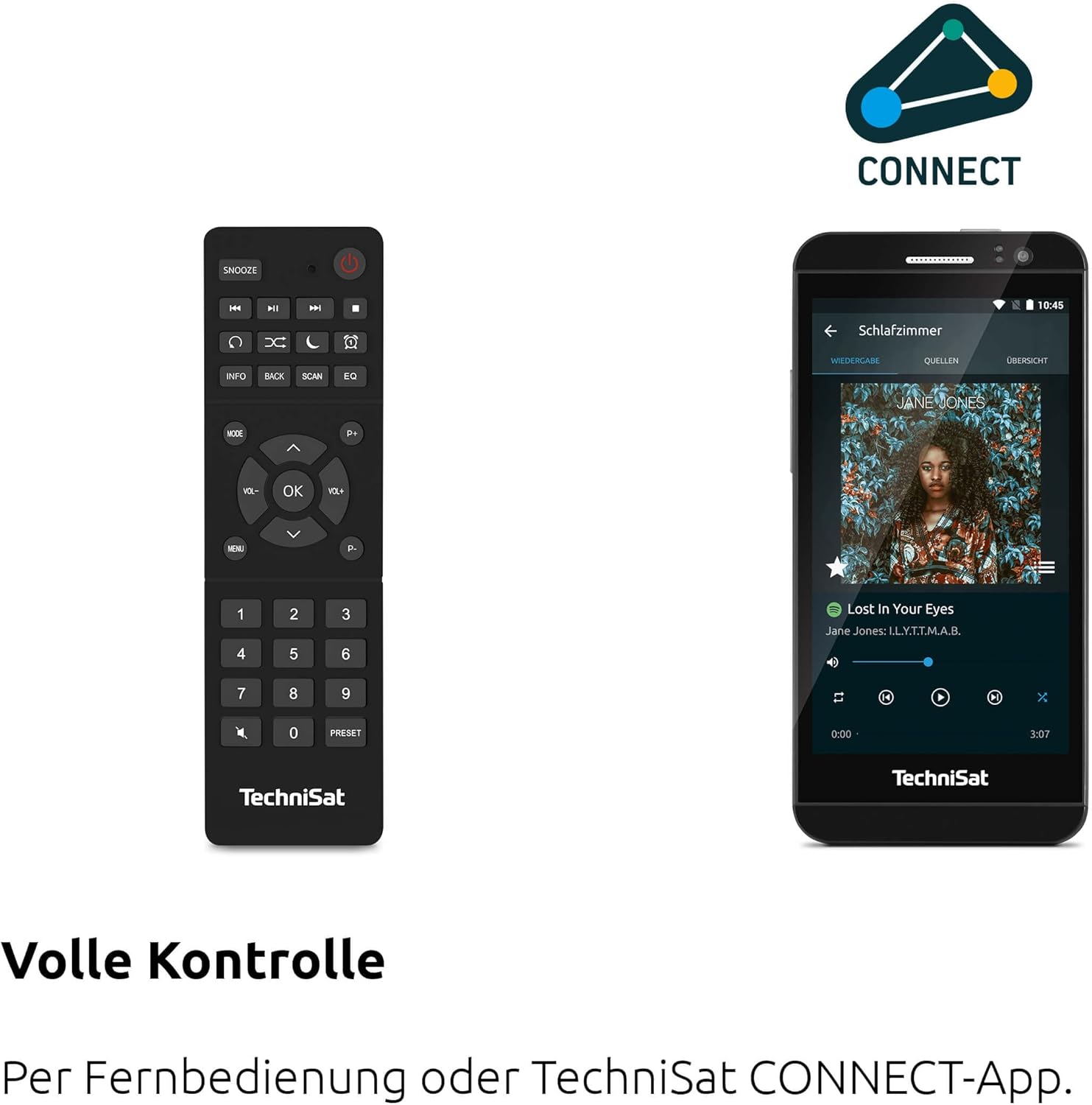
Figure 4.2: Remote Control and App Interface
This image shows the included remote control with buttons for power, snooze, mode, info, scan, EQ, preset numbers, volume, and navigation. It also illustrates the TechniSat CONNECT app interface on a smartphone, providing an alternative control method.
Nadzor sprednje plošče:
- Gumb za vklop: Vklopi/izklopi napravo.
- Gumb za način: Switches between DAB+, FM, Internet Radio, Bluetooth, AUX, and USB modes.
- Prednastavljen gumb: Accesses stored radio station presets.
- Gumb za glasnost: Prilagodi izhodni nivo zvoka.
- Gumb za uglaševanje/OK: Navigacija po menijih in potrditev izbir.
- Gumb za skeniranje: Initiates station scanning in radio modes.
- Gumb za nazaj: Vrne se na prejšnji meni ali zaslon.
- Zaslon: 2.4-palčni barvni TFT zaslon za informacije in navigacijo po menijih.
Priključki na zadnji plošči:
- Vhodna moč: Priključite priloženi napajalnik.
- AUX-IN: 3.5 mm priključek za priključitev zunanjih avdio naprav.
- Priključek za slušalke: 3.5 mm priključek za zasebno poslušanje.
- Vrata USB: For MP3 playback from USB drives and charging external devices.
5. Nastavitev
5.1 Začetni vklop
- Place the DIGITRADIO 370 IR on a stable, flat surface.
- Extend the telescopic antenna for optimal DAB+ and FM reception.
- Connect the power adapter to the DC IN port on the rear of the radio and then to a wall outlet.
- Pritisnite gumb za vklop na sprednji plošči ali daljinskem upravljalniku, da vklopite napravo.
- Za začetno nastavitev, vključno z izbiro jezika in konfiguracijo omrežja, sledite navodilom na zaslonu.
5.2 Network Configuration (WLAN)
To access Internet Radio and app control, the device must be connected to a Wi-Fi network.
- Navigate to the 'Settings' menu using the Tuning/OK knob.
- Select 'Network' and then 'Wi-Fi Setup'.
- The radio will scan for available networks. Select your desired network from the list.
- Enter the Wi-Fi password using the on-screen keyboard and the Tuning/OK knob.
- Confirm the connection. Once connected, the Wi-Fi icon will appear on the display.
6. Navodila za uporabo

Figure 6.1: Radio Diversity
This image highlights the multiple radio reception options available: DAB+ Digital Radio, Internet Radio via WLAN, and UKW/FM analog radio.
6.1 DAB+ radio
- Press the 'Mode' button until 'DAB+' is selected.
- The radio will automatically scan for available DAB+ stations during the first use. To initiate a scan manually, press the 'Scan' button.
- Use the Tuning/OK knob to scroll through the list of available stations. Press the knob to select a station.
- To save a station as a preset, press and hold the 'Preset' button, then select a preset number and confirm.
6.2 FM radio
- Press the 'Mode' button until 'FM' is selected.
- Press the 'Scan' button to automatically search for and store FM stations.
- Alternatively, use the Tuning/OK knob to manually tune to a frequency.
- To save a station as a preset, press and hold the 'Preset' button, then select a preset number and confirm.
6.3 Internetni radio
Prepričajte se, da je radio povezan z omrežjem Wi-Fi (glejte razdelek 5.2).
- Press the 'Mode' button until 'Internet Radio' is selected.
- Postaje lahko brskate po lokaciji, žanru ali iščete določene postaje.
- Use the Tuning/OK knob to navigate and select stations.
- To save a station as a preset, press and hold the 'Preset' button, then select a preset number and confirm.
6.4 Pretakanje zvoka prek Bluetootha

Figure 6.2: Bluetooth Audio Streaming
This image demonstrates a smartphone wirelessly streaming music to the radio via Bluetooth, indicating the device's capability for wireless music enjoyment.
- Press the 'Mode' button until 'Bluetooth' is selected. The radio will enter pairing mode.
- Na pametnem telefonu ali drugi napravi Bluetooth omogočite Bluetooth in poiščite razpoložljive naprave.
- Select 'DIGITRADIO 370 IR' from the list to pair.
- Ko sta napravi združeni, lahko predvajate zvok iz naprave prek radia.
6.5 Predvajanje in polnjenje prek USB-ja

Figure 6.3: USB Playback and Charging Function
This image illustrates the dual functionality of the USB port: connecting USB storage devices for MP3 playback and using the port to charge compatible devices like smartphones.
- Vstavite bliskovni pogon USB, ki vsebuje MP3 files into the USB port on the rear of the radio.
- Press the 'Mode' button until 'USB' is selected.
- Use the Tuning/OK knob to navigate through folders and select tracks for playback.
- The USB port can also be used to charge compatible smartphones and other devices. Connect your device's charging cable to the USB port.
6.6 Brezžično polnjenje

Figure 6.4: Wireless Charging Function
This image shows a hand placing a smartphone on the top surface of the radio, demonstrating the wireless charging capability for compatible smartphones.
The DIGITRADIO 370 IR features a wireless charging surface on its top panel.
- Ensure your smartphone or device supports Qi wireless charging.
- Place your compatible device centrally on the designated wireless charging area on top of the radio.
- The device should indicate that charging has begun.
6.7 Alarm Clock, Sleep Timer, and Snooze
The radio includes an alarm clock, sleep timer, and snooze function.
- Budilka: Set up to two independent alarms with customizable sources (buzzer, DAB+, FM, Internet Radio) and volume. Access via the 'Settings' menu.
- Časovnik spanja: Allows the radio to turn off automatically after a set period (e.g., 15, 30, 60 minutes). Access via the 'Settings' menu.
- Preložitev: When an alarm sounds, press the 'Snooze' button on the remote control to temporarily pause the alarm.
6.8 App Control (UNDOK App)
The DIGITRADIO 370 IR can be controlled via the UNDOK app on your smartphone or tablet.
- Download the 'UNDOK' app from your device's app store.
- Ensure your smartphone/tablet and the radio are connected to the same Wi-Fi network.
- Open the UNDOK app; it should automatically detect your DIGITRADIO 370 IR.
- You can now control all major functions of the radio, including mode selection, station tuning, volume, and presets, directly from the app.
7. Vzdrževanje
7.1 Čiščenje
- Pred čiščenjem napravo vedno izključite iz vtičnice.
- Za brisanje zunanjih površin uporabite mehko, suho krpo.
- Ne uporabljajte tekočih čistil, aerosolnih čistil ali močnih kemičnih topil, saj lahko poškodujejo premaz.
7.2 Shranjevanje
If storing the device for an extended period, unplug it from the power source and store it in a cool, dry place, away from direct sunlight and extreme temperatures.
8. Odpravljanje težav
| Težava | Možen vzrok | rešitev |
|---|---|---|
| Brez moči | Napajalni kabel ni priključen; vtičnica je okvarjena | Preverite priklop napajalnega kabla; poskusite z drugo vtičnico. |
| Brez zvoka | Volume too low; Mute activated; Incorrect source selected | Increase volume; Check if mute is active; Select the correct input source (DAB+, FM, Internet, Bluetooth, USB, AUX). |
| Slab sprejem radia (DAB+/FM) | Antenna not extended; Weak signal; Interference | Fully extend the telescopic antenna; Reposition the radio; Avoid placing near other electronic devices. |
| Internetni radio ne deluje | No Wi-Fi connection; Incorrect Wi-Fi password; Router issue | Check Wi-Fi connection in settings; Re-enter Wi-Fi password; Restart your Wi-Fi router. |
| Bluetooth povezovanje ni uspelo | Radio not in pairing mode; Device too far; Bluetooth off on source device | Ensure radio is in Bluetooth mode; Move devices closer; Enable Bluetooth on your source device. |
| Brezžično polnjenje ne deluje | Device not Qi-compatible; Device not placed correctly; Phone case too thick | Verify device supports Qi charging; Adjust device position on charging pad; Remove thick phone cases. |
9. Specifikacije
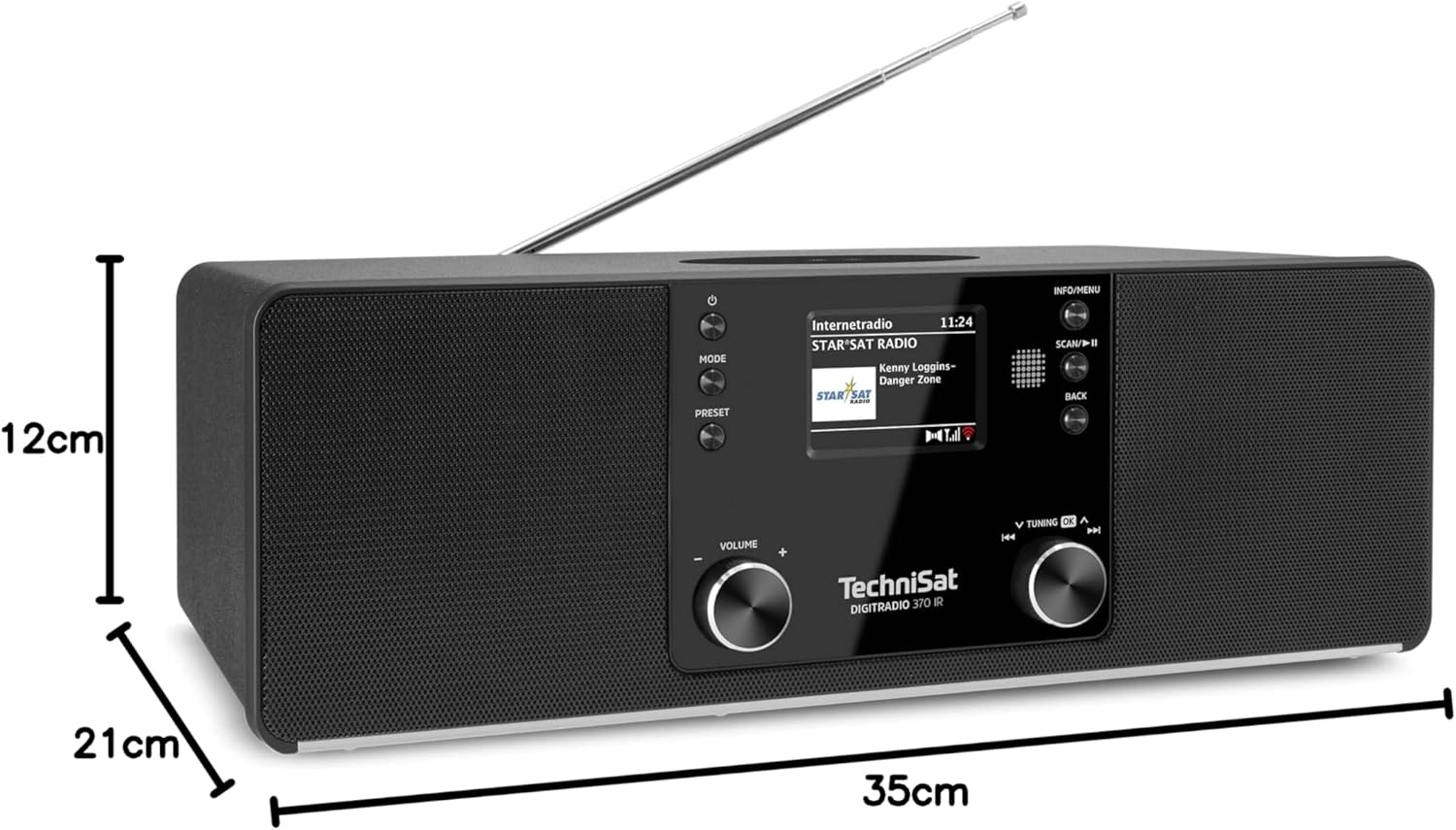
Slika 9.1: Dimenzije izdelka
This image provides a visual representation of the radio's dimensions: 35 cm (length), 12 cm (height), and 21 cm (depth).
| Funkcija | Podrobnost |
|---|---|
| Številka modela | 0000/3971 |
| Znamka | TechniSat |
| Podprti radijski pasovi | DAB+, FM, internetni radio |
| Tehnologija povezljivosti | Bluetooth, USB, Wireless-Charging, WLAN (2.4 GHz & 5 GHz) |
| Posebne lastnosti | Wireless Charging, Bluetooth Audio Streaming, USB Playback & Charging, Alarm Clock, Sleep Timer, Snooze, App Control (UNDOK) |
| Način avdio izhoda | Stereo |
| Izhodna moč zvočnika | 2 x 5 Watts RMS (10 Watts total) |
| Vrsta zaslona | 2.4-palčni barvni TFT LCD |
| Vir napajanja | Electric Cord (230 Volts, 60 Hz) |
| Dimenzije (D x Š x V) | 35 x 21 x 12 cm |
| Teža | 2.7 kilogramov |
| Material ohišja | Les |
| Združljive naprave | Smartphone, MP3 player, tablet, laptop, headphones |
| Vmesniki | 3.5 mm Audio (AUX-IN), USB 2.0, 3.5 mm Headphone |
10. Garancija in podpora
10.1 Informacije o garanciji
This product comes with a 2-year warranty (Gewährleistung) from the date of purchase. Please retain your proof of purchase for any warranty claims. The warranty covers manufacturing defects and malfunctions under normal use. It does not cover damage caused by misuse, accidents, unauthorized modifications, or normal wear and tear.
10.2 Podpora strankam
For technical assistance, troubleshooting beyond this manual, or warranty inquiries, please contact TechniSat customer support. Refer to the TechniSat official webspletno mesto za kontaktne podatke za vašo regijo.
Spletni viri: Visit the official TechniSat website for updated manuals, FAQs, and support information.