
1. Uvod
Hvala za nakupasing the GOWENIC Mini MP3 Player. This compact and portable digital music player is designed to provide high-fidelity lossless sound, making it ideal for various activities such as running, business, and travel. Please read this manual carefully to ensure proper use and to maximize your enjoyment of the device.
Vsebina paketa
- GOWENIC Mini MP3 Player
- USB polnilni kabel
- Uporabniški priročnik
- Note: Memory card and headphones are not included.
2. Varnostne informacije
- Naprave ne izpostavljajte ekstremnim temperaturam, neposredni sončni svetlobi ali visoki vlažnosti.
- Izogibajte se padcem ali izpostavljanju naprave močnim udarcem.
- Napravo hranite ločeno od vode in drugih tekočin.
- Naprave ne poskušajte razstavljati ali popravljati sami. V primeru težav se obrnite na podporo strankam.
- Za polnjenje uporabljajte samo priloženi kabel USB.
- Poslušajte pri zmerni glasnosti, da preprečite poškodbe sluha.
3. Izdelek je končanview
Seznanite se s komponentami in upravljalnimi elementi vašega MP3 predvajalnika.

Slika 3.1: Stran view of the GOWENIC Mini MP3 Player, showing the headphone jack at the top, the micro USB charging/data port, and the microSD card slot on the side.
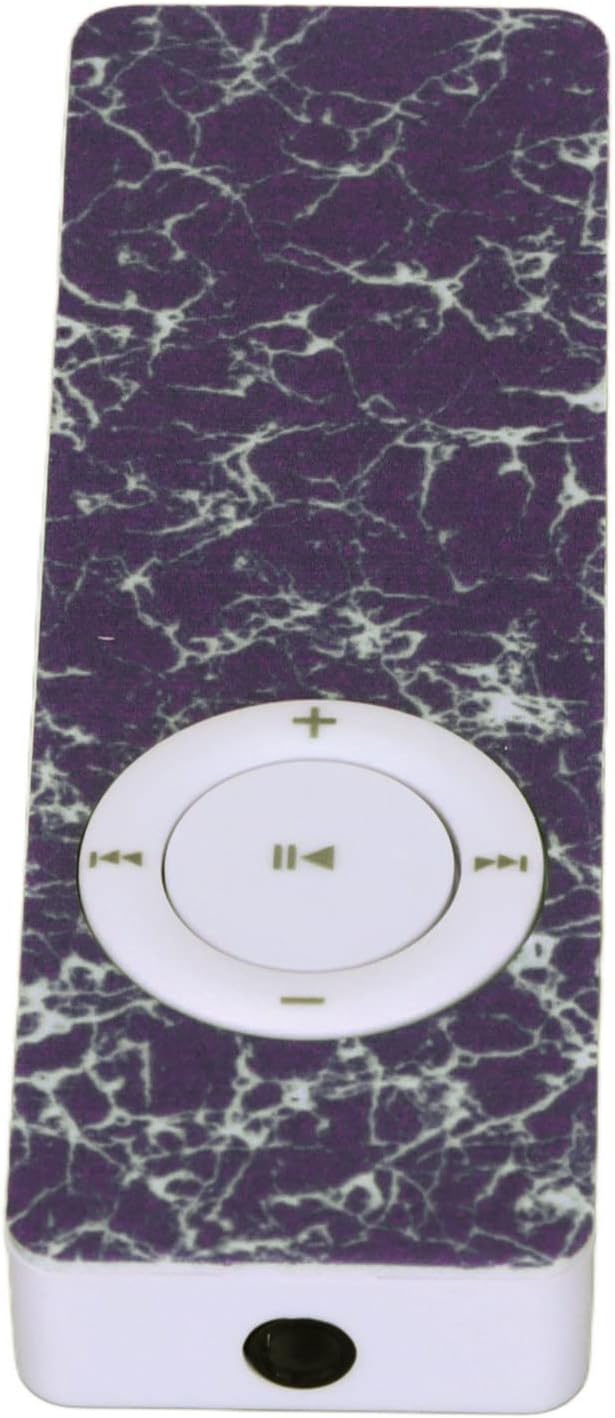
Slika 3.2: Vrh view of the GOWENIC Mini MP3 Player, highlighting the 3.5mm headphone jack.

Slika 3.3: Spodaj view of the GOWENIC Mini MP3 Player, showing the microSD card slot and the micro USB port.
Kontrole:

Slika 3.4: Spredaj view of the GOWENIC Mini MP3 Player, displaying the central circular control pad.
- Central Button (Play/Pause): Pritisnite za predvajanje ali začasno ustavitev glasbe.
- Left/Right Buttons (Previous/Next Track): Press to skip to the previous or next song.
- Up/Down Buttons (Volume +/-): Pritisnite za povečanje ali zmanjšanje glasnosti.
- Stikalo za vklop: Located on the side (not visible in all images, but implied by typical MP3 player design). Slide to turn the device on or off.
4. Nastavitev
4.1 Polnjenje naprave
- Connect the small end of the USB charging cable to the micro USB port on the MP3 player.
- Večji konec kabla USB priključite na napajalnik USB (ni priložen) ali na vrata USB računalnika.
- The device will begin charging. A full charge typically takes a few hours.
- Ko je naprava popolnoma napolnjena, izključite kabel.
4.2 Vstavljanje pomnilniške kartice
The GOWENIC Mini MP3 Player supports microSD cards up to 64GB (not included).
- Locate the microSD card slot on the side/bottom of the player (refer to Image 3.3).
- Gently insert the microSD card into the slot with the gold contacts facing down until it clicks into place.
- To remove the card, push it in slightly until it springs out.
4.3 Prenos glasbe Files
- Ensure a microSD card is inserted into the MP3 player.
- Predvajalnik MP3 priključite na računalnik s kablom USB.
- The computer should recognize the MP3 player as a removable disk.
- Odprite mapo izmenljivega diska.
- Povlecite in spustite želeno glasbo files (e.g., MP3, WAV, FLAC) into the player's storage.
- Enkrat fileKo se datoteke prenesejo, varno izvrzite izmenljivi disk iz računalnika, preden odklopite kabel USB.
5. Navodila za uporabo
5.1 Vklop/izklop
- Za vklop: Potisnite stikalo za vklop v položaj "VKLOP".
- Za izklop: Potisnite stikalo za vklop v položaj "IZKLOP".
5.2 Basic Music Playback
- Ensure headphones are connected to the 3.5mm audio jack.
- Vklopite napravo.
- Pritisnite Osrednji gumb da začnete predvajati glasbo.
- Pritisnite Osrednji gumb znova, da začasno ustavite predvajanje.
- Uporabite Levi/desni gumbi za navigacijo med skladbami.
- Glasnost prilagodite s tipko Gumbi gor / dol.

Slika 5.1: The GOWENIC Mini MP3 Player in use, surrounded by musical notes, illustrating its primary function.
6. Vzdrževanje
- Čiščenje: Za brisanje naprave uporabite mehko, suho krpo. Ne uporabljajte tekočih čistil ali aerosolov.
- Shranjevanje: Store the MP3 player in a cool, dry place when not in use. Avoid extreme temperatures.
- Vzdrževanje baterije: Da podaljšate življenjsko dobo baterije, se izogibajte pogostemu popolnemu praznjenju baterije. Napravo redno polnite, tudi če je ne uporabljate nenehno.
7. Odpravljanje težav
| Težava | Možen vzrok | rešitev |
|---|---|---|
| Naprava se ne vklopi. | Baterija je prazna. Stikalo za vklop je izklopljeno. | Charge the device. Ensure the power switch is in the "ON" position. |
| Brez zvoka. | Headphones not connected properly. Volume is too low. Corrupt music file. | Ensure headphones are fully plugged in. Increase volume. Try playing a different music file. |
| Računalnik ne prepozna naprave. | Ohlapna povezava USB. Težava z gonilnikom. | Reconnect the USB cable. Try a different USB port or computer. Ensure the device is powered on. |
| Glasba filene igra. | Nepodprto file format. No memory card inserted. | Zagotovite files are in a supported format (e.g., MP3, WAV, FLAC). Insert a formatted microSD card with music. |
8. Specifikacije
- Model: GOWENICuzhgqv83iw3060-12
- Material: ABS
- Baterija: Built-in 180 mAh Polymer Lithium Battery
- Podpora za pomnilniško kartico: Pomnilniška kartica microSD do 64 GB (ni priložena)
- Povezljivost: Auxiliary (3.5mm headphone jack), USB (for data transfer and charging)
- Velikost zaslona: 1.44 palcev
- Kakovost zvoka: Hi-Fi Lossless Decoding
9. Garancija in podpora
For warranty information or technical support, please refer to the retailer's policy or contact GOWENIC customer service through their official channels. Keep your purchase receipt for warranty claims.