
Uvod
This manual provides essential information for the proper installation, operation, and maintenance of your TELE System TS6105 DVB-T2 HEVC Digital Terrestrial Decoder. Please read these instructions carefully before using the device to ensure optimal performance and safety.
The TS6105 decoder is designed to receive DVB-T2 HEVC 10-bit digital terrestrial television broadcasts, offering Full HD resolution up to 1080p@60Hz. It includes features such as automatic channel scanning (AUTOSCAN), an Electronic Program Guide (EPG), and multimedia playback capabilities via USB.
Vsebina paketa
Prepričajte se, da so v paketu prisotni vsi elementi:
- TELE System TS6105 DVB-T2 HEVC Digital Terrestrial Decoder
- Daljinski upravljalnik
- Napajalni adapter
- Uporabniški priročnik (ta dokument)

This image shows the compact design of the TS6105 decoder, highlighting the TELE System logo, model number TS6105 DVB-T2 HEVC, Dolby Audio, and HDMI branding on the front, with ventilation on the side.
Nastavitev
1. Priključitev dekoderja
Before connecting, ensure your television and the decoder are turned off.

This image displays the rear panel of the TS6105 decoder, featuring the ANT IN, ANT OUT, COAXIAL, HD OUT (HDMI), SCART, and DC IN ports for power and signal connections.
- Antenska povezava: Priključite kabel zemeljske antene na MRAVLJICA V port on the rear of the decoder. If you wish to loop the signal to another device, connect a coaxial cable from the MRAVLJA VEN port to the next device.
- Priključek za TV (HDMI): For the best picture quality, connect an HDMI cable from the HD IZHOD port on the decoder to an available HDMI input on your television. Select the corresponding HDMI input on your TV.
- Priključek za TV (SCART): If your TV does not have an HDMI input, connect a SCART cable from the SCART vrata na dekoderju povežite z vhodom SCART na televizorju.
- Napajalni priključek: Napajalnik priključite na DC IN port on the decoder, then plug the adapter into a wall outlet.
2. First-Time Installation and Channel Scan
After connecting the decoder and turning on your TV, switch on the decoder. The first time you use it, an installation wizard will guide you through the initial setup.
- Izbira jezika: Choose your preferred language using the remote control's navigation buttons and press OK.
- Izbira države: Select your country. This helps the decoder apply the correct regional settings for channel scanning.
- AVTOSKAN: The decoder will automatically initiate the AUTOSCAN function. This process searches for all available digital terrestrial channels and organizes them logically using the LCN (Logical Channel Number) system. This may take several minutes.
- Dokončanje: Once the scan is complete, the decoder will save the channels and display the first available channel.
Operating the Decoder
Daljinski upravljalnik končanview
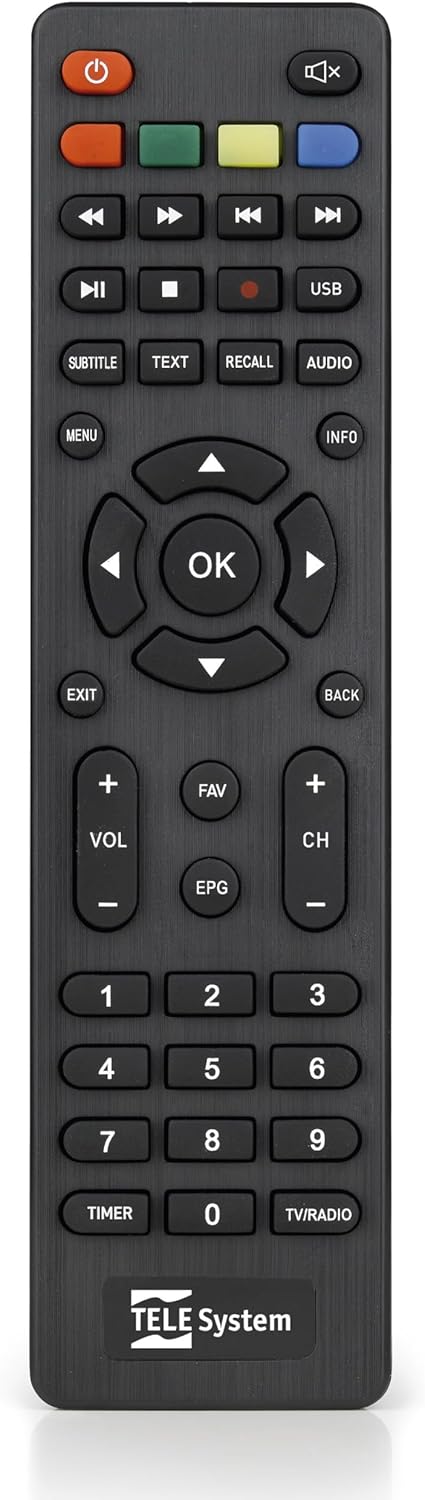
This image presents the remote control for the TS6105 decoder, featuring power, mute, channel, volume, navigation, EPG, media playback, and numeric buttons for comprehensive control.
- Gumb za prižig (U): Turns the decoder on or off (standby).
- CH +/-: Preklaplja kanale navzgor ali navzdol.
- GLASNOST +/-: Prilagodi raven glasnosti.
- V REDU: Potrdi izbire v menijih ali prikaže informacije o kanalu.
- MENI: Dostopi do glavnega menija za nastavitve in funkcije.
- IZHOD/NAZAJ: Exits the current menu or returns to the previous screen.
- EPG: Odpre elektronski programski vodnik.
- BESEDILO: Activates Teletext.
- PODNASLOV: Toggles subtitles on/off or selects subtitle language.
- USB: Accesses the multimedia player.
- Barvni gumbi (rdeča, zelena, rumena, modra): Functionality varies depending on the current menu or EPG.
Elektronski programski vodnik (EPG)
Pritisnite EPG na daljinskem upravljalniku do view the Electronic Program Guide. The EPG provides information about current and upcoming programs for all channels. You can navigate through channels and time slots to see program details.
Multimedia Player (USB)
TS6105 lahko predvaja večpredstavnostne vsebine files s pomnilniške naprave USB.
- Insert a USB drive into the USB port on the decoder.
- Pritisnite USB button on the remote control or navigate to the multimedia section via the MENI.
- Select the type of media you wish to play (Music, Photo, Video).
- Brskajte po svojem files in pritisnite OK igrati.
Pause TV / Timeshift
The Pause TV / Timeshift function allows you to pause live television and resume viewing later. This feature requires a USB storage device connected to the decoder.
- Med gledanjem programa pritisnite PREMOR button (usually represented by two vertical bars) on the remote control.
- Za nadaljevanje predvajanja pritisnite IGRAJ button (usually represented by a right-pointing triangle).
- You can also fast-forward or rewind using the respective buttons.
Vzdrževanje
Čiščenje
To clean the decoder, ensure it is unplugged from the power outlet.
- Za brisanje zunanjih površin uporabite mehko, suho krpo.
- Do not use liquid cleaners, aerosols, or abrasive materials, as these can damage the device.
- Prezračevalne odprtine naj bodo čiste od prahu in ovir.
Posodobitve programske opreme
Občasno preverite proizvajalčeve website for available software updates. Updates can improve performance, add new features, or resolve issues. Follow the instructions provided with the update file previdno.
Odpravljanje težav
If you encounter problems with your decoder, refer to the following common issues and solutions:
- Brez slike/zvoka:
- Ensure all cables (antenna, HDMI/SCART, power) are securely connected.
- Preverite, ali je vaš televizor nastavljen na pravilen vhodni vir (npr. HDMI 1, AV).
- Check if the decoder is powered on and not in standby mode.
- Ni najdenih kanalov:
- Perform an AUTOSCAN again from the menu.
- Check your antenna connection and ensure the antenna is properly positioned and functional.
- Verify that your region has DVB-T2 HEVC broadcasts.
- Daljinski upravljalnik se ne odziva:
- Zamenjajte baterije v daljinskem upravljalniku.
- Ensure there are no obstructions between the remote control and the decoder's IR sensor.
- Picture Freezing or Pixelation:
- This often indicates a weak or unstable signal. Check your antenna connection and position.
- Try rescanning channels.
Specifikacije
- Model: TS6105
- Znamka: TELE sistem
- barva: Črna
- Vrsta sprejemnika: DVB-T2 HEVC 10-bit
- Ločljivost videa: Up to 1080p@60Hz (Full HD)
- Povezljivost: HDMI, USB, SCART, Coaxial (ANT IN/OUT)
- Lastnosti: AUTOSCAN, LCN, EPG, Pause TV/Timeshift, Multimedia Player (USB), Teletext, Subtitle Support
- Številka modela: 21005353
Garancija in podpora
Informacije o garanciji
This product comes with a manufacturer's warranty of 2 years. Please retain your proof of purchase for warranty claims. The warranty covers defects in materials and workmanship under normal use. It does not cover damage caused by misuse, accidents, unauthorized modifications, or improper installation.
Podpora uporabnikom
For technical assistance, troubleshooting beyond this manual, or warranty inquiries, please contact TELE System customer support. Refer to the official TELE System webZa najnovejše kontaktne podatke glejte spletno mesto ali embalažo izdelka.