
Ysametp M10
Ysametp Mini Projector M10 User Manual
1080P Full HD Supported Portable Video Projector
Uvod
Hvala za nakupasing the Ysametp Mini Projector M10. This portable video projector is designed to provide a high-quality home theater experience with its 1080P Full HD support and 10000 Lux LED light source. It features dual built-in stereo speakers with an SRS sound system for immersive audio. Its compact size and multi-connection capabilities make it ideal for various entertainment and presentation needs. Please read this manual thoroughly before operating the projector to ensure proper use and maintenance.
Varnostne informacije
Za varno delovanje in podaljšanje življenjske dobe projektorja upoštevajte naslednje varnostne ukrepe:
- Ne blokirajte prezračevalnih odprtin. Zagotovite zadosten pretok zraka okoli projektorja, da preprečite pregrevanje.
- Projektorja ne izpostavljajte dežju ali vlagi, da preprečite električni udar ali požar.
- Ne odpirajte projektorja casing. Vsa servisna dela prepustite usposobljenemu serviserju.
- Uporabljajte samo napajalnik, ki je priložen projektorju.
- Place the projector on a stable, flat surface to prevent it from falling.
- Izogibajte se neposredni izpostavljenosti oči leči projektorja, ko je lamp je vklopljen.
- Med nevihtami ali če projektorja dalj časa ne uporabljate, ga izključite iz električne vtičnice.
Vsebina paketa
Po razpakiranju preverite vsebino paketa:
- 1 x Ysametp Mini Projector M10
- 1 x HDMI kabel
- 1 x 3-in-1 AV Line
- 1 x napajalni kabel
- 1 x stojalo
- 1 x Drawstring Backpack
- 1 x daljinski upravljalnik (baterije niso vključene)
- 1 x uporabniški priročnik

Konec izdelkaview
Seznanite se s komponentami projektorja in priključnimi vrati.

Vhodno/izhodna vrata:
- Vrata HDMI: Connect to devices like TV sticks, laptops, gaming consoles.
- Vrata USB: Za predvajanje medijev priključite USB-pogone.
- Reža za TF kartice: Za predvajanje medijev vstavite kartice TF.
- VGA vrata: Connect to computers or laptops.
- AV vrata: Connect to older devices like DVD players using the 3-in-1 AV cable.
- 3.5 mm avdio priključek: Priključite zunanje slušalke ali zvočnike.
Nastavitev
1. Placement and Screen Size
Position the projector on a flat, stable surface. The projection size can range from 32 inches to 200 inches, with an optimal projection distance between 3.6 feet and 16.4 feet.

2. Napajalni priključek
Connect the supplied power cord to the projector's power input and then plug it into a power outlet.
3. Nastavitev ostrenja in trapezne korekcije
After powering on, adjust the focus and keystone knobs located on top of the projector to achieve a clear and rectangular image. The focus ring adjusts image sharpness, while the keystone correction corrects trapezoidal distortion if the projector is not perfectly perpendicular to the screen.
Navodila za uporabo
1. Vklop/izklop
- Prižgati: Pritisnite gumb za vklop na projektorju ali daljinskem upravljalniku.
- Izklopiti: Press the power button again. The projector will go through a shutdown sequence.
2. Izbira vhodnega vira
Use the "Source" button on the remote control or the projector's control panel to select the desired input source (HDMI, USB, TF, VGA, AV).
3. Povezovanje naprav
- HDMI: Connect an HDMI cable from your device (e.g., TV Stick, laptop, game console) to the projector's HDMI port.
- USB/TF kartica: Insert a USB drive or TF card into the respective port. The projector will automatically detect the media or prompt you to select it.
- VGA: Connect a VGA cable from your PC/laptop to the projector's VGA port.
- OD: Use the provided 3-in-1 AV cable to connect to devices with AV output.
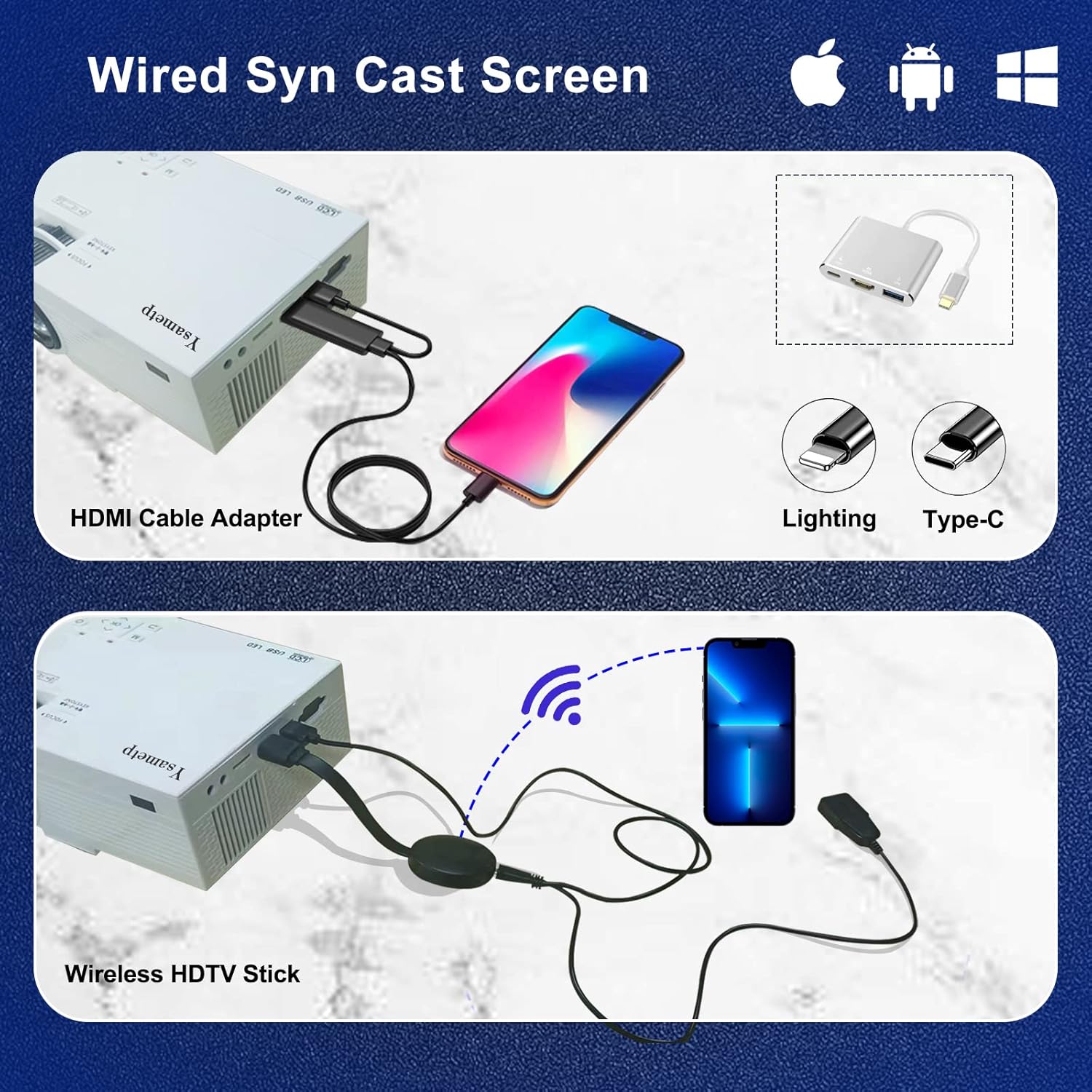
4. Wired Screen Mirroring (for Smartphones)
To mirror your smartphone screen, you will need an HDMI adapter (e.g., Lightning to HDMI for iPhone, USB-C to HDMI for Android) or a Miracast dongle/TV stick (like Roku, Fire TV Stick).

5. Zvočni izhod
The projector has dual built-in stereo speakers. For external audio, connect headphones or external speakers to the 3.5mm audio jack.

Vzdrževanje
1. Čiščenje
- Objektiv: Uporabite mehko krpo, ki ne pušča vlaken in je posebej zasnovana za optične leče. Ne uporabljajte abrazivnih čistil.
- Casing: Zunanjost projektorja obrišite z mehko, suho krpo. Ne uporabljajte tekočih ali aerosolnih čistil.
- Prezračevanje: Regularly check and clean the ventilation openings to prevent dust buildup, which can affect cooling performance.
2. Shranjevanje
When not in use, store the projector in a cool, dry place, away from direct sunlight and extreme temperatures. Use the provided drawstring backpack for protection during storage or transport.
3. LED Lifespan
The built-in LED light source is designed to support up to 55,000 hours of use, providing long-lasting performance.
Odpravljanje težav
| Težava | Možen vzrok/rešitev |
|---|---|
| Na zaslonu ni slike. |
|
| Slika je zamegljena. |
|
| Slika je trapezoidne oblike. |
|
| Brez zvoka. |
|
| Daljinski upravljalnik ne deluje. |
|
Specifikacije
| Funkcija | Podrobnost |
|---|---|
| Znamka | Ysametp |
| Model | M10 |
| Tehnologija zaslona | LCD |
| Izvorna ločljivost | 1920 x 1080 Pixels (Full HD Supported) |
| Svetlost slike | 11000 luksa |
| Razmerje kontrasta slike | 10000:1 |
| Razmerje stranic | 4:3 |
| Velikost projekcije | 32 - 200 palcev |
| Projekcijska razdalja | 3.6 ft - 16.4 ft |
| Življenjska doba LED | 55,000 uri |
| Nivo hrupa | 31 dB |
| Wattage | 60 vatov |
| Strojni vmesnik | VGA, USB, HDMI, 3.5mm Audio, TF Card |
| Dimenzije (D x Š x V) | 23.88 x 15.49 x 8.13 cm |
| Teža | 975.22 g (približno 2.15 funta) |
Garancija in podpora
Ysametp provides a 3-letna garancija na izdelek for the Mini Projector M10.
If you encounter any problems or have questions regarding your projector, please do not hesitate to contact our customer support. Refer to the contact information provided on the product packaging or the official Ysametp webstran za pomoč.
Ask a question about this manual
Ask about setup, troubleshooting, compatibility, parts, safety, or missing instructions. Manuals+ will review the question and use this page’s manual context to help answer it.