Uvod
This manual provides comprehensive instructions for the operation and maintenance of your YAOHUIMI replacement remote control. This remote is designed to be compatible with various Fujitsu air conditioner models, including AR-NJ1, ASY2U0, ASY25U, ASY35U, ASY25UA, ASY35UA, ASH9LSACW, ASH12LSACW, and ASY12USCCW, among others. Please read this manual carefully to ensure proper use and to maximize the lifespan of your remote control.
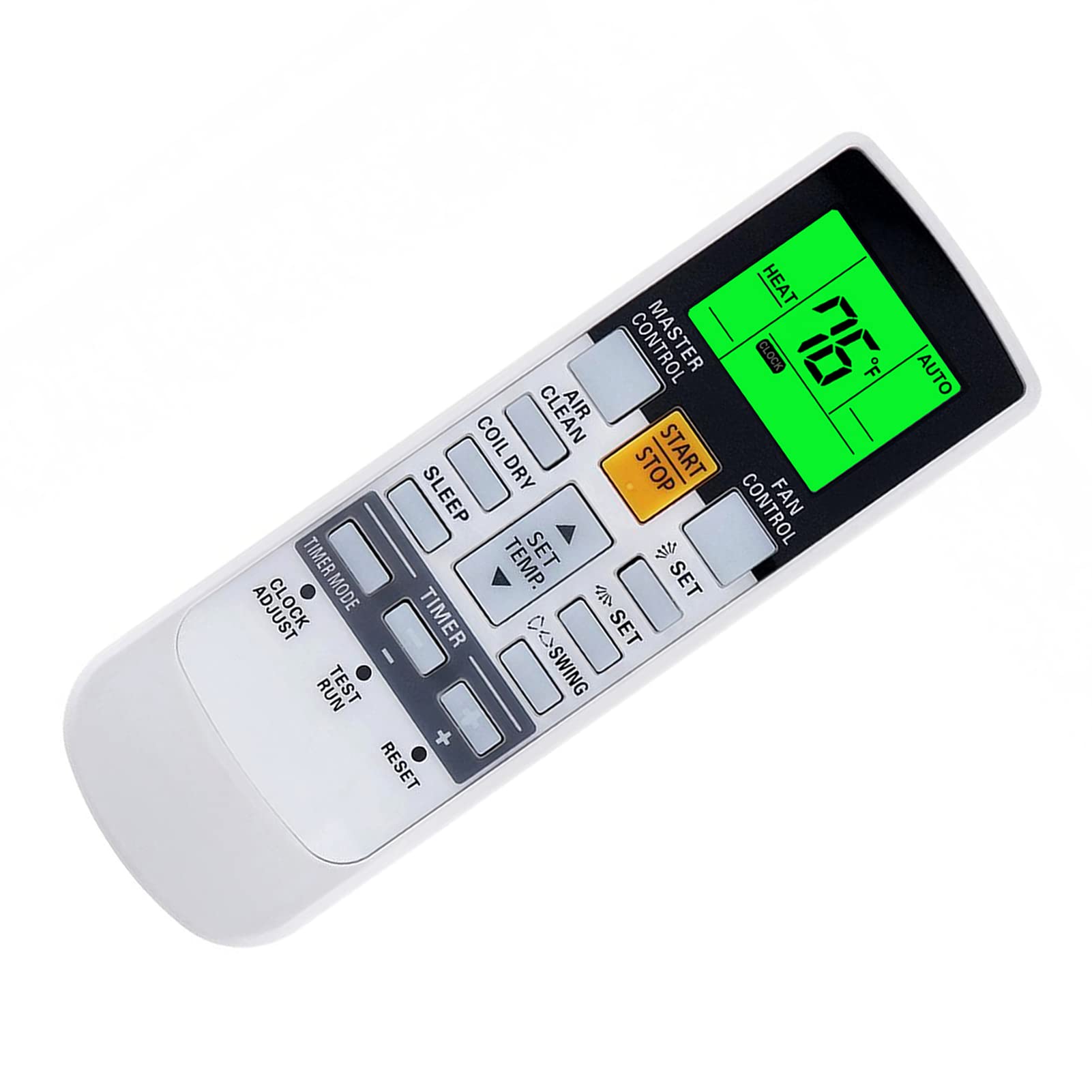
Slika: spredaj view of the YAOHUIMI Replacement Remote Control.
Nastavitev
Namestitev baterije
Daljinski upravljalnik za delovanje potrebuje dve bateriji AAA (nista priloženi). Za namestitev baterij sledite tem korakom:
- Poiščite pokrov prostora za baterije na zadnji strani daljinskega upravljalnika.
- Potisnite pokrov navzdol, da odprete predal.
- Insert two new AAA batteries, ensuring the positive (+) and negative (-) terminals match the diagrams inside the compartment.
- Pokrov predalčka za baterije potisnite nazaj na svoje mesto, dokler se ne zaskoči.

Slika: Spredaj in zadaj view daljinskega upravljalnika, ki prikazuje lokacijo predala za baterije.
Začetna uporaba
This replacement remote control is pre-programmed and typically requires no additional setup or pairing. Simply install the batteries and point the remote towards your Fujitsu air conditioner to begin operation.
Navodila za uporabo
Osnovne funkcije
- Gumb START/STOP: Pritisnite za VKLOP ali IZKLOP klimatske naprave.
- GLAVNI NADZOR: Preklaplja načine delovanja, kot so Samodejno, Hlajenje, Sušenje, Ventilator in Ogrevanje.
- NADZOR VENTILATORJA: Prilagodi hitrost ventilatorja (npr. Samodejno, Nizko, Srednje, Visoko).
- SET TEMP. Buttons (Up/Down Arrows): Prilagodi želeno temperaturo.
- SWING Buttons: Nadzira funkcijo nihanja lamel za porazdelitev zraka.
- TIMER Buttons: Used to set ON/OFF timers for the air conditioner.
Temperature Display (Fahrenheit/Celsius)
The remote control can display temperature in both Fahrenheit (°F) and Celsius (°C). To switch between these units:
- With the remote control powered on, observe the current temperature unit on the display.
- Press the designated button (often a small button near the temperature display or a combination of buttons) to toggle between °F and °C. Refer to the image below for visual guidance.

Image: Remote control display illustrating the Fahrenheit and Celsius temperature units and the green backlight.
Green Backlight Feature
The remote control features a green backlight for improved visibility in low-light conditions. This backlight activates automatically when buttons are pressed, making it easier to operate the air conditioner at night.
Advanced Heat Functions (If Applicable)
Some Fujitsu AC models support advanced heat functions such as "10°C HEAT", "50°F HEAT", "MINI.HEAT", or "ECONOMY". These functions are only available if your original remote control also had these specific buttons or capabilities. To activate these, you may need to press and hold a specific button for approximately 4 seconds. Consult your air conditioner's original manual for specific details on these functions.

Image: Diagram showing how to activate advanced heat functions by pressing and holding a button for 4 seconds.
Vzdrževanje
Čiščenje daljinskega upravljalnika
To clean the remote control, use a soft, dry cloth. Do not use liquid cleaners, sprays, or abrasive materials, as these can damage the remote's surface or internal components.
Zamenjava baterije
Replace the batteries when the remote control's range decreases, or if the display becomes dim or unresponsive. Always replace both batteries at the same time with new AAA batteries. Do not mix old and new batteries, or different types of batteries.
Če daljinskega upravljalnika ne boste uporabljali dlje časa, odstranite baterije, da preprečite puščanje in morebitno škodo.
Odpravljanje težav
Daljinski upravljalnik se ne odziva
- Preverite baterije: Prepričajte se, da so baterije pravilno vstavljene s pravilno polarnostjo (+/-). Po potrebi jih zamenjajte z novimi baterijami AAA.
- Vidnem polju: Prepričajte se, da med daljinskim upravljalnikom in sprejemnikom klimatske naprave ni ovir.
- Razdalja: Ensure you are within the effective operating range of the air conditioner's infrared receiver.
- Infrardeče motnje: Močni viri svetlobe (npr. neposredna sončna svetloba, fluorescentne luči) lahko motijo infrardeči signal. Poskusite daljinski upravljalnik uporabljati v drugačnih svetlobnih pogojih.
Težave z zaslonom
- Zatemnjen zaslon: To običajno pomeni nizko napolnjenost baterij. Zamenjajte baterije.
- Brez zaslona: Check battery installation and ensure batteries are fresh. If the issue persists after replacing batteries, the remote may require service.
Functions Not Working
- Združljivost: While this remote is broadly compatible, some advanced functions might not be supported by all Fujitsu AC models, especially if your original remote did not have those specific features.
- AC Unit Status: Ensure your air conditioner unit is powered on and functioning correctly.
Specifikacije
| Znamka | YAOHUIMI |
| Številka modela | A420220331-BEIGUANG-87 |
| Združljive naprave | Fujitsu AC models including AR-NJ1, ASH12LSACW, ASH9LSACW, ASY12USCCW, ASY25U, ASY25UA, ASY2U0, ASY35U, ASY35UA, and others. |
| Tehnologija povezljivosti | Infrardeči (IR) |
| Posebna funkcija | Ergonomic design, Green Backlight, Fahrenheit/Celsius display |
| Vir napajanja | 2 x AAA baterije (niso vključene) |
| Proizvajalec | HUIMIKEJI |
Podpora
For further assistance or inquiries regarding your YAOHUIMI replacement remote control, please refer to the seller's contact information on the platform where the product was purchased. Ensure you have your product model number (A420220331-BEIGUANG-87) available when seeking support.