
Uvod
Hvala za nakupasing the UBeesize 170cm Tripod. This versatile tripod is designed to provide stable support for various devices, including cameras, smartphones, tablets, and video cameras. Its lightweight aluminum construction, 3-way pan head, and adjustable height make it suitable for a wide range of photography and videography needs, from family trips to live streaming. Please read this manual carefully to ensure proper setup and operation.
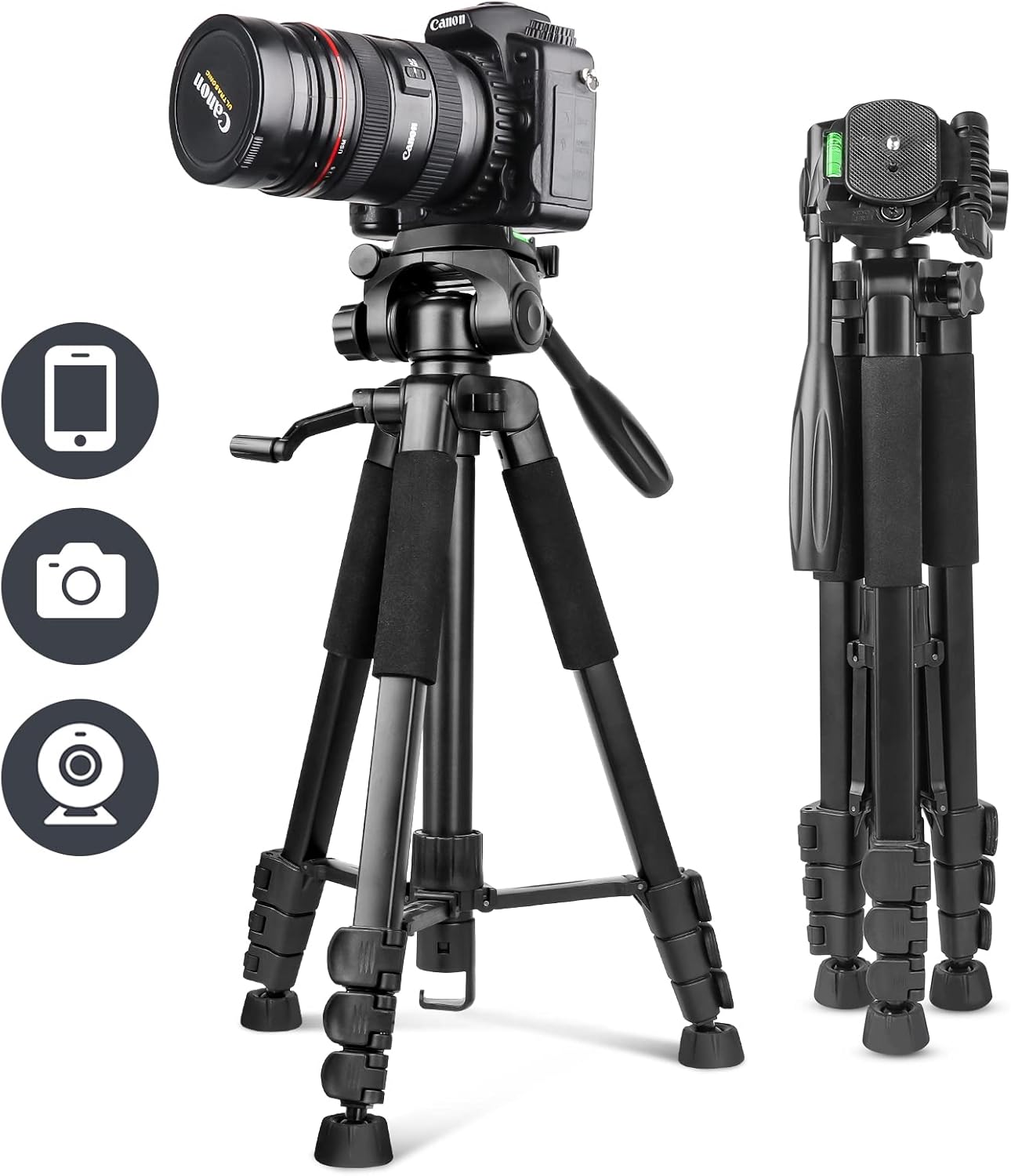
Image: The UBeesize 170cm Tripod shown fully extended with a camera attached, illustrating its primary use.
Vsebina paketa
Prosimo, preverite, ali so v vašem paketu priloženi vsi spodaj navedeni artikli:
- UBeesize Camera Tripod x 1
- Smartphone Clip x 1
- Brezžični daljinski upravljalnik x 1
- Nosilna torba x 1
- Navodila za uporabo x 1

Image: Visual representation of the tripod and its accompanying accessories, including the smartphone clip, wireless remote, and carrying bag.
Product Diagram and Parts Identification
Familiarize yourself with the different components of your UBeesize tripod:

Slika: Eksplodirala view diagram highlighting key parts such as the pan handle head, quick release plate, spirit level, center column, leg locks, anti-slip feet, and the hook for added stability.
- Pan Handle Head: Allows for smooth horizontal and vertical adjustments.
- Plošča za hitro sprostitev: For quick attachment and detachment of your device.
- Spirit Level: Helps ensure your setup is perfectly horizontal.
- Sredinski stolpec: Extends for additional height adjustment.
- Zaklepanje nog: Secure the tripod legs at desired lengths.
- Protizdrsne noge: Provide stability on various surfaces.
- Kavelj za dodatno opremo: Located at the bottom of the center column, can be used to hang a weight (e.g., backpack) for increased stability.
Navodila za namestitev
1. Razstavljanje stojala
- Stativ postavite na ravno, stabilno površino.
- Release the leg locks on each leg.
- Extend the legs to the desired length and angle.
- Vse zaklepe nog varno pritrdite, da preprečite nenamerno zrušitev.
2. Nastavitev višine
The tripod offers 4-stage height adjustment, from a minimum of 51cm to a maximum of 170cm.
- To adjust the leg height, open the leg locks, extend the leg sections, and then close the locks firmly.
- To adjust the center column height, loosen the center column lock knob, raise or lower the column, and then tighten the knob securely.

Image: A visual guide demonstrating the tripod's adjustable height settings, ranging from its folded state to its maximum extension of 170cm.
3. Attaching Devices (Camera, Smartphone)
- Za kamere: Unscrew the quick release plate from the tripod head. Attach the quick release plate to the bottom of your camera by screwing it into the camera's tripod mount. Then, slide the quick release plate with the camera back onto the tripod head until it clicks into place. Ensure it is securely locked.
- Za pametne telefone: Attach the smartphone clip to the quick release plate. Insert your smartphone into the clip, ensuring it is held firmly. Then, attach the quick release plate with the smartphone clip to the tripod head.
- Pomembno: Always ensure the device is securely mounted and all screws are tightened to prevent accidental drops and maintain the maximum load capacity of 5.5kg.
4. Uporaba brezžičnega daljinskega upravljalnika
The included wireless remote control is compatible with both iOS and Android smartphones, offering a maximum effective range of 10 meters.
- Vklopite daljinski upravljalnik s stikalom za VKLOP/IZKLOP.
- V pametnem telefonu omogočite Bluetooth in poiščite razpoložljive naprave.
- Select the remote control (usually named 'AB Shutter3' or similar) from the list to pair.
- Once paired, open your smartphone's camera app. Use the corresponding button on the remote (iOS or Android) to trigger the shutter.
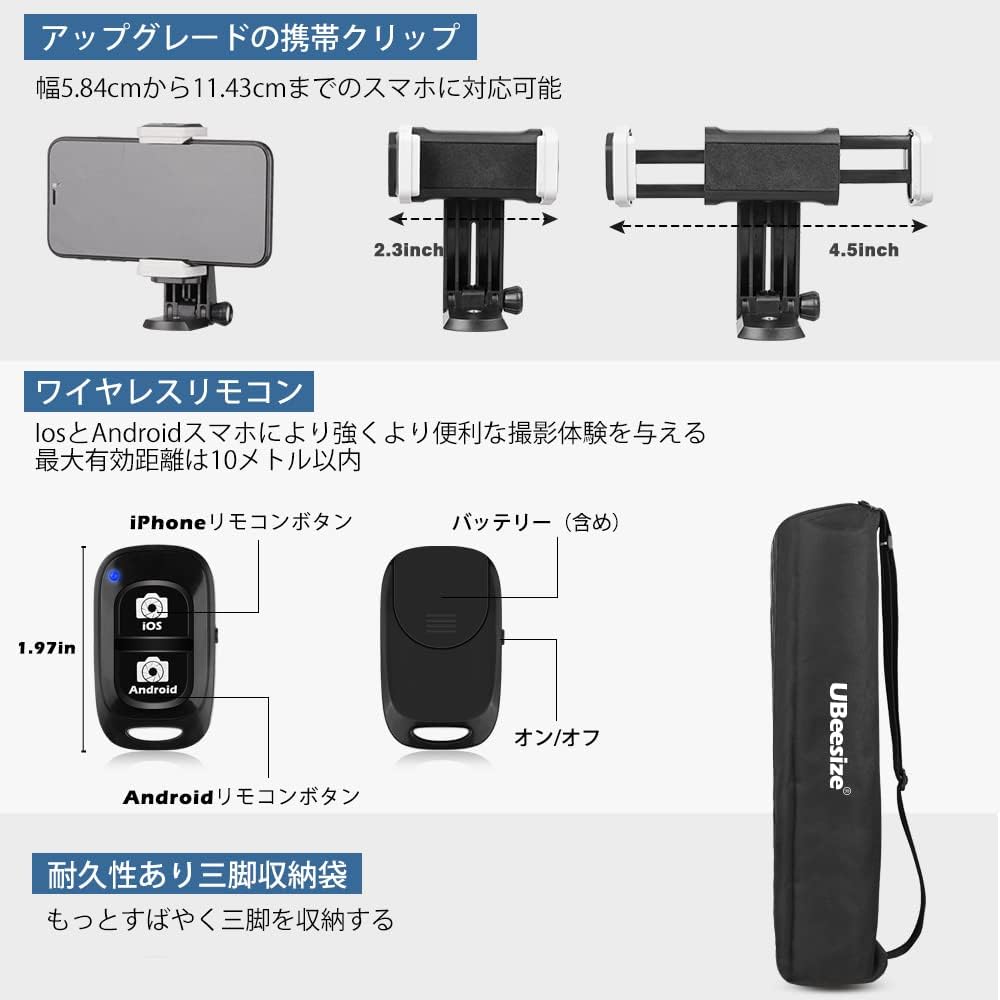
Slika: Bližnji posnetek view of the adjustable smartphone clip, the wireless Bluetooth remote control with iOS and Android buttons, and the compact carrying bag.
Navodila za uporabo
1. Adjusting Shooting Angles with the 3-Way Pan Head
The 3-way pan head allows for flexible positioning of your device:
- Horizontal Panning: Loosen the horizontal lock knob on the pan head to rotate the device 360 degrees horizontally for panoramic shots. Tighten to secure.
- Vertical Tilting: Loosen the vertical tilt handle to adjust the device's angle up or down. Tighten the handle to secure the position.
- Portrait/Landscape Orientation: The quick release plate mount can be tilted 90 degrees to switch between landscape and portrait orientations. Loosen the side knob, adjust, and tighten.

Slika: npramples of various shooting modes achievable with the 3-way pan head, including landscape, portrait, upward-angle, and downward-angle shots, along with an indicator for 360-degree rotation.
2. Enhancing Stability
For maximum stability, especially with heavier devices or in windy conditions:
- Ensure all leg locks and head adjustment knobs are firmly tightened.
- Hang a weight (e.g., your camera bag or backpack) from the accessory hook located at the bottom of the center column.
- Use the spirit level on the tripod head to ensure your setup is perfectly balanced.

Image: The tripod set up outdoors with a camera, showing a backpack attached to the center column hook to provide additional stability.
Vzdrževanje
Za zagotovitev dolge življenjske dobe in optimalne zmogljivosti vašega stojala:
- Clean the tripod regularly with a soft, dry cloth. Avoid abrasive cleaners or solvents.
- If used in dusty or sandy environments, carefully clean the leg sections and locks to prevent grit from affecting their operation.
- Store the tripod in its carrying bag in a dry, cool place when not in use.
- Občasno preverite trdnost vseh vijakov in priključkov.
Odpravljanje težav
1. Tripod is unstable:
- Prepričajte se, da so vse ključavnice na nogah popolnoma zategnjene.
- Verify that the quick release plate and your device are securely attached to the tripod head.
- Extend the legs evenly and ensure they are spread wide enough.
- Consider hanging a weight from the accessory hook for added stability.
2. Device is slipping or tilting:
- Tighten the pan handle and tilt adjustment knobs firmly.
- Ensure your device's weight does not exceed the maximum load capacity of 5.5kg.
3. Wireless remote control not pairing:
- Ensure the remote control is turned on and within 10 meters of your smartphone.
- Preverite, ali je Bluetooth omogočen na vašem pametnem telefonu.
- If previously paired, try unpairing and re-pairing the remote control in your smartphone's Bluetooth settings.
- Po potrebi zamenjajte baterijo daljinskega upravljalnika.
Specifikacije
| Številka modela | UB-TR670BK01 |
| Material | Aluminij |
| barva | Črna |
| Največja višina | 170 cm |
| Najmanjša višina | 51 cm |
| Zložena dolžina | 51 cm |
| Teža predmeta | 1.39 kg (body weight), 1.64 kg (package weight) |
| Največja nosilnost | 5.5 kg |
| Tip glave stativa | 3-Way Pan Handle Head |
| Združljive naprave | Cameras, Smartphones, Tablets, Video Cameras |
| Ocena vodotesnosti | IP54 |
| Posebne lastnosti | Portable, 360° Rotation, Accessory Hook |
Garancija in podpora
Your UBeesize 170cm Tripod comes with a 12-mesečna garancija from the date of purchase. If you encounter any issues or have questions regarding your product during this period, please do not hesitate to contact our customer support team. We are committed to providing reliable service and assistance.
For support, please refer to the contact information provided on the UBeesize official webspletno mesto ali vašo nakupovalno platformo.