
Uvod
Hvala za nakupasing the Naxa NT-1400 Portable 14.1-inch TV and Digital Multimedia Player. This device is designed to provide portable entertainment, featuring a built-in ATSC tuner for over-the-air HD TV reception and multimedia playback capabilities via USB. This manual provides essential information for the proper setup, operation, and maintenance of your device. Please read it thoroughly before use and retain it for future reference.
Varnostne informacije
- vir energije: Use only the provided AC adapter or DC car cord. Ensure the voltage ustreza zahtevam naprave.
- Varnost baterije: The device contains a rechargeable lithium battery. Do not expose to extreme temperatures, puncture, or disassemble. Dispose of batteries according to local regulations.
- Voda in vlaga: Naprave ne izpostavljajte dežju, vlagi in je ne potapljajte v vodo.
- Prezračevanje: Zagotovite ustrezno prezračevanje okoli enote. Ne blokirajte prezračevalnih odprtin.
- Čiščenje: Pred čiščenjem izklopite napajanje. Uporabite mehko, suho krpo. Izogibajte se tekočim čistilom.
- Servisiranje: Ne poskušajte sami servisirati enote. Vsa servisna dela prepustite usposobljenemu osebju.
Vsebina paketa
Preverite, ali so v vašem paketu priloženi vsi spodaj navedeni elementi:
- Naxa NT-1400 Portable TV Unit
- Daljinski upravljalnik
- ETL AC Adapter
- DC Car Cord
- Zunanja antena
- A/V kabel
- Namizno stojalo
- Uporabniški priročnik (ta dokument)

Image: Included accessories for the Naxa NT-1400.
Konec izdelkaview
The Naxa NT-1400 features a 14.1-inch LCD screen with 1280 x 800 resolution, a built-in ATSC tuner for digital TV, and various input options for multimedia playback.

Slika: spredaj view of the Naxa NT-1400 Portable TV.

Image: Naxa NT-1400 in a portable setting, such as an RV.
Vrata in kontrole
Familiarize yourself with the various ports and controls located on the unit:
- MRAVLJA: Connect the external antenna for TV reception.
- HD-IN: HDMI input for connecting external high-definition devices.
- VGA: VGA input for connecting to computers or other compatible devices.
- AV-IN/AV-OUT: Audio/Video input and output for connecting to older devices or external displays.
- Vhod za slušalke (3.5 mm): Za zasebno poslušanje.
- Vrata USB: For playing multimedia files pogona USB.
- DC 12V ON/OFF: Power input for the AC adapter or DC car cord, with a power switch.
- Nadzor sprednje plošče: Volume, Channel, Menu, Input Source, Power.

Slika: Stran view of the Naxa NT-1400 showing input/output ports.
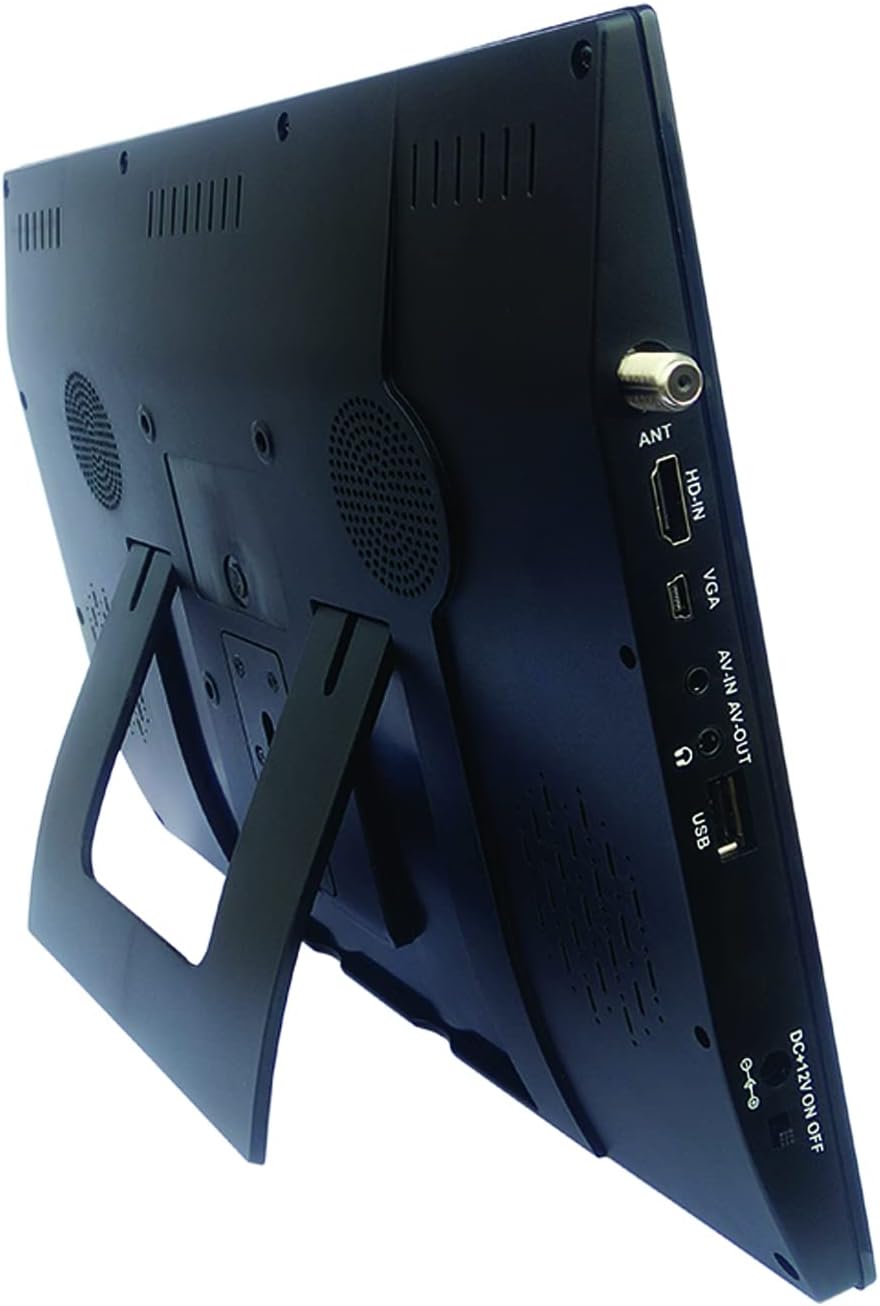
Image: Naxa NT-1400 with the integrated kickstand.
Nastavitev
1. Napajanje naprave
- AC napajanje: Connect the ETL AC adapter to the DC 12V input on the unit and plug it into a standard wall outlet.
- DC Car Power: Connect the DC car cord to the DC 12V input on the unit and plug it into your vehicle's 12V accessory socket.
- Notranja baterija: The unit has a built-in rechargeable lithium battery. Ensure it is charged before portable use. The battery charges automatically when connected to AC or DC power.
2. Pritrditev stojala
- The unit includes an integrated flip-out kickstand for quick setup.
- For more stable placement, attach the provided tabletop stand to the back of the unit using the designated mounting points.
3. Priključitev antene
For optimal over-the-air TV reception, connect the external antenna to the ANT port on the side of the unit. Position the antenna in an area with good signal strength.
4. Začetno skeniranje kanalov
After powering on the device for the first time, navigate to the 'Channel Setup' or 'Auto Scan' option in the main menu to scan for available digital TV channels. This process may take several minutes.
Navodila za uporabo
1. Vklop/izklop
Press the 'POWER' button on the unit or the remote control to turn the device on or off.
2. Izbira vhodnega vira
Press the 'MODE' or 'INPUT' button on the unit or remote control to cycle through available input sources: TV, USB, HDMI, VGA, AV.
3. Upravljanje televizorja
- Izbira kanala: Use the 'CH+' / 'CH-' buttons on the unit or the remote control to change channels. You can also enter channel numbers directly using the remote's numeric keypad.
- Nadzor glasnosti: Use the 'VOL+' / 'VOL-' buttons on the unit or the remote control to adjust the volume.
- Krmarjenje po meniju: Press the 'MENU' button to access settings. Use arrow keys and 'OK' on the remote to navigate and confirm selections.
4. Uporaba slušalk
Plug standard 3.5mm headphones into the headphone jack for private audio listening. The internal speakers will automatically mute.
Predvajanje multimedije
The Naxa NT-1400 supports playback of various multimedia files pogona USB.
1. Povezovanje pogona USB
Insert your USB flash drive into the USB port on the side of the unit.
2. Accessing USB Media
Switch the input source to 'USB'. The device will display a file browser. Navigate through your folders and select the desired media file.
3. Podprto File Formati
- Video: MPEG, XVID, AVC, MP4, H.264, HEVC (H.265), FLV, MKV
- Avdio: MP3
- Slika: JPEG
- Besedilo: TXT
Vzdrževanje
Čiščenje
Ensure the unit is powered off and unplugged before cleaning. Use a soft, dry, lint-free cloth to wipe the screen and exterior surfaces. Do not use liquid cleaners, aerosols, or abrasive materials.
Skrb za baterijo
To prolong battery life, avoid fully discharging the battery frequently. If storing the unit for an extended period, charge the battery to approximately 50% and store in a cool, dry place.
Shranjevanje
Ko enote ne uporabljate, jo shranite v čistem in suhem okolju, stran od neposredne sončne svetlobe in ekstremnih temperatur.
Odpravljanje težav
- Brez napajanja: Ensure the AC adapter or DC car cord is securely connected and the power switch is in the 'ON' position. Check if the internal battery is charged.
- Ni TV signala: Verify the external antenna is properly connected and positioned. Perform an 'Auto Scan' for channels. Signal strength can vary by location.
- Ni zvoka: Check the volume level. Ensure headphones are not plugged in unless intended. Verify the audio settings in the menu.
- Težave s predvajanjem na USB-ju: Ensure the USB drive is formatted correctly (FAT32 is generally recommended). Verify that the media fileso v podprtih formatih.
- Daljinski upravljalnik ne deluje: Check the battery in the remote control. Ensure there are no obstructions between the remote and the unit's IR sensor.
Specifikacije
| Funkcija | Specifikacija |
|---|---|
| Znamka | Naxa |
| Številka modela | NT-1400 |
| Velikost zaslona | 14.1 palcev |
| Tehnologija zaslona | LCD |
| Resolucija | 1280 x 800 |
| Razmerje stranic | 16:9 |
| Hitrost osveževanja | 50/60 Hz |
| Vrsta sprejemnika | Built-in Digital ATSC TV Tuner |
| Povezljivost | HDMI, USB, VGA, AV-IN/AV-OUT |
| Vrsta zvočnika | Vgrajeno |
| Baterija | 1 litij-ion (priložen) |
| Vir napajanja | AC Adapter, DC Car Cord, Internal Battery |
| Dimenzije izdelka | 1.5"D x 13.45"Š x 9.2"V |
| Teža predmeta | 2.2 funta |
Garancija in podpora
For warranty information, technical support, or service inquiries, please visit the official Naxa Electronics webspletno mesto ali se obrnite na njihovo službo za pomoč strankam. Račun shranite kot dokazilo o nakupu za uveljavljanje garancije.
Naxa Electronics: Obiščite trgovino Naxa na Amazonu