
1. Uvod
This manual provides detailed instructions for the safe installation, operation, and maintenance of your Lucci Air Peregrine 56-inch White Ceiling Fan with Remote, Model 21328001. The Peregrine fan features a modern design with three blades, energy-efficient direct current (DC) technology, six speeds, and high airflow. It is rated for both indoor and outdoor use in covered areas. The fan includes a 6-inch warm white GX53 light kit with 3-step dimming functionality and comes with a remote control and wall mount bracket.

Slika 1.1: Spredaj view of the Lucci Air Peregrine 56-inch White Ceiling Fan.
2. Varnostne informacije
Pred začetkom namestitve natančno preberite vsa navodila in shranite ta priročnik za poznejšo uporabo. Nepravilna namestitev ali uporaba lahko povzroči električni udar, požar ali telesne poškodbe.
- Električna varnost: Ensure the power supply is disconnected at the circuit breaker before installation or maintenance. All electrical wiring must be performed by a qualified electrician and comply with local codes and regulations.
- Montaža: The ceiling fan must be mounted to a structurally sound ceiling joist or outlet box capable of supporting the fan's weight (15.92 lbs).
- Razdalja rezila: Maintain a minimum clearance of 7 feet from the floor to the fan blades and 18 inches from the fan blades to any walls or obstructions.
- Komplet luči: Use only the specified GX53 12W 3000K bulb. Do not exceed the maximum wattage.
- Zunanja uporaba: This fan is rated for indoor and outdoor use in covered areas. Do not expose to direct water spray.
- Daljinski upravljalnik: Keep the remote control away from water and extreme temperatures. Replace batteries as needed.
3. Vsebina paketa
Verify that all components are present and undamaged before proceeding with installation. If any parts are missing or damaged, contact customer support.
- Ceiling Fan Motor Housing with Downrod
- Rezila ventilatorja (3)
- Daljinski upravljalnik
- Wall Mount Bracket for Remote
- GX53 12W 3000K Light Kit (pre-installed or separate)
- Optional Metal Cap (for non-light use)
- Montažna oprema
- Navodila za uporabo

Slika 3.1: Konecview of the remote control and its features, including 6 fan speeds, reverse switch, light on/off/dimming, fan on/off, and wall mount holster. A CP2032 battery is included.
4. Nastavitev in namestitev
Professional installation is recommended for this ceiling fan. Ensure all power is disconnected at the main circuit breaker before beginning installation.
- Priprava mesta montaže: Securely attach the mounting bracket to a suitable ceiling joist or fan-rated outlet box. Ensure the structure can support the fan's weight.
- Sestavite spodnjo palico in motor: Attach the downrod to the fan motor housing. Carefully feed the electrical wires through the downrod.
- Sklop obešenega ventilatorja: Dvignite sklop ventilatorja in ga obesite na nosilec.
- Električne povezave: Connect the fan's electrical wires to the household wiring according to the wiring diagram provided in the separate installation guide (not included in this manual). Ensure all connections are secure.
- Pritrdite rezila: Tri lopatice ventilatorja varno pritrdite na ohišje motorja s priloženimi vijaki.
- Install Light Kit (Optional): If using the light, install the GX53 12W 3000K bulb into the light kit socket. Attach the light kit to the bottom of the fan motor housing. If not using the light, install the optional metal cap.
- Varna nadstrešnica: Slide the canopy up to the ceiling and secure it to the mounting bracket, covering all wiring.
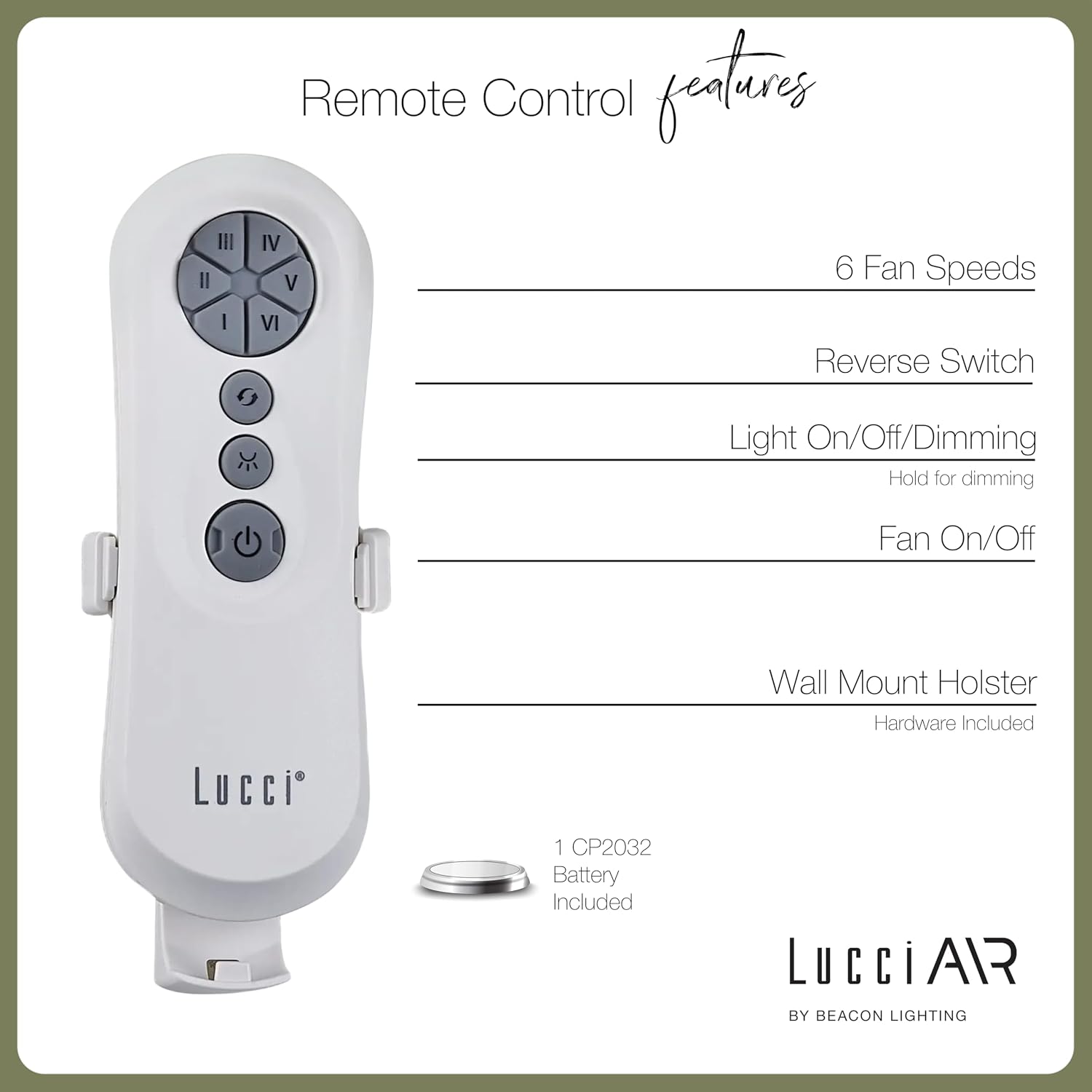
Image 4.1: Dimensional diagram of the Lucci Air Peregrine 56-inch Ceiling Fan, showing overall height, width, and blade length measurements.

Slika 4.2: Spodaj view of the Lucci Air Peregrine fan, highlighting the integrated light kit.
5. Delovanje
The Lucci Air Peregrine fan is operated using the included remote control. Ensure the remote has a working CP2032 battery installed.
5.1 Funkcije daljinskega upravljalnika
- Vklop/izklop ventilatorja: Press the power button (ⓘ) to turn the fan on or off.
- Hitrost ventilatorja: Use buttons I, II, III, IV, V, VI to select one of the six available fan speeds. I is the lowest speed, VI is the highest.
- Stikalo za vzvratno vožnjo: Press the reverse button (↻) to change the direction of the fan blades. This function is typically used to switch between summer (downward airflow) and winter (upward airflow) modes. Note: Some models may have a manual switch on the motor housing for this function.
- Vklop/izklop/zatemnitev luči: Press the light button (☀) to turn the light on or off. Hold the light button to dim or brighten the light through its 3-step dimming range.
5.2 Winter/Summer Mode
The fan features a manual switch on the motor housing to change between winter and summer modes. For summer operation, the blades should rotate counter-clockwise to push air downwards, creating a cooling breeze. For winter operation, the blades should rotate clockwise to draw cool air up, circulating warm air trapped near the ceiling. Adjust the switch accordingly.
6. Vzdrževanje
Redno vzdrževanje zagotavlja optimalno delovanje in podaljšuje življenjsko dobo vašega stropnega ventilatorja.
- Čiščenje: Občasno obrišite prah z lopatic ventilatorja in ohišja motorja z mehko krpoamp krpo. Ne uporabljajte abrazivnih čistil ali topil, saj lahko poškodujejo premaz.
- Tesnost rezila: Check all blade screws annually to ensure they are tight. Loose blades can cause wobbling and noise.
- Zamenjava žarnice: Disconnect power before replacing the GX53 light bulb. Allow the bulb to cool completely before handling.
- Baterija daljinskega upravljalnika: Replace the CP2032 battery in the remote control when its range decreases or it stops responding.
7. Odpravljanje težav
Za pogoste težave in njihove rešitve glejte naslednjo tabelo.
| Težava | Možen vzrok | rešitev |
|---|---|---|
| Ventilator se ne zažene | Ventilator ni napajan Zrahljane žične povezave Prazna baterija daljinskega upravljalnika | Preverite odklopnik Preverite, ali so vse žične povezave varne (izklopite napajanje) Zamenjajte baterijo daljinskega upravljalnika |
| Ventilator niha | Zrahljani vijaki rezila Neuravnotežena rezila Ohlapen montažni nosilec | Privijte vse vijake rezila Ensure blades are installed correctly and balanced Verify mounting bracket is securely fastened |
| Svetloba ne deluje | Okvara žarnice Loose wire connection to light kit | Zamenjajte žarnico Check light kit wiring (power off) |
| Daljinski upravljalnik ne deluje | Prazna baterija Daljinski upravljalnik ni seznanjen (če je primerno) | Zamenjajte baterijo Refer to separate remote pairing instructions (if provided with fan) |
8. Specifikacije
Key technical details for the Lucci Air Peregrine 56-inch White Ceiling Fan (Model 21328001).
| Funkcija | Podrobnost |
|---|---|
| Ime modela | Peregrine |
| Številka modela | 21328001 |
| Znamka | Lucci Air |
| barva | Bela |
| Oblikovanje ventilatorja | Stropni ventilator |
| Vir napajanja | DC (enosmerni tok) |
| Dimenzije izdelka | 56"D x 56"Š x 15"V |
| Število rezil | 3 |
| Dolžina rezila | 31.1 palcev |
| Zmogljivost pretoka zraka | 6363 kubičnih čevljev na minuto (CFM) |
| Število hitrosti | 6 |
| Poraba energije (povprečna) | 38 W |
| voltage | 120 Vac, 60 Hz |
| Komplet luči je vključen | 1x GX53 12W 3000K bulb, 1100 Lumens, 3-step dimmable |
| Nadzorna metoda | Daljinski upravljalnik |
| Notranja/zunanja uporaba | Indoor, Outdoor (covered areas) |
| Teža predmeta | 15.92 funtov |
| UPC | 811769032344 |
9. Garancija in podpora
The Lucci Air Peregrine 56-inch White Ceiling Fan comes with a omejena doživljenjska garancija. For warranty claims, technical support, or replacement parts, please contact Lucci Air customer service. Keep your proof of purchase for warranty validation.
Za dodatno pomoč obiščite Lucci Air Store on Amazon ali se obrnite na prodajalca.