
1. Uvod
This manual provides essential instructions for the proper use and maintenance of your LOTUS Smartwatch Model 50003/A. Please read this guide thoroughly before using your smartwatch to ensure optimal performance and longevity.
The LOTUS Smartwatch 50003/A features an intuitive interface and elegant design, offering a variety of smart functions. It is equipped with Bluetooth connectivity, allowing seamless synchronization with your mobile devices. This synchronization enables features such as call and message notifications, music control, and other practical functions for daily life.
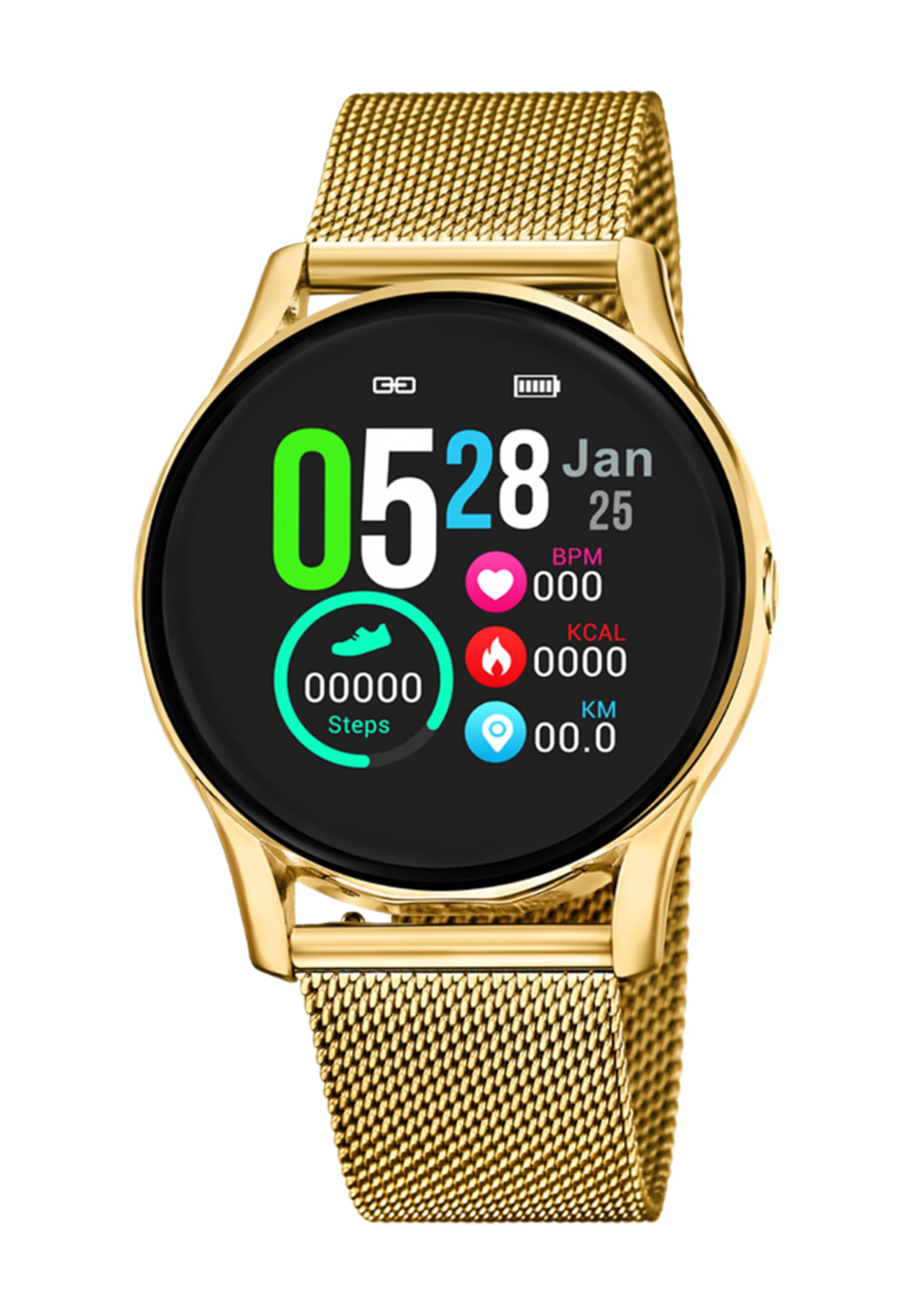
Slika 1.1: Spredaj view of the LOTUS Smartwatch 50003/A.
2. Vsebina paketa
Please check the package contents upon unboxing. The standard package for the LOTUS Smartwatch 50003/A should include:
- LOTUS Smartwatch 50003/A
- Polnilni kabel
- Uporabniški priročnik (ta dokument)
3. Navodila za namestitev
3.1. Polnjenje pametne ure
Pred prvo uporabo popolnoma napolnite pametno uro.
- Polnilni kabel priključite na polnilno vtičnico na zadnji strani pametne ure.
- Drugi konec polnilnega kabla priključite v napajalnik USB (ni priložen) ali v vrata USB računalnika.
- The watch display will indicate charging status. Allow approximately 2-3 hours for a full charge.
3.2. Namestitev spremljevalne aplikacije
To unlock all features and synchronize your smartwatch with your smartphone, you need to install the official LOTUS Connected app.
- Scan the QR code provided in the watch packaging or search for "LOTUS Connected" in your smartphone's app store (Google Play Store for Android, Apple App Store for iOS).
- Prenesite in namestite aplikacijo.
- Sledite navodilom na zaslonu, da ustvarite račun ali se prijavite.

Image 3.2: Synchronizing the smartwatch with the companion app on a smartphone.
3.3. Seznanjanje s pametnim telefonom
Ensure Bluetooth is enabled on your smartphone and the smartwatch is charged.
- Open the LOTUS Connected app on your smartphone.
- Follow the app's instructions to add a new device.
- The app will search for available smartwatches. Select "LOTUS 50003/A" from the list.
- Po potrebi potrdite zahtevo za seznanjanje tako na pametnem telefonu kot na pametni uri.
- Ko je ura združena, bo sinhronizirala čas in podatke z vašim telefonom.
4. Navodila za uporabo
4.1. Osnovna navigacija
- Zaslon na dotik: Za navigacijo po menijih in funkcijah podrsajte levo/desno, gor/dol. Dotaknite se za izbiro.
- Stranski gumbi: The smartwatch may have one or more physical buttons. Typically, one button serves as a power on/off, back, or home button. Refer to the on-screen prompts for specific button functions.

Slika 4.1: Primerample of a smartwatch display showing activity data.
4.2. Ključne značilnosti
- Obvestila: Receive alerts for incoming calls, messages, and app notifications directly on your wrist. Manage notification settings via the LOTUS Connected app.
- Nadzor glasbe: Control music playback on your connected smartphone (play, pause, skip tracks, adjust volume).
- Sledenje dejavnosti: Spremljajte korake, razdaljo, porabljene kalorije in vzorce spanja. View detailed statistics in the companion app.
- Vodoodpornost: The smartwatch is water resistant. Avoid prolonged submersion or use in hot water/steam. Refer to specifications for exact water resistance rating.
5. Vzdrževanje
5.1. Čiščenje pametne ure
- Zaslon in ohišje ure obrišite z mehko krpo, ki ne pušča vlaken.
- Za trdovratno umazanijo rahlo dampkrpo z vodo. Izogibajte se agresivnim kemikalijam ali abrazivnim materialom.
- Pred polnjenjem se prepričajte, da so polnilni kontakti čisti in suhi.
5.2. Skrb za baterijo
- Charge the smartwatch regularly. Avoid letting the battery completely drain for extended periods.
- Do not expose the smartwatch to extreme temperatures, as this can affect battery life and performance.
- Če ure ne boste uporabljali dlje časa, jo pred shranjevanjem napolnite na približno 50 %.
6. Odpravljanje težav
6.1. Pogoste težave in rešitve
- Ura se ne vklopi: Prepričajte se, da je ura popolnoma napolnjena. Priključite jo na polnilnik in počakajte nekaj minut, preden jo poskusite vklopiti.
- Seznanjanje s pametnim telefonom ni mogoče:
- Prepričajte se, da je Bluetooth na vašem pametnem telefonu omogočen.
- Prepričajte se, da je pametna ura v dosegu vašega telefona.
- Znova zaženite pametni telefon in pametno uro.
- Poskusite prekiniti seznanitev in ponovno seznaniti napravo prek aplikacije.
- Obvestila niso bila prejeta:
- Check notification settings in the LOTUS Connected app.
- Prepričajte se, da ima aplikacija na vašem pametnem telefonu potrebna dovoljenja.
- Verify that the smartwatch is properly connected via Bluetooth.
- Kratka življenjska doba baterije:
- Zmanjšajte svetlost zaslona.
- Disable unnecessary notifications or features.
- Pred uporabo se prepričajte, da je ura popolnoma napolnjena.
6.2. Tovarniška ponastavitev
If issues persist, a factory reset may resolve them. This will erase all data on the smartwatch and restore it to its original settings.
- Navigate to the "Settings" menu on your smartwatch.
- Look for an option like "System," "Reset," or "Factory Reset."
- Ob pozivu potrdite ponastavitev.
- After resetting, you will need to re-pair the smartwatch with your phone and set it up again.
7. Specifikacije
| Funkcija | Podrobnost |
|---|---|
| Znamka | LOTUS |
| Številka modela | 50003/A |
| barva | Črna |
| Združljivost operacijskega sistema | Android, iOS |
| Velikost zaslona | 39.65 milimetrov |
| Posebne lastnosti | Vodoodporen |
| Združljive naprave | Pametni telefon |
| Sestava baterije | Kovinski litij |
| Razpoložljivost rezervnih delov | 5 leti |
8. Garancija in podpora
Your LOTUS Smartwatch 50003/A comes with a manufacturer's warranty. Please refer to the warranty card included in your product packaging for specific terms and conditions.
Rezervni deli za ta model so na voljo do 5 let od datuma nakupa.
For technical support, service, or warranty claims, please contact LOTUS customer service through their official webspletnega mesta ali kontaktnih podatkov, navedenih v garancijski dokumentaciji.