
1. Uvod
This manual provides detailed instructions for the safe and effective operation of your Andoer 4K 48MP 60FPS WiFi Camcorder. Please read this manual thoroughly before using the device and retain it for future reference. This camcorder is designed for high-quality video recording and photography, featuring 4K Ultra HD resolution, 48-megapixel photos, a 3-inch IPS touchscreen, and infrared night vision capabilities. It is equipped with WiFi connectivity for easy file transfer and remote control, and comes with essential accessories such as an external microphone and a wide-angle macro lens.

Image 1.1: Andoer 4K Camcorder with included accessories.
2. Vsebina paketa
Preverite, ali so v paketu vsi spodaj navedeni predmeti. Če kateri koli predmet manjka ali je poškodovan, se obrnite na prodajalca.

Slika 2.1: Vse komponente so vključene v paket.
- Videokamera
- Mikrofon
- Vetrobransko steklo za mikrofon
- 3.5 mm TRS v TRS avdio kabel
- USB kabel
- Ročaj
- Camera Lens (Wide-angle macro lens)
- Adapterski obroč za objektiv
- 2 x Lithium-polymer Batteries (2000mAh)
- Daljinski upravljalnik
- Camcorder Storage Bag
- Torba za shranjevanje leč
- Camcorder User Manual
- Uporabniški priročnik za mikrofon
3. Izdelek je končanview
Familiarize yourself with the various parts and controls of your camcorder.
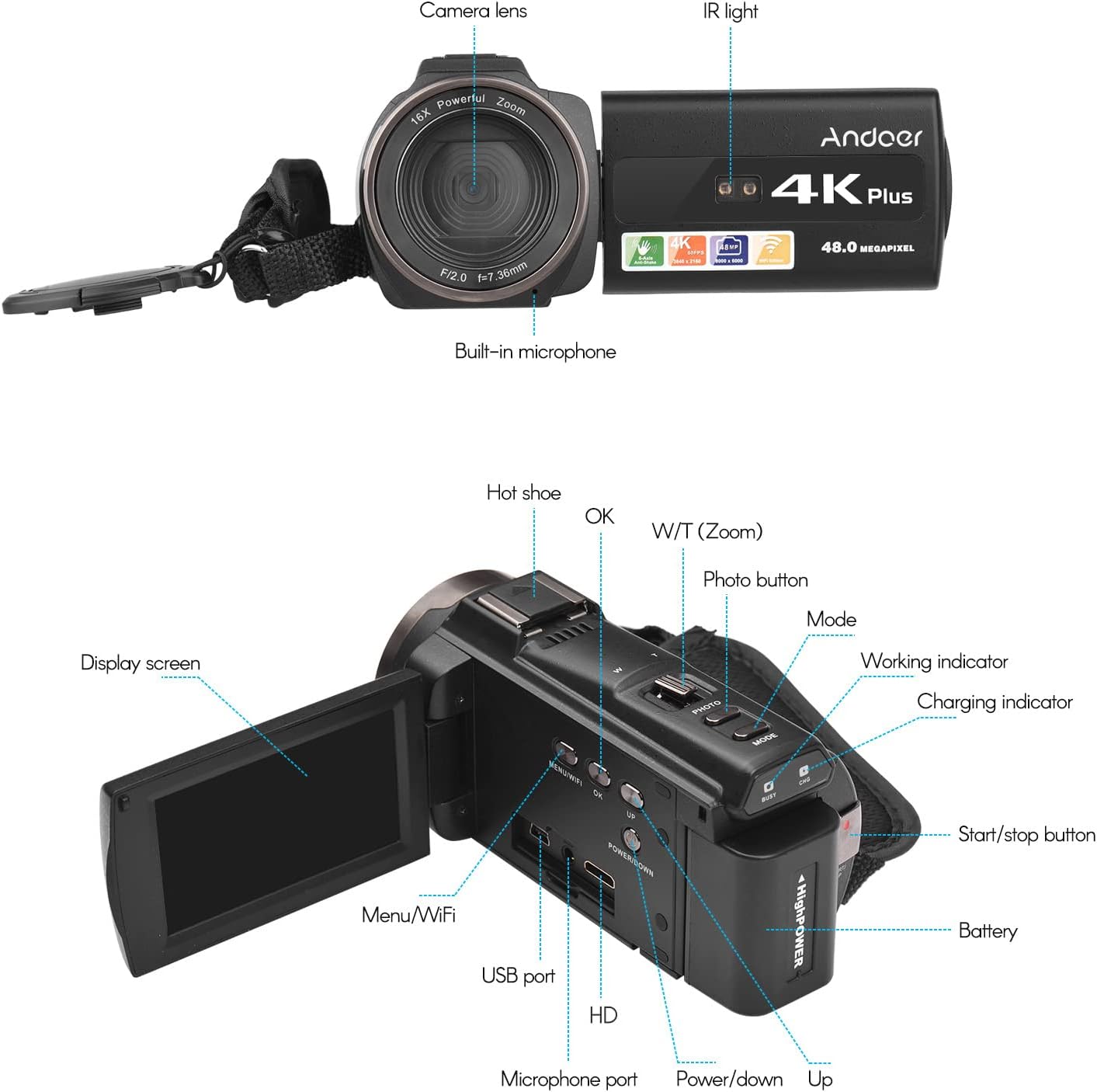
Image 3.1: Front and Rear View of the Camcorder with labeled components.
Ključne komponente:
- Objektiv kamere: Main optical component for capturing images and videos.
- IR svetloba: Emits infrared light for night vision recording.
- Vgrajen mikrofon: Captures audio. An external microphone can be connected for enhanced sound quality.
- Vroči čevelj: Mount for external accessories like the included microphone or an LED video light.
- Display Screen (3" IPS Touch Screen): Za viewv živo footage, playback, and navigating menus.
- Gumbi za upravljanje: Including Power, Mode, Photo, Zoom (W/T), OK, Menu/WiFi, Up/Down.
- Pristanišča: USB, HD (HDMI), Microphone port.
- Predal za baterije: Vsebuje polnilno baterijo.
4. Nastavitev
4.1 Polnjenje baterije
Before first use, fully charge the included lithium-polymer batteries. Insert one battery into the camcorder's battery compartment. Connect the camcorder to a power source using the provided USB cable. The charging indicator will illuminate during charging and turn off when fully charged. A full charge typically takes several hours.

Image 4.1: Battery installation and charging indication.
4.2 Vstavljanje pomnilniške kartice
The camcorder supports TF (MicroSD) cards up to 128GB. Ensure the card is formatted before first use in the camcorder's settings. Insert the memory card into the designated slot until it clicks into place.
- Use a Class 10 or higher speed rating for optimal performance, especially for 4K video recording.
- The camcorder supports V60 video speed class.
4.3 Attaching the External Microphone
For improved audio quality, attach the external stereo microphone to the hot shoe mount on top of the camcorder. Connect the microphone's 3.5mm audio cable to the microphone input port on the camcorder.
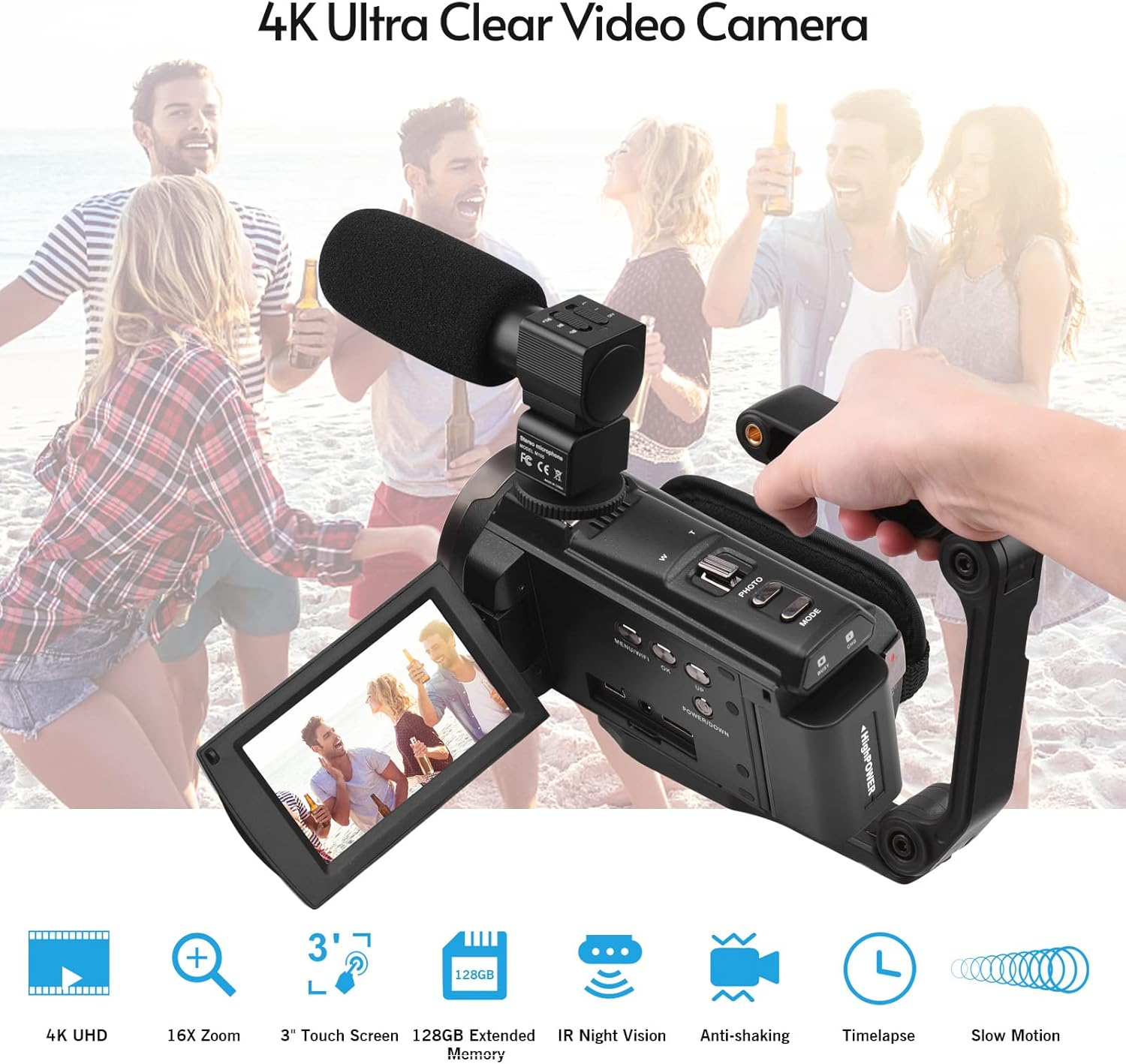
Image 4.2: External microphone attached to the camcorder.
4.4 Attaching the Wide-Angle Macro Lens
To use the wide-angle macro lens, first attach the lens adapter ring to the camcorder's main lens. Then, screw the wide-angle macro lens onto the adapter ring. This lens provides a broader perspective for your shots.

Image 4.3: Wide-angle macro lens for expanded field of view.
4.5 Attaching the Handgrip
The included handgrip can be attached to the bottom of the camcorder via the 1/4" screw hole for more stable handheld recording.
5. Navodila za uporabo
5.1 Vklop/izklop
To power on the camcorder, open the display screen and press the Power button. To power off, press and hold the Power button, or close the display screen.
5.2 Snemanje videa
- Vklopite videokamero.
- Pritisnite Način button to select video recording mode.
- Pritisnite Start/Stop button to begin recording. The recording indicator will flash.
- Pritisnite Start/Stop ponovno pritisnite gumb, da ustavite snemanje.
The camcorder supports 4K/60FPS video resolution for clear and smooth footage.
5.3 Fotografiranje
- Vklopite videokamero.
- Pritisnite Način button to select photo mode.
- Kadrirajte posnetek s pomočjo zaslona.
- Pritisnite Fotografija button to capture a 48-megapixel image.
5.4 Using the 3" IPS Touch Screen
The capacitive touchscreen allows for intuitive navigation of menus and settings. Tap to select options, swipe to scroll, and pinch to zoom (if supported in specific modes).
5.5 Funkcija brezžičnega omrežja
The built-in WiFi allows for wireless transmission of files to a compatible smartphone or tablet via a dedicated app. It also enables remote control of the camcorder from your mobile device.
- Activate WiFi on the camcorder via the menu.
- Download and install the specified app on your mobile device.
- Connect your mobile device to the camcorder's WiFi network.
- Use the app to control recording, view v živo footage in prenos files.
5.6 IR nočni vid
For recording in low-light or dark conditions, activate the IR Night Vision feature. This utilizes infrared light to capture clear black and white footage.

Image 5.1: IR Night Vision in operation.
5.7 Digitalni zoom
Use the W/T (Wide/Telephoto) button to adjust the 16x digital zoom. Note that digital zoom can reduce image quality compared to optical zoom.
5.8 Stabilizacija slike
The camcorder features 6-axis image stabilization to reduce blur and shakiness in your recordings, especially during handheld use.
5.9 Posebnosti
- Zaznavanje gibanja: The camcorder can be set to automatically start recording when motion is detected.
- Face Detection/Recognition: Optimizes focus and exposure for faces in the frame.
- Daljinski upravljalnik: Use the included remote control to operate the camcorder from a distance, useful for self-recording or group shots.
- Samosprožilec: Set a delay before capturing a photo or starting a video recording.

Image 5.2: Tripod mounting for self-timer and stable shots.
5.10 Povezovanje z zunanjimi napravami
- USB: Povežite se z računalnikom za file prenos.
- HD (HDMI): Connect to a TV or monitor to view svoje posnetke na večjem zaslonu.
6. Vzdrževanje
- Čiščenje: Use a soft, dry cloth to clean the camcorder body. For the lens, use a specialized lens cleaning cloth and solution. Avoid harsh chemicals.
- Shranjevanje: Videokamero shranjujte na hladnem in suhem mestu, stran od neposredne sončne svetlobe in ekstremnih temperatur. Če jo shranjujete dlje časa, odstranite baterijo.
- Vzdrževanje baterije: Do not expose batteries to high temperatures. Recharge regularly even if not in use to maintain battery health.
- Posodobitve vdelane programske opreme: Preverite pri proizvajalcu webobčasno preverjajte spletno mesto za morebitne posodobitve vdelane programske opreme, da zagotovite optimalno delovanje in nove funkcije.
7. Odpravljanje težav
| Težava | Možen vzrok | rešitev |
|---|---|---|
| Videokamera se ne vklopi. | Baterija je prazna ali ni pravilno vstavljena. | Ensure battery is fully charged and correctly inserted. Try the second battery. |
| Ni mogoče snemati videoposnetkov/fotografirati. | Memory card is full, not inserted, or corrupted. Incorrect mode selected. | Check memory card status, ensure it's inserted and has free space. Format if necessary (backup data first). Select the correct mode. |
| Slaba kakovost slike/videoposnetka. | Lens is dirty. Low light conditions without IR. Digital zoom used excessively. | Clean the lens. Activate IR Night Vision in dark environments. Avoid excessive digital zoom. Ensure sufficient lighting. |
| Težave z brezžično povezavo. | Incorrect WiFi settings. App not installed or updated. | Ensure WiFi is enabled on camcorder and mobile device. Re-establish connection. Update or reinstall the mobile app. |
| Mikrofon ne snema zvoka. | Microphone not connected properly or settings incorrect. | Check microphone cable connection. Verify audio input settings in the camcorder menu. |
8. Specifikacije
| Funkcija | Podrobnost |
|---|---|
| Številka modela | ZOH0150584179474NZ |
| Video ločljivost | 4K (3840x2160) at 60FPS |
| Ločljivost fotografij | 48 milijonov slikovnih pik (8000 x 6000) |
| Stabilizacija slike | 6-osni |
| Zaslon zaslona | 3-palčni IPS kapacitivni zaslon na dotik |
| Digitalni zoom | 16x |
| Povezljivost | USB, Wi-Fi, HDMI |
| Podpora za pomnilniško kartico | TF (MicroSD) up to 128GB (Class 10, V60 recommended) |
| Posebne lastnosti | IR Night Vision, Motion Detection, Face Detection, Remote Control |
| Baterija | 2 x 2000mAh Lithium-polymer |
| Zaslonka objektiva | f/2.0 |
| Najmanjša goriščna razdalja | 39 mm |
| Združljive naprave | Tripod, Microphone, TV, Computer, Smartphone |
| Združljivost operacijskega sistema | Windows |
| Dimenzije (paket) | 18 x 15 x 11 cm |
| Teža (paket) | 1.01 kg |
9. Garancija in podpora
Andoer products are designed for reliability and performance. For any technical assistance, troubleshooting beyond this manual, or warranty inquiries, please contact Andoer customer support through their official webspletno mesto ali vaš prodajalec.
Za garancijske zahtevke shranite dokazilo o nakupu.