
Uvod
Thank you for choosing the Mcdodo MC-7050 20W PD GoPower MagSafe 5000mAh Power Bank. This portable charger is designed to provide convenient and efficient power to your devices, featuring both wired USB-C Power Delivery and MagSafe-compatible wireless charging. Please read this manual carefully before use to ensure proper operation and to maximize the lifespan of your device.
Varnostne informacije
- Prenosne baterije ne izpostavljajte ekstremnim temperaturam, neposredni sončni svetlobi ali ognju.
- Izogibajte se padcem, udarcem ali razstavljanju naprave.
- Hraniti ločeno od vode in drugih tekočin.
- Ne uporabljajte, če je prenosna baterija poškodovana ali nabrekla.
- Hraniti izven dosega otrok.
- Uporabljajte samo certificirane polnilne kable in adapterje.
- Powerbank odvrzite odgovorno v skladu z lokalnimi predpisi.
Vsebina paketa
Prosimo, preverite paket za naslednje artikle:
- Mcdodo MC-7050 20W PD GoPower MagSafe 5000mAh Power Bank
- Polnilni kabel USB-C do USB-C
- Uporabniški priročnik
Konec izdelkaview
Familiarize yourself with the components of your Mcdodo MC-7050 Power Bank:

Image: Mcdodo MC-7050 Power Bank shown with its integrated kickstand extended, displaying the MagSafe charging area on the front. This view highlights the compact design and the stand feature for convenient use.
- MagSafe Wireless Charging Area: Central circular area for magnetic wireless charging.
- Gumb za vklop: Aktivira prenosno baterijo in preveri raven napolnjenosti baterije.
- LED indikatorji: Prikažite preostalo kapaciteto baterije.
- Vrata USB-C: Used for both charging the power bank and charging other devices.
- Integrirano stojalo: Allows the power bank to stand upright, useful for viewing content while charging wirelessly.

Slika: Poševna view of the Mcdodo MC-7050 Power Bank, clearly showing the USB-C input/output port on the side and the power button located near the top edge. The kickstand is also visible in this perspective.
Nastavitev
Začetno polnjenje prenosne baterije
- Priloženi kabel USB-C priključite na vrata USB-C na prenosni bateriji.
- Connect the other end of the USB-C cable to a compatible USB power adapter (not included). For optimal charging speed, use a Power Delivery (PD) compatible adapter.
- The LED indicators will illuminate to show the charging status. All LEDs will be solid when fully charged.
- Priporočljivo je, da pred prvo uporabo power bank popolnoma napolnite.
Navodila za uporabo
Preverjanje nivoja baterije
Press the power button once to check the remaining battery capacity. The LED indicators will light up to show the current charge level.
Wired Charging (USB-C Output)
- Connect your device's charging cable to the USB-C port on the power bank.
- Drugi konec kabla priključite na napravo.
- Prenosna baterija bo samodejno začela polniti vašo napravo. Če ne, enkrat pritisnite gumb za vklop.
Brezžično polnjenje (združljivo z MagSafe)
- Ensure your device is compatible with MagSafe or Qi wireless charging.
- Align your MagSafe-compatible device (e.g., iPhone 12 series or newer) with the circular MagSafe charging area on the power bank. The magnets will help align it correctly.
- The power bank will automatically begin wireless charging. If not, press the power button once.
- The integrated kickstand can be used to prop up your phone while wirelessly charging.
Vzdrževanje
- Čiščenje: Za čiščenje površine prenosne baterije uporabite mehko, suho krpo. Ne uporabljajte agresivnih kemikalij ali abrazivnih materialov.
- Shranjevanje: Power bank shranjujte na hladnem in suhem mestu, stran od neposredne sončne svetlobe in ekstremnih temperatur.
- Zdravje baterije: Za ohranjanje zdravja baterije popolnoma napolnite in izpraznite prenosno baterijo vsaj enkrat na tri mesece, če je ne uporabljate redno.
Odpravljanje težav
- Powerbank se ne polni:
- Prepričajte se, da je polnilni kabel varno priključen tako na prenosno baterijo kot na napajalnik.
- Poskusite z drugim kablom USB-C ali napajalnikom.
- Preverite, ali napajalnik deluje pravilno.
- Naprava se ne polni iz prenosne baterije:
- Prepričajte se, da je power bank dovolj napolnjen.
- Press the power button to activate charging.
- Poskusite z drugim polnilnim kablom za svojo napravo.
- Ensure your device is properly aligned for wireless charging.
- Odstranite vse debele ovitke za telefon, ki bi lahko motili brezžično polnjenje.
- Počasno polnjenje:
- Ensure you are using a fast-charging compatible cable and adapter for both the power bank and your device.
- Some devices may limit charging speed when using wireless charging.
Specifikacije
| Funkcija | Specifikacija |
|---|---|
| Ime modela | MC-7050 |
| Kapaciteta baterije | 5000 mAh |
| Vrsta priključka | USB Type-C |
| Ključne značilnosti | Fast Charging, Wireless Charging (MagSafe compatible) |
| Izhodna moč | 20W napajanje (PD) |
| Vir napajanja | Napajanje na baterije |
| Število vrat | 1 (USB-C for input/output, plus wireless charging) |
| Združljivi modeli telefonov | Compatible with all phones (wired), MagSafe compatible phones (wireless) |
| Ponovno uporabnost | Polnilna |
| Teža izdelka | 0.18 kilogramov |
| Mere izdelka (D x Š x V) | 10.7 cm x 6.7 cm x 1.7 cm |
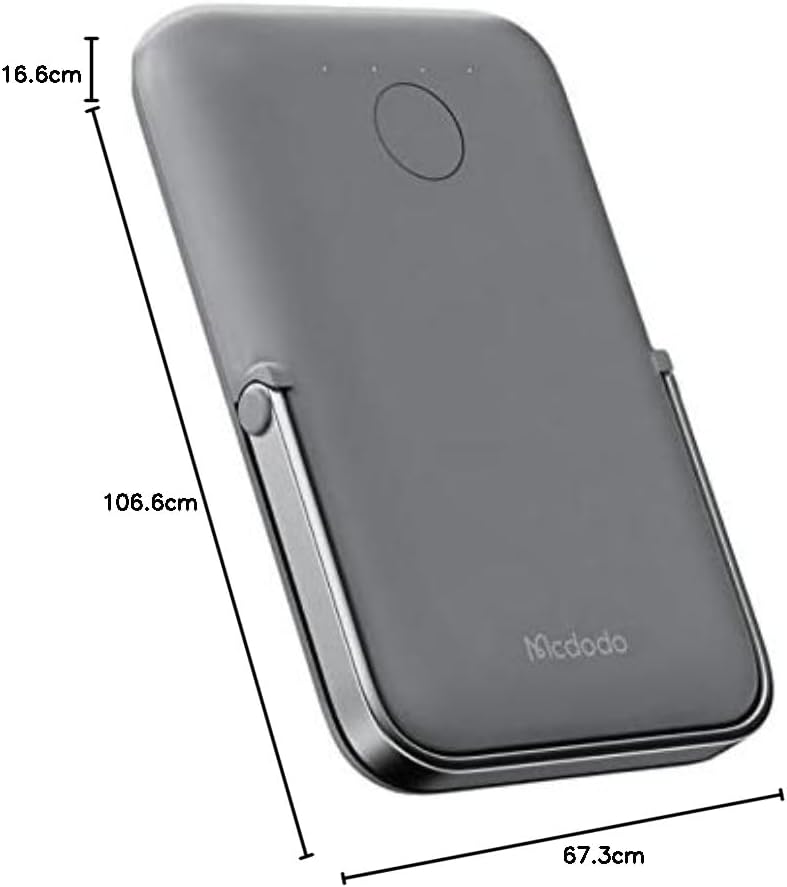
Slika: Od zgoraj navzdol view of the Mcdodo MC-7050 Power Bank illustrating its compact dimensions, approximately 10.7 cm in length, 6.7 cm in width, and 1.7 cm in thickness.
Garancija in podpora
For warranty information and technical support, please refer to the warranty card included in your product packaging or visit the official Mcdodo webspletno mesto. Shranite račun kot dokazilo o nakupu.
Mcdodo Official Webspletno mesto: www.mcdodo.com


