
1. Uvod
Thank you for choosing the FOXWELL NT726 OBD2 Scanner. This device is a professional, OE-level diagnostic tool designed to assist automotive technicians and enthusiasts in diagnosing vehicle issues efficiently. Based on the Android 9.0 operating system, the NT726 offers comprehensive system diagnostics and a range of essential reset services. This manual provides detailed instructions for the proper setup, operation, and maintenance of your scanner to ensure optimal performance and longevity.
2. Izdelek je končanview
The FOXWELL NT726 is a top-tier Android-based scan tool featuring a 5.5-inch LCD touchscreen for intuitive navigation and clear display of diagnostic data. It is equipped with a robust Android 9.0 system and 32GB of memory, ensuring fast and compatible operation. The device supports one-click WiFi updates for lifetime free software enhancements.

Image 2.1: The FOXWELL NT726 diagnostic scanner highlighting its key features including a 5.5-inch touchscreen, Android 9.0 operating system, WiFi connectivity for updates, and 32GB internal memory.
3. Nastavitev in prva uporaba
3.1 Razpakiranje in vklop
- Carefully unpack the NT726 scanner and its accessories from the packaging.
- Connect the OBDII cable to the scanner.
- Plug the other end of the OBDII cable into your vehicle's OBDII port, typically located under the dashboard on the driver's side. The scanner will power on automatically.
3.2 WiFi Connection and Updates
- Upon first use, navigate to the 'Settings' menu on the scanner's touchscreen.
- Select 'Wi-Fi' and connect to an available wireless network.
- Once connected, go to the 'Update' icon on the main screen.
- Perform a one-click update to ensure your scanner has the latest software, vehicle coverage, and bug fixes. Regular updates are crucial for optimal performance.
4. Navodila za uporabo
4.1 Popolna sistemska diagnoza
The NT726 scanner provides comprehensive diagnostic capabilities across all available control modules in a vehicle. This includes, but is not limited to, Engine, Transmission, ABS (Anti-lock Braking System), SRS (Supplemental Restraint System), EPB (Electronic Parking Brake), Immobilizer, IC (Instrument Cluster), DSC (Dynamic Stability Control), HVAC (Heating, Ventilation, and Air Conditioning), TPMS (Tire Pressure Monitoring System), BMS (Battery Management System), SAS (Steering Angle Sensor), Headlamp, DPF (Diesel Particulate Filter), and EVAP (Evaporative Emission Control System).

Image 4.1: Illustration of the extensive ECU modules covered by the NT726 scanner, demonstrating its full system diagnostic capabilities.
Key diagnostic functions include:
- Preberite kode: Retrieve Diagnostic Trouble Codes (DTCs) from the vehicle's control modules.
- Počisti kode: Erase DTCs after repairs have been made.
- Podatki v živo: View real-time sensor data and parameters.
- Informacije o ECU: Display control unit information such as part numbers and software versions.
4.2 8 Storitve vroče ponastavitve
The NT726 is equipped with 8 commonly used maintenance and reset functions to address various vehicle service needs:
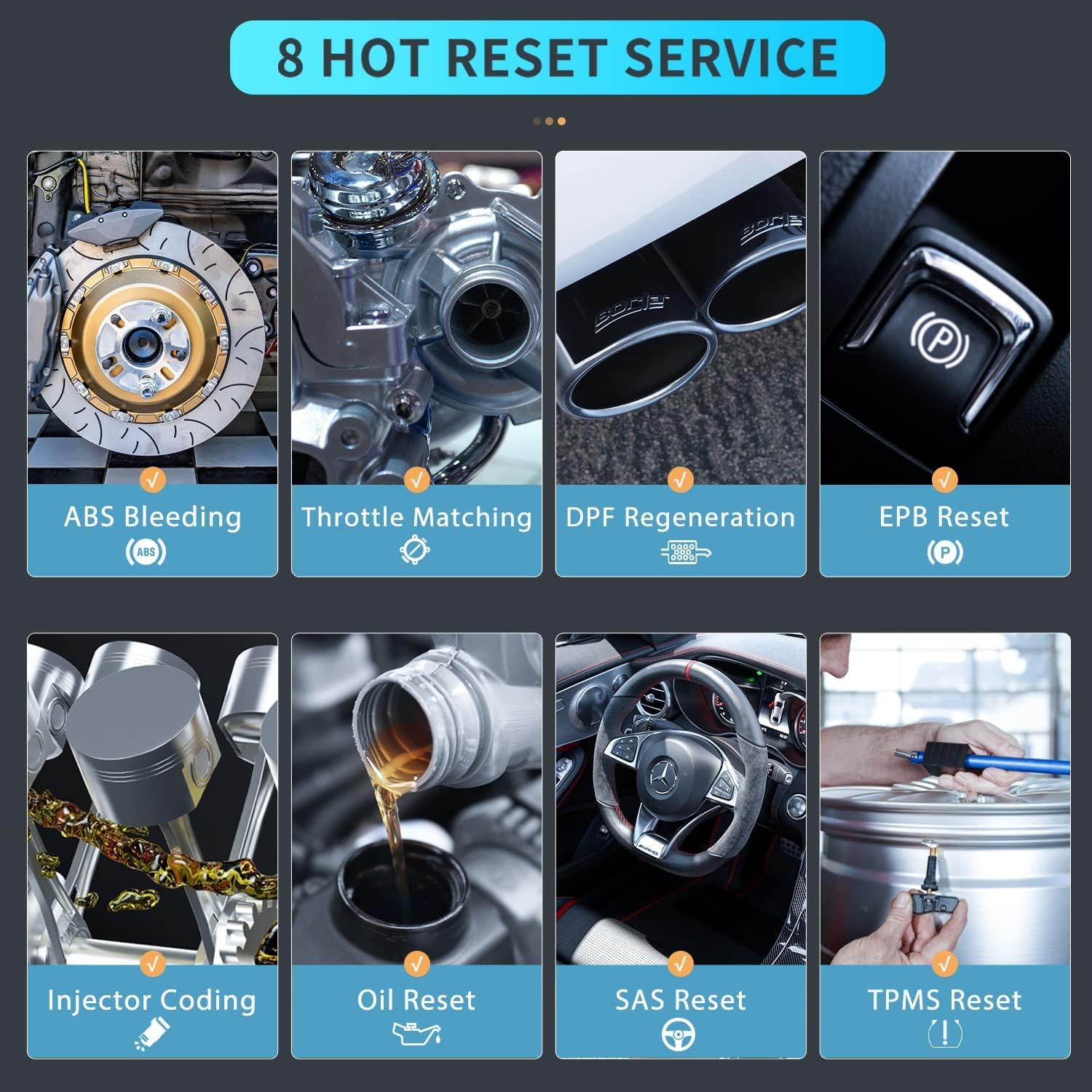
Image 4.2: Visual representation of the 8 hot reset services available on the FOXWELL NT726 scanner.
- Krvavitev iz ABS-a: Po zamenjavi komponent odzrači zavorni sistem.
- Ujemanje plina: Po čiščenju ali zamenjavi ponovno ugotovi položaj ohišja dušilne lopute.
- Regeneracija DPF-ja: Initiates the regeneration process for the Diesel Particulate Filter.
- Ponastavitev EPB: Ponastavi elektronsko parkirno zavoro po zamenjavi zavornih ploščic.
- Kodiranje injektorja: Kodira nove številke injektorjev v ECU.
- Ponastavitev olja: Resets the oil service light and calculates optimal oil life change interval.
- Ponastavitev SAS: Kalibrira senzor kota krmiljenja po popravilih krmilnega sistema.
- Ponastavitev TPMS: Ponastavi sistem za nadzor tlaka v pnevmatikah po rotaciji pnevmatike ali zamenjavi senzorja.
4.3 Live Data Stream and Analysis
The NT726 allows for a deep dive into auto diagnostics by providing live data streams. This feature enables users to view, graph, record, and playback real-time sensor data, which is crucial for identifying intermittent problems and verifying repairs.
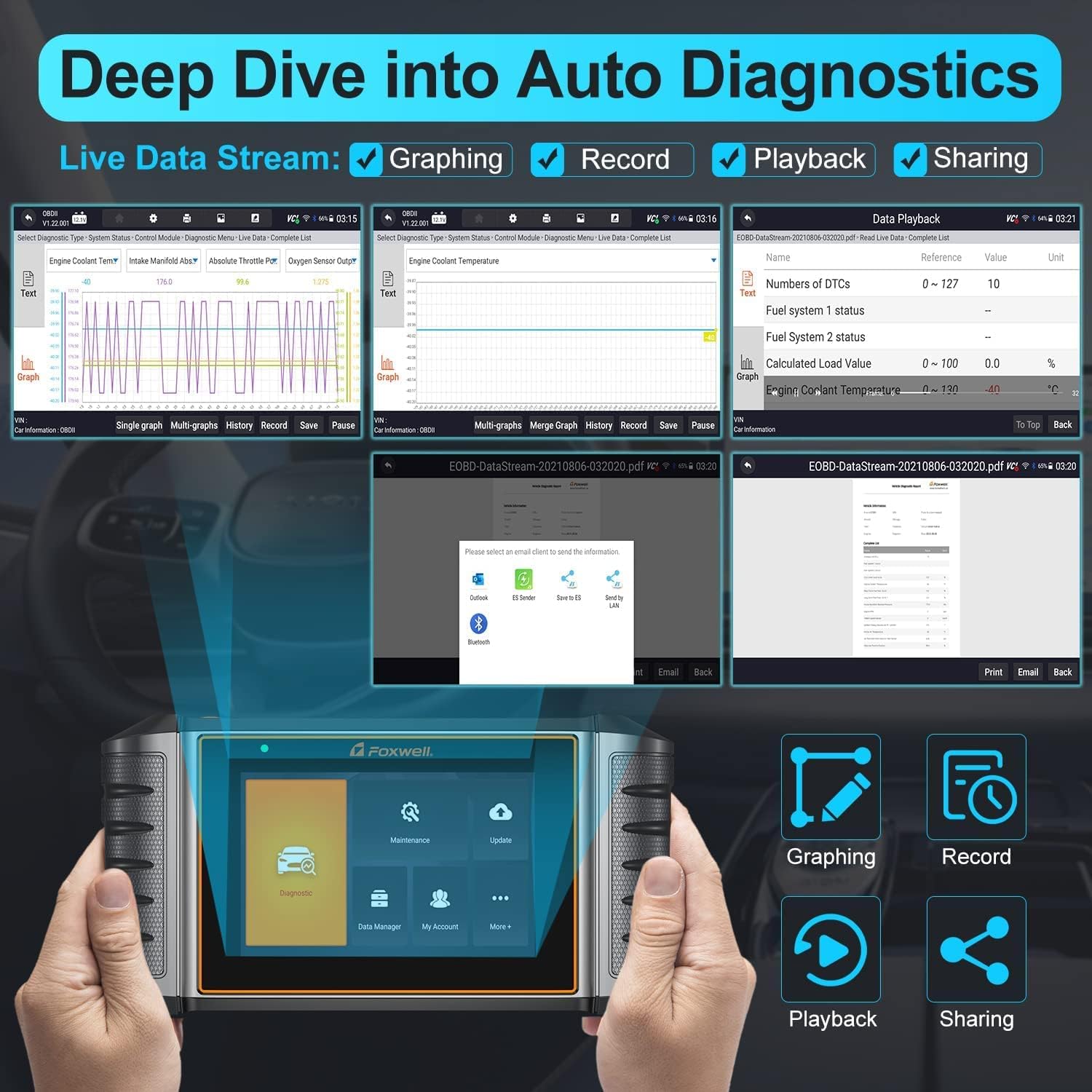
Image 4.3: The NT726 interface demonstrating live data stream capabilities, including graphing, recording, playback, and options for sharing diagnostic reports.
- Grafi: Visualize data parameters over time for easier analysis.
- zapis: Save live data sessions for later review.
- Predvajanje: Review recorded data to pinpoint issues.
- Skupna raba: Generate and share diagnostic reports via email or other methods.
4.4 Združljivost vozil
The FOXWELL NT726 offers extensive vehicle compatibility, supporting over 100 vehicle brands and 10,000+ car models manufactured after 1996 and up to 2021 (12V vehicles only). This broad coverage ensures its utility across a wide range of vehicles from various regions including USA, Europe, and Asia.
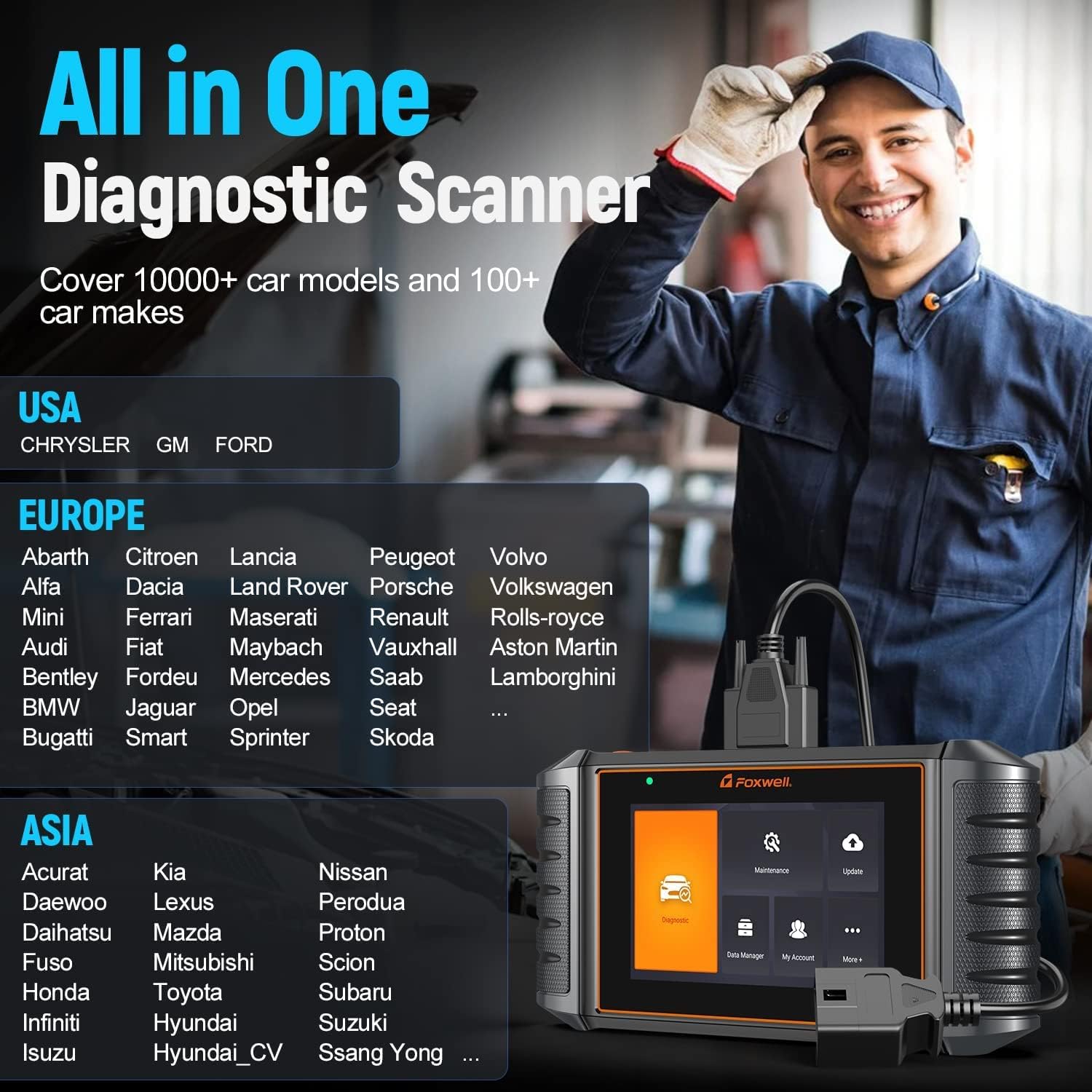
Image 4.4: A partial list of vehicle manufacturers supported by the NT726, demonstrating its wide compatibility across different regions.
5. Vzdrževanje
- Čiščenje: Uporabite mehko, damp cloth to clean the scanner's screen and body. Avoid abrasive cleaners or solvents.
- Posodobitve programske opreme: Regularly connect the device to Wi-Fi and perform software updates to ensure access to the latest vehicle data, functions, and bug fixes. FOXWELL provides lifetime free WiFi updates for the NT726.
- Shranjevanje: Store the scanner in a dry, cool environment, away from direct sunlight and extreme temperatures. Use the provided protective case (if applicable) to prevent physical damage.
- Skrb za kabel: Inspect the OBDII cable regularly for any signs of wear or damage. Replace if necessary to ensure reliable connection.
6. Odpravljanje težav
- Skener se ne vklopi: Ensure the OBDII cable is securely connected to both the scanner and the vehicle's OBDII port. Verify the vehicle's battery has sufficient charge.
- Napaka v komunikaciji z vozilom: Check that the vehicle's ignition is on. Ensure the OBDII cable is properly connected. Verify the vehicle is OBDII compliant (most vehicles after 1996). Try a different vehicle to rule out scanner issues.
- Napaka pri posodabljanju programske opreme: Ensure a stable Wi-Fi connection. Check for sufficient storage space on the device. Restart the scanner and try the update again.
- Zaslon se ne odziva: Perform a soft reset by holding the power button (if available) or by letting the battery drain and recharging. If the issue persists, contact FOXWELL support.
7. Specifikacije
| Funkcija | Specifikacija |
|---|---|
| Znamka | FOXWELL |
| Model | NT726 |
| Operacijski sistem | Android 9.0 |
| Zaslon | 5.5-palčni LCD-zaslon na dotik |
| Spomin | 32GB (Internal) |
| Povezljivost | Wi-Fi |
| Vir napajanja | Vehicle Battery (via OBDII) |
| Vozilo Voltage | Samo 12V |
8. Garancija in podpora
The FOXWELL NT726 scanner comes with lifetime free WiFi updates, ensuring your device remains current with the latest vehicle data and diagnostic functions without additional subscription fees. For technical assistance, warranty claims, or any operational questions not covered in this manual, please contact FOXWELL customer support through their official website or authorized distributors. Always provide your product model and serial number when seeking support.