
Uvod
Thank you for choosing the BUFFBEE Alarm Clock with Wireless Charging Station. This device combines a digital alarm clock with a versatile wireless charging stand, designed to charge your iPhone, Apple Watch, and AirPods simultaneously. It features a dimmable LED display, adjustable volume, and multiple safety protections to ensure efficient and secure charging. Please read this manual carefully before use to ensure proper operation and to maximize the lifespan of your product.
Kaj je v škatli
Ko odprete paket, preverite, ali so priloženi vsi naslednji elementi:
- BUFFBEE Alarm Clock with Wireless Charging Station
- Polnilni kabel USB-C
- Napajalni adapter
- Uporabniški priročnik (ta dokument)
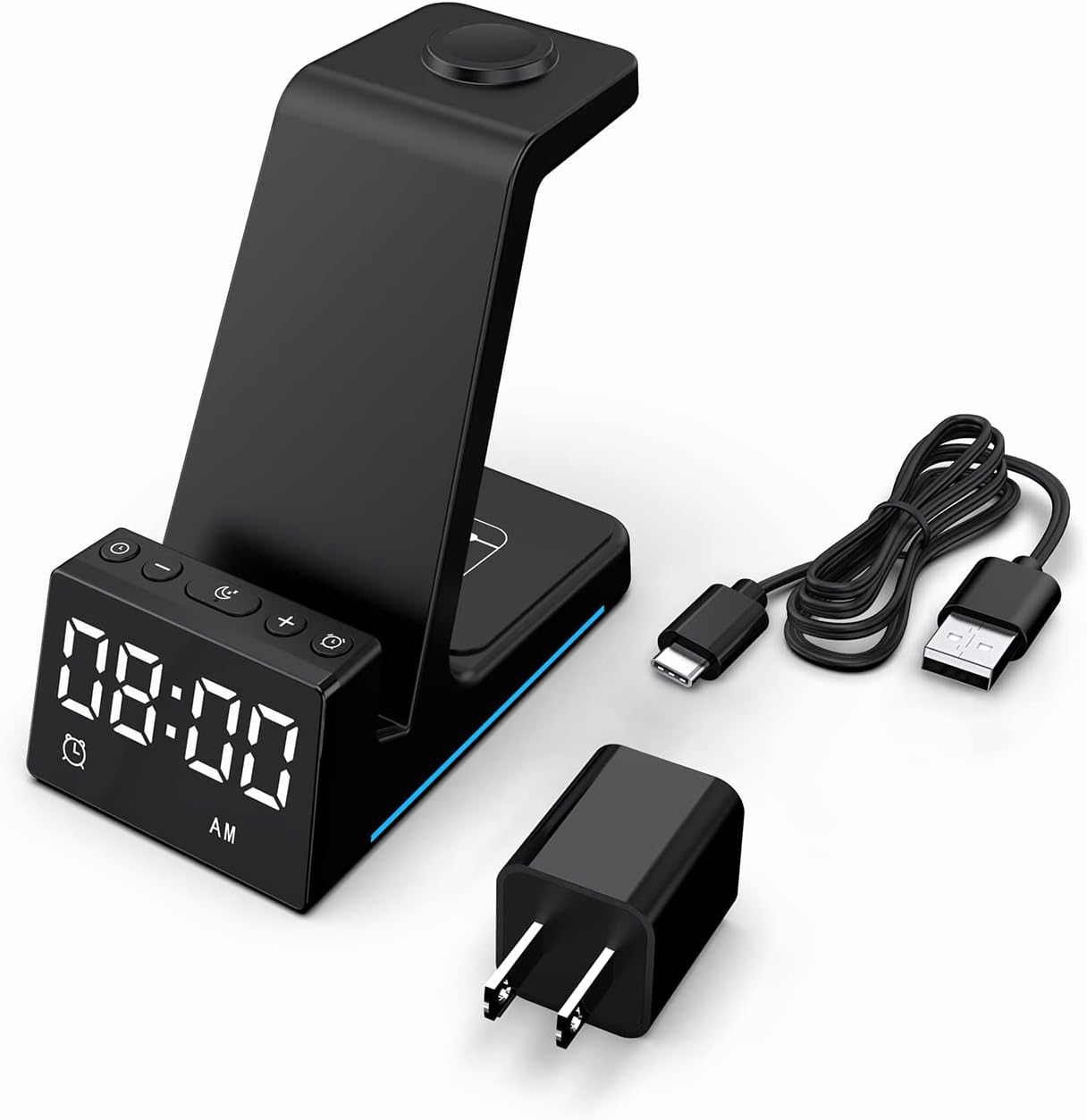
Slika: Vse komponente so vključene v embalažo izdelka.
Konec izdelkaview
The BUFFBEE Alarm Clock with Wireless Charging Station is designed for convenience and efficiency. It features dedicated charging areas for your smartphone, Apple Watch, and AirPods, alongside a clear digital clock display.
Ključne značilnosti:
- Digitalna budilka: Features adjustable brightness and volume, with 12/24 hour format options.
- Wireless Phone Charging: Supports 15W, 10W, 7.5W, and 5W output for various wireless charging enabled smartphones.
- Polnjenje Apple Watch: Dedicated magnetic charging spot for Apple Watch Series 2-7, SE.
- Polnjenje AirPods: Wireless charging pad for AirPods 2 (with wireless charging case), AirPods 3, and AirPods Pro.
- Varnostne zaščite: Built-in overcharge, overvoltage, overheat, and overcurrent protection.

Image: The charging station with devices in place, highlighting its multi-device capability.

Image: Diagram illustrating the internal safety features and charging coils.
Nastavitev
Follow these steps to set up your BUFFBEE Alarm Clock with Wireless Charging Station:
- Priključite napajanje: Insert the USB-C end of the charging cable into the port on the back of the charging station. Plug the other end of the cable into the provided power adapter, then plug the adapter into a wall outlet. The digital display will light up, indicating power is connected.
- Naprave za namestitev:
- pametni telefon: Place your wireless charging enabled smartphone vertically or horizontally on the main charging stand. Ensure it is centered for optimal charging.
- Apple Watch: Place your Apple Watch on the magnetic charging disc at the top of the stand.
- AirPods: Place your AirPods (with wireless charging case) on the flat charging pad at the base of the unit.
- Preverite polnjenje: A blue indicator light will briefly illuminate when a device is correctly placed and charging. Your device's screen will also show a charging icon.
Video: Official product video demonstrating the setup and charging capabilities of the BUFFBEE Alarm Clock with Wireless Charging Station for iPhone, Apple Watch, and AirPods.

Image: Universal compatibility chart for different devices and charging wattages.
Navodila za uporabo
Nastavitev časa
- Pritisnite in držite Nastavitev časa button (usually marked with a clock icon) for 3 seconds. The hour digits will begin to flash.
- Uporabite + in - gumbi za nastavitev ure.
- Pritisnite Nastavitev časa button again to switch to minute adjustment. The minute digits will flash.
- Uporabite + in - gumbe za nastavitev minut.
- Pritisnite Nastavitev časa še enkrat pritisnite gumb za potrditev in izhod iz načina nastavitve časa.
- To switch between 12-hour and 24-hour format, briefly press the Nastavitev časa button when not in setting mode.
Nastavitev alarma
- Pritisnite in držite Set alarmov button (usually marked with an alarm clock icon) for 3 seconds. The alarm hour digits will flash.
- Uporabite + in - gumbe za nastavitev ure budilke.
- Pritisnite Set alarmov button again to switch to alarm minute adjustment. The alarm minute digits will flash.
- Uporabite + in - gumbe za nastavitev minut alarma.
- Pritisnite Set alarmov še enkrat pritisnite gumb za potrditev in izhod iz načina nastavitve alarma.
- Za vklop ali izklop alarma na kratko pritisnite Set alarmov gumb. Na zaslonu se bo prikazala/izginila ikona alarma.
- When the alarm sounds, press any button to activate the snooze function (typically 9 minutes). To turn off the alarm completely, press and hold the Set alarmov gumb.

Slika: Konecview of the digital alarm clock features.
Prilagoditev svetlosti zaslona
The LED display has multiple brightness levels to suit your preference, especially for nighttime use.
- Pritisnite Svetlost button (usually marked with a sun icon) repeatedly to cycle through the available brightness levels (e.g., 100%, 40%, 3%, 1%, 0% off).
- Select the desired brightness level. The '0% off' setting turns the display completely off for undisturbed sleep.

Image: Visual representation of the 5-level adjustable brightness settings.
Prilagoditev glasnosti alarma
The alarm volume can be adjusted to your preferred level.
- While the alarm is sounding, or during alarm setting mode, press the Glasnost button (usually marked with a speaker icon) to cycle through the available volume levels.
- Izberite želeno glasnost.

Image: Illustration of the 3-level adjustable volume feature.
Vzdrževanje
Za zagotovitev dolge življenjske dobe in optimalne zmogljivosti vaše polnilne postaje upoštevajte naslednja navodila za vzdrževanje:
- Čiščenje: Disconnect the power before cleaning. Use a soft, dry cloth to wipe the surface. Do not use abrasive cleaners, solvents, or chemical sprays.
- Izogibajte se tekočinam: Naprave ne dotikajte vode in drugih tekočin. Ne upravljajte z mokrimi rokami.
- Temperatura: Store and operate the device in a dry environment at room temperature. Avoid extreme heat or cold.
- Ravnanje: Z napravo ravnajte previdno. Pazite, da vam ne pade ali da je ne izpostavljate močnim udarcem.
- Napajanje: Only use the provided power adapter and cable. Using unauthorized power sources may damage the device and void the warranty.
Odpravljanje težav
If you encounter any issues with your BUFFBEE Alarm Clock with Wireless Charging Station, please refer to the following troubleshooting guide:
| Težava | Možen vzrok | rešitev |
|---|---|---|
| Device is not powering on. | Napajalni kabel ni pravilno priključen; napajalnik je okvarjen; stenska vtičnica ne deluje. | Ensure the USB-C cable is securely connected to both the station and the power adapter. Try a different wall outlet. Verify the power adapter is functioning. |
| Smartphone/AirPods not charging wirelessly. | Device not placed correctly; Device not wireless charging compatible; Phone case too thick; Foreign objects on charging pad. | Reposition the device to ensure it is centered on the charging pad. Remove any thick phone cases or metallic objects. Confirm your device supports Qi wireless charging. |
| Apple Watch se ne polni. | Watch not placed correctly; Watch charger not making contact; Watch model not supported. | Ensure the Apple Watch is securely placed on the magnetic charging disc. Remove any watch cases that might obstruct contact. This charger supports Apple Watch Series 2-7, SE. |
| Polnjenje je počasno ali občasno. | Using a non-original power adapter/cable; Device overheating; Multiple devices charging simultaneously. | Use the provided power adapter and cable. Ensure the device is in a well-ventilated area. Charging multiple devices may slightly reduce individual charging speeds. |
| Alarm clock display is too bright/dim. | Potrebno je prilagoditi nastavitev svetlosti. | Pritisnite Svetlost button to cycle through the 5 brightness levels, including 'off'. |
| Alarm is not sounding or is too quiet/loud. | Alarm not set or deactivated; Volume level too low/high. | Verify the alarm is activated (alarm icon visible). Adjust the alarm volume using the Glasnost gumb. |
Specifikacije
| Funkcija | Podrobnost |
|---|---|
| Dimenzije izdelka | 6.3 x 1.5 x 3.5 palcev |
| Teža predmeta | 15.8 unč |
| Znamka | BUFFBEE |
| Vrsta priključka | Brezžično |
| Združljive naprave | Cellular Phones, Apple Watch, AirPods (with wireless charging case) |
| Združljivi modeli telefonov | Samsung Galaxy S10 series, iPhone 8 and newer, other Qi-enabled phones |
| Posebna funkcija | Adjustable, Fast Charging, Wireless Charger, Wireless Charging |
| Vhodna voltage | 9 volta |
| Skupno število vrat USB | 1 (za vhod moči) |
| Wattage | 15 watts (max output) |
| Specifikacija izpolnjena | Qi |
| Vir napajanja | AC Adapter (Battery Powered refers to internal clock battery backup, not main power) |
Garancija in podpora
Your BUFFBEE Alarm Clock with Wireless Charging Station comes with a standard manufacturer's warranty. For specific warranty details, including duration and coverage, please refer to the warranty card included in your product packaging or contact BUFFBEE customer support directly.
If you require technical assistance, have questions about product operation, or need to report a defect, please reach out to BUFFBEE customer service through the contact information provided on the product packaging or the official BUFFBEE webspletno mesto. Ko se obrnete na podporo, imejte pripravljen model izdelka in datum nakupa.