
Uvod
Thank you for choosing the SOMIC GS510 Cat Ear Wireless Gaming Headset. This manual provides detailed instructions on how to set up, operate, and maintain your new headset. Please read this manual thoroughly before use to ensure optimal performance and longevity of your device.
Kaj je v škatli
Carefully unpack your SOMIC GS510 headset and ensure all items are present:
- Brezžične slušalke x 1
- Zvočnik Tags x 4 (2 pre-installed, 2 extra)
- USB Transmitter x 1
- 3.5MM Audio Cable x 1
- Polnilni kabel Type-C x 1

Image: The SOMIC GS510 headset in black with its detachable cat ears and the included USB wireless transmitter.
Konec izdelkaview
Familiarize yourself with the key components and controls of your SOMIC GS510 headset:
- Nastavljiv naglavni trak: For a comfortable fit on various head sizes.
- Soft PU Earpads: Zasnovano za dolgotrajno udobje nošenja.
- Flexible Earcaps: Allow for slight rotation to conform to your ears.
- Zložljiv mikrofon: An omnidirectional microphone that can be extended or retracted as needed.
- Kontrole na ušesu: Located on the earcups for easy access to power, volume, mode switching, and microphone mute.
- Magnetni zvočnik Tags: Customizable outer earcup covers that can be easily swapped.

Slika: Podrobna view of the headset's comfort features, including the adjustable headband, soft PU earpads, flexible earcaps, and the retractable microphone.
Nastavitev
1. Polnjenje slušalk
Pred prvo uporabo slušalke popolnoma napolnite. Popolno polnjenje traja približno 2 ure.
- Priloženi polnilni kabel tipa C priključite na polnilno vtičnico na slušalkah.
- Drugi konec kabla priključite na vir napajanja USB (npr. vrata USB računalnika, stenski adapter USB).
- The LED indicator on the headset will show charging status and turn off or change color when fully charged.
2. Wireless Connection (2.4GHz USB Transmitter)
For wireless use with PS4, PS5, PC, or Laptop:
- Insert the USB transmitter into an available USB port on your console or computer.
- Power on the SOMIC GS510 headset by pressing and holding the power button.
- The headset will automatically pair with the USB transmitter. A stable indicator light on both devices confirms a successful connection.
- Prepričajte se, da so v nastavitvah zvoka sistema kot vhodna in izhodna zvočna naprava izbrane slušalke.

Image: The SOMIC GS510 headset demonstrating its 2.4GHz wireless connection to a laptop using the USB transmitter, indicating up to 8 hours working time and 33 feet transmission distance.
3. Žična povezava (3.5 mm avdio kabel)
For wired use with PS5 Controller, PS4 Controller, Xbox Series X/One Controller, and other mobile devices:
- Connect one end of the 3.5mm audio cable to the headset's 3.5mm jack.
- Connect the other end to the 3.5mm audio port on your device.
- For older Xbox One controllers, a Microsoft adapter (not included) may be required.
Navodila za uporabo
Vklop/izklop
- Za vklop pritisnite in držite gumb za vklop, dokler se ne prižge indikatorska lučka.
- Za izklop pritisnite in držite gumb za vklop, dokler se indikatorska lučka ne ugasne.
Avdio načini
The headset features three professional sound modes for different scenarios:
- Način igranja: Optimized for immersive gaming audio, enhancing footsteps, gunfire, and explosions.
- Način zvoka: Uravnotežen zvok profesionalcafile for music and general listening.
- Način v živo: Clearer voice reproduction, ideal for live streaming or voice chat.
Press the 'Mode Switch' button on the earcup to cycle through these modes.

Image: The headset's earcup controls with labels for ON/OFF, Mode Switch, Mic Mute Button, and Volume Wheel, illustrating the three distinct audio modes: Gaming, Audio, and Live.
Virtualni prostorski zvok 7.1
Experience enhanced spatial awareness with virtual 7.1 surround sound, allowing you to pinpoint audio cues like footsteps and gunfire in games.

Image: The headset positioned above a graphic representing virtual 7.1 surround sound, highlighting its ability to render distinct audio details such as footsteps, gunfire, explosions, and general surround sound.
Uporaba mikrofona
- Extend the retractable microphone for use.
- Press the 'Mic Mute Button' on the earcup to toggle microphone mute on or off. The microphone may have an indicator light to show its status.
- The omnidirectional microphone is designed to capture clear voice communication while reducing background noise.
RGB svetlobni učinki
The headset features 8 RGB lighting effects and a multi-color cycling mode.
- Press the light touch key on the earcup to switch between different RGB colors and modes.
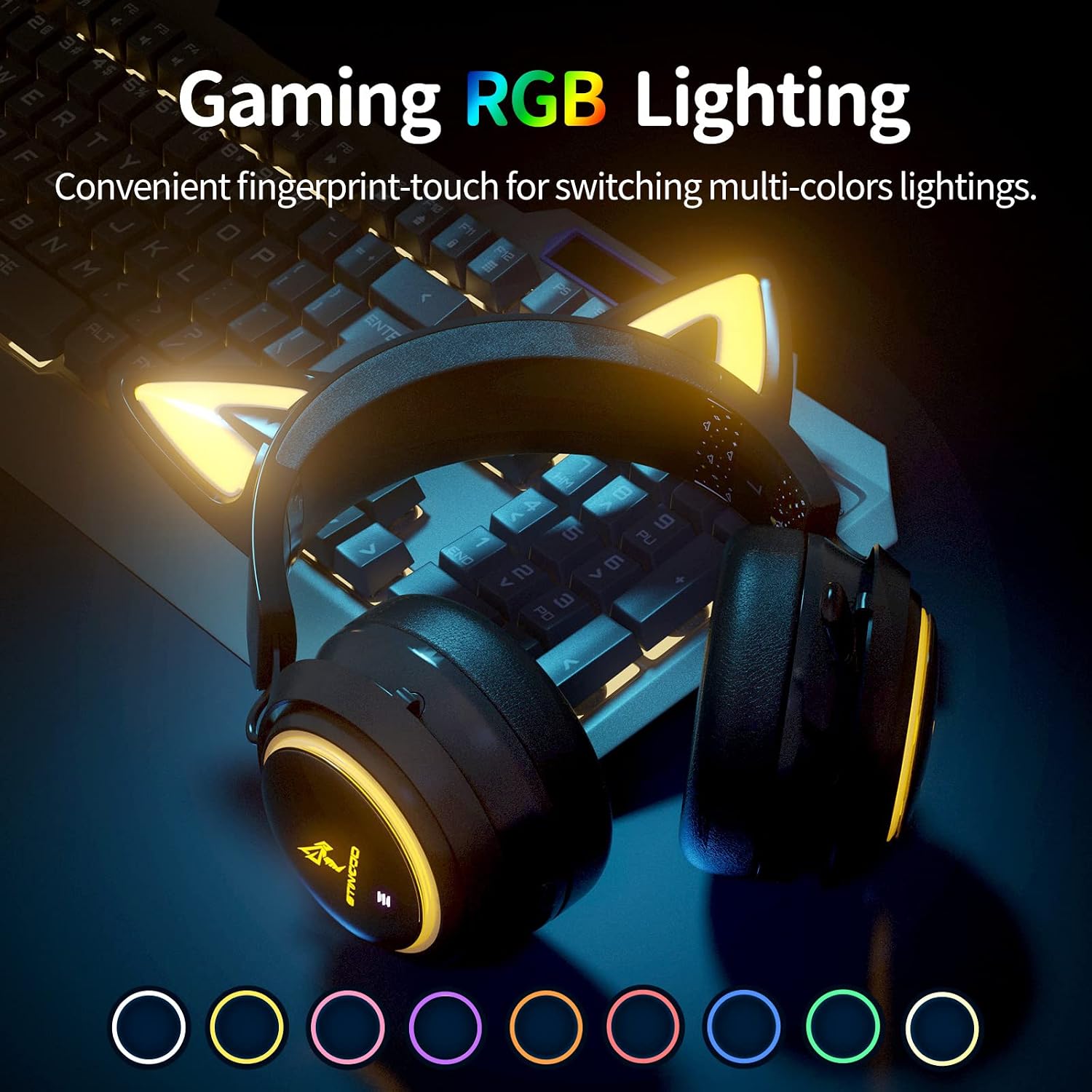
Image: The SOMIC GS510 headset showcasing its vibrant RGB lighting on the earcups and cat ears, with a row of colored circles indicating the available lighting options.
Nadzor glasnosti
- Adjust the volume using the 'Volume Wheel' located on the earcup.
Združljivost
The SOMIC GS510 headset offers wide compatibility:
- Wireless (2.4GHz USB Transmitter): PC, Laptop, PS4, PS5.
- Wired (3.5mm Audio Cable): PS5 Controller, PS4 Controller, Xbox Series X Controller, Xbox One Controller, Nintendo Switch, MAC, and other mobile devices with a 3.5mm jack.
Note: This headset does not have Bluetooth functionality. Xbox consoles only support wired mode.

Image: The SOMIC GS510 headset displayed alongside icons representing its wide compatibility with devices such as Nintendo Switch, PS4/PS5, Laptops, PCs, Mobile devices, and Xbox One/S/X.
Vzdrževanje
Za zagotovitev dolge življenjske dobe in optimalne zmogljivosti slušalk upoštevajte ta navodila za vzdrževanje:
- Čiščenje: Slušalke obrišite z mehko, suho krpo. Za ušesne blazinice uporabite rahloamp Krpo lahko uporabite, vendar se izogibajte prekomerni vlagi. Ne uporabljajte agresivnih kemikalij ali abrazivnih čistil.
- Shranjevanje: Slušalke shranjujte na hladnem in suhem mestu, stran od neposredne sončne svetlobe in ekstremnih temperatur.
- Skrb za kabel: Avoid sharp bends or kinks in the charging and audio cables. Disconnect cables by pulling the plug, not the cord.
- Izogibajte se kapljicam: While durable, repeated drops can damage internal components.
Odpravljanje težav
If you encounter issues with your SOMIC GS510 headset, refer to the following common problems and solutions:
| Težava | Možen vzrok | rešitev |
|---|---|---|
| Brez zvoka ali nizke glasnosti | Headset not powered on; Volume too low; Incorrect audio output selected; Loose connection. | Ensure headset is powered on and charged. Increase volume on headset and device. Check system audio settings to ensure SOMIC GS510 is selected. Reconnect USB transmitter or 3.5mm cable. |
| Mikrofon ne deluje | Microphone muted; Incorrect audio input selected; Microphone not fully extended. | Press the mic mute button to unmute. Check system audio settings to ensure SOMIC GS510 is selected as input. Ensure microphone is fully extended. |
| Wireless connection unstable or disconnected | Izven dosega; Motnje; Prazna baterija. | Move closer to the USB transmitter. Avoid strong electromagnetic interference. Recharge the headset. Re-pair the headset with the USB transmitter if necessary. |
| RGB osvetlitev ne deluje ali se zatakne | Software glitch; Low battery; Wired mode (RGB may not work in wired mode). | Ensure headset is sufficiently charged. Try cycling through lighting modes. If in wired mode, RGB functionality may be limited or unavailable. |
| Kratka življenjska doba baterije | RGB lighting enabled; High volume usage; Battery degradation over time. | Disable or reduce RGB lighting effects. Lower volume if possible. Ensure full charge before use. |
Specifikacije
Key technical specifications for the SOMIC GS510 Cat Ear Wireless Gaming Headset:
| Funkcija | Podrobnost |
|---|---|
| Ime modela | GS510-2.4G-BlACK |
| Tehnologija povezljivosti | Wireless (2.4GHz USB Transmitter), Wired (3.5mm Jack) |
| Velikost zvočnega gonilnika | 50 milimetrov |
| Frekvenčni odziv | 20 Hz - 20,000 Hz |
| Občutljivost mikrofona | 36 dB |
| Življenjska doba baterije | Do 10 ur (brezžično) |
| Čas polnjenja | 2 ur |
| Material | Usnje, plastika |
| Teža predmeta | 630 gramov (1.39 funta) |
| Dimenzije izdelka | 8.66 x 4.33 x 10.24 palcev |
| Vrsta nadzora | On-ear audio controls (Touch) |
| Namestitev ušesa | Nad ušesi |
Garancija in podpora
SOMIC provides a warranty for its products. For specific warranty terms, duration, and to register your product, please refer to the warranty card included in your product packaging or visit the official SOMIC website. If you require technical support or have questions not covered in this manual, please contact SOMIC customer service through their official channels.
Za dodatne vire lahko obiščete SOMIC Store on Amazon.