
Uvod
This manual provides comprehensive instructions for the safe and efficient use of your Coby True Wireless Earbuds (Model CETW535). Please read this manual thoroughly before using the product and retain it for future reference.
The Coby True Wireless Earbuds offer a seamless audio experience with Bluetooth 5.3 technology, a smart battery display, and intuitive controls for music and calls. They are designed for comfort and convenience, featuring a built-in microphone for hands-free communication.
Vsebina paketa
- Brezžične slušalke Coby True (leve in desne)
- Charging Case with Smart Battery Display
- USB polnilni kabel
- Uporabniški priročnik (ta dokument)
Nastavitev
1. Začetno polnjenje
Before first use, fully charge the earbuds and the charging case. Connect the charging case to a USB power source using the provided USB cable. The digital display on the case will indicate the charging status and battery level.

Image: The Coby True Wireless Earbuds are shown inside their open charging case, which displays "100%" on its digital screen, indicating a full charge. The earbuds are black and fit snugly into their respective slots.
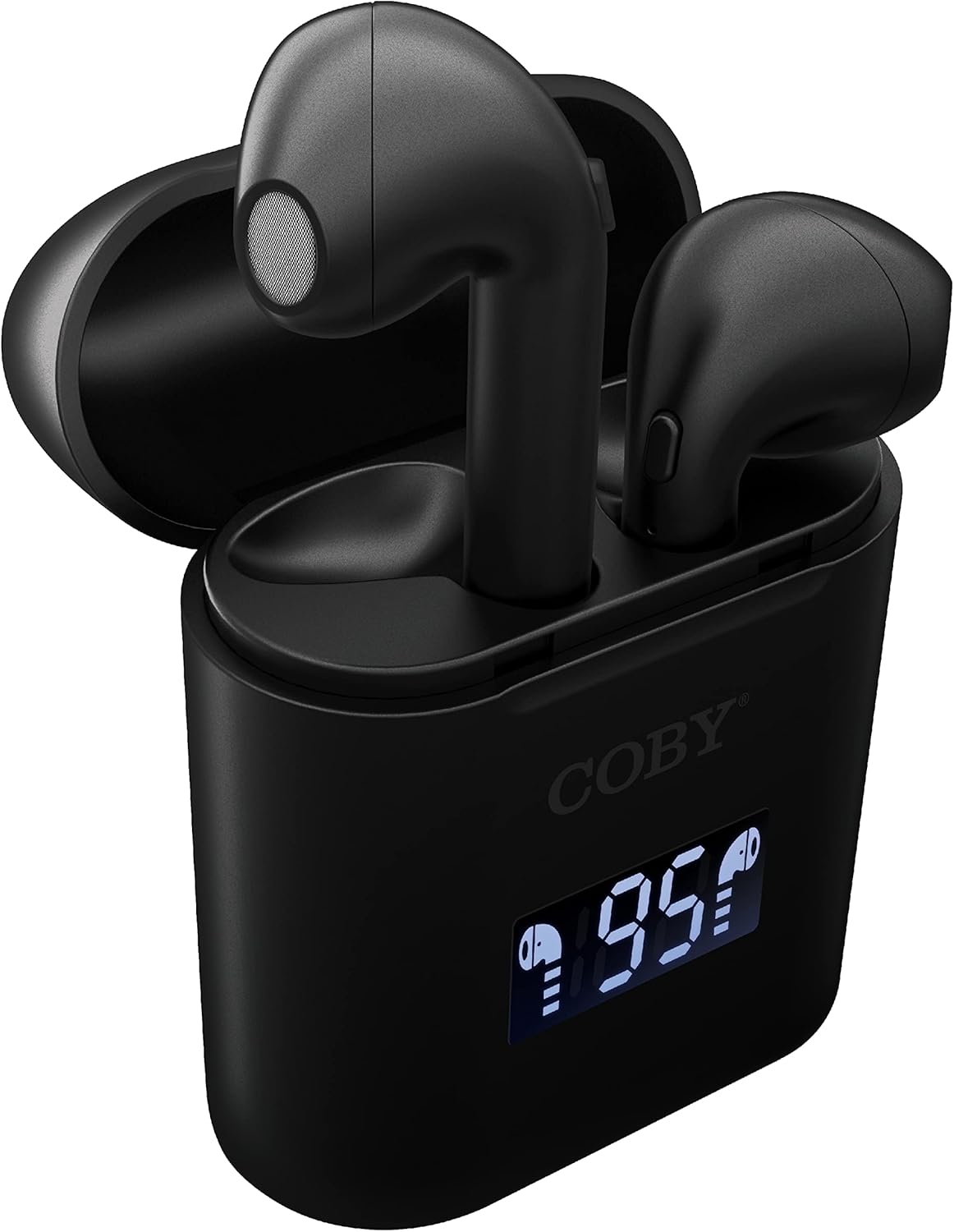
Slika: Bližnji posnetek view of the Coby True Wireless Earbuds resting in their open charging case. The case features a digital display showing "95%", indicating the current battery level of the case. The black earbuds are visible, with their microphones facing upwards.
2. Seznanjanje z napravo Bluetooth
- Prepričajte se, da so slušalke napolnjene in v polnilnem ohišju.
- Odprite polnilno ohišje. Slušalke se bodo samodejno vklopile in preklopile v način seznanjanja.
- V napravi (pametnem telefonu, tabličnem računalniku itd.) omogočite Bluetooth.
- Iskanje "CETW535" or "Coby Earbuds" in the list of available Bluetooth devices.
- Izberite ime naprave, s katero se želite povezati. Ko je povezava vzpostavljena, boste zaslišali potrditveni zvok.
- The earbuds will automatically re-pair with the last connected device when removed from the case, if Bluetooth is enabled on the device.
3. Namestitev ušesnih čepkov
Gently insert each earbud into the corresponding ear (L for left, R for right). Adjust them slightly until they feel secure and comfortable. A proper fit ensures optimal sound quality and comfort.

Image: A woman is shown smiling while wearing a black Coby True Wireless Earbud in her right ear, demonstrating a comfortable and secure fit.
Navodila za uporabo
Vklop/izklop
- Vklop: Open the charging case, or press and hold the touch control area on each earbud for 3 seconds.
- Ugasniti: Place the earbuds back into the charging case and close the lid, or press and hold the touch control area on each earbud for 5 seconds.
Kontrole glasbe
The earbuds feature touch-sensitive controls for easy management of your audio playback.
- Predvajanje/pavza: Enkrat tapnite eno od slušalk.
- Naslednja skladba: Dvakrat tapnite desno slušalko.
- Prejšnja skladba: Dvakrat se dotaknite leve slušalke.
- Povečaj glasnost: Trikrat tapnite desno slušalko.
- Znižaj glasnost: Trikrat tapnite levo slušalko.

Image: A man is shown wearing a Coby True Wireless Earbud in his right ear, taking a drink from a water bottle, illustrating the earbuds' use during active moments.
Nadzor klicev
Manage your calls effortlessly with the built-in microphone and touch controls.
- Sprejmi/končaj klic: Enkrat tapnite eno od slušalk.
- Zavrni klic: Pritisnite in držite katero koli slušalko 2 sekundi.

Image: A man is depicted wearing a Coby True Wireless Earbud in his left ear while concentrating on a laptop screen, highlighting the earbuds' suitability for work or study environments.
Aktiviranje glasovnega pomočnika
Activate your device's voice assistant (Siri or Google Assistant) for hands-free commands.
- Aktiviranje glasovnega pomočnika: Press and hold either earbud for 3 seconds (after powering on, before powering off gesture).
Intelligent Digital Battery Display
The charging case features a digital display that shows the remaining battery percentage of the case and individual charging status of the earbuds.
- The large number indicates the charging case's battery percentage.
- Small icons next to the percentage indicate the charging status of the left and right earbuds.

Image: The Coby True Wireless Earbuds are shown in their open charging case, with the digital display indicating "95%" battery life for the case. The black earbuds are visible, ready for use or charging.
Vzdrževanje
- Čiščenje: Za čiščenje slušalk in polnilnega ohišja uporabite mehko, suho krpo, ki ne pušča vlaken. Ne uporabljajte agresivnih kemikalij ali abrazivnih materialov.
- Shranjevanje: Ko slušalk ne uporabljate, jih shranite v polnilno škatlico, da jih zaščitite in ohranite napolnjene. Hranite na hladnem in suhem mestu, stran od ekstremnih temperatur.
- Polnjenje: Da podaljšate življenjsko dobo baterije, se izogibajte pogostemu popolnemu praznjenju baterije. Redno polnite etui in slušalke, tudi če jih ne uporabljate nenehno.
Odpravljanje težav
| Težava | Možna rešitev |
|---|---|
| Slušalke se ne seznanijo z napravo. |
|
| Zvok predvaja samo ena slušalka. |
|
| Polnilna škatlica se ne polni. |
|
| Slaba kakovost zvoka ali prekinitve povezave. |
|
Specifikacije
| Funkcija | Podrobnost |
|---|---|
| Znamka | Coby |
| Ime modela | Prave brezžične slušalke |
| Številka modela | CETW535 |
| Tehnologija povezljivosti | Bluetooth 5.3 |
| barva | Črna |
| Čas predvajanja slušalk | Up to 6.5 hours (on a full charge) |
| Skupni čas predvajanja (z ohišjem) | Do 22 ur |
| Mikrofon | Vgradna |
| Podpora za glasovnega pomočnika | Siri, Googlov pomočnik |
| Dimenzije (D x Š x V) | 0.99 x 1.85 x 2.44 palca (polnilna torbica) |
| Teža predmeta | 6.1 unč |
| UPC | 643620020982 |
| Proizvajalec | Summit Electronics, LLC |
Garancija in podpora
Specific warranty information for the Coby True Wireless Earbuds (Model CETW535) is not provided within this manual. For details regarding warranty coverage, terms, and conditions, please refer to the warranty card included with your product packaging or visit the official Coby webmesto.
For technical support or further assistance, please contact Coby customer service through the contact information provided on their official webembalaža spletnega mesta ali izdelka.