
1. Uvod
Thank you for choosing the OSALO OS-5M 12-Digit Desktop Calculator. This manual provides essential information for the proper setup, operation, and maintenance of your calculator. Please read it thoroughly before use to ensure optimal performance and longevity of the device.
The OSALO OS-5M calculator is designed for ease of use with its large buttons and extra-large 12-digit display. It is suitable for various environments, including offices, schools, and retail settings. The calculator operates on both solar power and a backup battery, ensuring reliable performance.
2. Varnostne informacije
- Opozorilo o bateriji: The included battery is for single use only. Do not attempt to recharge it.
- vir energije: The solar panel provides limited power and is intended to supplement the battery, not to charge it.
- Shranjevanje: Store the calculator in a dry place, away from extreme temperatures and direct sunlight for prolonged periods.
- Čiščenje: Use a soft, dry cloth to clean the calculator. Do not use liquid cleaners or abrasive materials.
- Demontaža: Do not attempt to disassemble or repair the calculator yourself. Contact qualified personnel for service.
3. Vsebina paketa
- 1 x OSALO OS-5M Desktop Calculator
- 1 x AAA Battery (pre-installed or included separately)
- 1 x angleški priročnik za uporabo
4. Izdelek je končanview
The OSALO OS-5M calculator features a clear layout and ergonomic design for comfortable and efficient use.

Slika 4.1: Spredaj view of the OSALO OS-5M Desktop Calculator.

Slika 4.2: Bližnji posnetek view highlighting the large buttons and clear 12-digit display.
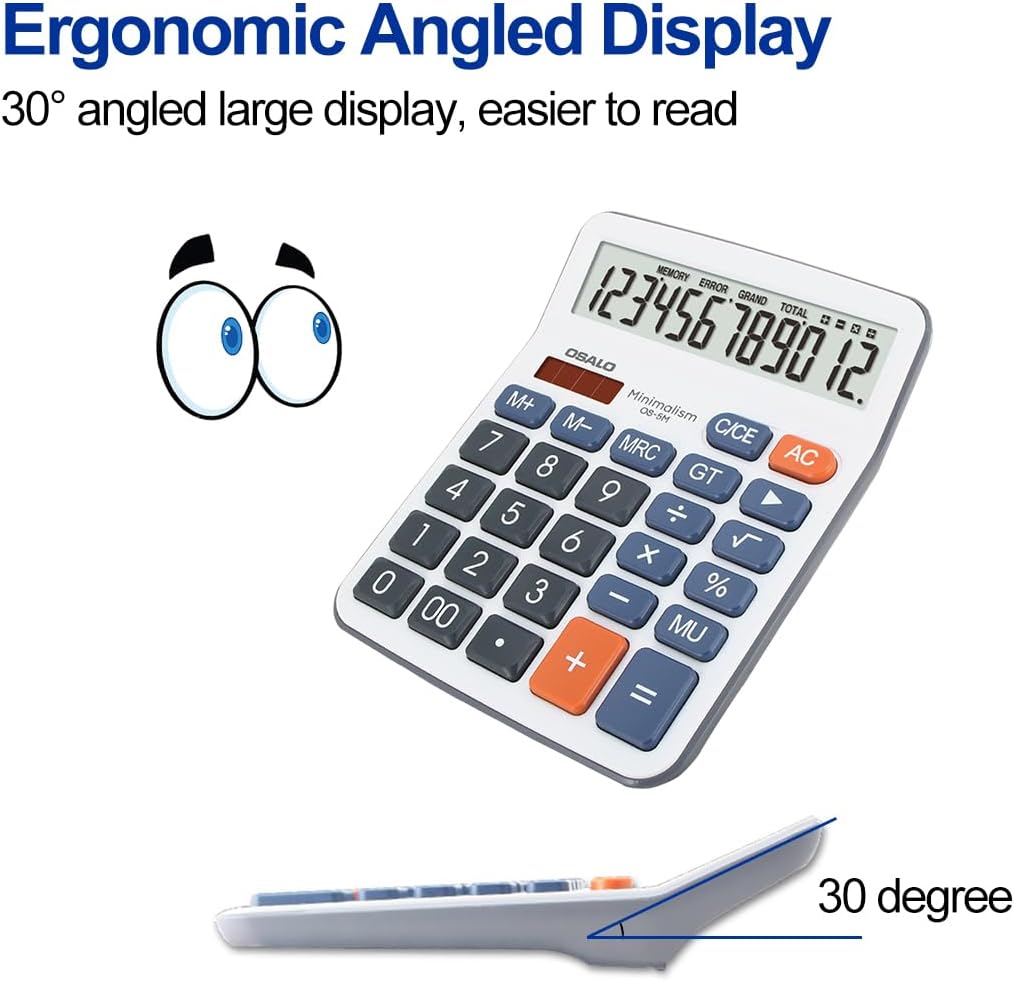
Slika 4.3: stran view demonstrating the ergonomic 30-degree tilted LCD screen for improved readability.

Slika 4.4: Podrobno view of the clear LCD screen, soft and silent keys, and the specially embossed '5' marking key for tactile recognition.

Slika 4.5: Spredaj in zadaj views of the calculator, showing the overall design and battery compartment on the rear.
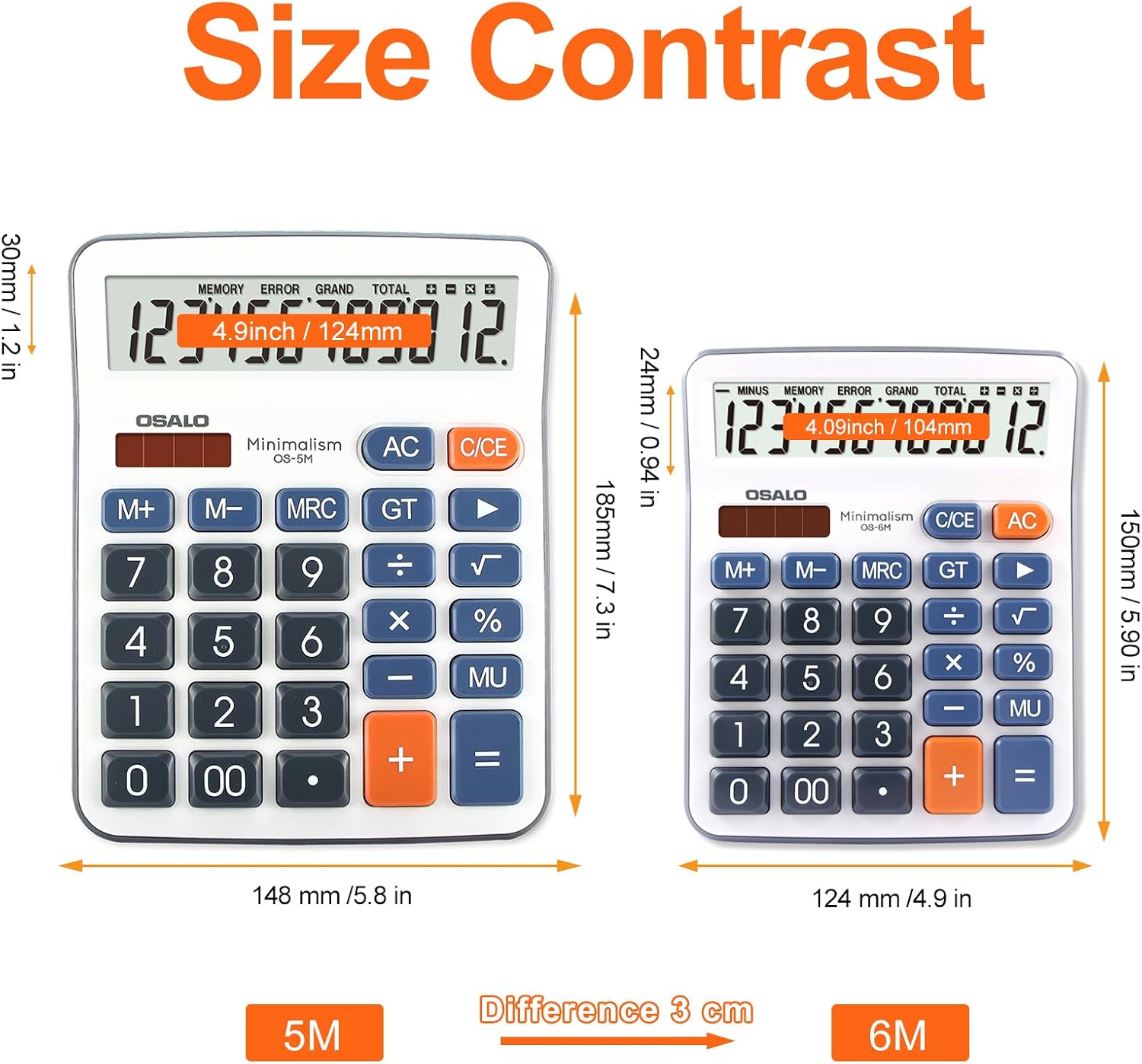
Figure 4.6: Size comparison of the OSALO OS-5M (left) with a smaller calculator, illustrating its larger dimensions for desktop use.

Slika 4.7: Npramples of the OSALO OS-5M calculator being used in different environments, such as a supermarket, office, business, and school.
Video 4.1: 360-stopinjski pogled view of the OSALO OS-5M calculator, showcasing njegovo zasnovo z vseh zornih kotov.
5. Nastavitev
5.1 Namestitev baterije
The OSALO OS-5M calculator requires one AAA battery for operation. The battery may be pre-installed or included separately in the package. If not pre-installed, please follow these steps:
- Poiščite predal za baterije na zadnji strani kalkulatorja.
- Nežno odprite pokrov predalčka za baterije.
- Vstavite eno baterijo AAA in pazite, da se pozitivni (+) in negativni (-) pol pravilno poravnata z oznakami v predalu.
- Trdno zaprite pokrov prostora za baterije.
Opomba: The calculator also features a solar panel for power. The solar panel helps extend battery life by providing power in well-lit conditions but does not recharge the installed battery.
6. Delovanje
6.1 Osnovni izračuni
Za izvajanje osnovnih aritmetičnih operacij:
- Pritisnite ON/C/CE button to turn on the calculator or clear the current entry.
- Enter the first number using the number keys (0-9, 00).
- Pritisnite želeno tipko za upravljanje (+, -, ×, ÷). The operation symbol will appear on the display.
- Vnesite drugo številko.
- Pritisnite = tipko za prikaz rezultata.
6.2 Posebne funkcije
- AC (vse čisto): Izbriše vse vnose in izračune ter ponastavi kalkulator na nič.
- C/CE (Clear Entry): Clears the last entered number or the current calculation without affecting previous operations in a sequence. Pressing it twice usually acts as an AC.
- M+ (Memory Plus): Prikazano vrednost doda v pomnilnik.
- M- (minus pomnilnika): Odšteje prikazano vrednost od pomnilnika.
- MRC (priklic/brisanje pomnilnika): Press once to recall the value stored in memory. Press twice to clear the memory.
- GT (skupni seštevek): Displays the grand total of all calculations performed since the last GT clear.
- % (odsttage): Uporablja se za odstotketage izračuni. Na primerampnpr. za izračun 10 % od 200 vnesite 200 × 10 %.
- MU (Mark Up): Used for profit margin calculations.
- +/- (Sprememba predznaka): Spremeni predznak prikazanega števila (iz pozitivnega v negativno ali iz negativnega v pozitivno).
- √ (kvadratni koren): Izračuna kvadratni koren prikazanega števila.
6.3 Samodejni izklop
The calculator is equipped with an automatic shutdown feature. If left idle for approximately 8 minutes, it will automatically power off to conserve battery life. To turn it back on, press the ON/C/CE gumb.
7. Vzdrževanje
7.1 Čiščenje
Za ohranitev videza in funkcionalnosti kalkulatorja:
- Wipe the exterior of the calculator with a soft, dry cloth.
- Ne uporabljajte abrazivnih čistil, topil ali pršil neposredno na kalkulator.
- Avoid getting moisture into the display or button areas.
7.2 Zamenjava baterije
When the display becomes dim or the calculator functions erratically, it may be time to replace the AAA battery. Follow the battery installation steps in Section 5.1 to replace the battery. Dispose of used batteries according to local regulations.
8. Odpravljanje težav
| Težava | Možen vzrok | rešitev |
|---|---|---|
| Kalkulator se ne vklopi. | Low or dead battery; insufficient light for solar power. | Replace the AAA battery. Ensure adequate lighting for solar operation. |
| Zaslon je zatemnjen ali utripa. | Nizka baterija. | Zamenjajte AAA baterijo. |
| Napačni rezultati izračuna. | Incorrect key input; complex calculation error. | Clear the calculator with AC and re-enter the calculation carefully. Refer to Section 6 for operation details. |
| Tipke se ne odzivajo. | Prah ali umazanija pod tipkami; notranja okvara. | Gently clean around the keys. If the problem persists, contact customer support. |
9. Specifikacije
| Funkcija | Podrobnost |
|---|---|
| Znamka | OSALO |
| Številka modela | OS-5M |
| Vrsta zaslona | LCD zaslon |
| Velikost zaslona | 4.5 palcev |
| Število števk | 12 |
| Dimenzije izdelka | 19 x 14.8 x 0.1 cm |
| Teža predmeta | 170 g |
| Vir napajanja | Solar Powered, 1 AAA Battery (required) |
| Material | Plastika |
| barva | siva |
| Vrsta kalkulatorja | Posel |
| Prvič na voljo | 12. maj 2022 |
10. Garancija in podpora
For warranty information or technical support, please refer to the contact details provided with your purchase or visit the official OSALO webspletnega mesta. Račun shranite kot dokazilo o nakupu za morebitne garancijske zahtevke.