
1. Uvod
The eero Max 7 mesh WiFi system is designed to provide high-speed, reliable internet connectivity throughout your home or office. Utilizing advanced Wi-Fi 7 technology, it supports internet plans up to 10 Gbps, offers extensive coverage, and can connect hundreds of devices simultaneously. This manual will guide you through the setup, operation, maintenance, and troubleshooting of your eero Max 7 system.

Slika 1.1: Spredaj in zadaj view of the eero Max 7 mesh WiFi system, showcasing its sleek design and port configuration.
2. Navodila za namestitev
Setting up your eero Max 7 system is a straightforward process primarily managed through the eero mobile application. Ensure you have a compatible iOS or Android device and an active internet service.
2.1 Kaj je v škatli
- eero Max 7 router(s)
- 45W USB-C napajalnik(ji)
- Ethernet kabel(i) CAT6a
2.2 Začetni koraki namestitve
- Prenesite aplikacijo eero: Iskanje 'eero' in your device's app store and download the official eero application.
- Povežite svoj prvi eero:
- Unplug your modem (if applicable).
- Connect one of your eero Max 7 units to your modem using the provided Ethernet cable. Use one of the 10 GbE ports for the primary internet connection.
- Plug in the eero Max 7 power adapter and connect it to a power outlet.
- Ponovno priključite modem.
- Sledite navodilom v aplikaciji: Open the eero app and follow the on-screen prompts to create your eero account, set up your first eero, and add additional eero units to expand your mesh network. The app will guide you through optimal placement for maximum coverage.
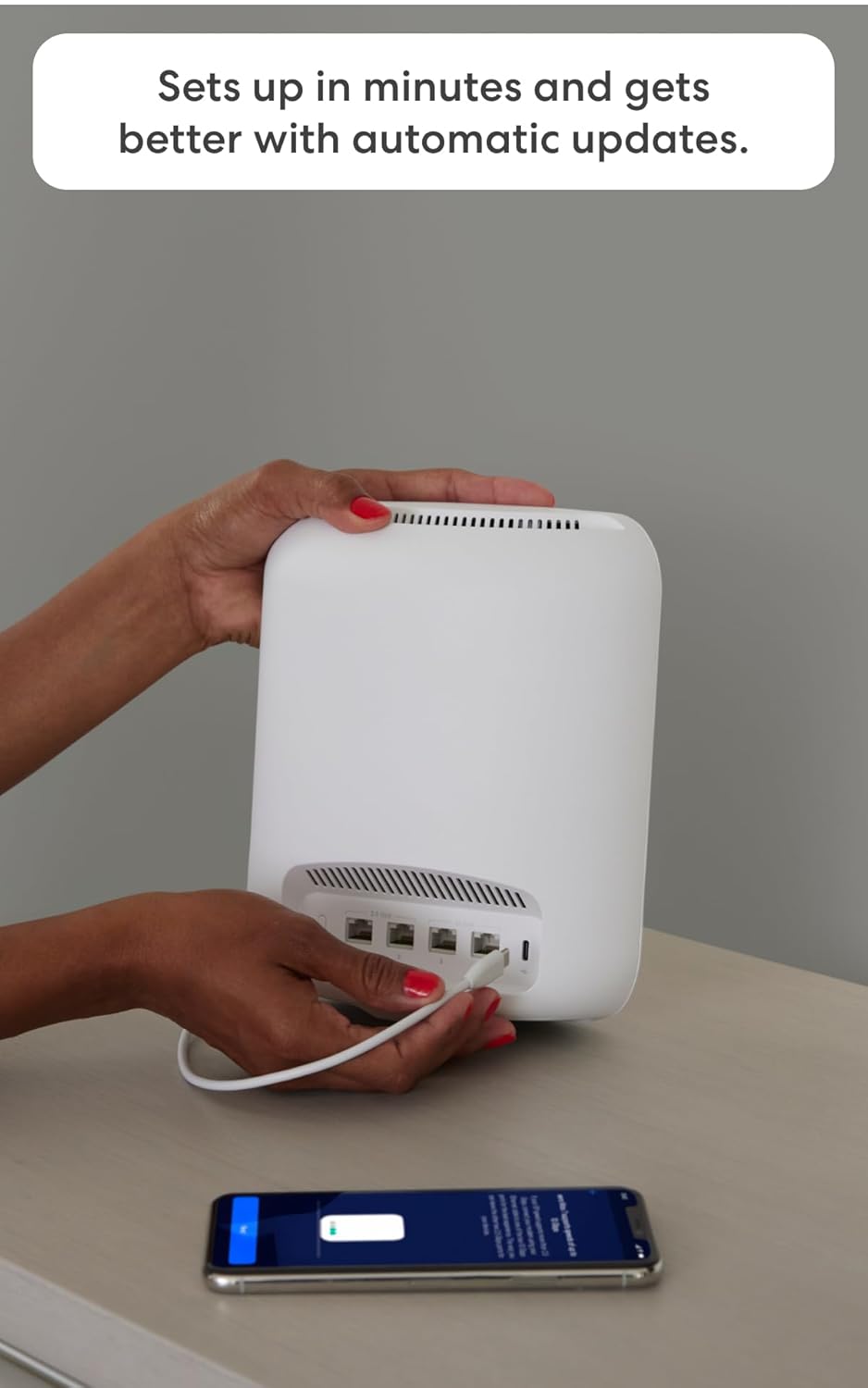
Image 2.1: A user connecting an Ethernet cable to the eero Max 7, with the eero app visible on a smartphone, illustrating the setup process.

Slika 2.2: Podrobno view of the eero Max 7's connectivity options, featuring two 2.5 GbE ports and two 10 GbE ports for versatile wired connections.
3. Upravljanje sistema eero Max 7
The eero app serves as your central control panel for managing your mesh WiFi network.
3.1 Upravljanje omrežja
- Nadzorna plošča: View your network status, connected devices, and internet speed.
- Dostop za goste: Easily create a separate guest network with a unique password for visitors.
- Nadzor naprave: Začasno ustavite dostop do interneta za določene naprave ali profesionalcefiles, manage bandwidth, and prioritize devices for critical tasks like gaming or streaming.
- Napredne nastavitve: Access advanced network configurations such as port forwarding, DNS settings, and IP reservations.
3.2 Smart Home Hub Functionality
The eero Max 7 acts as a smart home hub, allowing you to connect and control various smart devices directly from your network.
- Nit: Supports Thread devices for a more robust and responsive smart home network.
- Vprašanje: Functions as a Matter controller, enabling seamless integration with Matter-certified devices.
- Zigbee: Operates as a Zigbee controller, allowing you to connect compatible Zigbee devices.
- Deluje z Alexa: Integrate with Alexa devices to manage network access and other functions using voice commands.

Image 3.1: The eero Max 7 supporting high-performance applications like gaming, demonstrating its capability for demanding network activities.

Image 3.2: The eero Max 7 seamlessly integrated into a modern living space, providing Wi-Fi 7 connectivity for entertainment and smart home devices.
4. Vzdrževanje
The eero Max 7 system is designed for minimal maintenance, with several features ensuring optimal performance without constant user intervention.
4.1 Samodejne posodobitve programske opreme
eero devices automatically receive software updates to improve performance, add new features, and enhance security. Ensure your eero devices remain connected to the internet to receive these updates.
4.2 Splošna nega
- Keep your eero devices in well-ventilated areas to prevent overheating.
- Avoid placing eero devices near large metal objects, thick walls, or other electronics that may cause interference.
- Clean the exterior of your eero devices with a soft, dry cloth as needed. Do not use liquid cleaners.
5. Odpravljanje težav
If you encounter issues with your eero Max 7 system, try the following troubleshooting steps before contacting support.
5.1 Pogoste težave in rešitve
- Ni internetne povezave:
- Preverite, ali vaš modem deluje pravilno.
- Ensure all Ethernet cables are securely connected to your eero and modem.
- Restart your modem and then your eero devices by unplugging them for 30 seconds and plugging them back in.
- Počasne hitrosti:
- Run a speed test through the eero app to verify your internet speed.
- Ensure your eero devices are optimally placed and not too far apart.
- Check for any devices consuming excessive bandwidth and consider pausing them temporarily.
- Naprava se ne povezuje:
- Ensure the device's Wi-Fi is enabled and it is within range of an eero unit.
- Znova zaženite problematično napravo.
- Preverite, ali je vneseno geslo za Wi-Fi pravilno.
5.2 eero App Diagnostics
The eero app provides diagnostic tools and network insights that can help identify and resolve issues. Check the app for alerts or recommendations.
6. Specifikacije
Detailed technical specifications for the eero Max 7 mesh WiFi system:
| Funkcija | Podrobnost |
|---|---|
| Wifi standards | Wi-Fi 7 (IEEE802.11a/b/g/n/ac/ax/be) |
| Number of radios | 3; tripasovni |
| Podprti kanali | 2.4 GHz: 1–13; 5 GHz: 36–64, 100–144, 149–165; 6 GHz: 1–233 |
| MIMO | 2x2/4x4/4x4 MU/SU-MIMO |
| Prostorski tokovi | 10 |
| Širina kanala | 20, 40, 80, 160, 240, 320 MHz |
| Omrežna varnost in storitve | Prehodni način WPA2-PSK, WPA3-osebni |
| Other Wi-Fi features | WMM, Tx Beamforming, OFDMA |
| BE rating | BE20800 |
| Izbira kanala | Samodejna izbira kanalov |
| Tračno krmiljenje | ja |
| Device/profile premor | ja |
| Easy password sharing for guest and home network | ja |
| Središče za pametni dom | ja |
| nit | ja |
| Bluetooth | Bluetooth z nizko porabo energije 5.0 |
| Zigbee | Yes (as a controller only) |
| Deluje z Alexa | Yes: With eero Max 7 and an Alexa device (not included), you can easily manage wifi access for family profiles. |
| Zadeva | Yes (controller only) |
| Antena | 2.4 GHz: 2x2, 5 GHz: 4x4, 6 GHz: 4x4 |
| Frekvenčni pasovi | ISM (2.4-2.484 GHz), UNII 1: 5.15 - 5.25 GHz, UNII 2A: 5.25 - 5.35 GHz, UNII 2C: 5.47 - 5.725 GHz, UNII 3: 5.725 - 5.850 GHz, UNII 5: 5.925 - 6.425 GHz, UNII 6: 6.425 - 6.525 GHz, UNII 7: 6.525 - 6.875 GHz, UNII 8: 6.875 - 7.125 GHz |
| Types of modulation | OFDM |
| Ethernet | Two auto-sensing 10 GbE ports and two auto-sensing 2.5 GbE ports for WAN and/or LAN connectivity |
| Procesor | Štirijedrni procesor A73 |
| Spomin | 2 GB RAM |
| Shranjevanje | 4 GB flash pomnilnika |
| Velikost | 7.24 x 8.73 x 3.54 mm (183.90 x 221.89 x 89.90 palcev) |
| Delovna temperatura | 32°F–104°F (0°C–40°C) |
| Električna zahteva | 100-240 V AC, 50/60 Hz |
| AC napajanje | 45W zunanji USB-PD |
| OS support for eero app | Aplikacija za iOS/Android |
| Potreben za nastavitev | Supported iOS or Android device and internet service (with cable, DSL, or fiber ONT modem, if required). |
7. Garancija in podpora
eero provides comprehensive support and warranty coverage for your Max 7 mesh WiFi system.
7.1 Informacije o garanciji
The eero Max 7 comes with a 3-letna omejena garancija. For detailed warranty information, privacy policy, terms of service, and trial/subscription terms, please visit eero.com/legal.
7.2 Podpora strankam
If you require assistance with setup, troubleshooting, or any other issues, the eero support team is available to help.
- Podpora po e-pošti: support@eero.com
- Telefonska podpora: +1-877-659-2347